

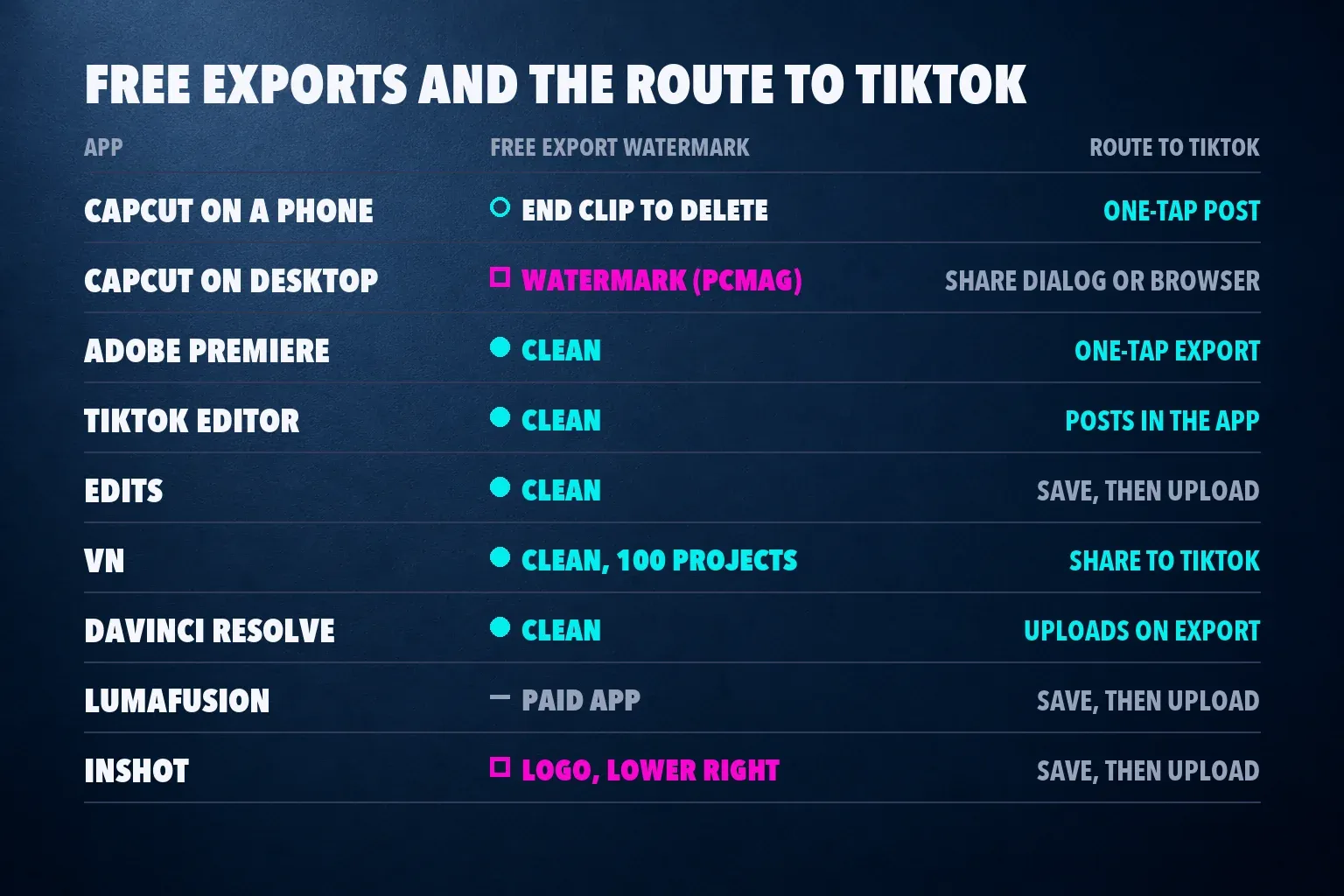
The best video editing app for TikTok is CapCut for most creators. It links to your TikTok account in the mobile app, so TikTok's trending templates and sounds open inside the editor and a finished edit posts with one tap, and its review median is 4 from three outlets. If you want a free editor that never stamps a watermark, use Adobe Premiere on your phone, which scores 4.5 and exports to TikTok at the right size in one tap. For a quick post, TikTok's own editor is enough, and on a computer, the free version of DaVinci Resolve uploads to TikTok as you export.
Most pages ranking for this search are forum threads with no readable answers, CapCut's own landing page, a clipping-tool vendor that ranks its own app first, a scheduling-tool blog and a TikTok video that still recommends Premiere Rush, which Adobe has shut down. One of those lists says free PowerDirector has no watermark, while TechRadar found a logo on its free exports. This list puts review scores side by side with the median, range and number of reviews, checks what each free plan exports, and shows how a finished video reaches TikTok, including the limits of TikTok's built-in editor and the music rule for business accounts.
My pick for a personal account is CapCut on a phone, linked to TikTok, because trends move fast and its templates follow them. For a brand account I'd edit in Premiere or Resolve and choose music from TikTok's Commercial Music Library, since a trending sound that's fine on a personal post can be off limits for a business. Expect CapCut to ask for money more often than it used to: one of the top Reddit threads for this search opens with an artist saying the features they rely on just went behind the paywall.
The best TikTok video editors at a glance
| App | Best for | Runs on | Price (US) | Free exports |
|---|---|---|---|---|
| CapCut | Trends, templates and captions | Phones, Windows, Mac, browser | Free; Standard $9.99 a month, Pro $19.99 a month | Varies by device and assets |
| Adobe Premiere | A clean free edit on a phone | iPhone, Android | Free; AI credits from $7.99 a month | Up to 4K, no watermark |
| TikTok's editor | Quick posts inside the app | TikTok app | Free | Posts straight to TikTok |
| Edits | Instagram first, TikTok as well | iPhone, Android, Mac | Free | Up to 4K, no watermark |
| VN | A free manual timeline | iPhone, Android | Free for 100 projects; VN Pro | No watermark |
| DaVinci Resolve | Free desktop editing with TikTok upload | Windows, Mac, Linux | Free; Studio $295 once | Up to UHD at 60 fps, no watermark |
| LumaFusion | Pro editing bought once | iPhone, iPad, Android, Chromebook | $29.99 once | Paid app, no watermark |
| InShot | Fast resizing and collages | iPhone, Android | Free; InShot Pro | Logo, lower right |
CapCut's prices are from the US App Store, and the others come from each vendor's page or store listing. Regional prices differ.
Review scores, compared
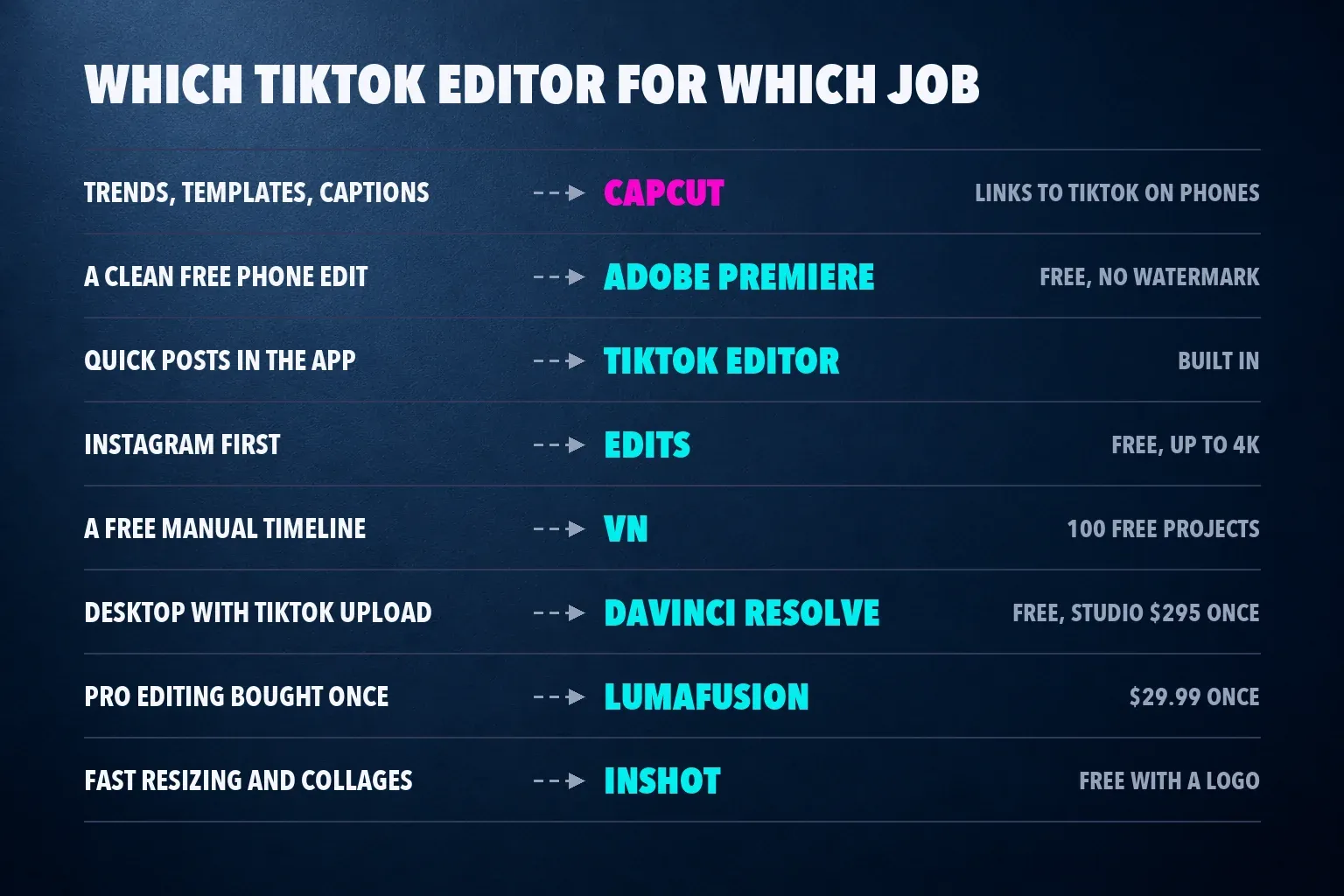
Each score is the outlet's rating on a five-point scale. The median is the middle value of an app's scores, and the count shows how many reviews sit behind it.
| App | Review scores | Median |
|---|---|---|
| LumaFusion | TechRadar 4.5, Digital Camera World 5 | 4.75 from 2 (range 4.5 to 5) |
| Adobe Premiere | TechRadar 4.5, PCMag 4.5, both on iPhone | 4.5 from 2 |
| DaVinci Resolve | TechRadar 4.5, PCMag 4, Creative Bloq 5 | 4.5 from 3 (range 4 to 5) |
| KineMaster | TechRadar 4.5 | 4.5 from 1 |
| CapCut | TechRadar 4 and MobileAppDaily 4 on phones, PCMag 3.5 on desktop | 4 from 3 (range 3.5 to 4) |
| PowerDirector | PCMag 5, TechRadar 4, Creative Bloq 3 for the mobile app | 4 from 3 (range 3 to 5) |
| InShot | TechRadar 2.5 | 2.5 from 1 |
| TikTok's editor, Edits, VN, YouCut | PCMag picks Edits, VN and YouCut without a score | Unscored |
CapCut ranks first here on the job, not the median. LumaFusion, Premiere and Resolve all score higher, but none of them links to a TikTok account or pulls in TikTok's trending templates and sounds. CapCut's three scores also cover different versions: TechRadar and MobileAppDaily reviewed the phone app, and PCMag reviewed the desktop editor in August 2026.
PowerDirector's spread is the widest, from PCMag's 5 to Creative Bloq's 3 for the mobile app. TechRadar's phone-app reviews of CapCut, InShot, KineMaster, LumaFusion and PowerDirector date from late 2023, so a single score from that batch carries less weight than a recent pair.
How each editor gets a video onto TikTok
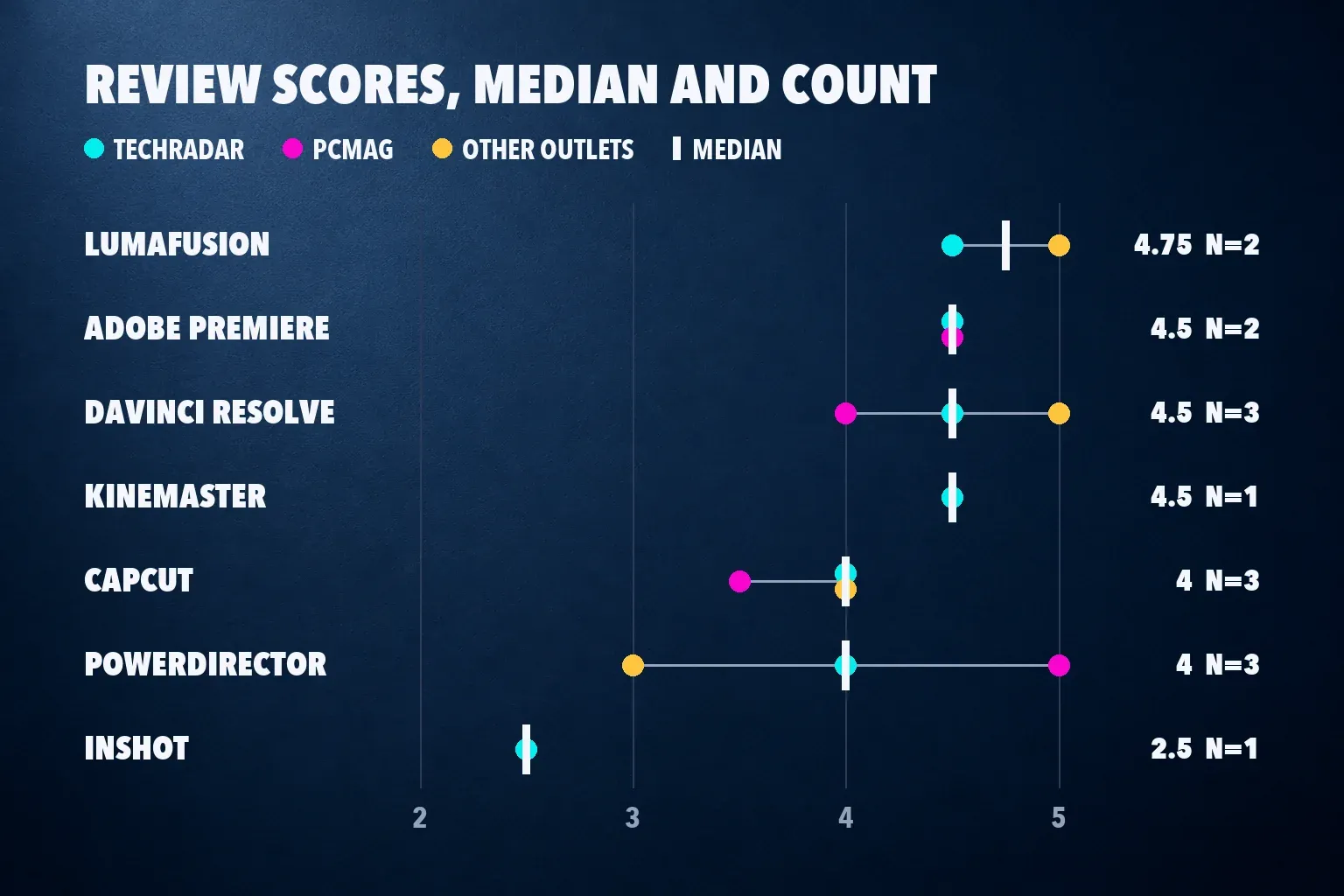
There are three routes. Some apps post to TikTok from the editor, Resolve uploads as it exports, and the rest save a file that you upload in the TikTok app or in TikTok Studio on the web. A saved file takes one more step, but it leaves you a master copy to post elsewhere.
| App | Watermark on free exports | Route to TikTok |
|---|---|---|
| CapCut on a phone | None in a 2026 Android test; an end clip to delete | One-tap post after you link TikTok |
| CapCut on desktop | PCMag found watermarks | Share dialog after export, or upload in a browser |
| Adobe Premiere | None | One-tap export, resized for TikTok |
| TikTok's editor | None | Posts in the app |
| Edits | None | Save, then upload in TikTok |
| VN | None for 100 projects | Share to TikTok from the app |
| DaVinci Resolve | None | Uploads to a linked TikTok account as it exports |
| LumaFusion | Paid app, none | Save, then upload in TikTok |
| InShot | Logo, lower right | Save, then upload in TikTok |
CapCut's desktop row has two sources that disagree. CapCut's own TikTok linking guide says the desktop and web editors can't link a TikTok account, so you export and upload in a browser. PCMag's August 2026 desktop review describes a second dialog after rendering that shares to TikTok or YouTube with a visibility setting and a link to TikTok Studio. If your desktop app shows that dialog, use it; if not, export and upload in TikTok Studio.
1. CapCut: the best app for TikTok trends and templates
CapCut links to TikTok in its iPhone and Android apps: tap the gear icon, open Manage Account, then tap Link next to TikTok under Connected accounts. CapCut's linking guide lists what that gets you: one-tap publishing, TikTok's trending templates, sounds and challenges inside CapCut, and drafts that sync between the two apps on supported devices. Only one TikTok account can be linked to a CapCut account at a time. TechRadar's review lists "Linked to TikTok by default" among its pros, and our CapCut for TikTok guide walks through a 9:16 edit with corrected captions and safe text placement.
The free plan's export depends on where you edit. In a Dailytech test on a Galaxy A31, CapCut's free export had no watermark, and a 1.96-second Ending clip with the CapCut logo came off the timeline for free. PCMag's desktop review found that the free version locks AI tools and many effects and that its exports include watermarks. Premium templates and stock can add a mark on any device, and our CapCut watermark guide covers each case.
The paywall has grown. In the US App Store, Standard costs $9.99 a month and Pro $19.99, and MobileAppDaily notes Pro doubled from $9.99 in 2025. Our CapCut pricing breakdown shows what each plan keeps, is CapCut Pro worth it helps you decide, and the CapCut Pro free trial guide explains how to cancel before renewal. PCMag's biggest con is privacy, because the app uploads a lot of your content to its servers; our guide to whether CapCut is safe goes through the data policy, and is CapCut banned in the US covers its current US store status.
I'd still open CapCut first for a trend edit. Its trending templates, auto captions and word-by-word caption styles are built for the For You feed, and the link to TikTok saves the export-and-upload round trip.
2. Adobe Premiere: the best free editor with no watermark
Adobe's free Premiere app is the clean alternative. Its launch announcement promises "one-tap exports to every major social platform, from TikTok and YouTube Shorts to Instagram," with resizing for each platform that keeps the main action in frame, and no watermark. The iPhone app needs iOS 18 or later, and Premiere reached Android in September 2026 for phones on Android 13 with at least 5 GB of RAM, free with no ads and 4K exports.
TechRadar and PCMag both score the iPhone app 4.5. The Google Play listing says you pay only for Firefly generative credits, which PCMag prices at $7.99 a month or $69.99 a year. Premiere's listings don't mention TikTok's trending templates or sounds, so pick the trend sound in TikTok's editor when you post. I'd use Premiere for an edit that has to look clean and stay yours, such as a product clip or a tutorial, and our best iPhone video editing apps and best Android video editing apps lists compare it with the rest of the phone field.
3. TikTok's own editor: enough for quick posts
You don't need a second app for a simple TikTok. Tap Add post, record or upload, then tap Edit on the side panel. TikTok's editing tools help page covers trimming, splitting and reordering clips, one speed setting per clip with a Normal or Curve option, sounds, sound effects, voice effects and voiceovers, transitions between clips, text, the Magic tool and overlays.
The limits show up on bigger edits. One editing session takes up to 35 photos and videos, overlays stop at 8 items, and a post carries one TikTok sound. Effect templates aren't available to everyone, AI Create isn't offered everywhere and has a daily regeneration limit, and a Business Account can only use templates built with music licensed for commercial use. For a longer video, TikTok's Smart Split in TikTok Studio on the web clips, reframes and captions anything over a minute into several vertical videos. Our guide to turning a long video into shorts shows the same job in CapCut, where you choose every cut.
I'd use TikTok's editor for a quick reply, a single clip with text or a voiceover, and switch to CapCut or Premiere once the edit needs keyframes, captions you can restyle or more than a handful of layers.
4. Edits: the best free pick if Instagram comes first
Edits is Instagram's free editor, and its App Store listing says you can export in 4K with no watermark and share to any platform. PCMag names it the pick for Instagram users and points out that it saves projects to your phone, so the same vertical video works on TikTok too. The Google Play version carries the same promise. If you'd rather cut on a computer, Edits for Mac is free too, with a multi-track timeline and keyframes, but it needs a Mac with Apple silicon and there's no Windows version.
It has no scored review yet, so it ranks on the job. I'd start in Edits when Reels is your main feed and TikTok gets the same video, then upload the saved file in TikTok and add the sound there. Our Edits review covers its tools and limits, and the Instagram Reel size guide sets the frame for both feeds.
5. VN: the best free manual timeline
VN's Play listing pitches it as an editor for TikTok, Instagram Reels and YouTube Shorts, with keyframes, AutoCut, BeatsClips, 4K exports at 60 fps and sharing to TikTok. In the Dailytech test it exported 1440p at 60 fps with no watermark and no end card. PCMag counts 100 free projects with no watermark before VN Pro removes the cap, and warns that its power makes it less simple to learn.
Pick VN when you'd rather build every cut yourself than start from a template, especially on an older phone that Premiere doesn't support. Our VN video editor review covers the project cap and VN Pro.
6. DaVinci Resolve: the best free desktop editor for TikTok
Resolve is free on Windows, Mac and Linux, and Blackmagic's Studio page says the free version handles UHD 3840 x 2160 at 60 fps. Its What's New page lists square and vertical resolutions in the project and timeline settings for TikTok and other feeds, and lets you link social accounts to upload directly to TikTok, YouTube, Vimeo and X as you export.
The cost is effort and hardware: PCMag says it needs a lot of system resources and takes time to learn. That trade is why the artist in the Reddit thread was weighing it after CapCut's paywall moved. Pick Resolve if you already edit long videos on a computer and want vertical cuts from the same project without a subscription. Our DaVinci Resolve review covers Free versus Studio, and the best video editing app for YouTube list compares it with other desktop editors.
7. LumaFusion: pro editing bought once
LumaFusion costs $29.99 once on Google Play, runs on Android 10 or later with 3 GB of RAM and on Chromebooks, and its listing says it saves videos ready to upload to YouTube, TikTok and Instagram. It has the highest median here, 4.75 from TechRadar and Digital Camera World, and it sells advanced features as one-time add-ons or through the optional Creator Pass.
It's more editor than most TikToks need. I'd buy it if you also cut longer videos on an iPad or a Chromebook and want one pro timeline with no subscription. Our LumaFusion review goes through the add-ons.
8. InShot: fast resizing, with a logo to remove
InShot's Play listing is built around quick social posts, with ratio presets for Instagram, TikTok and YouTube. In the Dailytech test it was the only app that watermarked its free export, with a logo in the bottom right corner that InShot Pro or a reward ad removes. TechRadar scored it 2.5 and flagged privacy concerns.
Pick InShot for a fast crop to 9:16 or a photo collage if you don't mind the logo or the ad. If you'd pay only to lose the watermark, Premiere and VN already export clean for free. Our InShot review covers what each purchase removes.
Also checked: KineMaster, YouCut, PowerDirector and Splice
KineMaster scored 4.5 from TechRadar in 2023, when free exports carried a large watermark in the top right corner, and in the 2026 Dailytech test it saved a clean 1080p file at 60 fps after a paywall prompt at save. Our KineMaster review tracks what the free tier allows now. YouCut is PCMag's pick for "frequent TikTok, Instagram, and YouTube users who need to perform quick edits," and its Play listing says it never adds a watermark.
PowerDirector's Play listing says it's optimized for TikTok, Reels and Shorts, and its median is 4 from three reviews. One ranking list for this search calls free PowerDirector watermark-free, but TechRadar found a PowerDirector logo on free exports and a 1080p ceiling until you subscribe. Splice suits people who "regularly post to Instagram, TikTok, or YouTube," in PCMag's words, though you pay a high price for everything it offers.
Premiere Rush is gone
A TikTok video ranking for this search still lists Adobe Rush among the top free apps. Adobe stopped new Rush downloads on September 30, 2025, and its end-of-life notice ended support on September 30, 2026, naming free Premiere on phones as the replacement. Any list that puts Rush near the top was written before that change.
Music for TikTok: personal accounts versus business accounts
A personal account can use TikTok's general sound library, and that's where trending sounds come from. Businesses can't. TikTok's Commercial Music Library page says businesses should use its library of about 1 million pre-cleared songs for all commercial activity, including organic posts, duets, stitches, ads and branded content, and to consult a legal team before using another user's original sound. The same rule limits a Business Account to templates built with commercially licensed music.
CapCut splits its music the same way. Its ordinary Sounds are for personal, non-commercial use, and its Commercial Sounds library is the separate route for commercial users, as our CapCut commercial use checklist explains. For a brand account I'd pick the track in TikTok's library or CapCut's Commercial Sounds before editing to the beat. Our guides to adding music in CapCut and CapCut sound effects cover the rest of the audio work.
Export settings TikTok expects
Edit on a 1080 x 1920 frame at 9:16, the full-screen size from our TikTok video size guide, which also covers the 10-minute in-app upload limit, file limits and the cover. Keep text and faces clear of TikTok's buttons and caption with the short video safe zone checker, and size the file with the video bitrate calculator.
If the same video goes to Reels and Shorts, the social media video size guide lists every frame, and the YouTube Shorts size page covers Shorts on its own. In CapCut, the export settings guide explains which resolution and frame rate to choose.
Set up CapCut for TikTok
Install from the official store with our CapCut Android download guide, or edit on a computer with CapCut for Mac and upload the file yourself. Start from a CapCut template for a quick trend, or build a velocity edit with speed curves timed to the beat. To post a finished video, a template or a review link, how to post on CapCut shows each route.
Cross-posting the same edit? CapCut for Instagram Reels and CapCut for YouTube Shorts cover the differences, and the CapCut alternatives guide compares editors across phone, browser, tablet and desktop.
TikTok video editing app questions
What is the best free video editing app for TikTok?
CapCut, if you want TikTok's trending templates and sounds and one-tap posting. If you want a free editor that never adds a watermark, Adobe Premiere on iPhone or Android exports 4K clean and resizes for TikTok in one tap. On a computer, DaVinci Resolve is free and uploads to TikTok as it exports.
Is CapCut still free for TikTok editing?
Yes, the editor and most of its tools are free, but more features sit behind Standard at $9.99 a month or Pro at $19.99 in the US App Store. Premium templates, effects and stock can add a watermark or a paid prompt, and PCMag found watermarks on free desktop exports.
Does TikTok have its own video editor?
Yes. Tap Add post, record or upload, then tap Edit to trim, split, add sounds, text, transitions, overlays and voiceovers. It takes up to 35 items per session and 8 overlays, and a post carries one TikTok sound, so bigger edits are easier in CapCut or Premiere.
Which TikTok editing apps have no watermark?
Adobe Premiere, Edits, VN for its first 100 projects, YouCut, DaVinci Resolve and TikTok's own editor export with no watermark. CapCut's phone export was clean in a 2026 test apart from an end clip you can delete, while InShot adds a logo in the bottom right corner on free exports.
Can I edit TikToks on a computer?
Yes. DaVinci Resolve is free on Windows, Mac and Linux, has vertical project settings and uploads to a linked TikTok account as it exports. CapCut's desktop app can't link a TikTok account, according to CapCut's help page, so export the file and upload it in TikTok Studio.
Can a business account use trending sounds on TikTok?
No. TikTok says businesses can't use the general music library for commercial content and should use the Commercial Music Library for organic posts, ads and branded content. Business Accounts can also use only templates made with commercially licensed music.
What size should a TikTok video be?
Use 1080 x 1920 pixels at 9:16 for a full-screen TikTok. Keep text and faces away from the bottom and right edges, where TikTok's caption and buttons sit, and export at your source frame rate.