

Download CapCut for Android from Google Play first. If CapCut offers an Android APK on its own website for your device and region, that's a separate manual-install route. Avoid third-party files advertised as "Pro unlocked". The label isn't evidence of an authentic or safe package. Once the app is installed, our CapCut tutorial for beginners walks you from a first edit through captions, audio and export.
Quick answer: install CapCut from Google Play, confirm the developer is Bytedance Pte. Ltd. and the package ID is com.lemon.lvoverseas, then let Google Play handle updates. If you sideload on purpose, use only the Android APK reached from capcut.com, keep Play Protect enabled, and revoke the install permission you gave the source app afterward.
Official store identities and installation guidance checked September 14, 2026. Compatibility can change by phone, Android build, account and region, so what your own device shows right now matters more than an old minimum-version number.
Before You Download CapCut on Android
Check these before changing an existing installation:
- Check device requirements: open the live listing on your phone. Install manufacturer-supported Android updates when appropriate, but do not assume an OS update guarantees compatibility.
- Check storage: the installer needs room, and CapCut needs additional working space for cache, imported media and exports.
- Use a stable connection: try another trusted, permitted connection. If you test without a personal VPN or proxy, restore it afterward. Do not bypass work or school network rules.
- Save local projects before reinstalling: Uninstalling or clearing CapCut storage can erase local drafts. Preserve an independent editable copy and its source media outside the storage you might remove, then verify that the copy opens. An exported MP4 preserves the finished video, not its editable tracks. If you cannot verify a backup, stop before uninstalling.
- Choose the source before the file: use Google Play first and capcut.com only when you have a reason to sideload.
If you need another platform, the CapCut Download hub separates the Android, iPhone, Windows, Mac and browser routes.
Download CapCut from Google Play
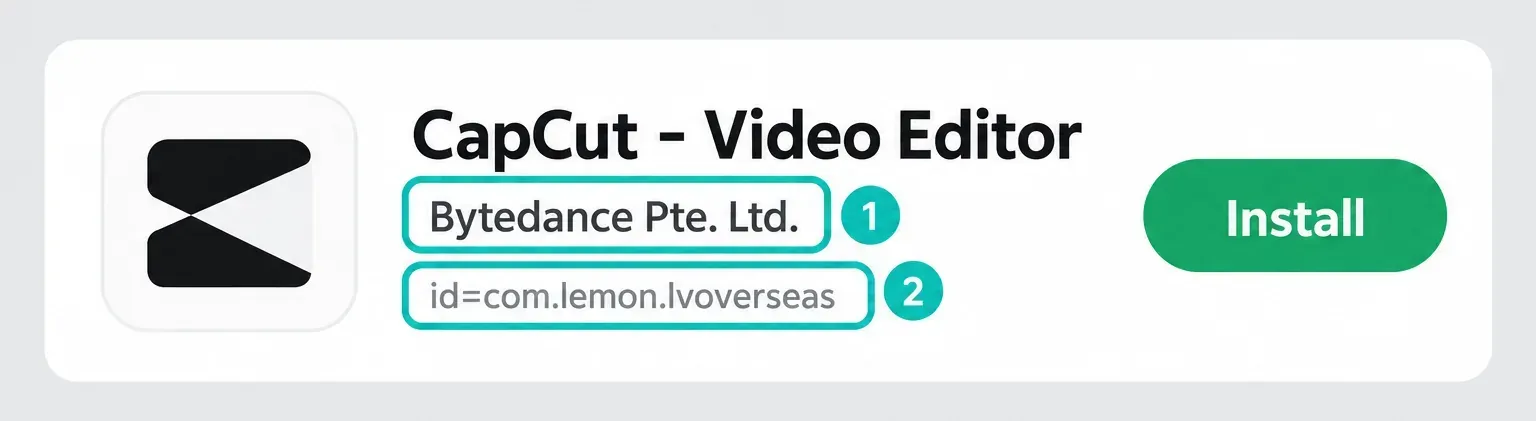
Open Google Play, search for CapCut and look over the listing before you tap Install. The official listing is CapCut - Video Editor by Bytedance Pte. Ltd.. Search results can also include similarly named apps from other developers, so I'd go by the developer and package ID. They're more reliable checks than the icon or a screenshot you remember.
- Open Google Play Store and search for CapCut.
- Open the listing from Bytedance Pte. Ltd..
- On the web listing, confirm the URL contains
id=com.lemon.lvoverseas. - Tap Install and wait for Android to finish before opening the editor.
- Leave automatic updates on unless you have a specific reason to test releases manually.
CapCut is free to install, but the listing declares in-app purchases. "Free download" doesn't mean every effect, AI tool, cloud allowance or Pro feature is included. For the plan split, use the CapCut pricing guide instead of trusting a third-party APK page that promises paid features for nothing.
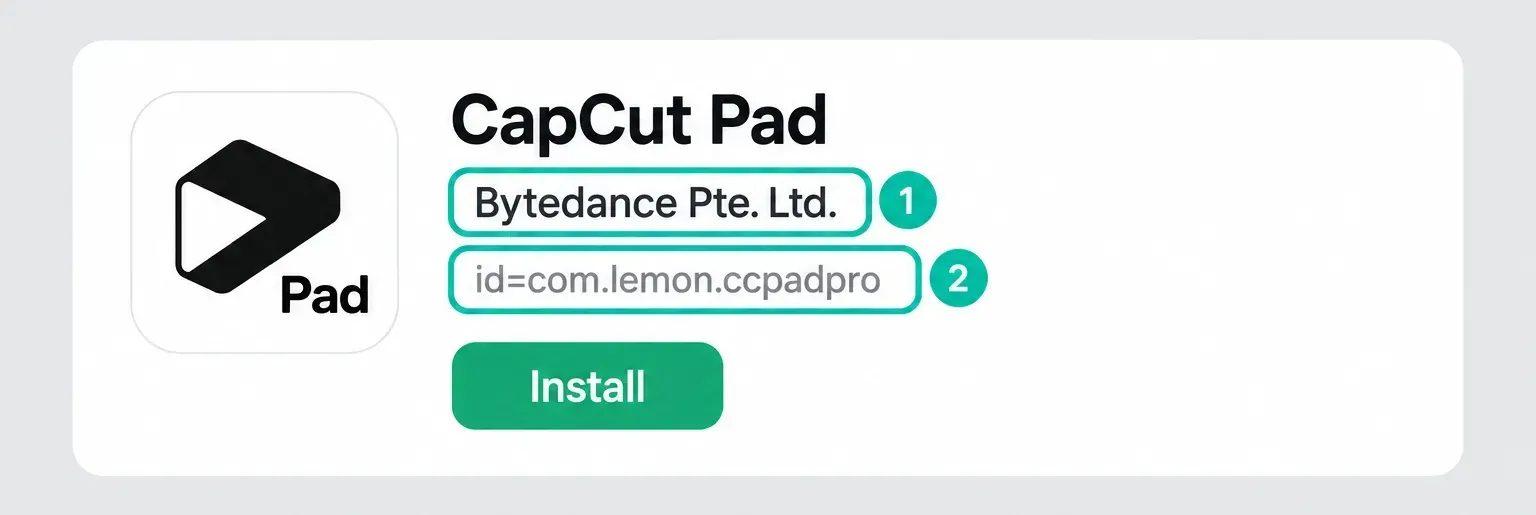
On a tablet, there's a separate official CapCut Pad listing, also by Bytedance Pte. Ltd., and it uses com.lemon.ccpadpro. It's a different app, not a renamed phone package. Check eligibility for your tablet, and don't assume the same features, subscription access or project-transfer behavior. Keep your existing phone projects until you've verified a separate editable copy.
Google Play also filters what your account and device can receive. Google's compatibility documentation says availability may depend on Android version, screen size, device, carrier and location, and that compatibility can change. That's why a friend may see the listing while the same search on your phone comes up empty.
Open the listing on a computer and Google Play may offer more than one phone or tablet linked to your account. Pick the exact device you're installing on. A grayed-out device is a useful clue: it points to compatibility or availability. A download stuck on pending on an eligible device more often points to storage, connectivity or the state of the Play Store.
Don't use the star rating as an identity check. Ratings vary by country and over time, and copied listings can imitate an icon or product name. The developer, package ID and official CapCut/Google Play link together make a stronger chain. The Data safety panel is worth reading too, but it reports the developer's current disclosures. It's not a promise that every permission or data flow applies the same way to every feature.
Google Play vs Official CapCut APK vs Mod APK
- Google Play is the default: the store manages normal updates and Play Protect checks the app before download and afterward.
- The capcut.com APK is a fallback: you verify the domain, install the file manually and return to the official route for future releases.
- A third-party APK has an unverified origin: a mirror can redistribute unchanged bytes or a modified file. An unlock advertisement does not establish which one you received. Use an official route instead.
A mod usually means a modified app, but a claim on a download page doesn't tell you what's inside the file. We haven't analyzed those files. A familiar logo doesn't prove authenticity, and neither does an advertised paid-feature unlock.
What Sideloading Changes on Android
Sideloading means installing an app from outside Google Play. On Android 8.0 and later, install permission is granted to a particular source, such as Chrome or a file manager. You don't need to leave a phone-wide "unknown sources" switch permanently open. The source can hand an APK to Android, but it can't make an unsupported device compatible or guarantee that the package matches CapCut's current release.
Google Play Protect checks Play Store apps before download, scans apps from other sources and can warn, disable, block or remove software it considers harmful. Keep it enabled. A scan is an extra layer of control. It doesn't give you permission to trust a random mirror.
Android's sideloading rules are changing too. Google's developer-verification timeline makes registration a requirement from September 30, 2026 for installs through participating app stores on certified devices in an initial group of countries. It also says verification will expand globally to all apps on certified devices in 2027. This isn't a blanket end to sideloading: Google also documents an advanced flow and ADB for unregistered apps. For a normal CapCut install, the practical advice stays the same. Use the verified Play listing or the vendor's own download route.
A file hash posted by the same unknown download site doesn't solve the trust problem. It only proves you got the file that site meant to distribute. Real verification needs an official source and the expected Android signing certificate. For everyday users the practical version is simple: start from the vendor or Google Play, never from a file name shared in a comment, short link or private message.
Android also enforces app signing. Its app-signing documentation explains that every APK must be signed before installation or update, and that the app signing key underpins Android's secure update model. A normal update still needs the same application ID and a matching certificate, or a valid key rotation, plus an acceptable version code. So if a modified CapCut build uses the same package name with a different signing key, Android can't install it as a normal update. That's one reason for an App not installed result.
Don't solve a signature conflict by uninstalling the working app right away. Android's update rules warn that uninstalling erases app data. Preserve the editable project and original media first. CapCut's project guidance separates an exported video from the project and says cross-platform projects must be uploaded to Spaces. If you choose cloud backup and you're allowed to upload the media, make sure the saved project opens as an editable timeline with its clips. A login or a project thumbnail alone isn't proof. If cloud access isn't available and there's no independent restorable copy, keep the current installation.
How to Install the Official CapCut APK
Only take this route if Google Play is unavailable for a reason you understand and the device can otherwise run CapCut. CapCut's APK resource page points Android users to capcut.com and a separate Download Android APK option. The same page also mentions third-party providers and modified packages. This guide sticks to the direct capcut.com route. Those broader suggestions don't make a mirror or a modified build part of CapCut's first-party download chain.
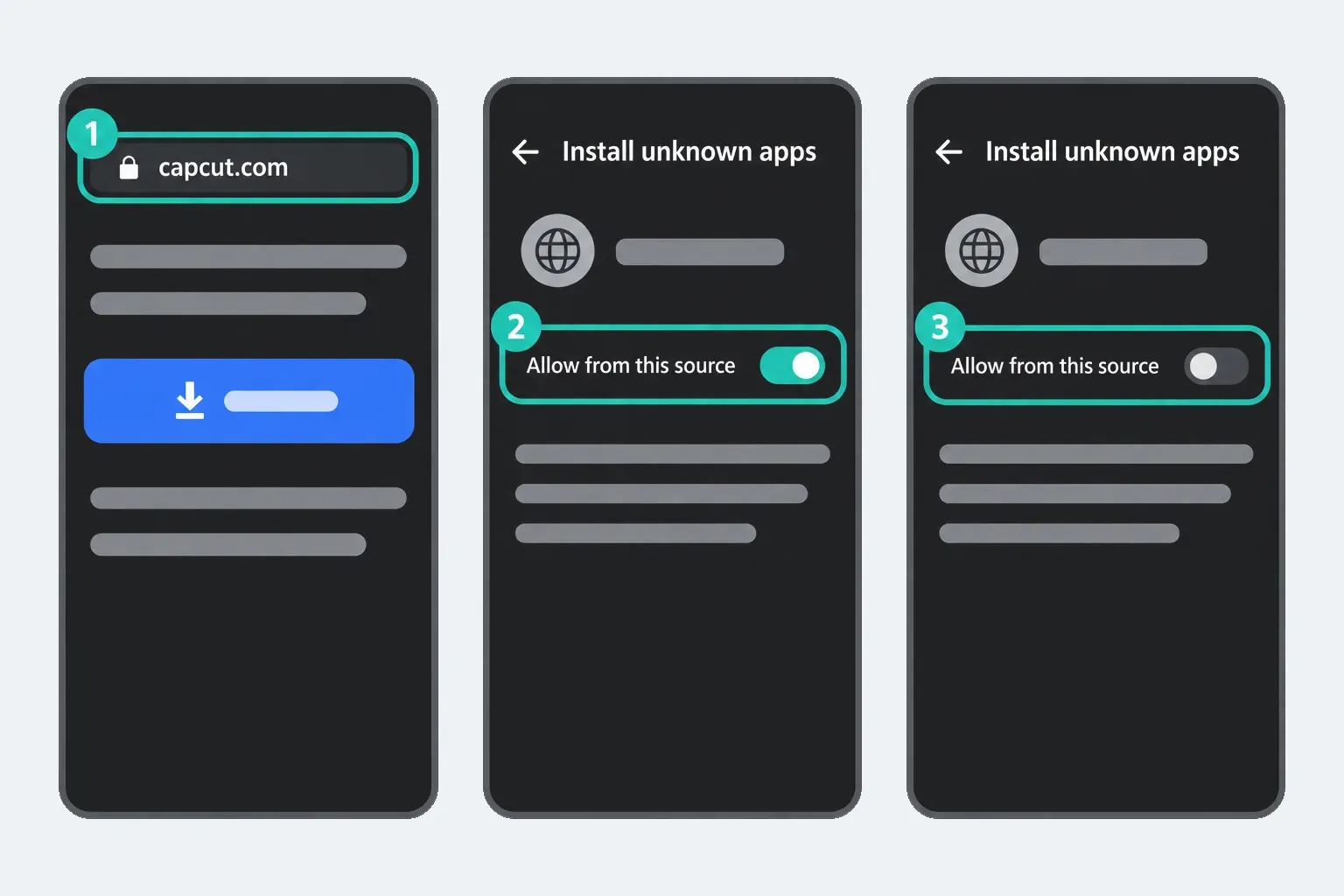
- Type capcut.com into the browser yourself. Don't follow an ad that imitates the domain.
- Choose the Android APK option only if CapCut offers it for your device and region. A generic file-type warning is not an authenticity check. If the browser, Play Protect or Android reports a harmful or blocked file, stop and verify with official support; do not turn protection off.
- Open the downloaded file. If you trust the official route and Android requests it, grant temporary install permission to the source app named in the prompt. This may be the browser or the file manager that opened the file.
- Complete the install without disabling Play Protect.
- Return to Settings > Apps > Special app access > Install unknown apps (wording varies by device) and turn off permission for the source app you authorized.
- Delete the installer after the app is working so an old file is not reused months later.
If the site doesn't offer an APK in your region, don't substitute the first mirror in search results. Use the browser editor where supported, another supported platform, or a current alternative rather than guessing which redistributed file is genuine.
When CapCut Does Not Appear in Google Play
A missing listing is a symptom, not a diagnosis. Open the Play listing in a browser while signed into the same Google account and check what it says about your phone. Google may gray out a device when the app is unavailable for that model, Android version, screen category or location.
Also check Play Store > profile > Settings > About > Play Protect certification. Google explains that uncertified devices may lack valid Google apps, security updates or reliable app compatibility. Turning Play Protect off doesn't turn an uncertified device into a certified one.
Regional availability can change regardless of your hardware. Check the official listing and CapCut's support material for your country. This guide doesn't recommend getting around local restrictions with a VPN or an APK. A sideload can still fail at sign-in, cloud services, templates or server-checked features.
Fix CapCut Android Download and Install Errors
- Download pending or stuck: check the connection and free space, enable automatic date and time, then restart Google Play and the phone.
- Not compatible with this device: inspect the listing for that exact phone and check manufacturer-supported Android updates. An APK can't repair a genuine eligibility mismatch.
- App not installed: verify the source, file and version. A different signing certificate can block an update over the working app.
- Package appears invalid: record the exact message and check whether the offered file supports your device. A fresh official download may help if the file was incomplete; the message alone does not prove that cause. Do not uninstall the working app to experiment.
- CapCut installs but won't open: restart and check official CapCut and supported Android updates. Only after the app opens, try a disposable local project. If it still cannot open, preserve drafts and use the crash guide below.
CapCut's install troubleshooting page groups the main causes into compatibility, free storage, connection, app-store problems, permissions and temporary glitches. Google's own basic download checklist adds automatic date/time and recommends a restart before you move on to advanced steps.
If Google Play itself is broken, start by clearing the Google Play Store cache: touch and hold the Play Store icon, open App info > Storage & cache, then tap Clear cache. The Google Play troubleshooting guide calls clearing the Play Store cache a common fix. Menu labels vary by manufacturer. Don't confuse Clear cache with Clear storage or Clear data, and don't clear CapCut's storage. Leave clearing Google Play services data for later, because it can remove saved information and force you to reauthenticate for Google Pay and other services.
Work in an order you can undo. First, note the exact error and check whether other apps download. Then check connection, free space, automatic date and time, Android updates and a phone restart. Next, reopen or update Google Play and clear only its cache. Stop before removing the account, deleting Play services data or uninstalling CapCut if you can't verify the affected backups and account access. A factory reset isn't an ordinary CapCut repair. If Play Store failures persist system-wide, take them to Google or the device manufacturer.
For a CapCut-specific crash after installation, go to the CapCut crash troubleshooting guide. If exports fail after the editor opens, use the export-stuck guide. An installation fix won't diagnose a full storage volume, an unsupported codec or a failing export project.
Security Notice, but no update is available
If CapCut asks for an official update but Google Play only offers Open, go to the official listing yourself instead of following an unfamiliar download link. CapCut says mobile updates roll out gradually by device and region, but that alone doesn't establish the cause of a particular security warning. Write down the exact message, device model, Android version and installed CapCut version from Android App info if it's available. Contact CapCut support through its official listing, and redact account details and private project names from screenshots. Keep Play Protect on and preserve local drafts. Uninstalling again and again, clearing storage or trying an old APK isn't a verified fix.
After CapCut Installs: Test a Disposable Project
Once CapCut opens, create a short disposable project from non-sensitive footage before you import client footage or a large camera roll. A successful export tests that workflow. It doesn't tell you whether the installed package is authentic or secure. Make sure the app can access only the media, microphone or camera permissions you intend to use. Android permission labels vary by version, and CapCut features vary by account and region, so approve a permission when a feature needs it instead of granting everything on first launch.
Then open Google Play and look for CapCut under Manage apps & device. If you installed through Play, updates can stay automatic. With the official APK, note where it came from and return to the official source for later releases. Don't let a third-party updater take over the package.
Keep the first test small: import one local clip, trim it, add a text layer and export at a resolution your device offers, such as 1080p. That checks media access, timeline playback, storage writes and the encoder without risking a real project. A failed template download doesn't prove local editing is broken, and a successful local export doesn't prove cloud or AI services are available in the current region. Diagnose those paths separately.
If you can't get CapCut through a normal official route, don't swap in a mod APK. The VN review and KineMaster review cover alternative mobile editors. Check each one's own official availability and project requirements.
CapCut Android Download FAQ
Is CapCut free to download on Android?
Yes. The official Google Play listing is free to install and declares in-app purchases. Some effects, AI tools, cloud allowances and Pro features may require payment even though the base download is free.
What is the official CapCut package name on Android?
The current international Google Play listing uses com.lemon.lvoverseas and names Bytedance Pte. Ltd. as the developer. Check the live listing because store presentation can change.
Is the official CapCut APK the same as a mod APK?
No. An official APK comes through CapCut’s own download route. A mod is a modified app, but an advertisement claiming ‘Pro unlocked’ does not prove what the file contains. Avoid third-party modified or unverified packages.
Should I disable Play Protect to install CapCut?
No. Play Protect scans apps from Google Play and other sources and may warn or block harmful software. A download that demands you disable it is a reason to stop and verify the source.
Why does Android say CapCut is not compatible?
The current build may exclude your Android version, device model, screen or hardware profile, Play Protect certification state, or region. An APK can't repair a genuine compatibility mismatch.
Why do I get App not installed when updating CapCut?
Common causes include low storage, an incomplete APK, a lower version code, or a package already installed with a different signing certificate. Preserve and verify an independent editable project copy and original media before removing the working installation. An MP4 export is not an editable backup; uninstalling can erase local app data.
Can I install the Play Store and APK versions together?
Not as two ordinary installations of the same package in the same user profile. A matching official package may update the existing installation; a package with a different signing certificate can't replace it as a normal update.
Does CapCut work offline after installation?
Basic local editing may work without a connection, but CapCut's no-internet guidance confirms that templates, project sync and AI features can depend on network access. Sign-in, cloud projects, downloads and stock assets may need it too. Test the exact workflow before relying on it offline.