
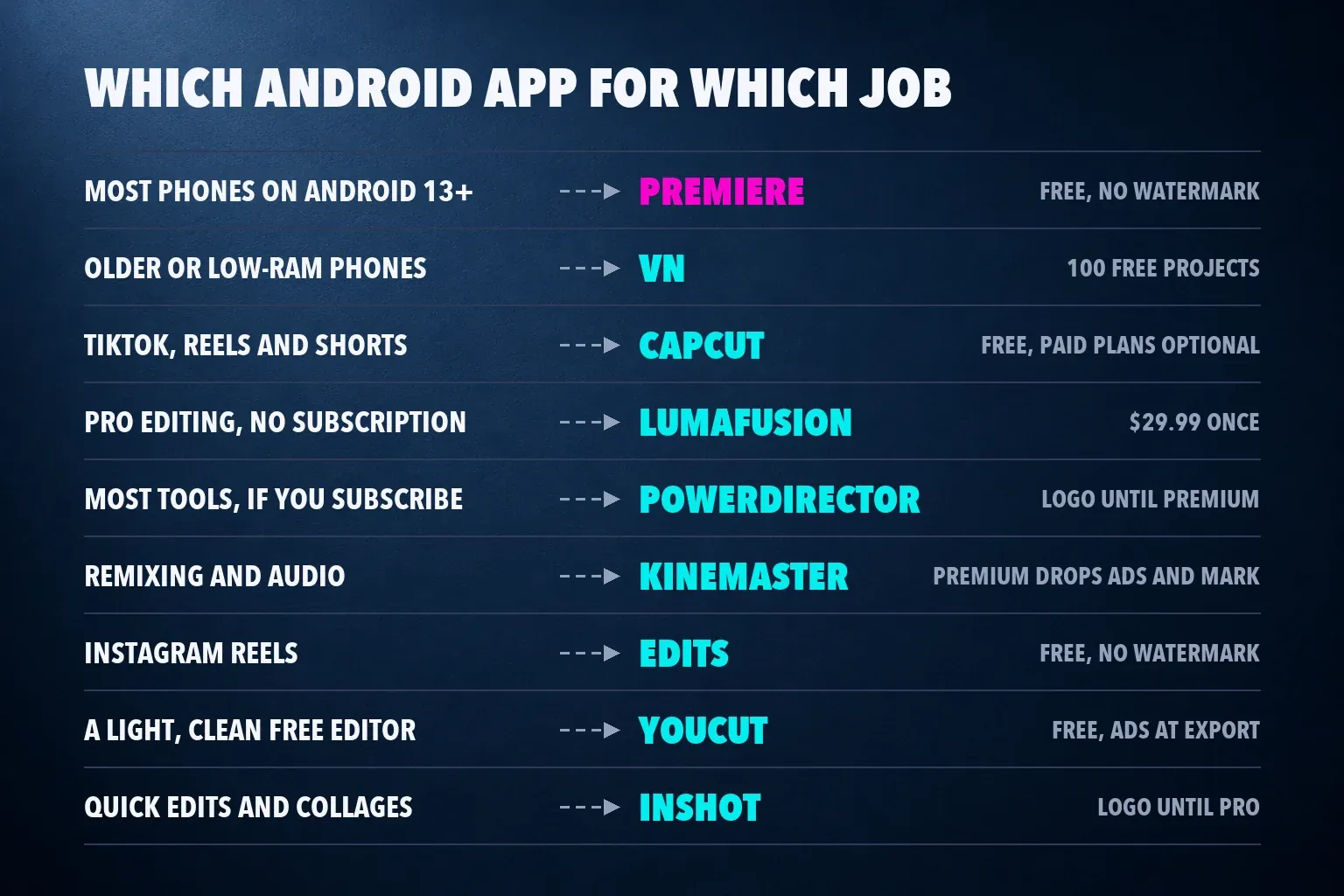
The best video editing app for most Android phones is Adobe Premiere. It reached Google Play in September 2026 as a free editor with a multitrack timeline, 4K exports, no ads and no watermark, but it needs Android 13 and at least 5 GB of RAM. On an older or lower-memory phone, pick VN, which gave the cleanest free export in a five-app Android test and keeps keyframes and LUTs free. Choose CapCut for TikTok, Reels and Shorts built on templates and auto captions, and buy LumaFusion for $29.99, once, for a pro timeline that also runs on a Chromebook.
Most Android lists were written before Premiere arrived, so they rank Premiere Rush, which Adobe has shut down, or leave Premiere out. Several of their scores were earned on iPhone versions, and Google Play ratings don't track App Store ratings: CapCut holds 4.6 in the US App Store and 3.5 on US Google Play. This list keeps only apps you can install from Google Play and ranks them on review scores (with the platform marked), US Google Play ratings and measured free exports from Android phones.
My pick is Premiere whenever your phone meets its requirements, because it gives you clean 4K exports with no ads, no end card and no export counter. On a phone that can't run it, I'd install VN before anything else. For a vertical clip built on a trend template, I'd open CapCut, because its templates and caption styles are made for that feed.
The best Android video editors at a glance
| App | Best for | Cost on Google Play (US) | Watermark on free exports |
|---|---|---|---|
| Adobe Premiere | Most phones on Android 13 or later | Free; $7.99 a month or $69.99 a year for AI credits and storage | None |
| VN | Older and low-RAM phones | Free for 100 projects; VN Pro removes the cap | None |
| CapCut | TikTok, Reels and Shorts | Free; Standard and Pro subscriptions | None in testing; a short end card to delete |
| LumaFusion | Pro editing with no subscription, Chromebooks | $29.99 once; add-ons or Creator Pass | None |
| PowerDirector | The most tools, if you'll subscribe | Free; Premium subscription | Logo, lower right |
| KineMaster | Remixing and audio | Free; Premium subscription | Watermark on the free tier |
| Edits | Instagram Reels | Free | None |
| YouCut | A light, clean free editor | Free; $19.99 a year for extras | None |
| InShot | Quick edits and collages | Free; InShot Pro | Logo, lower right |
Prices are US figures. Google Play shows each app's in-app purchases in your local currency, and plan names can differ by country.
Review scores and Google Play ratings, compared
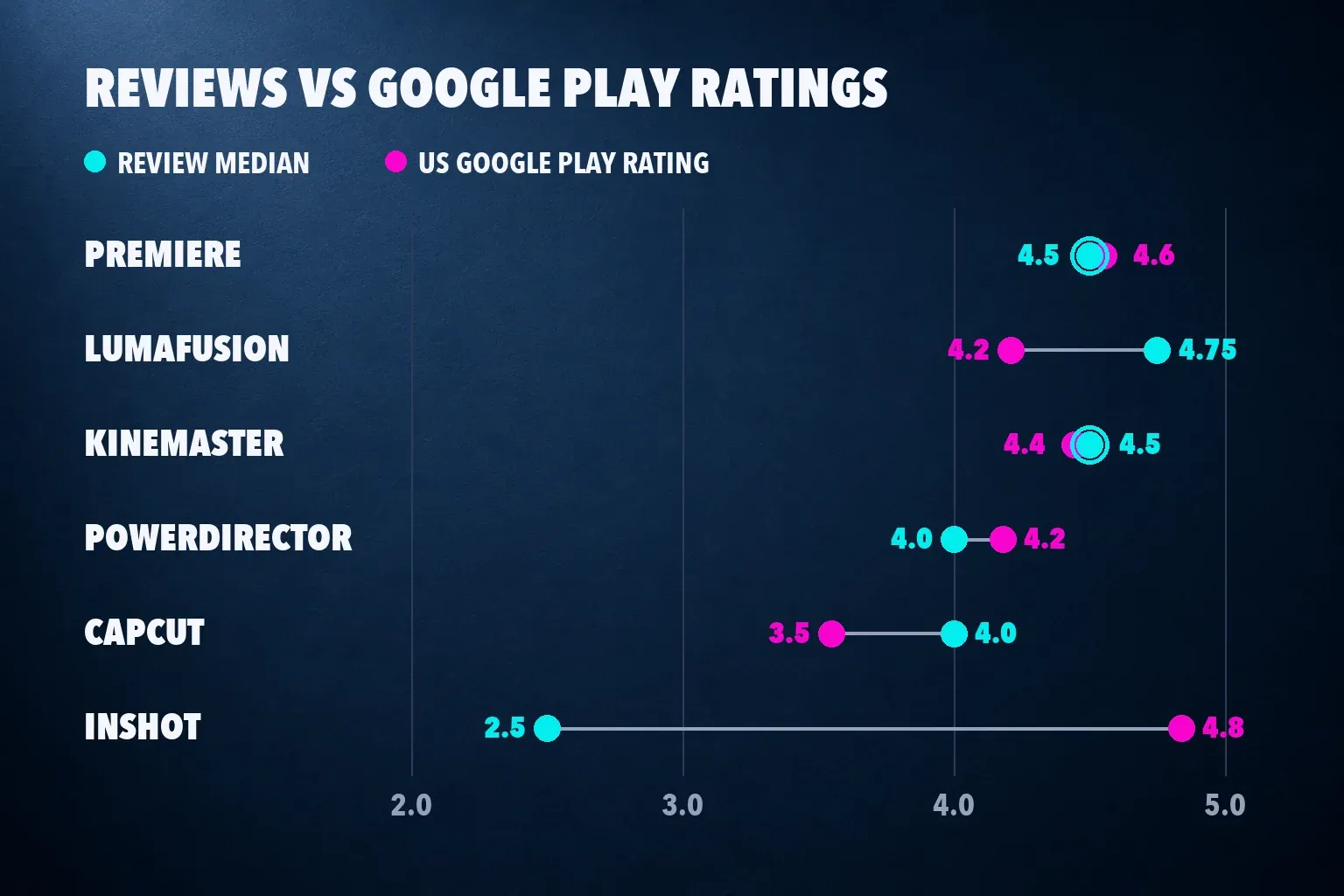
The review median takes the score each outlet gave the app, on a five-point scale. The Google Play column is the US store's average star rating and the number of ratings behind it.
| App | Review scores | Review median | US Google Play rating |
|---|---|---|---|
| Adobe Premiere | TechRadar 4.5, PCMag 4.5, both on iPhone | 4.5 from 2 reviews | 4.6 from about 16,700 ratings |
| LumaFusion | TechRadar 4.5, Digital Camera World 5 | 4.75 from 2 (range 4.5 to 5) | 4.2 from about 3,400 |
| KineMaster | TechRadar 4.5 | 4.5 from 1 | 4.4 from 6.1 million |
| PowerDirector | PCMag 5, TechRadar 4, Creative Bloq 3 for the mobile app | 4 from 3 (range 3 to 5) | 4.2 from 1.7 million |
| CapCut | TechRadar 4, MobileAppDaily 4 | 4.0 from 2 | 3.5 from 13.1 million |
| InShot | TechRadar 2.5 | 2.5 from 1 | 4.8 from 24.8 million |
| VN | PCMag category pick, no score | None | 4.7 from 5.5 million |
| YouCut | PCMag category pick, no score | None | 4.8 from 8.6 million |
| Edits | PCMag category pick, no score | None | 4.7 from 1.9 million |
Premiere's two scores come from its iPhone app, because both reviews were written before the Android launch. Android Authority reports that the Android version supports the functions of its iOS counterpart, so I count them here and mark them. TechRadar's reviews of CapCut, InShot, KineMaster, LumaFusion and PowerDirector date from late 2023, before Premiere existed on any phone.
InShot splits the two columns hardest: it has the highest Google Play rating here and the lowest review score, which TechRadar put down to privacy concerns. CapCut's gap to its reviews is smaller, but its Android rating trails its own App Store rating by more than a full star, while both reviews give it 4. I read the store number as a measure of how an app feels for a quick edit and the review median as a measure of how it holds up on a bigger project. When they disagree, the review tells you what to watch for.
1. Adobe Premiere: the best free editor for most Android phones
Adobe brought Premiere to Android on September 22, 2026, for phones running Android 13 or later with at least 5 GB of RAM. It's free with no ads and no watermark, exports up to 4K, and doesn't force a sign-in or show upgrade prompts. The Google Play listing adds unlimited tracks, frame-accurate trims, speed effects, Lightroom presets and Enhance Speech, and says you pay only when you need Firefly generative credits. PCMag puts that plan at $7.99 a month or $69.99 a year.
In TechRadar's Android hands-on, a 17-second clip exported at 4K in the highest quality took 34 seconds and came out at 106.5 MB, with no Adobe intro or outro. The export sheet offers 720p, 1080p or 4K, 24 to 60 fps and three quality levels, with an estimated file size before you commit. The catch is the AI allowance: the free credits in that test covered a single 4-second 720p clip.
Adobe lists keyframes, cropping, Adobe Fonts, enhanced captions, beat detection and continued editing on Premiere desktop as coming soon, and the Play listing doesn't promise keyframes yet. Pick Premiere if your phone qualifies and you want a clean timeline for nothing. Skip it for now if your edits depend on keyframed motion, which VN and CapCut already have. If you edit in CapCut today and plan to finish on a computer, our guide to moving a CapCut project into Premiere Pro covers what transfers and what gets flattened.
2. VN: the best free editor for older and low-RAM phones
VN gave the cleanest free result in Aron Mists's five-app test for Dailytech. On a Galaxy A31 running Android 12, a phone below Premiere's Android 13 requirement, it exported 1440p at 60 fps with no watermark, no end card and no lock on any export option. Switch the export sheet from Auto to Manual to get there, because Auto stops at 1080p at 30 fps.
The Play listing covers the tools I'd want on a phone: a multitrack timeline, 0.05-second trims, masks, keyframes with 19 built-in effects, LUT import, AutoCut and BeatsClips, auto captions with filler-word removal and exports up to 4K at 60 fps. PCMag counts 100 free projects with no watermark before VN Pro removes the cap, and warns about a significant learning curve.
Google Play labels VN as containing ads, though the test saw only a promo banner and a Remove Ads button. It was also the heaviest download in that test, 276 MB on its listing, and 30 seconds of 1440p video came to 138.9 MB. I'd pick VN when your phone can't run Premiere or you want keyframes today. Our VN review covers the Pro plan and the desktop versions.
3. CapCut: the best app for TikTok, Reels and Shorts
CapCut is free, and its Play listing, published by Bytedance Pte. Ltd., covers the short-form toolkit: keyframes, chroma key, stabilization, auto captions, text-to-speech, motion tracking and exports up to 4K at 60 fps. Its auto captions and templates are why most people install it, and the same editor runs on desktop and in a browser.
In the Dailytech test, CapCut's free export had no watermark. The first export did end with a 1.96-second black Ending clip showing the CapCut logo, which you delete from the timeline for free. The free plan offered 1080p, 2K and 4K at 25 fps, and the 4K file took 48.2 seconds and measured 148.3 MB. Moving the frame rate to 30 fps opened an offer to try high-res export free for seven days or upgrade, and a full-screen paywall appeared right after the first onboarding screen. That's one phone in one country. Our CapCut watermark guide covers the template, stock and outro cases where a mark does appear, and if you take a trial, the CapCut Pro free trial guide shows how to cancel before it renews.
The weak spot is Google Play: 3.5 from 13.1 million ratings. Both review scores land on 4, and MobileAppDaily, which reviewed the Android and iOS apps, gave pricing a 3.5 sub-score. Our CapCut pricing breakdown shows what Standard and Pro cost and keep, and is CapCut Pro worth it helps you decide with one project. I'd stay on Free until a locked effect gets in your way. CapCut ranks third because Premiere and VN give you more for nothing on Android, but for template-driven short-form work it's still the app I'd open first.
4. LumaFusion: the best paid editor, bought once
LumaFusion costs $29.99 once on Google Play, and its Android page asks for Android 10 or later and at least 3 GB of RAM, a lower bar than Premiere's. You get six video, audio or graphics tracks plus six more audio tracks, a magnetic timeline, scopes and unlimited keyframes. Speed Ramping and enhanced keyframing are one-time in-app purchases, or Creator Pass bundles the advanced add-ons into one subscription. On Android the in-app purchases run from $9.99 to $69.99.
TechRadar still names it the best Android video editing app in a roundup last updated before Premiere reached Google Play. Buy it on Google Play and the same purchase runs on a Chromebook, as 9to5Google's 2022 hands-on showed; there, a Pixel 7 Pro rendered an almost three-minute timeline within a minute, and 4K added only a few seconds.
Its review median is the highest here, 4.75, but its Google Play rating rests on about 3,400 ratings, a small sample next to the others. On iOS, Creator Pass also adds up to 24 tracks, Multicam Studio and FCPXML export, and LumaFusion's purchase page doesn't extend those to Android, so don't buy the Android version for them. Our LumaFusion review goes through the add-ons and Creator Pass.
5. PowerDirector: the most tools, on a subscription
PowerDirector has the deepest toolset on Android and the biggest catch for free users. PCMag scores it 5 out of 5 as its best full-power mobile editor, citing fast rendering, multicam, motion tracking and 100 video tracks. Its Play listing claims over 150 million downloads and a Google Editor's Choice badge, and lists 4K export, keyframes, chroma key, masks and blend modes. Auto captions and an ad-free editor sit under its Premium benefits.
Free exports carry a "PowerDirector" logo in the lower right and stop at 1920 x 1080, with 4K kept for Premium, according to TechRadar's 2023 review. Creative Bloq gave the mobile app 3 out of 5 and notes that it needs its own subscription, separate from PowerDirector 365 on the desktop. That's a median of 4 from three scores and the widest range here, 3 to 5. I'd pick PowerDirector only if you'll pay for it. On the free tier, VN gives you a clean, higher-resolution export with fewer limits.
6. KineMaster: remixing and audio, with strings attached
KineMaster's free tier is advertised with a watermark and ads, and Premium removes both, as our KineMaster review explains. It runs on Android 8.0 or later, and phones with less than 4 GB of RAM lose some AI tools. TechRadar scored it 4.5 and described a relatively large watermark in the top right, and PCMag names it the best pick for audio features and remixing other people's projects.
Dailytech's export came out differently: 1080p at 60 fps with no watermark and no end card. That single regional result is not a universal entitlement. The same test hit a paywall at every Save as Video tap, a counter that went from "5 left" to "4 left" with no reset date shown, QHD export marked as paid, and a full-screen ad after export styled like a system dialog. The Play listing adds tablet and Chromebook support and a Continue On transfer that needs Android 17. I'd use KineMaster only if you already know it, because the counter and the ads make it the hardest free app here to live with.
7. Edits: the best editor for Instagram Reels
Instagram's Edits app is free, and its Play listing offers 4K exports with no watermark, in-app capture of clips up to 10 minutes, green screen, cutouts and automatic captions, plus an insights dashboard for your Reels. PCMag names it the best pick for Instagram users.
Android feedback still mentions caption, playhead and draft problems, which our Edits review goes through with the reports behind them. I'd start Reels in Edits if Instagram is your main feed, and set the frame with our Instagram Reel size guide. For TikTok and Shorts, CapCut's templates and caption styles cover more.
8. YouCut: the lightest free editor with no watermark
YouCut is the lightest download in the test, 37 MB, and its Play listing says it never adds a watermark and shows no banner ads while you edit. Both held up in the Dailytech test, with a catch: the ads came during the export and again on the Saved page. A 1080p export at 30 fps and High quality took 21.0 seconds and measured 46.3 MB, while a 4K export at 60 fps was cancelled at 7 percent after 203 seconds.
You get a multi-layer timeline and chroma key for free, and PCMag puts the upgrade at $19.99 a year for more filters and effects. I'd install YouCut on a phone that's short on storage and needs simple, clean 1080p exports.
9. InShot: quick edits, with a logo to remove
InShot was the only app in the Dailytech test that watermarked its export, with a translucent logo in the bottom right of every frame checked. Tap the X on the watermark and you can remove it with InShot Pro or by watching a reward ad. In that test the reward ad twice left the tester on an ad with no close button, and the free app also ran a banner in the editor and full-screen ads.
Its Google Play rating is the highest here, 4.8 from 24.8 million ratings, and its Play listing includes keyframes, speed ramping, chroma key and auto captions, so it handles quick edits and collages well. Our InShot review covers what each purchase removes. If you'd pay only to lose the logo, Premiere and YouCut already give you a clean export for free.
Free Android exports, measured
Three hands-on sources exported from Android phones. Aron Mists tested five free editors for Dailytech on a Galaxy A31 with Android 12 on October 8, 2026, with apps from Google Play in Indonesia, no sign-in and a roughly 30-second 1080p clip saved at each app's highest free setting. TechRadar exported from Premiere on a Fairphone, and 9to5Google rendered from LumaFusion on a Pixel 7 Pro in 2022.
| App and source | What was exported | Time | File size | Watermark or end card | Ads and paywalls seen |
|---|---|---|---|---|---|
| Premiere, TechRadar | 17 s clip, 4K, highest quality | 34 s | 106.5 MB | None | None |
| VN, Dailytech | 30 s, 1440p, 60 fps, 35.2 Mbps | 50.9 s | 138.9 MB | None | Promo banner, Remove Ads button |
| CapCut, Dailytech | 30 s, 4K, 25 fps | 48.2 s | 148.3 MB | 1.96 s Ending clip, free to delete | Paywall after onboarding; 30 fps opens a trial offer |
| CapCut, second export | 1080p, 25 fps, end card removed | 16.4 s | 37.8 MB | None | Same as above |
| YouCut, Dailytech | 1080p, 30 fps, High | 21.0 s | 46.3 MB | None | Video ad during export, ad on the Saved page |
| KineMaster, Dailytech | 1080p, 60 fps | 43.4 s from the Save tap | 71.1 MB | None in this test | Paywall at each save, export counter, full-screen ad |
| InShot, Dailytech | 1080p, 30 fps | 21.9 s | 53.2 MB | Logo, bottom right | Banner, full-screen ads, reward ad to remove the logo |
| Samsung Gallery editor, Dailytech | 31 s trim at the source's 1080p, 30 fps | 2.8 s | 32.6 MB | None | None |
| LumaFusion, 9to5Google | Almost 3-minute timeline | Under 1 minute | Not reported | None | Paid app |
Every app exported a different setting on a different phone, so the times show what each export involved, not which app is fastest. Six of the seven free editors measured came out without a watermark, and InShot was the exception. The strings sit elsewhere: CapCut's end card, KineMaster's counter and paywall, and the ads in YouCut, InShot and KineMaster.
The Dailytech clip was 1080p, so its 1440p and 4K files are upscaled, which adds file size without adding detail. Export at your source resolution unless the platform asks for more, and our CapCut export settings guide explains which resolution and frame rate to pick for TikTok, Reels and Shorts.
Which free Android editors leave no watermark?
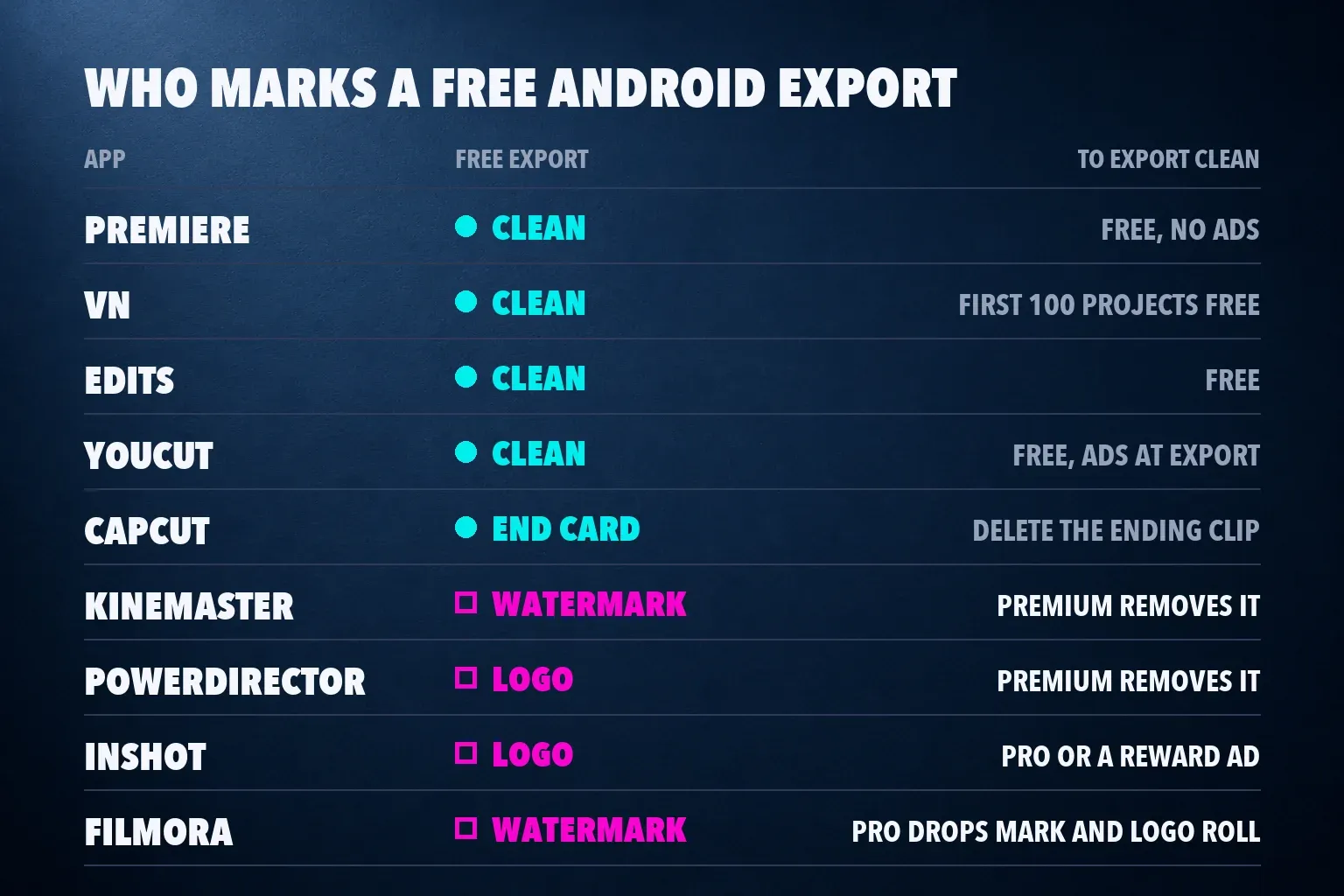
Premiere, Edits and YouCut export clean for free, and VN does for its first 100 projects. CapCut's free exports came out clean in testing, apart from an end card you delete yourself. PowerDirector and InShot stamp a logo on free exports, Filmora adds a watermark and a Logo Roll until you have Pro benefits, and KineMaster advertises a watermark on its free tier even though one regional test exported clean. Samsung's Gallery editor trims without a mark, but it has no text, music or filter tools.
Also checked: YouTube Create, Filmora, Videoleap, VLLO and Splice
YouTube Create is Google's free editor, with no in-app purchases on Google Play, for phones running Android 8.0 or later with at least 4 GB of RAM. It holds 4.6 from about 186,000 ratings. Filmora sits at 4.0, and its free exports carry the watermark and Logo Roll covered above; our Filmora review goes through its desktop plans. Videoleap rates 4.5, VLLO 3.8 and Splice 3.6 on US Google Play.
Splice is PCMag's unscored pick for interface and workflow, but its catch there is the high price of the full feature set, and at 3.6 on Google Play I'd take LumaFusion or PowerDirector for paid editing. The other four have neither a measured Android export nor a scored review in the pool above, so I keep them out of the ranking. Of the five, YouTube Create is the one I'd try first, because it's free with no in-app purchases and runs on far more phones than Premiere. If YouTube is your target, our YouTube video size guide gives you the dimensions to set.
Premiere Rush is gone from Google Play
Some Android lists still recommend Premiere Rush, but its Google Play listing now returns a not-found page. Adobe stopped new downloads on September 30, 2025, and its end-of-life notice ended support on September 30, 2026, naming free Premiere on iOS and Android as the replacement. If a list puts Rush near the top, it was written before that change.
Set up CapCut on your Android phone
Install CapCut from Google Play with our CapCut Android download guide, which shows the publisher and package name to check. CapCut is available in the US again, and our explainer on whether CapCut is banned in the US covers the January 2025 shutdown and why the app is back. Before you import footage, the CapCut safety guide shows which permissions to limit. On a Chromebook, the CapCut Chromebook guide compares the web editor, the installable web app and the Android app. If the app closes mid-edit or during export, CapCut keeps crashing goes through the fixes in order.
Before you export, the social media video size guide lists the frame for each platform, and the TikTok video size and YouTube Shorts size pages cover those two in detail. CapCut for TikTok and CapCut for YouTube Shorts walk through full vertical edits. If you also edit on an iPhone, our best iPhone video editing apps list ranks the iOS field, and the CapCut alternatives guide compares 12 editors across phone, browser, tablet and desktop.
Android video editing app questions
What is the best free video editing app for Android?
Adobe Premiere, if your phone runs Android 13 or later with at least 5 GB of RAM. It's free with no ads and no watermark, exports 4K and has a multitrack timeline. On older phones, VN is the best free pick, and YouCut is the lightest clean option at a 37 MB download.
Is CapCut free on Android, and does it add a watermark?
Yes, the editor is free. In an October 2026 Android test, its free export had no watermark but ended with a 1.96-second CapCut end card that you can delete. A watermark also appears from template endings and some stock assets. Standard and Pro subscriptions add the paid tools.
Which Android video editors have no watermark?
Premiere, Edits and YouCut on their free plans, VN for its first 100 projects, and LumaFusion as a paid app. CapCut leaves free exports clean once you delete its end card. InShot, PowerDirector and Filmora add a mark until you pay, and KineMaster advertises one on its free tier.
What is the best video editor for an older or low-RAM Android phone?
VN. It exported clean 1440p at 60 fps on a Galaxy A31 running Android 12, a phone too old for Premiere. YouCut is a good second choice for a phone that's short on storage, and LumaFusion needs only Android 10 and 3 GB of RAM if you'd pay $29.99.
What is the best paid video editing app for Android?
LumaFusion, at $29.99 once. It has six video and six extra audio tracks, scopes and keyframes, runs on Chromebooks from the same purchase, and sells advanced features as one-time add-ons or a Creator Pass. If you'd rather subscribe, PowerDirector has the most tools.
What does Adobe Premiere need on Android?
Android 13 or later and at least 5 GB of RAM. The app is free with no ads and no watermark, and paid plans add generative AI credits and storage. Adobe lists keyframes, cropping, Adobe Fonts and continued editing on Premiere desktop as coming soon on Android.
Which Android video editors work on a Chromebook?
LumaFusion runs on a Chromebook from the same Google Play purchase, and KineMaster's listing names Chromebook support. CapCut works there through its web editor, an installable web app or the Android app, depending on the Chromebook.