

The TikTok video size to use is 1080 × 1920 pixels at 9:16, a full-screen vertical frame. TikTok also takes horizontal 16:9 and square 1:1 video, but neither fills the screen. Uploads in the app run up to 10 minutes, and the posting API that scheduling tools use takes files up to 4 GB at 23 to 60 frames per second.
Size guides disagree because they mix three rule sets: the TikTok app, TikTok's developer API and its ad specifications. The 72 MB and 287.6 MB file caps that many of them repeat don't appear in TikTok's documentation, and the 60-minute length was a limited test. Every figure below says which rule set it comes from.
My pick for an ordinary TikTok is a 1080 × 1920 MP4 with H.264 video at the frame rate you shot, 30 or 60 fps. It fills the screen, sits well inside every limit TikTok publishes, and still qualifies if you later boost the post as an ad.
TikTok video size at a glance
The format, codec, frame rate and file size limits come from TikTok's media transfer guide for developers, the rules scheduling tools post under. The ad minimums come from TikTok's In-Feed ad specifications.
| Setting | What to use | TikTok's rule |
|---|---|---|
| Dimensions | 1080 × 1920 px | 360 to 4096 px per side through the API |
| Aspect ratio | 9:16 vertical | 9:16 recommended; 16:9 and 1:1 accepted |
| Frame rate | 30 fps, or 60 if you shot at 60 | 23 to 60 fps through the API |
| Length | Under 3 minutes works everywhere | Up to 10 minutes uploaded in the app |
| File type | MP4 with H.264 video | MP4, WebM or MOV; H.264, H.265, VP8 or VP9 |
| File size | Whatever 1080p at your bitrate produces | 4 GB through the API, 500 MB for ads |
Every size here is width × height. 1080 × 1920 and 1920 × 1080 hold the same pixels in a different order, and only the first one is vertical.
Aspect ratios: horizontal and square videos
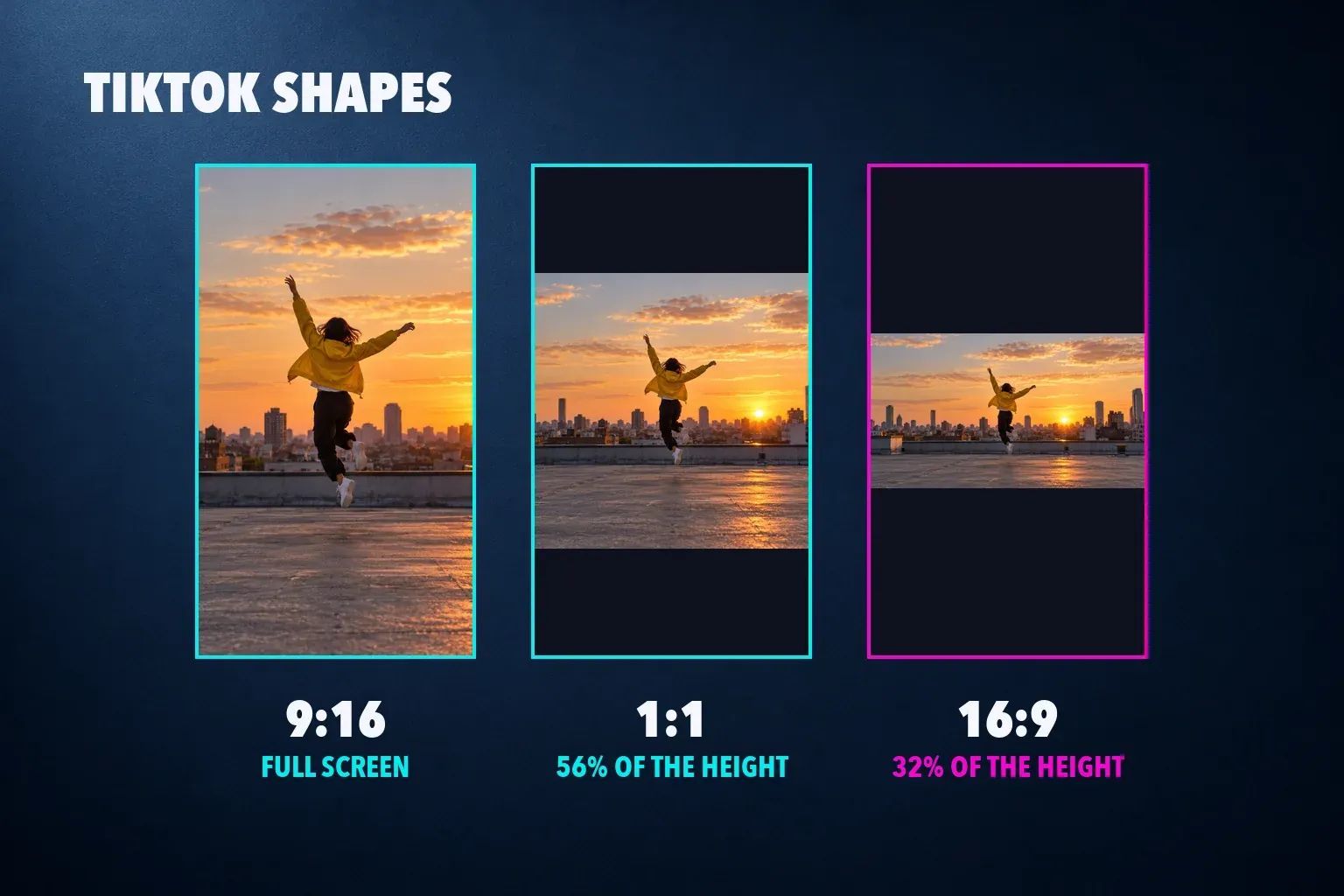
9:16 is the only shape that fills the screen. TikTok's ad specifications mark vertical 9:16 as recommended and list horizontal 16:9 and square 1:1 as the alternatives, while the posting API accepts any shape between 360 and 4096 pixels on each side. A video that isn't 9:16 still plays, with empty space above and below it.
Here's how much of a 1080 × 1920 screen each shape covers at full width:
| Video shape | Size at 1080 px wide | Share of the screen height |
|---|---|---|
| 9:16 vertical | 1080 × 1920 | All of it |
| 4:5 portrait | 1080 × 1350 | About 70% |
| 1:1 square | 1080 × 1080 | About 56% |
| 16:9 horizontal | 1080 × 608 | About 32% |
A horizontal video ends up as a strip across the middle of the phone. If the subject sits near the center, crop the footage to 9:16 before you post. Our guide on changing the aspect ratio in CapCut covers the crop, and CapCut's Auto Reframe keeps a moving subject in frame while it does it.
The ad minimums are lower than most guides suggest: 540 × 960 for vertical, 960 × 540 for horizontal and 640 × 640 for square. Treat them as floors. A 1080 × 1920 export has four times the pixels of 540 × 960, and that's the detail a sharp phone screen shows.
How long can a TikTok video be?
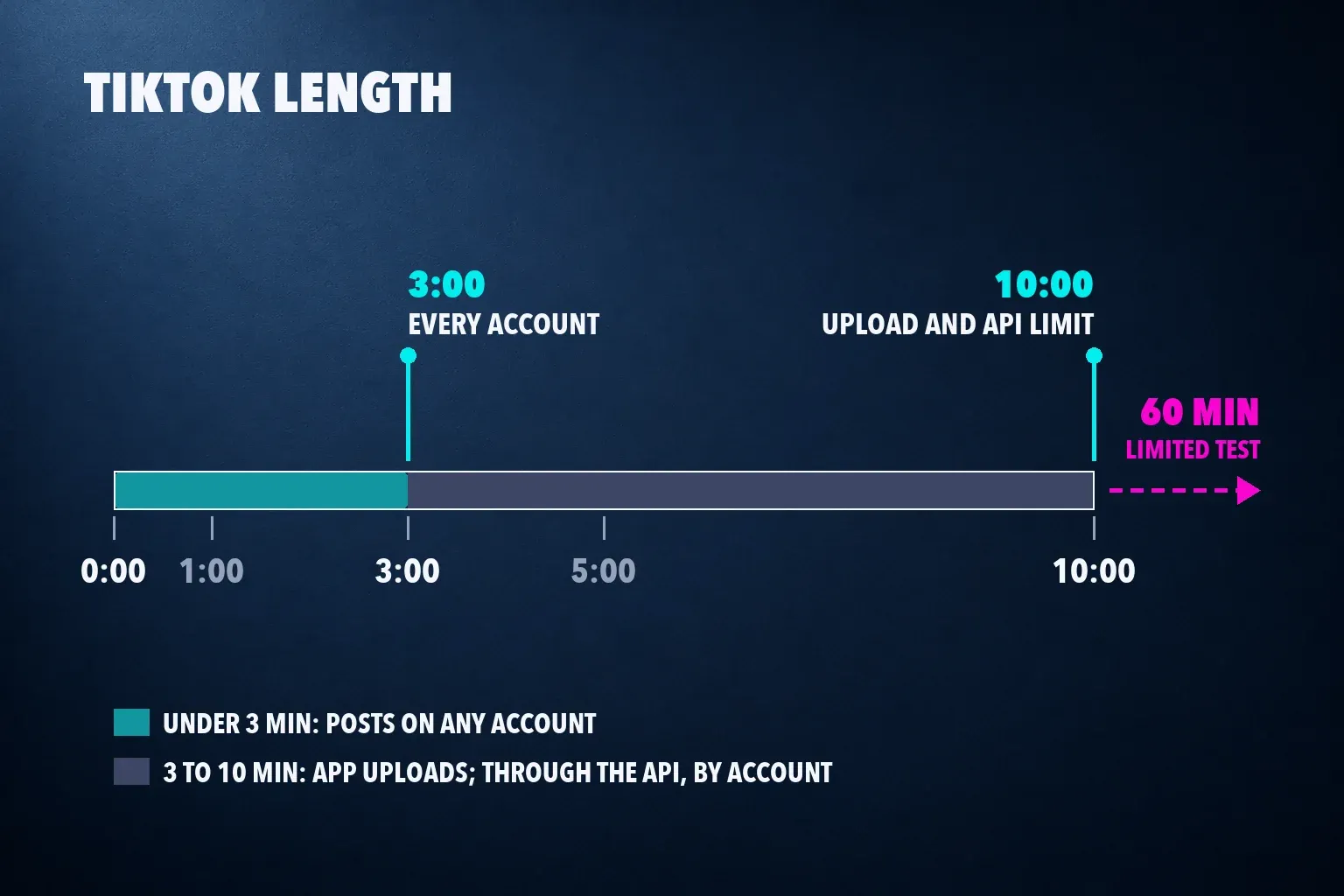
Up to 10 minutes for a video you upload in the app. TikTok raised the upload limit to 10 minutes in 2022, and when the 10-minute recording option disappeared from the in-app camera in 2023, TikTok told Social Media Today that "users can still upload videos up to 10 minutes" and that recording that long had been an experiment.
TikTok's developer guide sets out the floor every account shares: all creators can post 3-minute videos, and some have access to 5- or 10-minute ones. Each account has its own maximum, so a long file posted through a tool can need trimming first.
The other lengths you'll see quoted come from different routes:
- 3 minutes works on every account, through the app or any scheduling tool.
- 10 minutes is the longest video the posting API accepts. If the account's limit is shorter, TikTok lets the creator trim the video in the app before it goes out.
- 60 minutes was a test. TikTok confirmed to TechCrunch in May 2024 that a limited group of users in select markets could upload hour-long videos, with no immediate plans to offer it widely. Guides that list 60 minutes as the limit are quoting that test.
- 5 to 60 seconds is the length for TopView, the full-screen ad shown when the app opens. In-Feed ads run up to 10 minutes.
I'd keep a TikTok under 3 minutes unless the content needs more. It's the one length TikTok guarantees on every account and every posting route, so the video never gets trimmed by a limit you didn't plan for.
File size, codec and frame rate
TikTok's own file size limits cover the posting API and ads, not uploads in the app. The 72 MB Android and 287.6 MB iPhone caps in many size guides don't come from TikTok's documentation. Here's what TikTok does publish:
| Route | File size | Length | Formats | Other limits |
|---|---|---|---|---|
| API posting (scheduling tools) | 4 GB | Up to 10 min, by account | MP4, WebM, MOV | H.264, H.265, VP8 or VP9; 23 to 60 fps; 360 to 4096 px |
| In-Feed ads | 500 MB | Up to 10 min | MP4, MOV, MPEG, 3GP, AVI | 516 kbps or more; 9:16 at 540 × 960 or larger |
| TopView ads | 500 MB | 5 to 60 s | MP4, MOV, MPEG, 3GP | 2,500 kbps or more; vertical 9:16 only |
| Spark Ads (boosted posts) | Same as the post | No limit | MP4, MOV | Uses the organic video and its caption |
None of these is tight for a normal export. Ten minutes at 10 Mbps comes to about 750 MB, well under the API's 4 GB, and 500 MB holds about six and a half minutes at the same bitrate. Our video bitrate calculator works out the bitrate that fits a clip into any size limit.
The developer guide marks MP4 and H.264 as the recommended pair, and every editor can export it. For frame rate, export at what you shot: 24, 30 or 60 fps all fall inside the 23 to 60 range. A 120 fps slow-motion clip needs to come down to 60 before a scheduling tool can post it.
1080p or 4K on TikTok?
1080 × 1920 is my pick. The posting API accepts up to 4096 pixels per side, so a vertical 4K file of 2160 × 3840 goes through, but TikTok doesn't publish the resolution it plays videos back at. Some guides say TikTok converts every 4K upload to 1080p, and TikTok's documentation doesn't say that either.
A 4K export carries four times the pixels, takes longer to upload, and nothing TikTok documents promises viewers will see the difference. Upload 4K when that's the file you already have. When you're choosing the export, choose 1080p.
Cover: pick the frame people see first
The cover is the thumbnail that previews your video on your profile and in search results, as TikTok's help page on editing and posting puts it. You choose it before posting:
- On the post screen, tap Select cover on the video thumbnail.
- Drag to place the frame anywhere on the video.
- Tap Save at the top.
Through the API, a scheduling tool sets the cover as a point in the video. TikTok's Direct Post reference says that if that point isn't set or isn't valid, the cover is the first frame. If your tool has no cover field, make the first frame work as a cover: a clear subject and a few large words, not a fade in from black.
Safe zone: keep text clear of the buttons
The TikTok player lays the caption, username, sound label and action buttons over the bottom and right side of the video. TikTok doesn't publish safe-zone margins for ordinary posts. The one template it does publish is the In-Feed ad safe-zone file in its ad specifications, drawn on a 720 × 1280 frame. Scaled to 1080 × 1920, its margins are:
| Area | In-Feed template | Pixels on 1080 × 1920 |
|---|---|---|
| Top | 12.5% | 240 px |
| Bottom | 34.4% | 660 px |
| Left and right | 11.1% each | 120 px |
| Button column | 180 px wide, next to the right margin | From 840 px down to the bottom |
That leaves a clear band of 840 × 600 pixels across the upper middle, from 240 to 840 pixels down. Below it, a narrower 660 × 420 area runs beside the button column to 1260 pixels. Put the hook line, a price or a step number in the upper band, where nothing overlaps it.
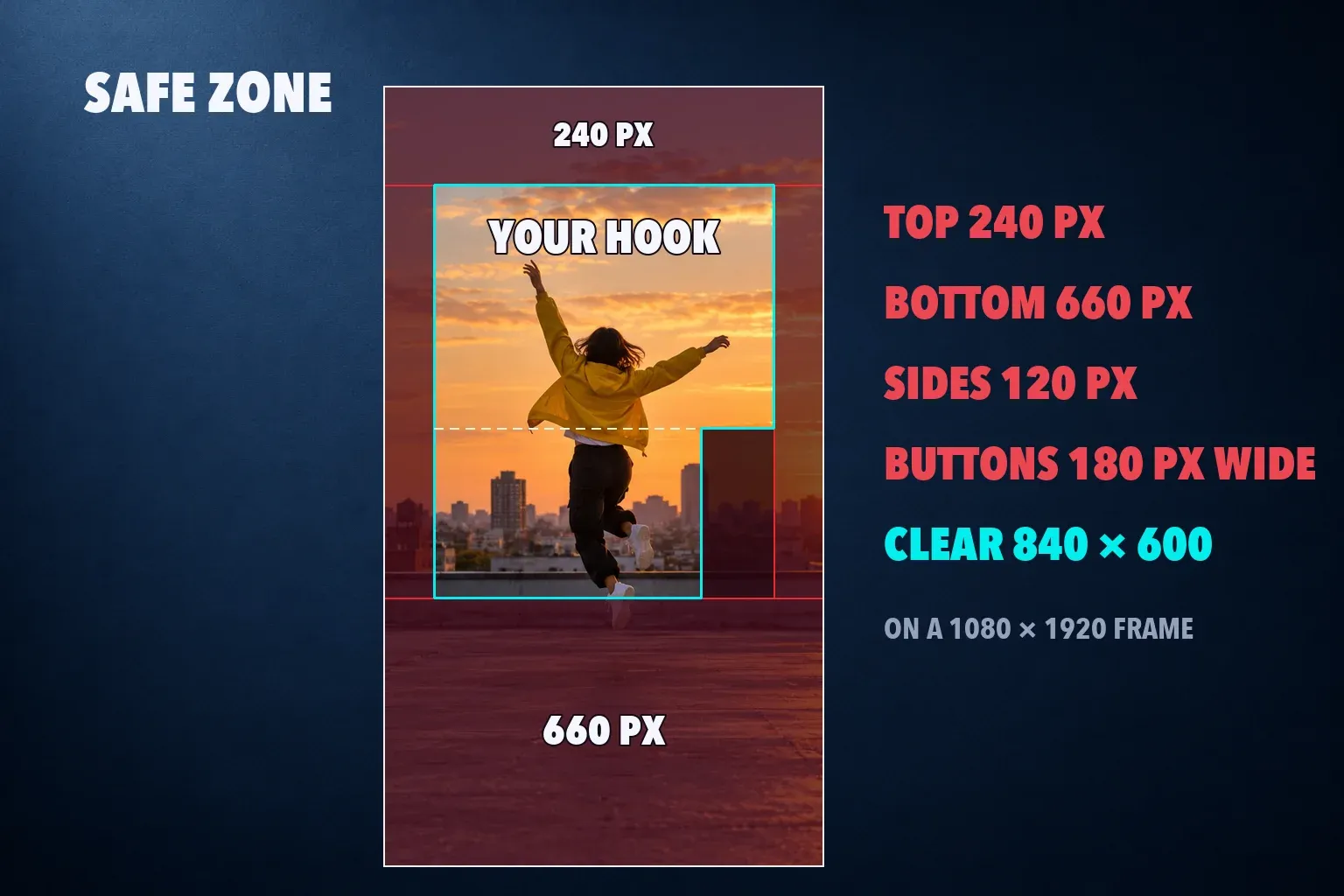
The ads help adds that the safe zone depends on the video's shape, the caption length and any extra ad formats, and TikTok's TopView ad specifications say the longer the caption, the smaller the safe zone. A caption of more than a line or two climbs higher up the frame, so leave extra room under the hook when you write a long one.
Our CapCut for TikTok guide uses working caution areas for organic posts, and the safe zone checker tests a frame against TikTok, Reels and Shorts layouts in your browser.
Set up the TikTok video in CapCut
Start the project on a 9:16 canvas and export at 1080p, and CapCut writes a 1080 × 1920 file. Keep the frame rate of your footage. Our best CapCut export settings guide lists resolution, frame rate and bitrate for TikTok, Reels and Shorts side by side, and the TikTok guide linked above walks through captions, safe areas and a final check on the phone.
The same 1080 × 1920 file fits the other vertical feeds. The YouTube Shorts size guide covers the 3-minute Shorts rule and the 9:16 thumbnail, the Instagram Reel size guide covers Reel covers and length, and our social video hub gathers the TikTok, Reels and Shorts workflows in one place.
TikTok video size questions
What are the dimensions for a TikTok video?
1080 × 1920 pixels, a 9:16 vertical frame. Through the API, TikTok accepts anything from 360 to 4096 pixels on each side, and its ads need at least 540 × 960 for vertical video.
Can I post a horizontal video on TikTok?
Yes. A 16:9 video uploads and plays, but at 1080 pixels wide it covers about a third of the screen height. Cropping it to 9:16 fills the screen.
What is the maximum length of a TikTok video?
10 minutes for a video uploaded in the app. TikTok's developer guide says every creator can post 3-minute videos and some accounts have 5 or 10 minutes. Hour-long uploads were a limited test.
Is there a file size limit for TikTok videos?
TikTok doesn't publish one for uploads in the app. Videos posted through the API, which scheduling tools use, can be up to 4 GB, and In-Feed and TopView ads up to 500 MB.
Should I upload TikTok videos in 4K?
You can, up to 4096 pixels per side through the API, but TikTok doesn't publish the resolution it plays back at. A 1080 × 1920 export fills the screen and uploads faster.
What frame rate should a TikTok video be?
The one you shot at, usually 30 or 60 fps. The posting API accepts 23 to 60 fps, so footage shot at 120 fps needs a 60 fps export first.