

The YouTube Shorts size to use is 1080 × 1920 pixels at 9:16, a full-screen vertical frame. YouTube treats any square or vertical video up to 3 minutes as a Short, and the Shorts upload in the YouTube app tops out at 1080p. The custom thumbnail is also 9:16, recommended at 2160 × 3840, and you can only add it in YouTube Studio on a computer.
Most confusion about Shorts comes from old limits. The 60-second cap was replaced by 3 minutes, and the 1280 × 720 thumbnail that some guides still list is the size for ordinary horizontal videos, not Shorts. Every number below traces to YouTube's or Google's own documentation. The safe-zone margins come from Google's ads guidance, because YouTube publishes none for ordinary Shorts.
My pick for an ordinary Short is a 1080 × 1920 MP4 with H.264 video, the frame rate you shot at, and about 8 Mbps at 30 fps or 12 Mbps at 60 fps. That file fills the phone screen, uploads through both the app and Studio, and leaves nothing for YouTube to pad or crop.
YouTube Shorts size at a glance
The length and shape rules come from YouTube's help page on uploading Shorts up to three minutes. The encoding figures come from its recommended upload encoding settings.
| Setting | What to use | YouTube's rule |
|---|---|---|
| Dimensions | 1080 × 1920 px | App Shorts upload: up to 1080p |
| Aspect ratio | 9:16 vertical | Square or vertical counts as a Short |
| Length | Up to 3 minutes | Over 1 minute is blocked if it has a copyright claim |
| Frame rate | Same as you recorded | 24, 25, 30, 48, 50 and 60 fps are common |
| Video bitrate | 8 Mbps at 24–30 fps, 12 Mbps at 48–60 fps | YouTube's 1080p SDR recommendation |
| File type | MP4 with H.264 video and AAC audio | MP4, H.264 High Profile, AAC-LC at 48 kHz |
| Thumbnail | 2160 × 3840 JPG or PNG | At least 640 px tall, up to 50 MB |
Every size here is width × height. 1080 × 1920 is vertical; 1920 × 1080 is the same number of pixels turned sideways, and it uploads as a regular video, not a Short.
What makes a video a Short
Shape and length decide it. On a standard channel, a video uploaded on or after October 15, 2024 is categorized as a Short when it has a square or vertical aspect ratio and runs up to 3 minutes. Videos uploaded before that date keep their earlier category, and Official Artist Channels follow the same rule for uploads from December 8, 2025.
There's no separate Shorts setting to turn on. If you upload a 2-minute vertical video, it's a Short. If you want a short vertical piece to stay a regular video, YouTube's own advice is to give it a wider aspect ratio such as 16:9.
You can upload a Short two ways, both described in YouTube's guide to uploading Shorts:
- YouTube app: tap Create, then Upload a video, and pick a square or vertical clip. Anything up to 3 minutes opens in the trim editor. A longer clip offers Edit into a Short so you can cut it down.
- YouTube Studio on a computer: click CREATE, then Upload videos, and select files up to 3 minutes with a square or vertical shape. Studio takes up to 15 Shorts at a time.
Aspect ratio: square, portrait and horizontal clips
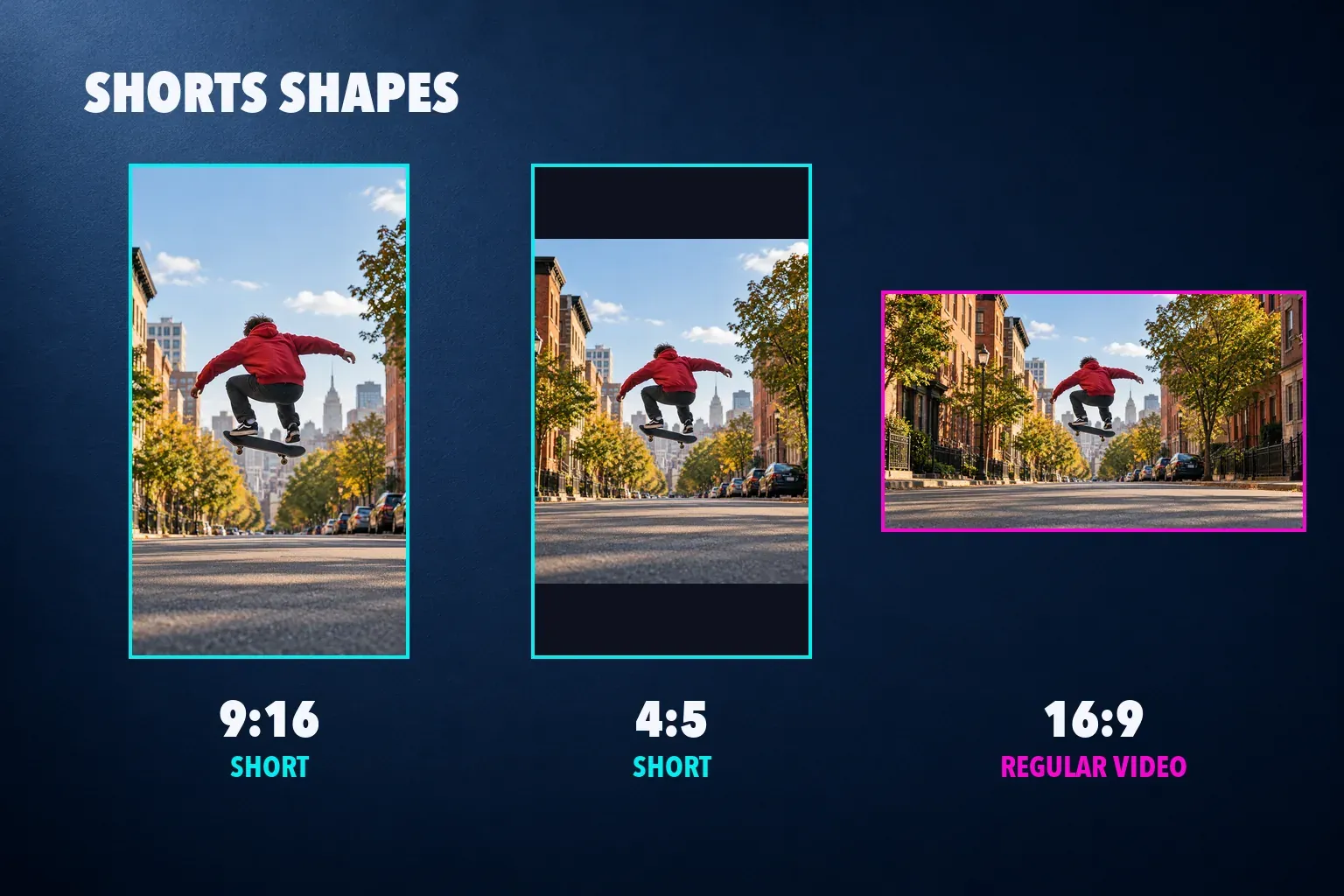
9:16 is the only shape that fills the Shorts player. Square and 4:5 portrait clips still count as Shorts because they aren't wider than they are tall, but they play smaller, with the rest of the screen left empty.
Here's how much of a 1080 × 1920 screen each shape covers at full width:
| Clip shape | Size at 1080 px wide | Share of the screen height | Counts as a Short? |
|---|---|---|---|
| 9:16 vertical | 1080 × 1920 | All of it | Yes |
| 4:5 portrait | 1080 × 1350 | About 70% | Yes |
| 1:1 square | 1080 × 1080 | About 56% | Yes |
| 16:9 horizontal | 1080 × 608 | Doesn't apply | No, it uploads as a regular video |
Don't fix a horizontal clip by adding black bars to make it 9:16. YouTube's page on aspect ratios asks creators not to add padding or bars to the video itself, because the player adjusts to the frame on each device. Crop the footage instead. Our guide on changing the aspect ratio in CapCut covers the crop, and CapCut's Auto Reframe keeps a moving subject in the vertical frame while it does it.
How long can a YouTube Short be?
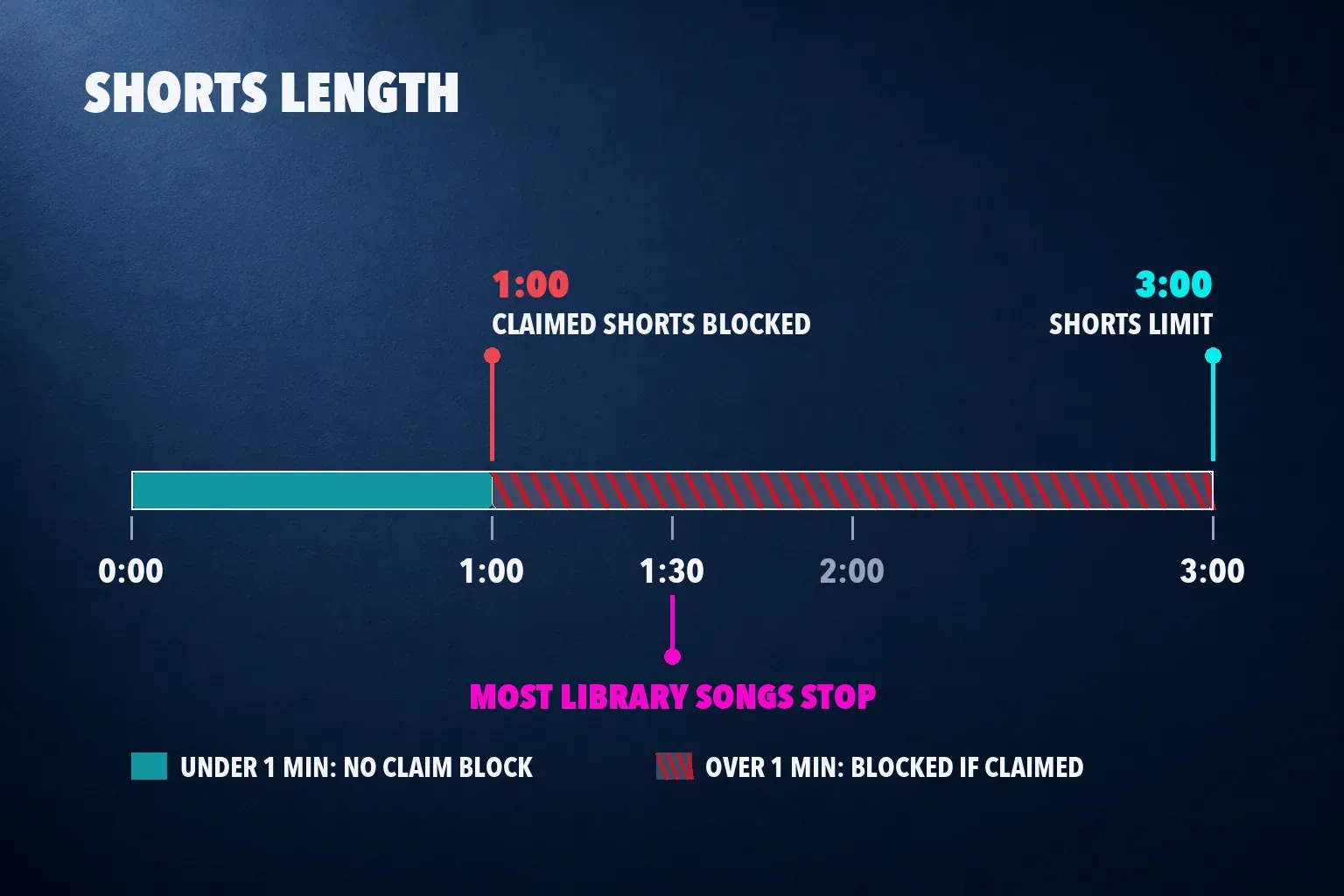
Up to 3 minutes. The old 60-second limit still appears in some size guides, but it no longer applies to new uploads.
Two rules matter once a Short runs past a minute:
- Copyright claims block longer Shorts. A Short over 1 minute with an active Content ID claim, including a manual claim, is blocked worldwide. It won't play, get recommended or earn money until the claim is resolved. YouTube says the block carries no penalty for the channel, but the Short is effectively off the platform until then.
- Music has its own cap. On a standard channel, most songs from the Shorts audio library can play for up to 90 seconds in a 3-minute Short, and some are limited to 60 or 30 seconds. Royalty-free tracks from the YouTube Audio Library don't receive Content ID claims.
So a 2-minute Short is fine, but music or clips you don't own are a bigger risk past the 1-minute mark. If a longer Short uses a song, pick it from YouTube's own library or keep the cut under a minute.
Resolution, 4K and encoding
Export 1080 × 1920. YouTube's help page on getting started with Shorts states that you can upload Short videos with a maximum resolution of 1080p, in the instructions for the app's Shorts upload. Studio's general encoding guidance lists bitrates up to 2160p, so don't read that note as a ban on 4K files. Our CapCut for YouTube Shorts guide keeps 1080 × 1920 as the default for the same reason: it works on every upload route, and it's the frame a phone screen shows.
YouTube's encoding recommendations for the file itself:
| Part | Recommendation |
|---|---|
| Container | MP4, with the index at the front of the file (Fast Start) |
| Video codec | H.264, High Profile, progressive scan |
| Frame rate | Same as recorded, without converting 30 to 60 |
| Bitrate at 1080p | 8 Mbps at 24, 25 or 30 fps; 12 Mbps at 48, 50 or 60 fps |
| Bitrate at 2160p | 35–45 Mbps standard, 53–68 Mbps high frame rate |
| Audio | AAC-LC, stereo, 48 kHz, 384 kbps |
| Color | BT.709 for standard dynamic range |
A 3-minute Short at 8 Mbps comes to about 180 MB of video, and at 12 Mbps about 270 MB. Our video bitrate calculator works out bitrate and file size for any length.
Shorts thumbnail size
The Shorts thumbnail is vertical. YouTube's thumbnail help page recommends 2160 × 3840 pixels at 9:16, with a minimum height of 640 pixels, as a JPG or PNG up to 50 MB on desktop.
Two conditions catch people out. You can only add a custom Shorts thumbnail in YouTube Studio on a computer, not in the app, and your account must be verified. And if a vertical video has a 16:9 custom thumbnail, YouTube replaces it with an auto-generated 4:5 thumbnail on the home, explore and subscriptions pages.
To add one after the Short is up:
- Sign in to YouTube Studio on a computer.
- Open Content, then the Shorts tab at the top.
- Click Edit on the Short.
- Under Thumbnail, click Upload file and choose your 9:16 image.
- Click SAVE.
Our YouTube thumbnail size guide covers both shapes, including the 1280 × 720 thumbnail for regular videos.
Safe zones: keep text clear of the buttons
YouTube doesn't publish pixel safe zones for ordinary Shorts. What it gives creators is a live guide. In the YouTube app's Shorts editor, visual guides appear while you drag text or stickers, showing where the like button, comments and description might sit. Drag too close to the edge and animated white lines mark the area that may be hidden on some devices.
The only published percentages come from Google's ads side. Its page on Shorts ads advises keeping critical elements out of the top 10%, the bottom 25% and the right-hand 10% of the frame, where the channel name, caption and engagement buttons appear. On a 1080 × 1920 frame that works out to:
| Edge | Google's Shorts ads guidance | Pixels on 1080 × 1920 |
|---|---|---|
| Top | 10% | 192 px |
| Bottom | 25% | 480 px |
| Right | 10% | 108 px |
| Left | Not listed | 0 px |
That leaves a clear area of 972 × 1248 pixels. For ads, Google's video ad safe-zone guide also links a stricter vertical overlay. Measured on its 1080 × 1920 template, the open area runs from 48 to 888 pixels across and from 288 to 1248 pixels down, an 840 × 960 box.
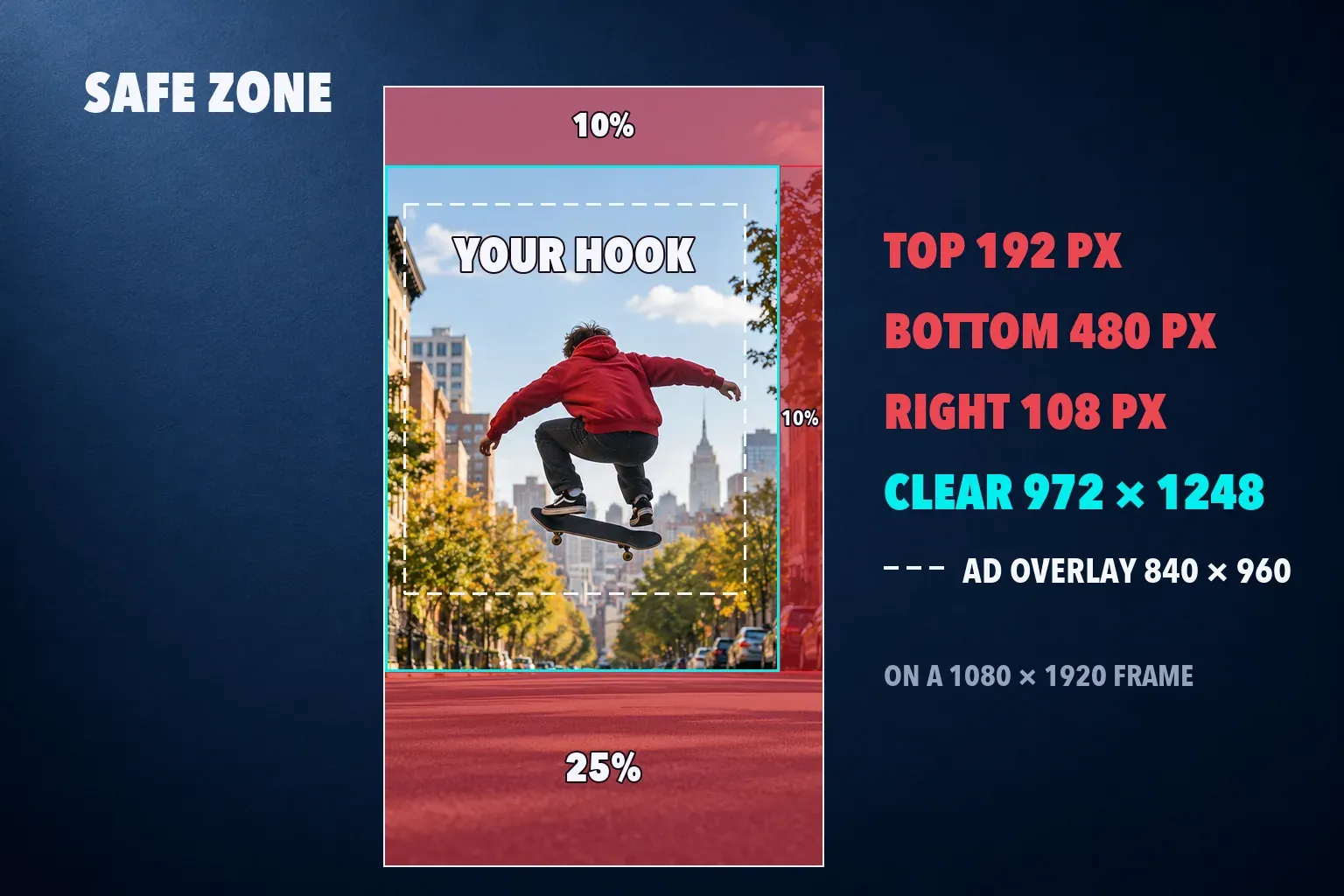
For an organic Short, my rule is to start from the 10/25/10 margins and keep hook lines, prices and step numbers inside them. Ads numbers are the only published ones, and they cover the same buttons. Then check the final placement against the app's visual guides, or with an unlisted test upload, before trusting it. Our safe zone checker lets you preview a frame against Shorts, TikTok and Reels layouts in your browser.
Reuse the same file for Reels
A 1080 × 1920 Short is already the right shape for the other vertical feeds. The differences are length, covers and where each app puts its buttons. Instagram allows longer Reels but stops recommending them to new audiences after 3 minutes, as our Instagram Reel size guide explains. Meta's published Reels margins also reserve 35% of the bottom against Google's 25% for Shorts, so if you post one edit to both, place text for the Reels layout.
Set up the Short in CapCut
Start the project on a 9:16 canvas and export at 1080p, and CapCut writes a 1080 × 1920 file. Keep the frame rate of your footage and pick a bitrate near YouTube's recommendation. Our best CapCut export settings guide lists the values for Shorts, TikTok and Reels side by side, and the Shorts guide linked above covers captions, hooks and a posting check.
If the same video also goes out as a regular upload, the YouTube video size guide covers the 16:9 version, and our social video hub gathers the TikTok, Reels and Shorts workflows in one place.
YouTube Shorts size questions
What are the pixel dimensions for YouTube Shorts?
1080 × 1920 pixels, width × height, at a 9:16 aspect ratio. That frame fills a phone screen in the Shorts player and is the highest resolution the app's Shorts upload accepts.
Can a square video be a YouTube Short?
Yes. YouTube counts square and vertical videos up to 3 minutes as Shorts. A 1:1 clip plays at about 56% of the screen height, so 9:16 still looks better.
Can I upload a horizontal video as a Short?
No. A 16:9 video is wider than it is tall, so YouTube treats it as a regular video even if it's under 3 minutes. Crop it to 9:16 to make it a Short, without adding black bars.
Can YouTube Shorts be 4K?
The app's Shorts upload is limited to 1080p. Studio's general encoding guidance goes up to 2160p, but 1080 × 1920 is the safe export for Shorts and looks the same on a phone.
What size is a YouTube Shorts thumbnail?
2160 × 3840 pixels at 9:16, at least 640 pixels tall, JPG or PNG up to 50 MB. You add it in YouTube Studio on a computer, and your account has to be verified.
How long can a YouTube Short be?
Up to 3 minutes for uploads on standard channels since October 15, 2024. A Short over 1 minute with an active copyright claim is blocked, and most library songs can only play for 90 seconds of it.