
The best video editing app for most iPhone users is Adobe Premiere. It's free, has a multitrack timeline, exports 4K with no ads and no watermark, and both TechRadar and PCMag score it 4.5 out of 5. Pick CapCut if you mostly post TikToks, Reels or Shorts and want templates and auto captions. Buy LumaFusion for $29.99, once, when you want a professional timeline without a subscription.
Lists of iPhone editors rarely agree because they mix three kinds of apps: real iPhone editors, iPad-only apps such as DaVinci Resolve and Final Cut Pro, and Premiere Rush, which Adobe stopped offering in 2025. Most scored reviews also came out before Premiere for iPhone existed. This list keeps only apps that install on an iPhone and ranks them on reviews of their iPhone versions, US App Store ratings and what each one charges for.
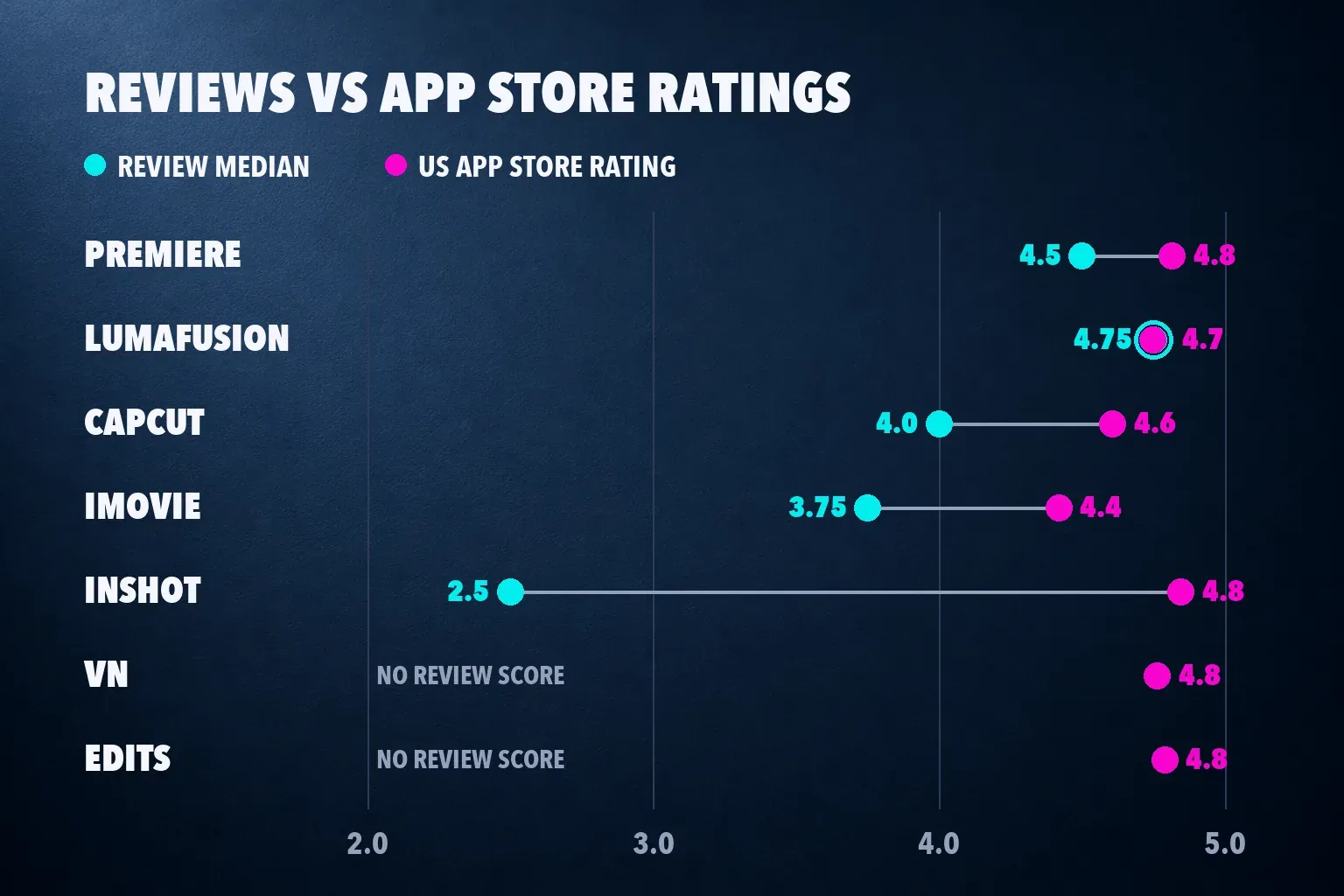
My pick is Premiere for anything with a story: a vlog, a trip video, a talking head with B-roll. It's the only free editor here with no ads, no watermark and a direct route to Premiere on a computer. For a vertical clip that needs captions and a trending format, I'd go to CapCut instead, because its templates and caption tools are built around that feed.
The best iPhone video editors at a glance
| App | Best for | Price in the US App Store | Watermark on free exports |
|---|---|---|---|
| Adobe Premiere | Most people | Free; $7.99 a month or $69.99 a year for AI credits and storage | None |
| CapCut | TikTok, Reels and Shorts | Free; Standard $9.99 a month, Pro $19.99 a month | Most exports have none |
| LumaFusion | Pro editing with no subscription | $29.99 once; $19.99 add-ons | None |
| VN | A free manual timeline | Free for 100 projects; VN Pro $7.99 or $69.99 | None |
| iMovie | Simple movies | Free, no in-app purchases | None |
| Edits | Instagram Reels | Free, no in-app purchases | None |
| InShot | Quick edits and collages | Free; Pro $4.99 a month, $19.99 a year or $49.99 once | Small InShot logo |
Prices come from each app's US in-app purchase list. Other countries see their own local prices.
Review scores and App Store ratings, compared
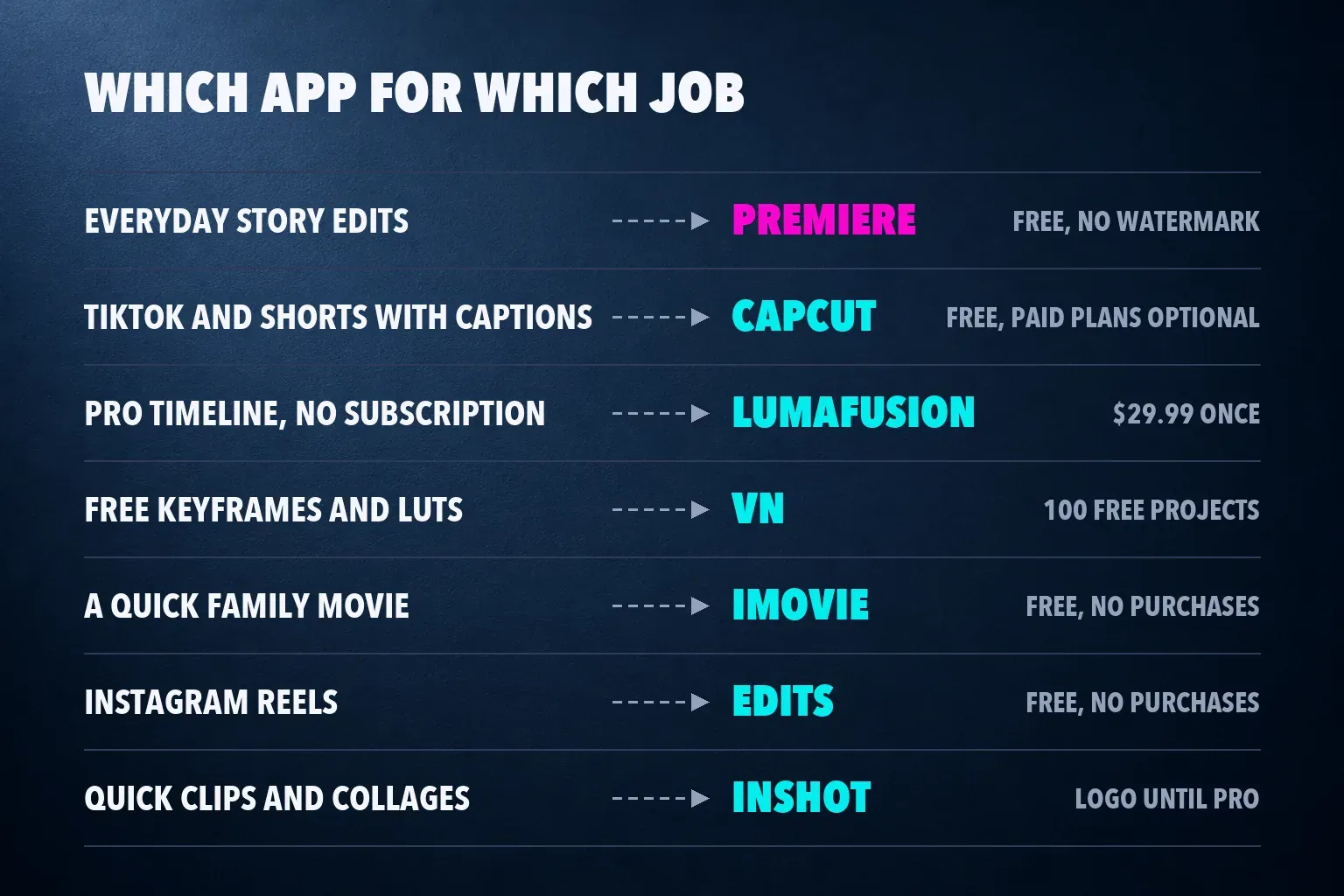
The review median takes the score each outlet gave the app's iPhone version, on a five-point scale. The App Store column is the US store's average star rating and the number of ratings behind it.
| App | Review scores | Review median | US App Store rating |
|---|---|---|---|
| Adobe Premiere | TechRadar 4.5, PCMag 4.5 | 4.5 from 2 reviews | 4.8 from about 27,000 ratings |
| LumaFusion | TechRadar 4.5, Digital Camera World 5 | 4.75 from 2 (range 4.5 to 5) | 4.7 from about 25,000 |
| CapCut | TechRadar 4, MobileAppDaily 4 | 4.0 from 2 | 4.6 from 1.1 million |
| iMovie | TechRadar 3.5, PCMag 4 | 3.75 from 2 (range 3.5 to 4) | 4.4 from about 319,000 |
| InShot | TechRadar 2.5 | 2.5 from 1 | 4.8 from 2.5 million |
| VN | PCMag category pick, no score | None | 4.8 from about 322,000 |
| Edits | PCMag category pick, no score | None | 4.8 from about 97,000 |
The scores are close at the top and far apart at the bottom. Premiere and LumaFusion lead the review column and hold 4.7 or better in the store. TechRadar's reviews of CapCut, iMovie, InShot and LumaFusion date from late 2023, while its Premiere review and PCMag's roundup came out after Premiere reached the iPhone, so the newer reviews are scoring against a stronger field.
InShot is where the two columns split. Its users give it 4.8 from 2.5 million ratings, the most of any app here, yet TechRadar scored it 2.5 because of privacy concerns while praising its interface and tools. I read the App Store number as a measure of how pleasant an app feels for a quick edit, and the review median as a measure of how it holds up on a bigger project. When the two disagree, the review tells you what to watch for.
1. Adobe Premiere: the best free editor for most people
Adobe launched Premiere on iPhone as a free app in September 2025, with upgrade plans only for extra storage and generative AI credits. The App Store listing is just as plain about the deal: no ads, no watermarks, 4K exports for free, and you pay only when you need Firefly credits. In the US store that plan is $7.99 a month or $69.99 a year.
Free gets you the editing itself: a multitrack timeline, frame-accurate trimming, speed effects with reverse and freeze frames, 4K HDR editing, free music tracks and Adobe Fonts. PCMag points out that projects carry over to Premiere on the desktop, which matters if you finish longer edits on a computer. TechRadar's complaints are small ones: a short list of transitions, and AI tools behind the paywall.
Premiere needs iOS 18 or later. Pick it if you want a real timeline at no cost. Skip it if you build most videos from templates, because that's where CapCut is strongest.
2. CapCut: the best app for TikTok, Reels and Shorts
CapCut is free, and its App Store listing covers the tools short-form editing depends on: keyframes, chroma key, stabilization, auto captions, text-to-speech, motion tracking, background removal and exports up to 4K at 60 fps. The same editor runs on desktop and in a browser, so you aren't locked to the phone. Our CapCut auto captions guide covers the feature most people install it for.
Both scored reviews land on 4 out of 5. TechRadar called its free features surprisingly powerful, and MobileAppDaily gave its lowest sub-score, 3.5, to pricing. Free covers most editing, and most exports come out clean. A watermark appears from a template's ending clip, a stock asset that needs credit or the default outro, and our CapCut watermark guide shows the fix for each one.
The paid plans are Standard at $9.99 a month and Pro at $19.99 a month in the US store. Our CapCut pricing breakdown shows the split: Standard's benefits stay in the mobile app, while Pro works across phone, desktop and web with more cloud storage. I'd stay on Free until a specific locked effect gets in your way or you need cloud sync between devices, because CapCut gives newly created free Spaces 0 GB of storage. Then pick the plan that matches the devices you edit on.
3. LumaFusion: the best paid editor, bought once
LumaFusion costs $29.99 once on the App Store, and it's the closest thing to a desktop editor on this list: six video, audio or graphics tracks plus six more audio tracks, 4K ProRes and HDR media, and a timeline that works track-based or magnetic. Its reviews are the strongest here, with a median of 4.75.
Three features cost $19.99 each: Speed Ramping and Keyframing, Multicam Studio, and FCPXML Export for finishing in Final Cut Pro on a Mac. LumaFusion's Creator Pass bundles all the advanced in-app purchases into one subscription and, on iOS, raises the limit to 24 tracks. TechRadar's main objection is the up-front cost for very casual users. That's fair: if you edit one clip a month, Premiere does the job for nothing.
The current version needs iOS 27, the newest requirement on this list along with iMovie. Our LumaFusion review goes through the add-ons and Creator Pass in detail.
4. VN: a free manual timeline with no watermark
VN gives you a multitrack timeline with masks and keyframes, 19 built-in keyframe effects with adjustable curves, LUT import and exports up to 4K at 60 fps, plus Dolby Vision HDR on iPhone 12 and later. PCMag counts 100 free projects with no watermark before you'd need VN Pro, which removes the limit and costs $7.99 or $69.99 in the US store.
The catch is the learning curve. PCMag compares VN's interface to pro editing software, and our VN review notes the ads and in-app purchases on the free plan. I'd choose VN when you want keyframes and LUTs at no cost and don't mind ads.
5. iMovie: the simplest free editor, from Apple
iMovie is free with no in-app purchases. Its App Store listing includes Magic Movie, which builds a video from an album with titles, transitions and music, plus 20 Storyboards that tell you which shots to film, 8 themes, 13 filters and saves up to 4K at 60 fps. PCMag likes that projects move between iPhone and Mac.
Its two scores split: TechRadar gave it 3.5 in 2023, saying competitors had overtaken it, and PCMag gives it 4. It's the app I'd hand to someone who wants a birthday or holiday video without learning an editor. Our iMovie review shows where it stops being enough. Like LumaFusion, the current version needs iOS 27, so check Settings > General > About for your iOS version before you count on it.
6. Edits: the best editor for Instagram Reels
Instagram's Edits app is free, with no in-app purchases. Its listing promises 4K exports with no watermark, in-app capture of clips up to 10 minutes, green screen, cutouts, overlays and automatic captions. PCMag adds multitrack overlays, voice-overs and motion tracking for overlays, and names it the best pick for Instagram users.
I'd start Reels in Edits if Instagram is your main feed. For TikTok and Shorts, CapCut's templates and caption styles cover more. Our Edits review goes through its tools in more depth.
7. InShot: quick edits, collages and photo work
InShot handles video, collages and photo edits in one app, and its listing adds keyframes, stabilization, sticker motion tracking and 4K 60 fps saves. It has the highest App Store rating here and the lowest review score. On the free plan you get ads, and exports carry a small InShot logo in the lower right.
Pro costs $4.99 a month, $19.99 a year or $49.99 once, and Remove ads alone is $3.99. Our InShot review covers what each purchase removes. I'd pick InShot for quick clips and collages. If you'd pay only to lose the logo, Premiere already gives you a clean export for free.
Which free iPhone editors leave no watermark?
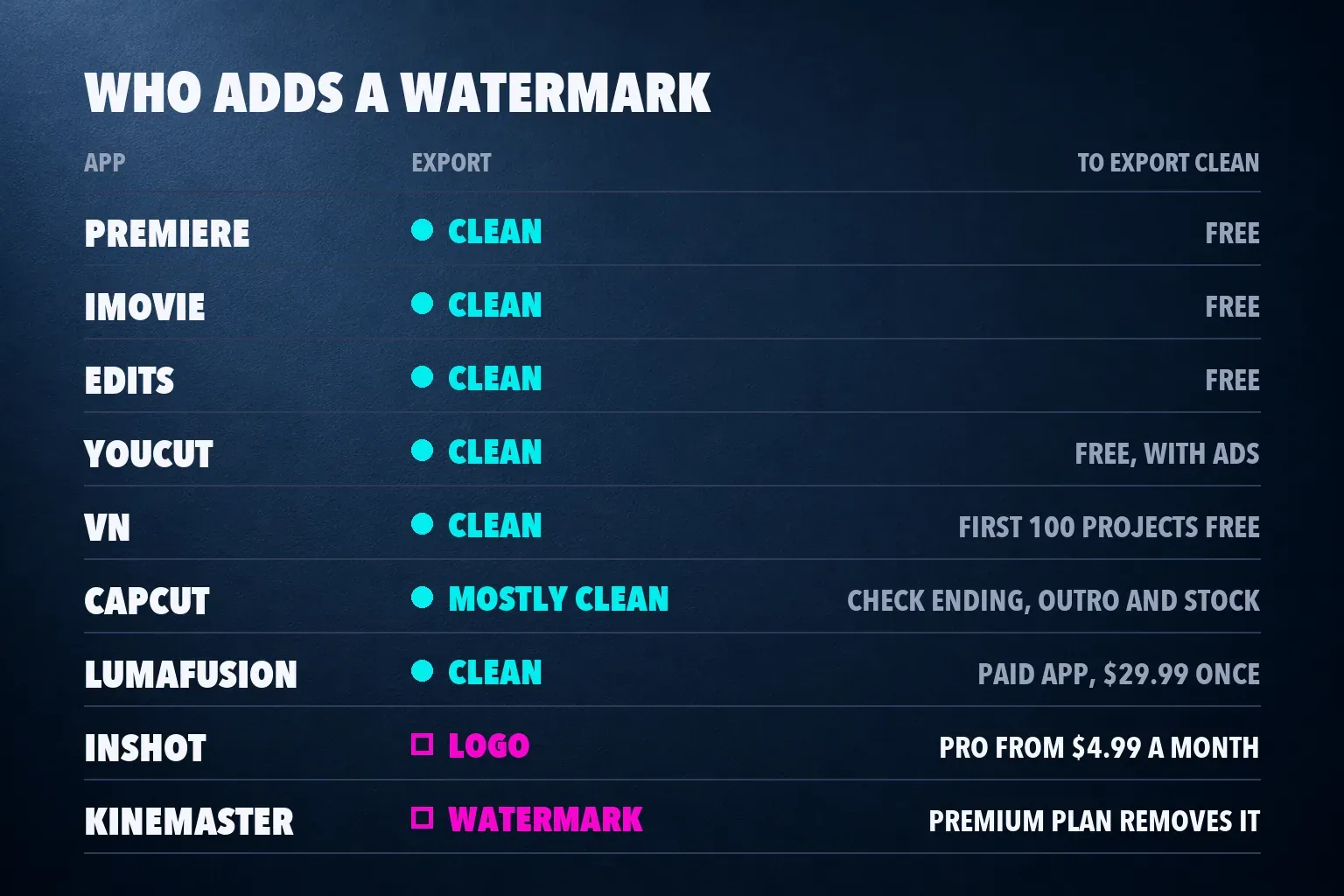
Premiere, iMovie and Edits export with no watermark and charge nothing for editing. VN is clean for its first 100 projects, and YouCut is free with no watermark too. CapCut leaves most exports clean, with the template, stock and outro exceptions above. InShot and KineMaster put a mark on free exports, and both sell a plan that removes it.
Also checked: KineMaster, YouCut, Splice and YouTube Create
KineMaster exports up to 4K at 60 fps, but the free version adds a watermark and ads, and Premium removes both, as our KineMaster review explains. YouCut is free with no watermark; PCMag notes it relies on ads, and $19.99 a year adds more filters and effects. Splice pairs what PCMag calls one of the slickest interfaces of any mobile editor with 6,000+ royalty-free tracks from Artlist and Shutterstock, but PCMag's catch is the high price of the full feature set.
YouTube Create, Google's own editor, reached the US App Store in December 2025, and none of the outlets above has scored it. It's free with no in-app purchases, holds 4.6 from about 3,900 US ratings and needs an iPhone XR or later on iOS 17. The listing promises 4K at 60 fps, auto captions in selected languages, beat matching and upload straight to your YouTube channel, but it says nothing about a watermark either way, so I don't count it as watermark-free.
None of the four beats the top seven at its own job. KineMaster and Splice cost more to get a clean export, YouCut does less than VN for the same price of nothing, and YouTube Create has neither a review score nor a watermark statement to rank it on. I'd still try it for a quick Short you'll post from the phone, since publishing to your channel is built into the app.
Apps that won't install on an iPhone
DaVinci Resolve and Final Cut Pro show up on many iPhone lists, but in the US App Store DaVinci Resolve for iPad, Final Cut Pro and CapCut Pad all list iPad only. If you also edit on an iPad, our CapCut for iPad guide explains which CapCut app to use there, and the CapCut vs Final Cut Pro comparison and DaVinci Resolve review cover the bigger editors.
Premiere Rush is gone. Adobe stopped new downloads on September 30, 2025, and its end-of-life notice set September 30, 2026 as the end of support, with Premiere on iPhone as the replacement. PowerDirector, PCMag's top-scored editor at 5 out of 5, returned no US App Store listing when I searched the store, so it isn't ranked here.
Set up CapCut on your iPhone
Install CapCut from the App Store with our CapCut iPhone download guide, which covers the iOS version it needs and the first sign-in. If the photo picker comes up empty, the missing photos fix checks photo access and iCloud downloads. Drafts and cache grow fast, and the CapCut iPhone storage guide clears them without losing projects.
Before you export, the social media video size guide lists the frame size for TikTok, Reels, Shorts and YouTube, and CapCut for TikTok walks through a full vertical edit. If you're comparing CapCut with desktop and browser editors as well, our CapCut alternatives guide covers those.
iPhone video editing app questions
What is the best free video editing app for iPhone?
Adobe Premiere. It's free with no ads and no watermark, exports 4K and has a multitrack timeline, and you pay only for generative AI credits or extra storage. iMovie and Edits are free too, with no in-app purchases at all.
Is CapCut free on iPhone?
Yes. The editor is free, and most exports have no watermark. Standard at $9.99 a month and Pro at $19.99 a month in the US store add features and cloud storage, and only Pro carries its benefits to desktop and web.
Which iPhone video editor has no watermark?
Premiere, iMovie, Edits and YouCut on their free plans, VN for its first 100 projects, and LumaFusion as a paid app. CapCut leaves most exports clean. InShot and KineMaster add a mark until you pay.
Is iMovie good enough for YouTube videos?
For simple videos, yes. iMovie saves up to 4K at 60 fps and exports versions optimized for YouTube. For layered edits with several overlays, Premiere or LumaFusion gives you more tracks to work with.
Can I use DaVinci Resolve or Final Cut Pro on an iPhone?
No. In the US App Store, DaVinci Resolve for iPad and Final Cut Pro both list iPad only. On an iPhone, LumaFusion is the closest to a desktop editor, and Premiere is the free option.
What is the best paid video editor for iPhone?
LumaFusion, at $29.99 once. It has six video and six extra audio tracks, ProRes and HDR media, and $19.99 add-ons for keyframing, multicam and Final Cut Pro export, or a Creator Pass subscription that bundles them.
Is Premiere Rush still available on iPhone?
No. Adobe stopped new downloads on September 30, 2025, and support ended on September 30, 2026. Adobe's replacement is the free Premiere app for iPhone.