

DaVinci Resolve 21 is the stronger CapCut alternative when a project needs dedicated color grading, node-based compositing or organized audio post-production. Its Edit, Color, Fusion and Fairlight pages make those tasks part of one workflow. CapCut remains a useful choice for phone-first templates, animated captions, stickers and social edits. Choose Resolve for a specific finishing requirement, then check its hardware, storage and learning demands against the project.
We rechecked this DaVinci Resolve review on September 4, 2026 against Blackmagic Design's current product, Studio, support, collaboration and feature pages, Apple's live iPad listing, the current review/comparison results and recent user discussions. At that point, the maintenance release we could verify was 21.0.4. Blackmagic announced Resolve 21.1 on September 8, 2026, so check the latest build and its requirements before you install. Older comparisons often describe Resolve 20, call the Free build “unlimited 4K,” blur desktop and iPad licensing, or quote old Mac requirements.
DaVinci Resolve Review Facts at a Glance
| Review fact | Current answer |
|---|---|
| Current version | DaVinci Resolve 21.1 was announced on September 8, 2026. The original review verified 21.0.4 on September 4; confirm the latest build in Blackmagic Design’s support center. |
| Price | Free build; DaVinci Resolve Studio is listed at US$295 as a one-time purchase on the current US page. Taxes and regional pricing differ. |
| Free limits | Virtually all 8-bit video formats up to 60 fps and Ultra HD 3840×2160, according to Blackmagic's Studio comparison. Full list: Resolve 21 Free features and limits. |
| Studio limits | Professional 10-bit formats, up to 120 fps and up to 32K, plus extra AI, Resolve FX, noise reduction, text-based editing, Magic Mask and hardware acceleration. |
| Platforms | Apple-silicon Mac, Windows, Linux and supported iPads. There is no Android or iPhone edition. |
| Best fit | Desktop editing, color-critical footage, multicam, audio work, VFX, camera originals and projects that need a repeatable post-production workflow. |
| Biggest trade-off | A steep learning curve and hardware/media-management demands for jobs that CapCut can finish in minutes. Start with the DaVinci Resolve beginner tutorial if you switch. |
Quick Verdict: Should a CapCut User Switch?
Consider Resolve when its Color, Fusion or Fairlight workflow solves a specific finishing problem, or when its project organization and interchange options fit a continuing production. A timeline, keyframes or multicam editing alone do not settle the comparison. Check the actual camera, audio and delivery requirements, and preserve the camera originals and a reference export before moving an existing edit.
Stay with CapCut if the real job is a daily vertical post: cut a few clips, remove pauses, add a lively caption style, use a template, add a sticker and publish from a phone. Resolve can do parts of that job, but the extra clicks and setup don't make the workflow better by themselves. A professional tool earns its place only when its control solves a specific problem.
Resolve is the better choice when
- you edit on a Mac, Windows or Linux desktop and can keep media and project backups organized;
- color, sound, stabilization, multicam or compositing matters as much as the cut;
- you need exact keyframes, tracks, masks, nodes, curves or timecode-based revisions;
- your footage includes camera codecs, 10-bit files, high frame rates or large timelines that need proxies;
- you expect to outgrow template-led editing and want one application for edit, finishing and delivery.
CapCut is still the better choice when
- your primary device is an iPhone or Android phone;
- speed, templates, animated social captions and stickers matter more than finishing control;
- you don't want to manage a project library, cache, proxies and source-media folders;
- your videos are short, mostly 8-bit phone footage and don't need advanced color or audio work.
What DaVinci Resolve 21 Is in 2026
Resolve isn't a browser editor with a few desktop extras. On the current DaVinci Resolve product page, Blackmagic Design positions it as one application for editing, color correction, visual effects, motion graphics and audio post. Blackmagic announced Resolve 21.1 on September 8, 2026 in its 21.1 release announcement, while the September 4 review originally checked 21.0.4. If a deadline is close, check the support center again before you change a working system.
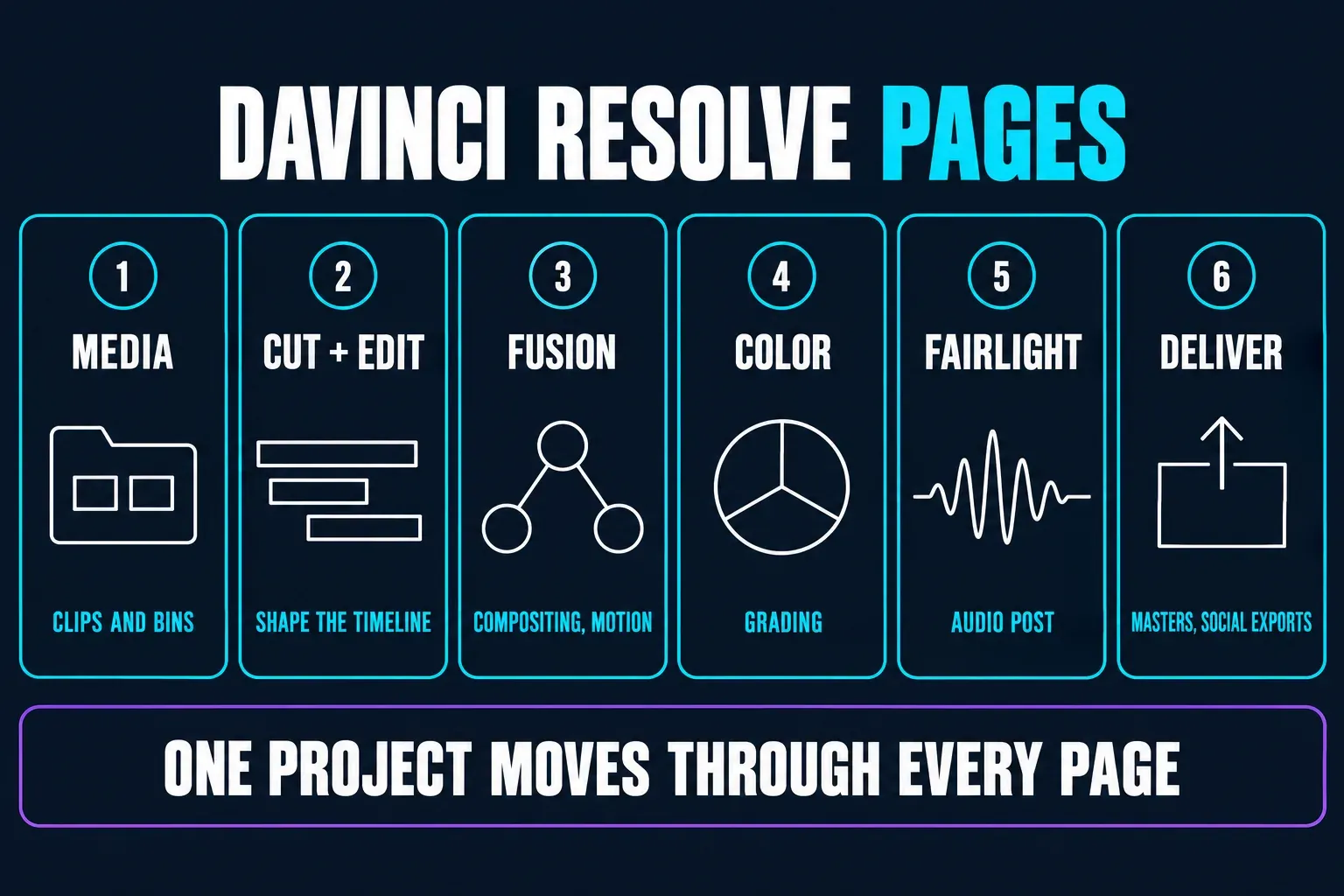
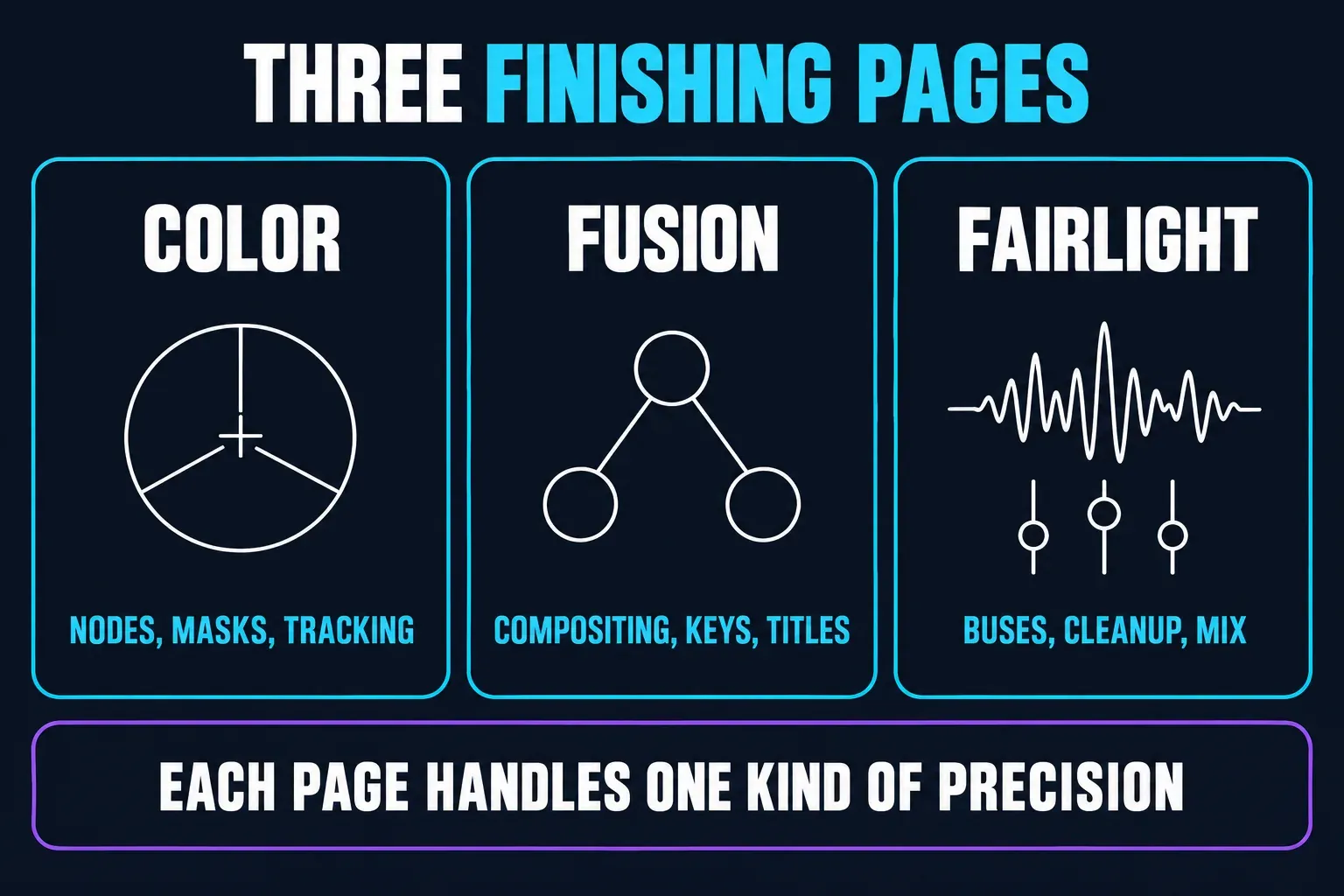
Resolve's pages aren't separate products. They're parts of one application. Media organizes clips and bins, Cut and Edit shape the timeline, Fusion covers node-based compositing and motion graphics, Color handles grading, Fairlight takes care of audio and Deliver handles masters and social exports. That separation is powerful. It also means a beginner has more concepts to learn than in a single-screen mobile editor.
Resolve 21 is more than a simple version-number bump, and it adds a Photo page too. Blackmagic's current What's New guide lists AI content search, slate data, de-aging and blemish tools, improved keyframing, HTML and Lottie graphics, Krokodove effects in Fusion, Fairlight folders, multi-master trim passes, layer-list node graphs and direct social upload options. Treat the feature list as a map, not a promise that every item is in the Free build.
Free vs Studio: the Limits That Change the Decision
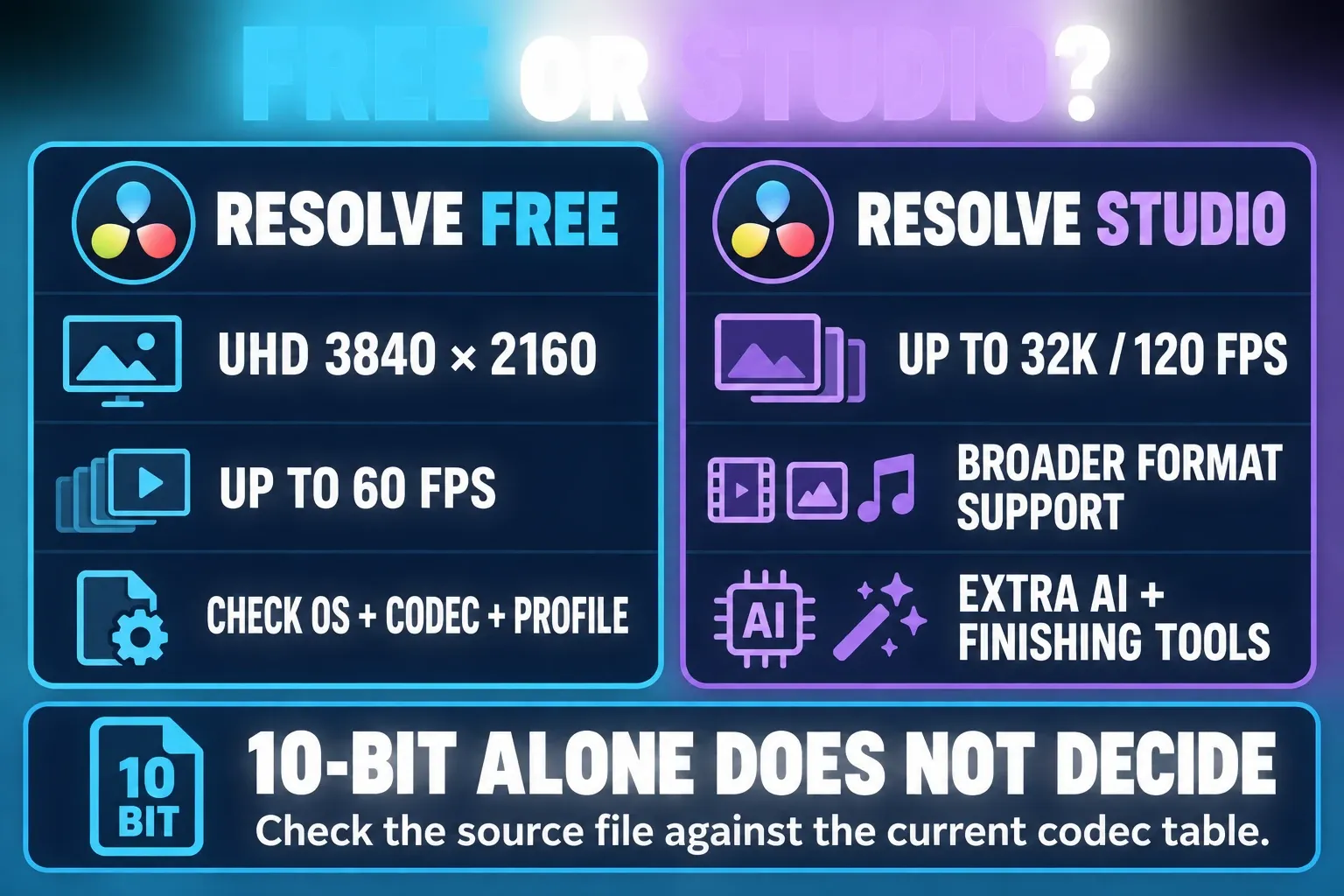
The Free version isn't a trial with a timer. It's a capable editor, color tool and collaboration client. According to Blackmagic's current Studio page, Free handles virtually all 8-bit formats up to 60 fps and Ultra HD 3840×2160. That's enough for plenty of phone, webcam and standard social projects.
On the current US product page, Studio is a one-time US$295 purchase, not a monthly individual subscription. It adds professional 10-bit formats, higher frame rates up to 120 fps, timelines and output up to 32K, multiple-GPU support, hardware H.264/H.265 decode and encode, extra Resolve FX and Neural Engine features. Regional checkout, taxes and organization licensing can differ, so use the current Studio page as your price reference.
Several features CapCut users might expect from a modern AI editor also live in Studio. Blackmagic's current product comparison places text-based editing, Magic Mask, advanced noise reduction and the DaVinci AI Neural Engine in Studio. Don't assume a feature shown on the Resolve 21 page is included in Free. Check the exact tool before you build a paid job around it.
Free can still grade HDR and collaborate with other users. Describing the Free build as “SD only,” “ordinary exports watermarked by default” or “single-user only” is wrong. The real decision is more specific: does Free support your exact source codec on your operating system, do you need output above UHD or 60 fps, and will a Studio-only effect save enough time to justify $295?
Hardware, Storage and Project Safety
The Resolve 21.1 readme, updated September 8, 2026, lists installation minimums. Confirm the requirements for your chosen build before you upgrade. For Mac, the readme lists macOS 15 Sequoia or later, Apple silicon, 8 GB of memory or 16 GB when using Fusion. For Windows, it's Windows 10 Creators Update, 16 GB of memory or 32 GB with Fusion, and an integrated or discrete GPU with at least 4 GB of VRAM. The Linux entry lists Rocky Linux 8.6, 32 GB of memory and a discrete GPU with at least 4 GB of VRAM. These are installation minimums, not a promise that demanding 4K H.265, noise reduction or Fusion work will play smoothly. To check a specific machine against those lines, use the Resolve 21 PC checker on DaVinci Resolve Club.
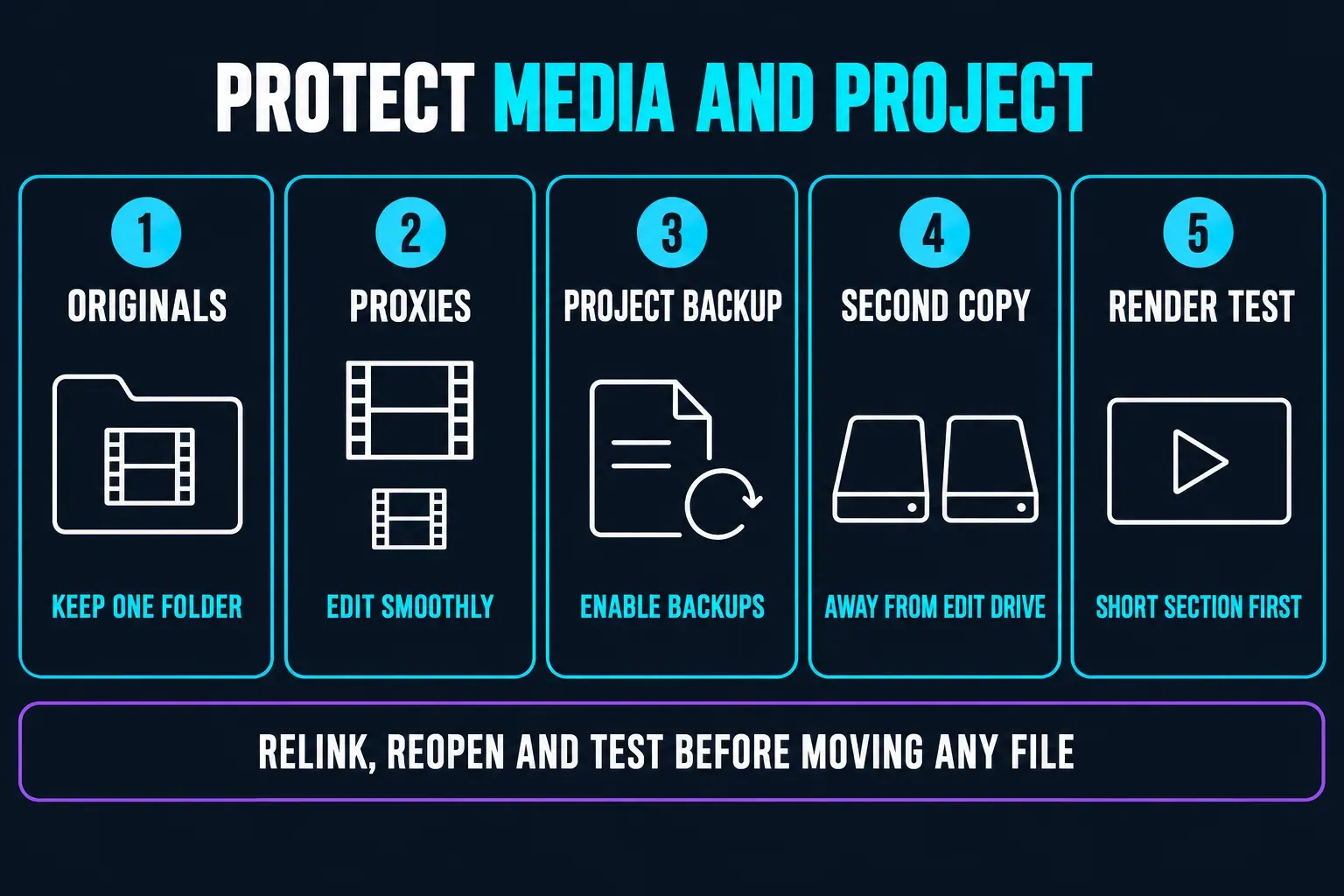
Resolve gives you two separate things to protect: the project data and the source media. A .drp exports project metadata, bins and timelines; it does not bundle the camera originals. A .dra archive can include the project and its media. Blackmagic’s official project-archive training explains Export Project Archive and Restore Project Archive in the Project Manager. Keep camera files, audio, graphics and exports organized, enable project backups, and store a separate copy away from the editing drive. A Cloud login does not replace a project-and-media backup that you have checked.
With difficult footage, switch to proxies or optimized media so you are not judging the edit through dropped frames. Blackmagic’s 21.0.4 release notes added proxy relinking across different formats. That is a historical addition, not a reason to stop checking links in a newer build. Reopen the project and render a short section from the camera originals before deleting or relocating media.
That's one of the sharpest differences from CapCut. CapCut hides much of the storage plumbing because the typical project is short and tied to an account. Resolve puts the plumbing in plain view. It's extra work, but it's also why an editor can reopen a serious project, replace one shot and export a new master without rebuilding the whole post.
Cut and Edit Pages: Control With a Learning Curve
The Cut page is built for fast assembly: source tape-style browsing, trim tools, sync and quick delivery. Once you've adjusted, the Edit page feels more familiar to a CapCut user, with tracks, clip handles, transitions, markers, keyframes and more exact trim decisions.
Resolve's learning curve isn't about a lack of tutorials. It comes from how many decisions the app exposes at once: track targeting, clip attributes, frame interpolation, color management, render cache, proxy mode, audio routing and project-library locations. Learn a small, repeatable loop first: import, organize, cut, check audio, add a simple grade, render a short proof, then save a project backup.
The 21 release also improves keyframe and curve workflows. Blackmagic's What's New page lists loop, ping-pong and relative animation modes, simultaneous changes to multiple clips, normalized zoom and more Bezier easing. Those controls matter when a title or zoom has to land on an exact frame. They also explain why a simple CapCut edit can feel slower in Resolve: you're gaining control you may not need for every post.
For a quick contrast, see our CapCut keyframes tutorial. CapCut's keyframes are easier to reach for a fast social push-in, while Resolve folds the same move into a wider timeline, curve and finishing system.
Color Page: the Main Reason to Move Up From CapCut
Resolve's Color page goes much further than a selection of filters. It uses nodes for primary correction, secondaries, masks, tracking, keys, HDR work and look management. You can balance a camera clip, isolate skin, match two cameras, create a deliberate contrast curve and reuse a correction across related shots.
That depth matters when lighting changes, when a camera profile needs a transform, or when a product color has to stay consistent across a campaign. It's worth less when a creator only wants a warm preset over five phone clips. A good grade still starts with exposure and white balance, and piling on nodes won't rescue a badly exposed source.
Studio expands the finishing toolset with extra Resolve FX, Neural Engine functions, noise reduction, Magic Mask and other acceleration. Free still includes substantial color work and HDR grading. So the honest CapCut comparison isn't “CapCut has filters, Resolve has color.” It's “CapCut makes a pleasing look quick; Resolve gives a colorist more repeatable control when the shot demands it.”
Fusion: Powerful VFX, Heavy on Weak Machines
Fusion is Resolve's node-based compositing and motion-graphics page. It can combine 2D and 3D elements, particles, keyframes, camera tracking, rotoscoping and keying in the same project. Resolve 21's What's New page also lists Krokodove with more than 70 graphics and effects, plus HTML and Lottie graphic support.
Fusion is the wrong place to begin if all you need is a caption pop and a drop shadow. It becomes worthwhile for screen replacements, tracked labels, clean keys, title systems, product reveals and effects that must survive revisions. Keep Fusion compositions modular and cache the difficult sections; otherwise a single heavy node tree can make the entire timeline feel broken.
Studio's extra effects and GPU/Neural Engine acceleration change what is practical, but they don't turn weak hardware into a workstation. Render a short section after every major compositing change and watch for edge chatter, soft keys, broken motion blur and mismatched color management.
Fairlight Audio: More Than a Music Track
Fairlight turns Resolve into a serious audio-post environment. Blackmagic's Fairlight page documents sample-accurate editing, buses, automation, ADR/Foley and immersive formats. It also advertises up to 2,000 tracks with real-time effects on a suitably equipped system. That's a high-end ceiling, so don't expect it from a normal laptop. For creators, the useful gains arrive much earlier: clip gain, dialogue cleanup, ducking and a repeatable mix.
CapCut is faster when you want to drop in a trending sound and line up a few cuts. Resolve is better when the voice has to stay intelligible under music, when several speakers need matching levels, or when a revision shouldn't wreck the mix. Resolve 21 adds Fairlight folder functions and other workflow improvements. Check the guide for the exact build behavior.
Before delivery, check the mix on headphones and on a phone speaker. A mix that sounds polished on studio monitors can hide consonants on a small device. Export a short proof before you commit to a long render.
Captions, Transcription and the Social-Text Gap
Resolve can create and edit subtitle tracks, and Resolve 21 adds subtitle timing, fade, font-browser and inspector improvements. Blackmagic's current comparison lists automatic transcription and the text-based editing workflow as a Studio feature, so don't pitch the Free build as a direct replacement for CapCut's automatic captions. If captions decide the purchase, test the exact language, speaker separation and export format in the current build.
CapCut still wins on the “make this look like a current social post” part of the job. Its caption templates, stickers, translation shortcuts and animated word treatment are easier to find, and our CapCut auto-captions guide covers that faster path. In a CapCut discussion about moving to Resolve, Berch3 recommends doing the main edit, stabilization and audio in Resolve, then using CapCut for text and presets. In the Resolve workflow discussion, GilbeyPink describes a Resolve-to-CapCut caption/effects pass; other commenters prefer keeping the work in one editor. These are individual workflow examples, not evidence that most creators use both.
Resolve 21's AI tools include text search and other assisted workflows, but what's available depends on the build and the Studio tier. Before you promise a client a particular language, transcription mode or one-click caption style, check the current What's New page.
AI Tools in Resolve 21
Resolve 21's AI list has more to it than the old “manual editor only” reputation suggests. Blackmagic currently documents IntelliSearch, AI Speech Generator, CineFocus, Face Age Transformer, Face Reshaper, Blemish Removal, slate detection and metadata tools, UltraSharpen and Motion Deblur. These advanced AI workflows sit in Studio unless Blackmagic explicitly marks a Free exception. If you want a different balance of generated clips, cleanup and captions, compare our overview of CapCut AI tools.
Many of the advanced tools are Studio features. AI results can also be slower, less predictable or less appropriate than a manual correction. A face-aging tool, voice model or blemish remover can change a real person in a way a client didn't ask for. Treat AI as an optional assistant: verify every frame, disclose material transformations when the project requires it and keep the source unchanged.
Blackmagic's direct social upload options can send a finished file to services including YouTube, TikTok, Vimeo and X with destination-oriented compression settings. Uploading from the Deliver page doesn't mean you can skip checking the title, privacy, account, caption, thumbnail and platform recompression before you publish.
Vertical Video, 4K and Social Delivery
Resolve handles vertical timelines and social delivery, but it doesn't start with a phone feed the way CapCut does. Set the timeline resolution and frame rate deliberately, inspect the crop, keep titles out of app-interface zones and render a short section before the full export. If you need a browser-first CapCut workflow for a quick handoff, see our CapCut web editor guide.
The Free build supports output up to 60 fps and Ultra HD 3840×2160. Input and output codec support also depends on the operating system, codec, bit depth and chroma subsampling; 10-bit alone is not a reliable Free-versus-Studio rule. Studio adds broader professional-format support, output up to 120 fps and 32K, and hardware acceleration on supported systems. Use the Resolve 21.1 codec table for the exact file and read Decode separately from Encode. For example, its Windows H.265 rows include OS-supported 8/10-bit profiles, with more profiles and GPU acceleration in Studio; the Rocky Linux H.264/H.265 rows require Studio. That is why the operating system and codec profile matter before you buy.
Use our CapCut export settings walkthrough for the same final-file checks: dimensions, duration, frame rate, audio sync and destination requirements. Resolve gives you more control, but a bad export preset is still a bad export.
Blackmagic Cloud, Local Media and Collaboration
Resolve can collaborate through Blackmagic Cloud project libraries, shared timelines, bin and timeline locking, shared markers, live save, Proxy Generator and media-sync workflows. Multiple people can work on a project without passing a growing pile of exported MP4s through chat.
Cloud is optional. Local media can stay on local storage, and Project Server supports controlled local collaboration. A Blackmagic Cloud ID on its own isn't the same thing as unlimited cloud storage, since storage, media sync and organization services can add cost. Work out whether your team needs a shared project library, shared proxies, remote media or just a review link.
Before you invite a collaborator, define folder ownership, project-library backups, proxy locations, relink rules and who can change the master timeline. Resolve puts these responsibilities in front of you, while CapCut often hides more of them in an account workflow. Neither product removes the need for an archive.
Pricing: Is Studio Worth US$295?
If you edit solo with 8-bit clips up to UHD at 60 fps, Free isn't a teaser. It's a serious product, and I'd start there. Buy Studio when a concrete need shows up: a codec Free does not support on your operating system, output above 60 fps or UHD, multiple-GPU and supported H.264/H.265 acceleration, noise reduction, Magic Mask, text-based editing, extra Resolve FX or recurring AI work.
Studio's one-time price can compare well with a recurring subscription, but the app is only one part of the budget. Fast storage, a supported GPU, backup drives, proxy time and a training period all cost something. If all you want is a template caption style, $295 is the wrong fix. CapCut or a dedicated caption step may be faster.
Blackmagic's license page and current checkout are the authority for regional terms. Don't copy a USD price into a local buying guide without adding the tax and currency caveat.
Resolve vs CapCut: Feature Comparison
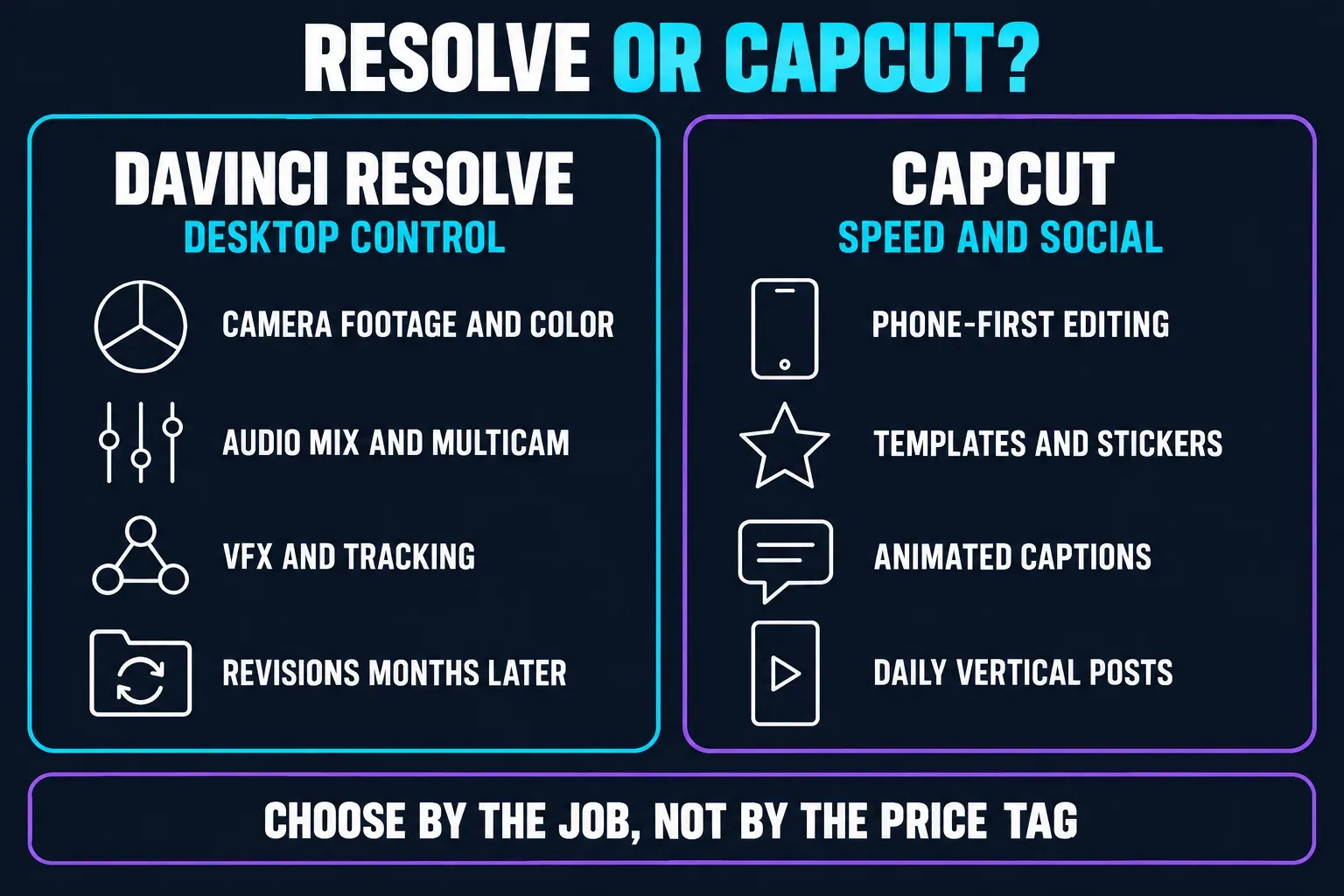
Both editors can cut clips, add music, caption speech and deliver a vertical video. Their centers of gravity sit far enough apart, though, that a feature-count comparison would mislead you. Resolve is a desktop post-production system with an iPad version. CapCut is a social editor that keeps its fastest path in plain view on phone and web.
| Decision factor | DaVinci Resolve | CapCut |
|---|---|---|
| Primary workflow | Desktop edit, finishing, audio, VFX and delivery across dedicated pages | Fast mobile, web and desktop social editing with templates and AI shortcuts |
| Free tier | Free build with virtually all 8-bit media up to UHD 3840×2160 and 60 fps | Free access varies by platform, account, template, asset and feature; check the export screen |
| Paid model | Studio listed at US$295 one-time on the current US page | Plan, region and feature availability vary; some tools/assets use subscription or credits |
| Learning curve | Steeper because pages, tracks, nodes, cache, proxies and project-library choices are exposed | Lower for short-form creators; deeper controls still take practice |
| Color | Node-based grading, tracking, HDR and reusable corrections | Fast filters, adjustments and looks for social output |
| Motion and VFX | Keyframes, curves, Fusion nodes, 2D/3D, tracking, keys and rotoscoping | Templates, effects, keyframes, masks and creator-oriented shortcuts |
| Audio | Fairlight editing, buses, automation, ADR/Foley and surround/immersive workflows | Quick music, effects, voice and social-mix workflow |
| Captions | Manual subtitle tools in Free; Studio adds transcription/text-based editing; social styling takes more setup | Fast automatic captions, animated styles, translation and stickers for social posts |
| High-end media | Studio adds professional 10-bit, up to 120 fps, up to 32K and extra acceleration | Depends on device, plan, source and export workflow; test the actual destination file |
| Platforms | Apple-silicon Mac, Windows, Linux and supported iPad | Mobile apps, web editor and desktop apps; stronger phone-first path |
| Project safety | Local media and project library are explicit responsibilities; Cloud is optional | Account/cloud features can be convenient, but source and export backups still matter |
| Best for | Footage, color, sound, multicam, VFX and repeatable desktop post | Fast social edits, templates, captions, stickers and trend response |
Choose Resolve If You Need...
- a color-managed desktop timeline for camera footage;
- reliable keyframes, curves, tracking, masks and timecode revisions;
- multicam editing, dialogue cleanup, buses or a proper mix;
- Fusion compositing or a path from a quick cut to a finished master;
- proxy and cache controls for high-resolution or difficult codecs;
- a project that must remain editable and relinkable after a client revision;
- an upgrade path from Free to Studio without rebuilding the project.
Stay With CapCut If You Need...
- an iPhone or Android-first workflow from shoot to publish;
- templates, social captions, stickers, beat-led edits and fast trend formats;
- minimal setup for short 8-bit phone clips;
- AI-assisted creator effects that are ready to use without learning nodes;
- a quick result where color science, audio routing and project libraries are not the bottleneck.
A Practical Resolve and CapCut Hybrid Workflow
A hybrid workflow makes sense when each editor handles the layer it does best. Ingest and organize camera originals in Resolve, cut the story, stabilize, grade and mix the master, then export a high-quality intermediate or final file. If the deliverable needs a specific social caption treatment or sticker pack, do that last pass in CapCut and don't bounce the file back and forth.
The reverse order works for a quick post: assemble and caption in CapCut, then move the finished cut into Resolve only when a client needs a cleaner grade, audio pass, tracked graphic or alternate master. Keep a high-quality source export, and don't stack up repeated lossy MP4 generations.
Write down who owns the Resolve project, where the source media lives, which CapCut account holds the social treatment and which export is the approved master. A two-tool workflow stays manageable when the handoff is explicit. It gets fragile when the only archive is a download folder full of similarly named MP4s.
Frequently Asked Questions
Is DaVinci Resolve free?
Yes. The Free build is a full editor with Edit, Cut, Color, Fusion and Fairlight workflows and output up to 60 fps and Ultra HD 3840×2160. Codec support depends on operating system and file characteristics. Studio is an optional one-time purchase for broader professional-format support, higher output limits, acceleration and extra tools.
Is DaVinci Resolve better than CapCut?
Resolve is better for desktop editing, color, audio, multicam, VFX, camera media and repeatable finishing. CapCut is better for quick mobile social edits, templates, animated captions, stickers and trend response. The right choice depends on the job, not the number of features in a brochure.
Can the Free version edit 4K and 60 fps?
Yes. Free supports output up to 60 fps and Ultra HD 3840×2160. Check the operating system, codec, bit depth and chroma subsampling of the actual source: 10-bit alone does not settle edition support. Studio adds broader professional-format support, higher output frame rates and larger-than-UHD delivery. Codec, GPU and timeline effects still affect real-time playback.
Does Resolve have automatic captions?
Resolve has manual subtitle-track tools, while Blackmagic's current comparison places automatic transcription and text-based editing in Studio. Resolve 21 improves subtitle timing and styling controls, but CapCut remains faster for animated social captions, stickers and word-by-word treatments. Test the needed language and export format before committing.
Can I use DaVinci Resolve on a phone?
Blackmagic offers Resolve for iPad, not for Android phones or iPhones. Apple's current listing requires iPadOS 18.0 or later and an A12 Bionic chip or newer; Blackmagic recommends an M1-or-newer iPad Pro with at least 8 GB of memory. Older supported iPads can face HD or feature limits. If the phone is where you shoot, cut and publish, CapCut is the simpler route.
Is DaVinci Resolve Studio a subscription?
The current US Studio page lists US$295 as a one-time purchase. Regional taxes, currency, organisation licensing and Blackmagic Cloud services can change the final cost. Check the current official checkout before buying.
Verdict
DaVinci Resolve 21 is a serious CapCut alternative because it solves a different problem. It gives a desktop editor a coherent path from media organization to cut, grade, VFX, audio and delivery, and the Free build is genuinely useful within its supported-codec and UHD/60 fps output limits. Studio starts to make sense when professional formats, higher frame rates, larger output or advanced AI and finishing tools save real time.
It isn't the fastest replacement for a daily social workflow. Resolve asks you to learn pages, protect a project library, manage storage and respect hardware limits. If polished captions, templates and phone-first publishing are your priority, CapCut still earns its place. If your projects are outgrowing those shortcuts, install Resolve Free, cut a real project, test your hardest footage and let the result decide. Our full roundup of CapCut alternatives covers the other mobile, browser and desktop options.