

Finding a CapCut trending template is easy. Finding one that still opens, fits your footage and exports cleanly takes a little more work. CapCut can show a use count or place a template on a Trend shelf, but neither signal tells you when the template was created or whether your audience is tired of it.
Quick answer: Search the Templates area where your Mobile, Desktop or Web build exposes it, then check TikTok posts that carry a real Use template in CapCut link. Open the exact result, count its media slots, review the audio and paid labels, and test a short export. CapCut's current help covers template search on Mobile, PC and Web, though individual results can still vary by account, region and version. For a live shortlist, open CapCut's Trend Templates gallery, then verify the exact card before planning the edit.
This page is a method for finding and checking templates. It isn't a static “top 20” list that goes stale. If you already have a working link and just need the replacement and export steps, our full CapCut Templates guide covers them.
What “Trending” Tells You
A trending label is a discovery signal, not a promise of future reach. The guidance reviewed for this article provides no universal ranking formula, fixed TikTok-to-CapCut delay or public peak metric. It does not establish thresholds such as “Trending within 24 hours” or “under 100,000 uses means early.”
Use the labels you can see, but read them narrowly:
- Trend or Trending means CapCut is surfacing the template in that current page or shelf.
- New is useful only when the current listing carries that label.
- For You is a recommendation area, not a chronological feed.
- Use count shows accumulated activity on that listing. It is not an upload date, growth rate or saturation score.
The practical question isn't “Will this go viral?” It's “Can I make a post that suits this structure, and does the template work for the account and platform I'll use?”
A Dated Example from CapCut Explore
On October 19, 2026, CapCut's public Trend Templates page displayed “Trending capcut” at 2.6M uses and “Viral Song Slowmo” at 2.2M. Those displayed totals are discovery context. They don't reveal creation dates, and one observation cannot tell you whether use is accelerating.
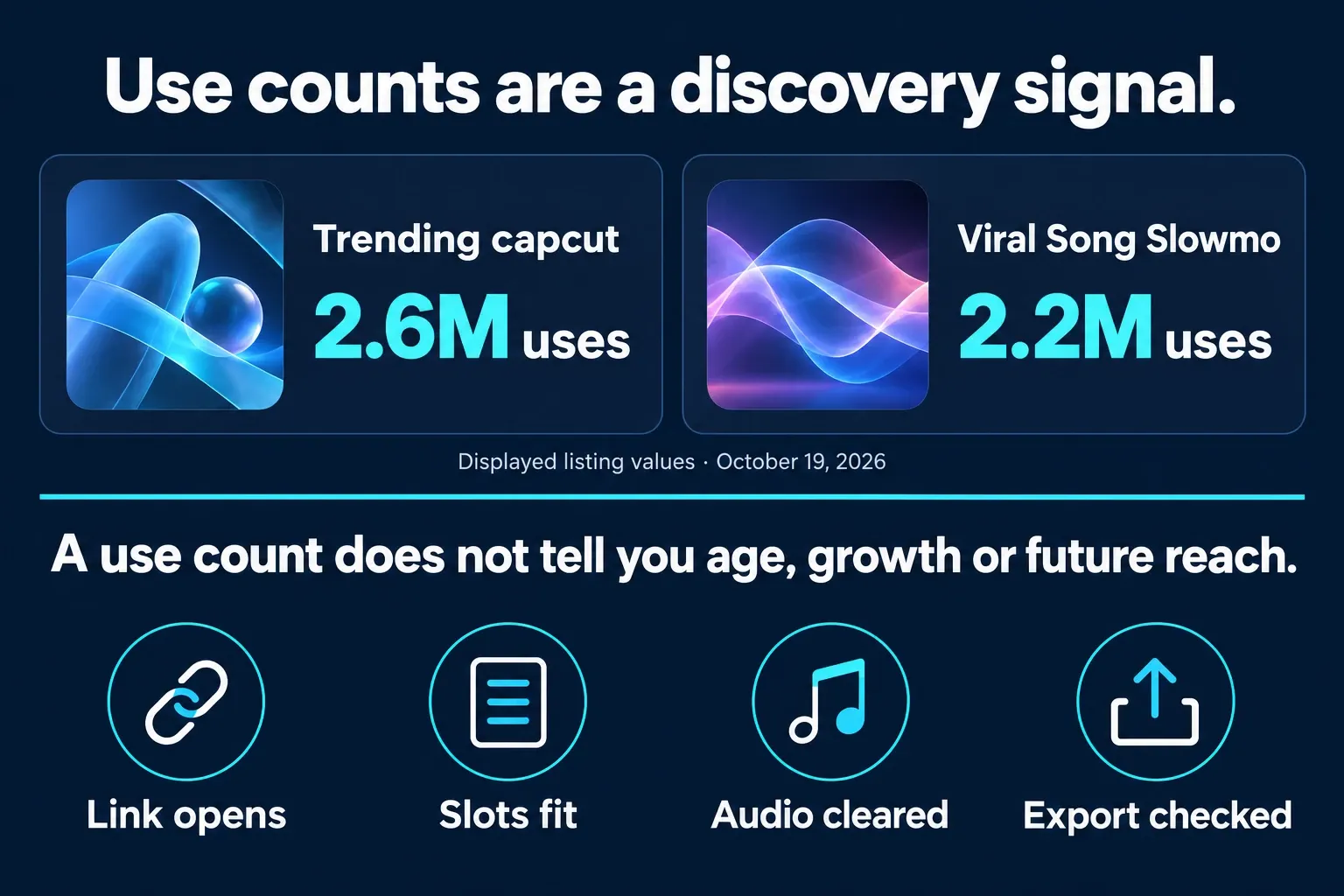
Use a dated gallery snapshot as a shortlist, then preview the exact card. A template with millions of uses may still work for a specific product, location or niche audience. A lower count may be genuinely new, or it may simply have weaker distribution in that region. The number alone can't decide.
How to Search CapCut Trending Templates
Start with the result you want to make. Search by movement, content type, number of clips, subject or visual style: slow motion walk, three photo beat, travel recap, product reveal, lyrics or before and after. “Viral” and “trending” produce broad, repetitive results.
CapCut's search guide describes the routes below, but another Help page says Desktop has only preloaded templates without search. Use the controls exposed in your build:
- Mobile: open Template if it is available, then search at the top of the template area.
- Desktop: if Templates exposes search, enter the keyword and choose Use template. Otherwise use Mobile or Web discovery.
- Web: open Templates, search and choose a result that opens in the online editor.
CapCut's official PC template-search instructions show a search field and Orientation, Clips and Duration filters. If your launcher has those controls, use them to narrow the shortlist, then choose Use Template. If search is missing, use Mobile or Web; the same catalogue may not be available on every platform.

| Platform | Best discovery route | Check before editing |
|---|---|---|
| Mobile | Templates area and TikTok handoff | Tab availability, clip slots and Paid/Pro labels |
| Desktop | Templates search in the current installation | The exact result opens and its placeholders are editable |
| Web | Templates search and public Explore pages | The card opens in the online editor for your account |
When search comes back empty, simplify the phrase and check that the wider gallery loads. CapCut's template search troubleshooting says login, region, network and browser conditions can all affect results. Don't assume one empty query means the entire catalog is unavailable.
For slow-motion-specific choices and frame-rate checks, continue with our CapCut slow motion template guide.
Use TikTok as a Second Discovery Route
TikTok helps when a video carries a real CapCut handoff. Search for the song, edit type or subject, then look for Use template in CapCut on the video. Open the link and confirm that it lands on a template preview, not a copied caption or unrelated download page.
CapCut's TikTok handoff guide treats this as a Mobile route. A recent TikTok post can still reuse an old template, so the post date isn't the template's creation date. If the structure is useful, save the original post and the exact template URL. A guessed title is much harder to recover later.
Pinterest, Reels, Shorts and creator portfolios can help you name a style, but they're weak availability checks. Go back to CapCut and make sure the exact asset still opens for the account that will use it.
Verify a Template Before Building the Post
Don't judge a template from the cover frame. Open it and run four checks:
- The link works. The exact result opens now, in the account and region that will edit it.
- The format fits. The clip count, duration, aspect ratio and pace suit the footage you have.
- The edit is usable. Text can be changed where needed, the crop is acceptable, audio is available and any Paid or Pro asset is clear.
- The export passes. All required slots are filled, and the complete template export shows the two or three hardest inputs without a surprise prompt, broken media or timing problem.
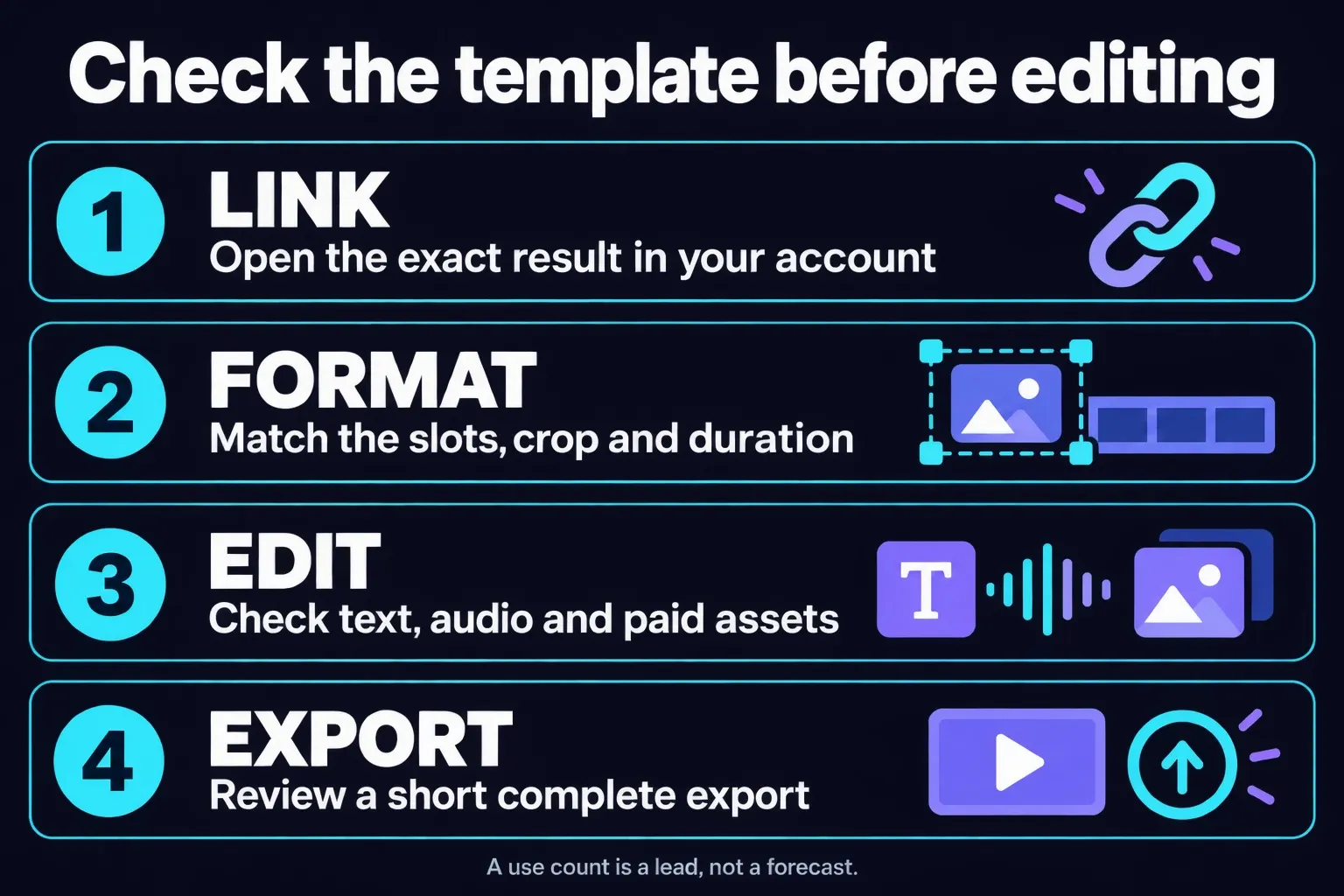
Following a creator can make discovery faster when you consistently like their pacing and slot structure. Treat that as editorial screening, not a platform advantage. A reliable recent link doesn't guarantee early access, future availability or better reach.
For a concrete single-template workflow, the Healing Thailand template walkthrough shows how to check slots and the handoff before replacing media.
When to Skip a Trending Template
Skip the template when the structure fights the footage. Common warning signs are a fixed portrait crop that cuts off the subject, more clip slots than you can fill well, text that can't be changed, an unavailable audio track or a speed change that makes the source footage look rough. Popularity won't fix any of those problems.
Skip it, too, when the template adds work but doesn't save you a real editing decision. If you'd have to replace the music, rebuild every transition, change all the timing and remove most effects, a normal project will be faster and easier to maintain. Borrow the template's pacing as a reference, then recreate only the parts that help the story.
For branded or planned campaign work, check whether the template leaves enough control over typography, colors, safe areas and approval changes. A short personal post can tolerate a fixed structure. A campaign with several aspect ratios and revision rounds usually needs a reusable normal timeline instead.
Why a CapCut Template Link Stops Working
First, figure out whether you're dealing with one dead asset or a wider access problem. When one link fails but other templates open, that result may have been removed or may be unavailable to that account or region. If every template link fails along with the catalog, check the app version, connection, sign-in state and supported-link handling.
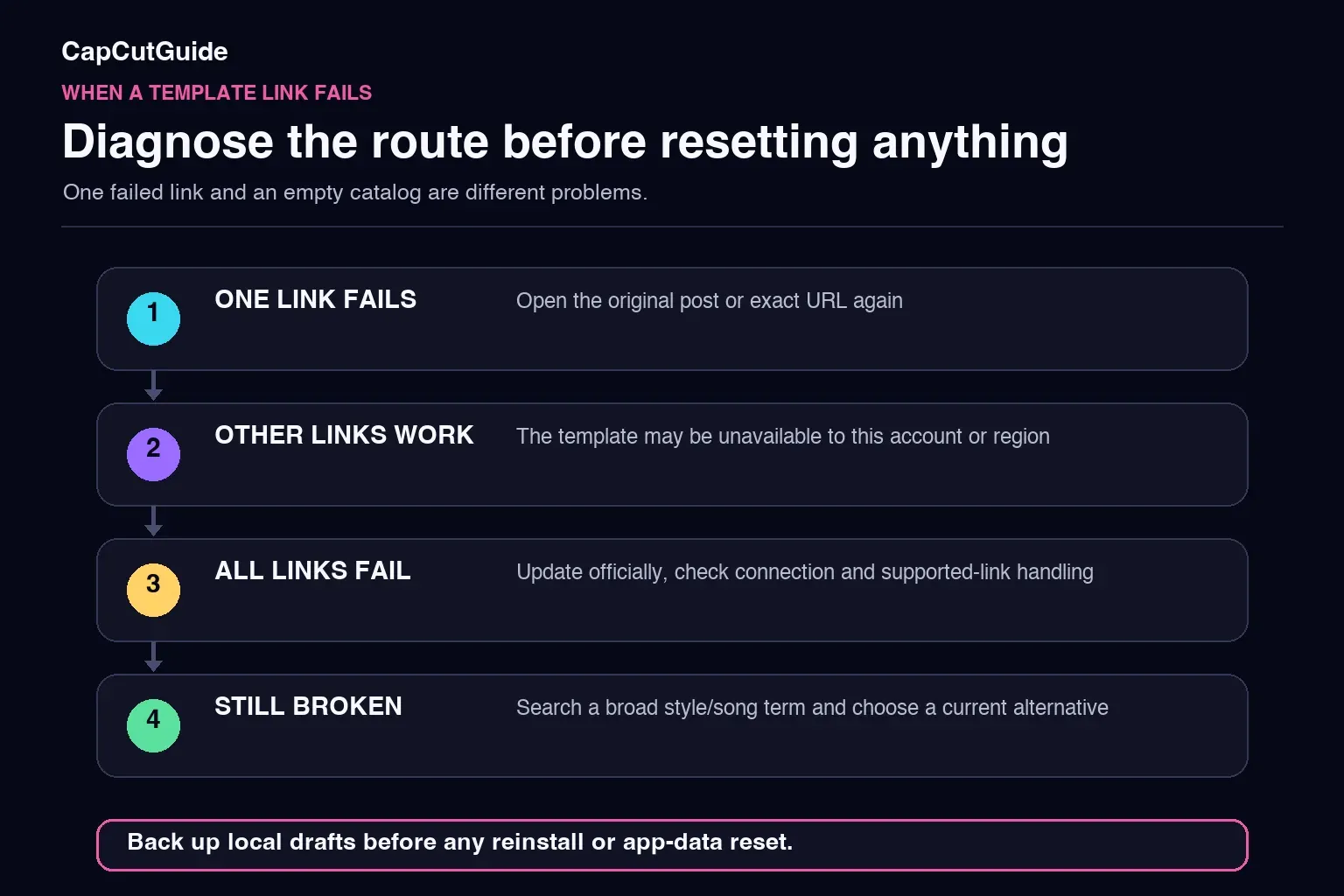
- Open the original post or exact template URL again.
- Test another known template in CapCut.
- Update CapCut and TikTok from their official stores, then retry on a stable connection.
- On Android, check whether CapCut is allowed to open its supported links.
- If the original remains unavailable, search the song or style and preview a current alternative as a separate asset.
Don't reach for a reinstall or app-data reset early, because it can put local drafts at risk. Before considering either step, verify that the needed editable projects and source media can be restored from outside the storage that would be removed. When the entire Templates area is missing, CapCut's missing-template guide is the safer place to start.
Paid, Pro and Commercial Use Are Separate Checks
A free template can still contain an asset that triggers a Pro prompt. A Paid label, the template price, music rights and permission to use the final video commercially are separate questions too. Don't treat one “free” or “commercial” badge as clearance for every element in the edit.
CapCut's current paid-template help says paid templates are discovered and bought on Mobile, and a detail page can show price and licensing terms. Read the exact listing, then check the music, imported media, fonts and brand assets separately. If a watermark or paid-asset prompt shows up at export, our CapCut watermark guide helps you tell a removable ending clip from a restricted asset.
CapCut Trending Templates FAQ
How do I find trending CapCut templates?
Search the Templates area where your Mobile, Desktop or Web build exposes it, and use TikTok videos with a real Use template in CapCut link as a second route. Search by style, motion, subject or clip count, then verify the exact result before planning the post.
Can I find CapCut templates without TikTok?
Yes. CapCut documents template search on Mobile, PC and Web, while another Help page describes Desktop without search. Use the controls exposed in your build. TikTok is an additional discovery route, not a requirement. The visible catalog can still vary by account, region, version and platform.
Does a high use count mean a template is overused?
No. It shows accumulated activity on that listing. It doesn't reveal the upload date, growth rate or how often your specific audience has seen the format. Use it as context, then judge fit and freshness for your audience.
How do I know whether a CapCut template is new?
Use a visible New label or a dated original creator post when available, but don't infer age from the use count alone. The guidance reviewed for this article provides no universal release cadence or public peak metric.
Why is my CapCut template link not working?
The specific result may be unavailable, or the problem may involve region, account, app version, connection or link handling. Test another template first. If only one fails, search for a current alternative; if all fail, troubleshoot access before resetting the app.
Are trending CapCut templates free?
Many are free, but paid templates and templates containing Pro assets also exist. Review the exact listing and export summary. Template price, premium assets, music rights and commercial permission are separate checks.
Do trending CapCut templates work on Desktop?
CapCut's official search guide and its Desktop image show search and filters, while another Help page describes built-in templates without search. Use the feature shown in your installation, and use Mobile or Web when it is absent. A particular template can still be unavailable or behave differently by account, region, version or source.