
The best free video editing app is DaVinci Resolve on a computer and Adobe Premiere on a phone. Resolve's free version edits up to UHD 3840 x 2160 at 60 fps on Windows, Mac and Linux with no watermark, and its review median is 4.5 from three outlets. Premiere is free on iPhone and Android, has no ads or watermark, exports 4K and also scores 4.5. CapCut is free to start and has the best templates and captions, but premium assets can mark your export, and PCMag found watermarks on free desktop exports.
Pages ranking for this search mix vendor landing pages from Canva and Adobe Express, forum threads with no readable answers and two editorial lists that carry outdated details. TechRadar's free-software list says Lightworks' free plan stops at 720p and MPEG files, while Lightworks' own pricing page lists Full HD 1080p export with no watermarks. The same list calls CapCut portrait-only, though CapCut edits in 16:9 and 1:1 too, and Zapier's list still recommends Premiere Rush, which Adobe has shut down. This page puts phone and desktop editors in one table, shows the median, range and number of reviews behind each score, and spells out the catch on every free plan.
My test for "free" is strict: a usable export at 1080p or better, no logo on the picture, no trial clock and no project cap you'll hit in a month. Resolve, Premiere, Shotcut, Kdenlive, OpenShot, Lightworks, Clipchamp, iMovie and Edits all pass. VN passes until your 100th project, and CapCut passes when you stick to free assets. Descript, Filmora and InShot fail, because their free exports carry a watermark.
The best free video editors at a glance
| App | Best for | Runs on | Free export | The catch |
|---|---|---|---|---|
| DaVinci Resolve | Serious editing on a computer | Windows, Mac, Linux | Up to UHD at 60 fps, no watermark | Needs a strong graphics card and time to learn |
| Adobe Premiere | A clean edit on a phone | iPhone, Android | Up to 4K, no ads or watermark | iOS 18 or Android 13 with 5 GB of RAM; AI credits cost extra |
| VN | A manual phone timeline | iPhone, Android | Up to 4K at 60 fps, no watermark | 100 free projects, then VN Pro |
| CapCut | Templates, captions and trends | Phones, Windows, Mac, browser | Clean with free assets | Premium assets add marks; PCMag found desktop watermarks |
| Shotcut | Open-source editing | Windows, Mac, Linux | 4K and 8K supported, no watermark | A plain interface |
| Kdenlive | Linux, multicam and subtitles | Linux, Windows, macOS, BSD | No paid tier, no watermark | Speech-to-text needs a model download |
| Clipchamp | Quick edits on Windows or in a browser | Windows, Edge or Chrome | 1080p at 30 fps, no watermark | Premium assets block the export; 4K needs Microsoft 365 |
| iMovie | A simple start on a Mac or iPhone | Mac, iPhone, iPad | 4K at 30 fps or 1080p at 60 fps | Two video tracks |
| Edits | Instagram Reels | iPhone, Android, Mac | Up to 4K, no watermark | Phone clips up to 10 minutes; Mac needs Apple silicon |
| YouTube Create | Shorts on a phone | Android, iPhone | Up to 4K at 60 fps | Upload works in select countries |
Export limits come from each vendor's page or store listing. CapCut's are from its own help page and PCMag's desktop review, because they depend on the device and the assets you use.
Review scores, compared
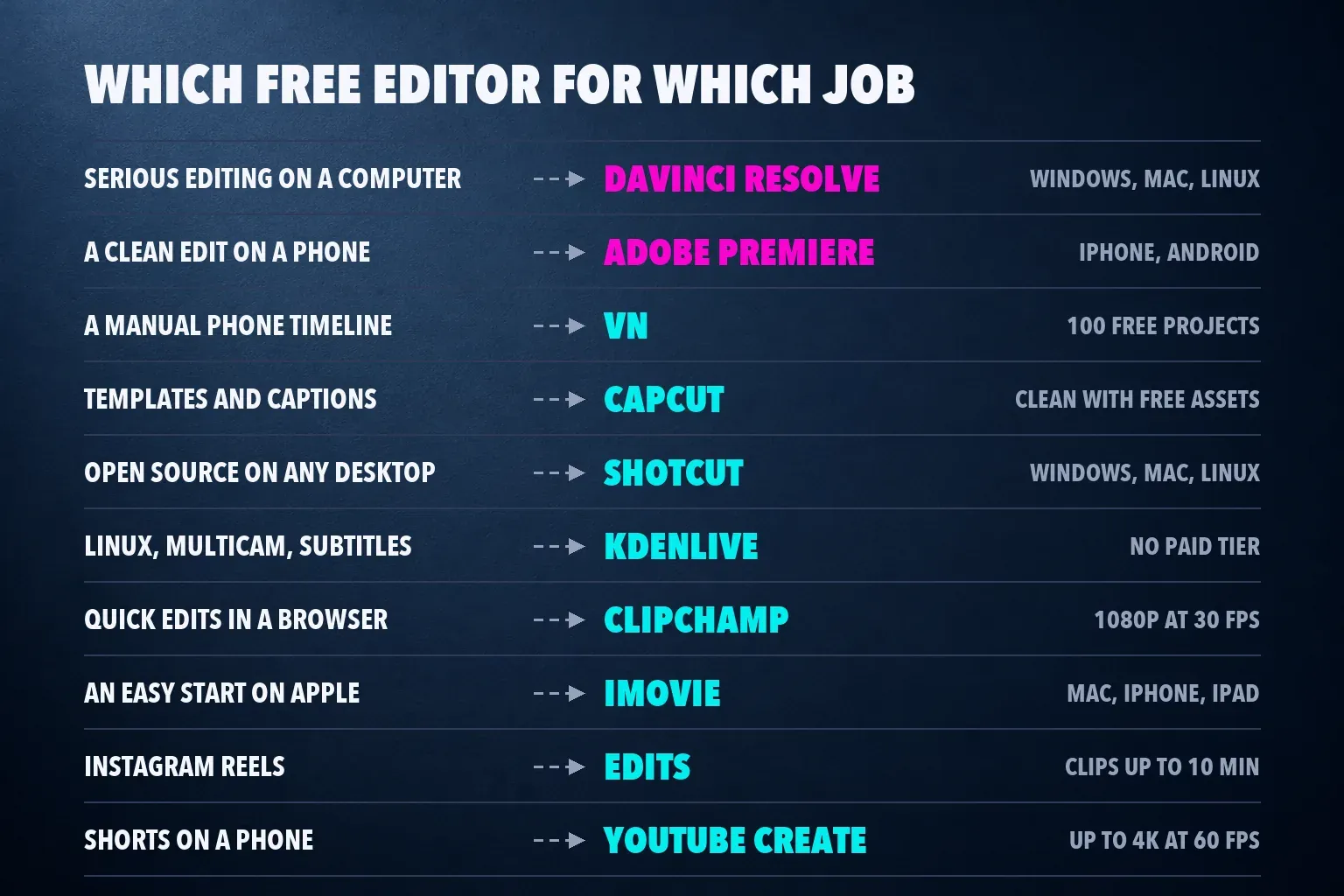
Each score is the outlet's rating on a five-point scale. The median is the middle value of an app's scores, and the count shows how many reviews sit behind it.
| App | Review scores | Median |
|---|---|---|
| DaVinci Resolve | TechRadar 4.5, PCMag 4, Creative Bloq 5 | 4.5 from 3 (range 4 to 5) |
| Adobe Premiere | TechRadar 4.5, PCMag 4.5, both on iPhone | 4.5 from 2 |
| KineMaster | TechRadar 4.5 | 4.5 from 1 |
| CapCut | TechRadar 4 and MobileAppDaily 4 on phones, PCMag 3.5 on desktop | 4 from 3 (range 3.5 to 4) |
| PowerDirector | PCMag 5, TechRadar 4, Creative Bloq 3 for the mobile app | 4 from 3 (range 3 to 5) |
| Shotcut | TechRadar 4 | 4 from 1 |
| Lightworks | TechRadar 4 | 4 from 1 |
| Clipchamp | TechRadar 4, PCMag 3.5 | 3.75 from 2 (range 3.5 to 4) |
| iMovie | TechRadar 2.5, PCMag 4, Creative Bloq 3.5 | 3.5 from 3 (range 2.5 to 4) |
| Canva, Adobe Express | TechRadar 3.5 and TechRadar 3.5 | 3.5 from 1 each |
| OpenShot | TechRadar 3 | 3 from 1 |
| InShot | TechRadar 2.5 | 2.5 from 1 |
| Kdenlive, VN, Edits, YouTube Create | No scored review from these outlets | Unscored |
Resolve and Premiere share the top median, and both have more than one review behind it. KineMaster matches them on a single 2023 score, but its Play listing says the free version adds a watermark and ads, so it sits in the also-checked list. CapCut's three scores cover different products: TechRadar and MobileAppDaily reviewed the phone app, and PCMag reviewed the desktop editor in August 2026.
The single scores carry less weight. TechRadar's Shotcut, Lightworks, OpenShot, Canva and Adobe Express reviews date from 2022, and that Lightworks review predates the 1080p free export now on its pricing page. iMovie has the widest spread, from TechRadar's 2.5 to PCMag's 4, and Kdenlive, VN, Edits and YouTube Create rank here on their jobs because no outlet in this set has scored them.
What each free plan really exports
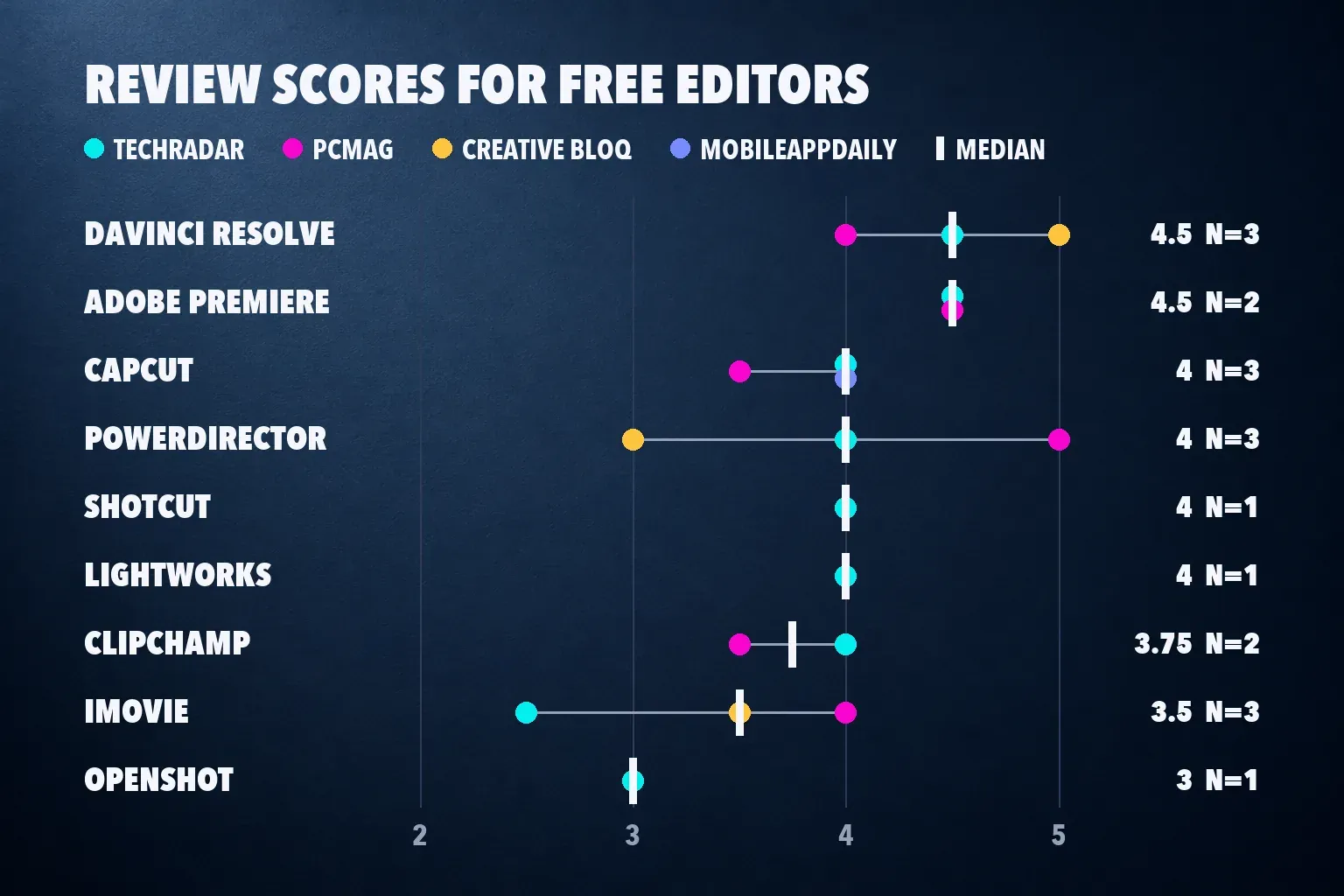
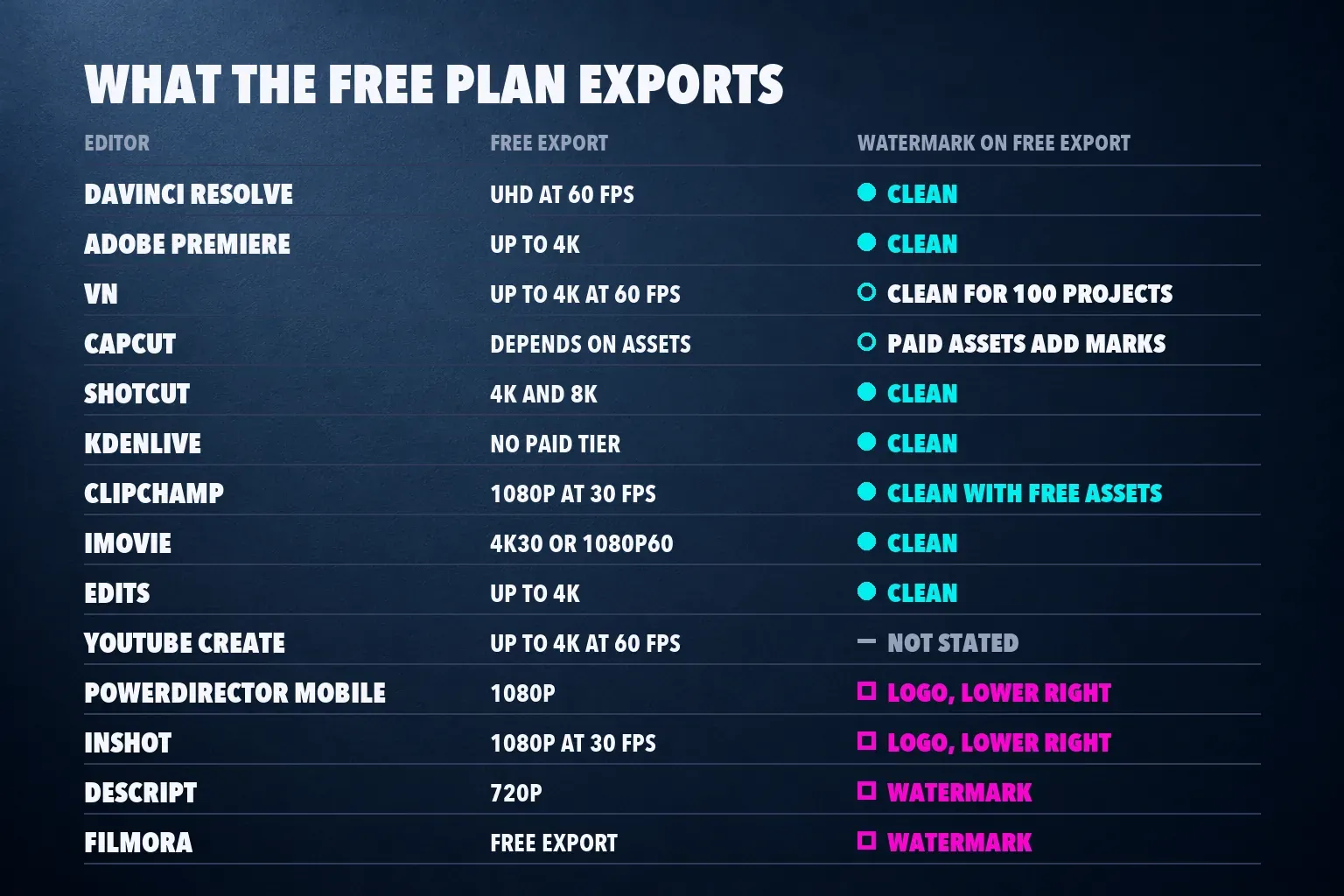
"Free" hides three different deals. Some editors are free outright, with no paid tier at all; some are free with a paid tier that adds tools but leaves the free export clean; and some stamp a watermark until you pay. This table shows which deal you get.
| App | Free export | Watermark on free exports |
|---|---|---|
| DaVinci Resolve | UHD 3840 x 2160 at 60 fps | None |
| Adobe Premiere | 4K | None |
| VN | Up to 4K at 60 fps; 1440p at 60 fps in a 2026 test | None for 100 projects |
| CapCut on a phone | 4K at 25 fps in a 2026 test | None with free assets; an end clip to delete |
| CapCut on desktop | Depends on assets and plan | PCMag found watermarks |
| Shotcut | 4K and 8K supported | None |
| Kdenlive | No paid tier | None |
| OpenShot | No project limits | None |
| Lightworks | Full HD 1080p | None |
| Clipchamp | 1080p at 30 fps | None with free assets |
| iMovie | 4K at 30 fps or 1080p at 60 fps | None |
| Edits | 4K | None |
| YouTube Create | Up to 4K at 60 fps | Not stated in its listings |
| PowerDirector mobile | 1080p | Logo, lower right |
| InShot | 1080p at 30 fps in a 2026 test | Logo, lower right |
| Descript | 720p | Watermark |
| Filmora | Free download and export | Watermark until you buy a license |
| ACDSee Luxea Free | Windows-only app | Adds an intro and outro |
The phone figures for VN, CapCut and InShot come from a Dailytech export test on a Galaxy A31 running Android 12, with no sign-in, on October 8, 2026. The rest come from each vendor's page or store listing. One gap is worth flagging: YouTube Create's store listings promise 4K at 60 fps and say nothing about a watermark either way, so I don't count it as watermark-free.
1. DaVinci Resolve: the best free editor on a computer
Blackmagic's Studio page for DaVinci Resolve 21 says the free version edits and finishes virtually all 8-bit formats up to 60 fps at UHD 3840 x 2160, on Mac, Windows and Linux. It doesn't stamp a watermark on ordinary exports. TechRadar's free-software list puts it first, and PCMag names it the top free pick.
The catches are hardware and learning time. PCMag says it "requires a lot of system resources" and "takes some time to learn," and Resolve splits its work across separate pages for editing, color, effects and audio. Studio costs $295 once, and when I checked Blackmagic's page on October 26, 2026 it showed a sale price of $236; Studio adds 10-bit professional formats, up to 120 fps at 32K and the DaVinci Neural Engine AI tools, and our DaVinci Resolve review shows how to choose by source footage.
I'd pick Resolve for anyone who edits on a computer with a capable graphics card and wants a free editor they won't outgrow. On an older laptop, start with Shotcut or Clipchamp and move up later.
2. Adobe Premiere: the best free editor on a phone
Adobe's free Premiere app is the clean choice on a phone. Adobe's Android launch post describes it as free with no ads and no watermark, with 4K exports, for phones on Android 13 with at least 5 GB of RAM. The iPhone app needs iOS 18 or later, and you pay only when you want Firefly generative AI credits, which PCMag prices at $7.99 a month or $69.99 a year.
TechRadar and PCMag both score the iPhone app 4.5, and the Google Play listing repeats the promise of no ads or watermarks. The limit is your phone: Android handsets below Adobe's Android 13 and 5 GB line aren't supported. I'd start here for a product clip, a tutorial or any edit that must look clean, and our best iPhone video editing apps and best Android video editing apps lists compare it with the rest of the phone field.
3. VN: the best free manual timeline on a phone
VN suits people who build every cut themselves. PCMag's mobile roundup says you get 100 projects for free with no watermarks on the output, and that VN Pro removes the cap; it also warns that VN's power comes with a real learning curve. The Play listing promises keyframes and exports up to 4K at 60 fps, and in the Dailytech test VN saved 1440p at 60 fps with no watermark and no end card.
I'd use VN on a phone that can't run Premiere, or when you want keyframes and speed ramps without starting from a template. A hundred projects lasts most hobby editors a long time; a daily poster will reach the cap in a few months. Our VN video editor review covers the cap and what VN Pro adds.
4. CapCut: the best free editor for templates and captions
CapCut runs on phones, on Windows and Mac, and in the web editor, and its templates, auto captions and trend effects are the reason people search for it. It also isn't portrait-only: our guide to changing the aspect ratio in CapCut covers 16:9 and 1:1 projects as well as 9:16, and CapCut on Chromebook covers the browser route on ChromeOS.
The free plan's export depends on what you use. CapCut's help page on watermarks says an edit made with free tools can export clean, while templates and some premium assets add marks, and the logo end clip can be removed. In the Dailytech test on Android, CapCut's free export saved 4K at 25 fps with no watermark, and a 1.96-second Ending clip with the CapCut logo came off the timeline for free. PCMag's desktop review found that the free version locks AI tools and many effects, fonts, transitions and soundtracks, and that its exports include watermarks.
The paid tiers have grown too: in the US App Store, Standard costs $9.99 a month and Pro $19.99. I'd still pick CapCut for a short with styled captions or a trend template, and keep the edit to free assets when you can. Our CapCut watermark guide shows each case, and the CapCut pricing breakdown lists what Free keeps.
5. Shotcut: the best open-source editor for Windows, Mac and Linux
Shotcut's features page describes a free, open-source, cross-platform editor for Windows, Mac and Linux, with support for 4K and 8K resolutions, webcam capture and hardware-accelerated decoding and encoding. It has no paid tier, and a Shotcut forum answer confirms it adds no watermark. TechRadar scored it 4 and ranks it fourth on its free list, with a spartan interface among the cons.
I'd pick Shotcut over Resolve on a modest computer, or when you want an open-source editor with no paid tier and no upsell. It looks plain, but the timeline does the job for a vlog or a tutorial. Our Shotcut vs CapCut comparison shows where it beats CapCut and where it falls behind.
6. Kdenlive: the best free editor on Linux
Kdenlive is free and open source for Linux, Windows, macOS and BSD, and its homepage lists version 26.08.2, released on October 13, 2026, with multicam editing, LUTs, scopes and subtitles with automatic transcription. Its speech-to-text guide supports VOSK and Whisper, and you download a speech model before the first transcription. Zapier's free-editor list includes it under a rule that every app must export at least 1080p with no watermark.
No outlet in this set has scored it, so it ranks on the job. I'd pick Kdenlive on Linux, or on any computer when you need a multicam edit or free subtitles and Resolve feels too heavy. Our Kdenlive vs CapCut comparison covers the setup.
7. Clipchamp: the best free editor in a browser or on Windows
Clipchamp is Microsoft's editor. The plan comparison lists a Windows desktop app plus browser editing in Edge or Chrome, free exports at 480p, 720p and 1080p, and 4K for Microsoft 365 Personal and Family subscribers. Clipchamp doesn't add a watermark, but a free project that uses a premium asset won't export until you remove the item or upgrade.
PCMag scored it 3.5 for slow exports and upsells, and personal exports stay at 30 fps. I'd use Clipchamp for screen recordings, tutorials and quick edits on a modest PC, or in Chrome on a Chromebook. Our Clipchamp review covers the paid plans and the frame-rate limit.
8. iMovie: the easiest free start on a Mac or iPhone
iMovie is free on the Mac App Store and on the iPhone and iPad App Store. Apple says the Mac version shares 4K projects at 30 fps and 60 fps projects at 1920 x 1080, so 4K at 60 fps is out. It adds no watermark.
PCMag scores it 4 and points to its two video tracks, while TechRadar's 2022 review gave it 2.5. Two tracks are enough for a family video or a vlog with a voice-over, and they run out once you stack B-roll, titles and picture-in-picture. Start in iMovie on an Apple device, then move to Resolve when the edits get busier. Our iMovie review covers both versions.
9. Edits: the best free editor for Instagram creators
Edits is Instagram's free editor. Its App Store listing promises 4K exports with no watermark that you can share to any platform, and clips up to 10 minutes; the Google Play version carries the same free promise. On a computer, the free Mac version adds a multi-track timeline, keyframes and color grading for longer projects; it needs a Mac with Apple silicon, and there's no Windows build. PCMag picks it for Instagram users without giving it a score.
I'd open Edits when Reels is your main feed and the same vertical video goes to TikTok or Shorts as well. Our Edits review covers its tools, and the Instagram Reel size guide sets the frame.
10. YouTube Create: free phone editing for YouTube Shorts
YouTube Create is free with no in-app purchases on Google Play, where it holds 4.6 from about 186,000 ratings and needs Android 8.0 or later with 4 GB of RAM. The iPhone version needs an iPhone XR or later on iOS 17. Both listings promise exports up to 4K at 60 fps and direct upload to your channel in select countries.
Neither listing says whether a watermark appears, so check your first export before you rely on it. I'd install it for Shorts and quick vlogs when the video lives on YouTube anyway. Our best video editing app for YouTube list compares it with desktop editors, and the YouTube video size guide covers frames for long videos and Shorts.
Also checked: Lightworks, OpenShot and the editors with a catch
Lightworks nearly made the ten. Its pricing page lists a Free plan with Full HD 1080p export, direct upload to YouTube and Vimeo and no watermarks on Windows, Mac and Linux, while the paid Create plan adds 4K. TechRadar scored it 4 in 2022, when the free plan stopped at 720p; its free-software list still repeats that limit. I left it out because Resolve and Shotcut do more for free on the same computers. OpenShot's homepage promises editing "without subscriptions, watermarks, or project limits," but TechRadar scored it 3 and flagged problems with the official Mac version.
The rest carry a catch on the free plan. PowerDirector has a median of 4 for its phone app, but TechRadar found a logo on free exports, a 1080p ceiling and ads. KineMaster scored 4.5 from TechRadar in 2023, and its Play listing says the free version adds a watermark and ads; in the Dailytech test it saved a clean 1080p file at 60 fps under an ad-supported offer. InShot stamped a logo in the bottom right corner in the Dailytech test, which InShot Pro or a reward ad removes, as our InShot review explains, and Descript's free plan exports 720p with a watermark.
Filmora's store sells the license that removes the watermark from free exports, which our Filmora review explains. Canva has no watermark when you use your own uploads and Free content, according to our Canva video editor review, and Adobe Express sits at 3.5 from TechRadar's 2022 review. TechRadar ranks ACDSee Luxea Free second on its list, yet its own cons say the free version is Windows-only and adds an intro and outro to your videos.
Premiere Rush is gone
Zapier's free-editor list still includes Premiere Rush. Adobe stopped new Rush downloads on September 30, 2025, and its end-of-life notice ended support on September 30, 2026, naming the free Premiere app on phones as the replacement. If you used Rush, move your phone edits to Premiere and your desktop edits to Resolve.
How I picked
I ranked each editor on what its free plan lets you finish, then on review scores. Watermarks and export limits come from vendor pages, store listings and help articles, plus the Dailytech phone test. Scores come from TechRadar, PCMag, Creative Bloq and MobileAppDaily, with the median, range and number of reviews shown so one old score can't carry an app. Where a ranking list disagrees with the vendor's current page, as with Lightworks' free export, I use the vendor's page and say so.
Get a clean free export from CapCut
CapCut's help page ties its watermarks to templates, premium assets and the logo end clip. Pick free templates and effects, delete the Ending clip, and check for paid-feature prompts before you render; our CapCut export settings and CapCut export quality guides cover resolution, frame rate and bit rate. Our CapCut auto captions guide covers captions from transcript to style.
If the paid tools tempt you, read is CapCut Pro worth it and the CapCut Pro free trial guide before you subscribe, and check CapCut AI credits for the tools that spend them. Install from the official store with our CapCut Android download or CapCut iOS download guides, and read is CapCut safe for its data policy. For more editors beyond this list, our CapCut alternatives guide compares twelve across phone, browser and desktop.
Free video editing app questions
What is the best free video editing app?
DaVinci Resolve on a computer and Adobe Premiere on a phone. Resolve exports up to UHD at 60 fps with no watermark on Windows, Mac and Linux, and Premiere exports 4K with no ads or watermark on iPhone and Android. Both have a review median of 4.5.
Which free video editors have no watermark?
DaVinci Resolve, Adobe Premiere, Shotcut, Kdenlive, OpenShot, Lightworks, Clipchamp, iMovie and Edits export with no watermark on their free plans, and VN does for its first 100 projects. CapCut exports clean with free assets on a phone, while Descript, Filmora, InShot and PowerDirector mark free exports.
Is CapCut still free?
Yes, CapCut's editor and many of its tools are free, but more features now sit behind Standard at $9.99 a month or Pro at $19.99 in the US App Store. Premium templates, effects and stock can add a watermark, and PCMag found watermarks on free desktop exports.
Is DaVinci Resolve really free?
Yes. The free version of DaVinci Resolve 21 edits and finishes up to UHD 3840 x 2160 at 60 fps with no watermark on ordinary exports. DaVinci Resolve Studio costs $295 once and adds 10-bit professional formats, up to 120 fps and the DaVinci Neural Engine AI tools.
What is the easiest free video editor for beginners?
Clipchamp on Windows or in a browser, iMovie on a Mac or iPhone, and CapCut on a phone are the easiest starts. Each has a simple timeline and exports at least 1080p for free. Move to Resolve when you need more tracks, color work or 4K at 60 fps.
Can I edit video for free in a browser or on a Chromebook?
Yes. Clipchamp runs in the Edge and Chrome browsers with free 1080p exports and no watermark, so a Chromebook can use it through Chrome. The CapCut web editor also runs in a browser, with the same premium-asset catch as the app.
Is Premiere Rush still available?
No. Adobe stopped new Premiere Rush downloads on September 30, 2025, and ended support on September 30, 2026. Adobe points Rush users to the free Premiere app on iPhone and Android, which exports 4K with no watermark.