

Edits is the better free pick when your videos end up on Instagram, and CapCut is the better editor for everything else. In the only same-clip test I found, CapCut finished a 4K 60 fps export first on all three phones, and Edits needed a median 2.5 times as long. Edits costs nothing, exports 4K with no watermark and keeps Instagram's trending audio attached when you post. CapCut gives you finer export control, precise voiceover trims and apps for Windows, Mac and the web, with paid plans from $9.99 a month.
The pages ranking for this comparison mostly argue from taste, and several get the facts wrong. Fresh Pies says free CapCut stamps a watermark across your video unless you pay, yet a free phone export in a 2026 test carried only an end card you can delete. CreatorFlow says Edits has no in-app purchases and that CapCut publishes no fixed price, while both stores label Edits with in-app purchases and CapCut's pricing page lists $179.99 a year. Martha Wood Marketing recommends Edits for privacy without mentioning that its Google Play listing declares sharing personal info and device IDs with third parties, which CapCut's listing doesn't. None of the ranking pages I could read publishes an export time, both apps' prices or the status of Edits Plus. This page puts a timed export test, caption and audio findings, store ratings, install sizes and three years of costs side by side, then tells you which one I'd use for each job.
Edits vs CapCut at a glance
| Feature | Edits | CapCut |
|---|---|---|
| Made by | Instagram (Meta) | ByteDance |
| Best for | Reels made on a phone, with Instagram's trending audio and posting | Footage-first edits, voiceovers, precise trims, TikTok and Shorts, editing on a computer |
| Runs on | iPhone (iOS 16.3 or later), Android and Mac with Apple silicon; no Windows or web app | iPhone and iPad (iOS 15 or later), Android, Mac, Windows and web |
| Price | Free; a paid Edits Plus tier is announced but not priced | Free; Standard $9.99 a month (phone only); Pro $19.99 a month or $179.99 a year |
| Watermark | None | Deletable end card on a free phone export; PCMag saw watermarks on free desktop exports |
| Export settings | HD, 2K or 4K; 24, 30 or 60 fps; SDR or HDR | 480p to 4K; 24 to 60 fps; bit rate, optical flow and a file size estimate |
| Same 4K60 video, median of three phones | 4:45 | 1:51 |
| Install size on iPhone | 340.8 MB | 828.5 MB |
| App Store rating (US) | 4.8 from 97,572 ratings | 4.6 from 1.1 million ratings |
| Google Play rating (US) | 4.7 from 1.9 million reviews | 3.5 from 13.1 million reviews |
Same 4K video, three phones: the export test
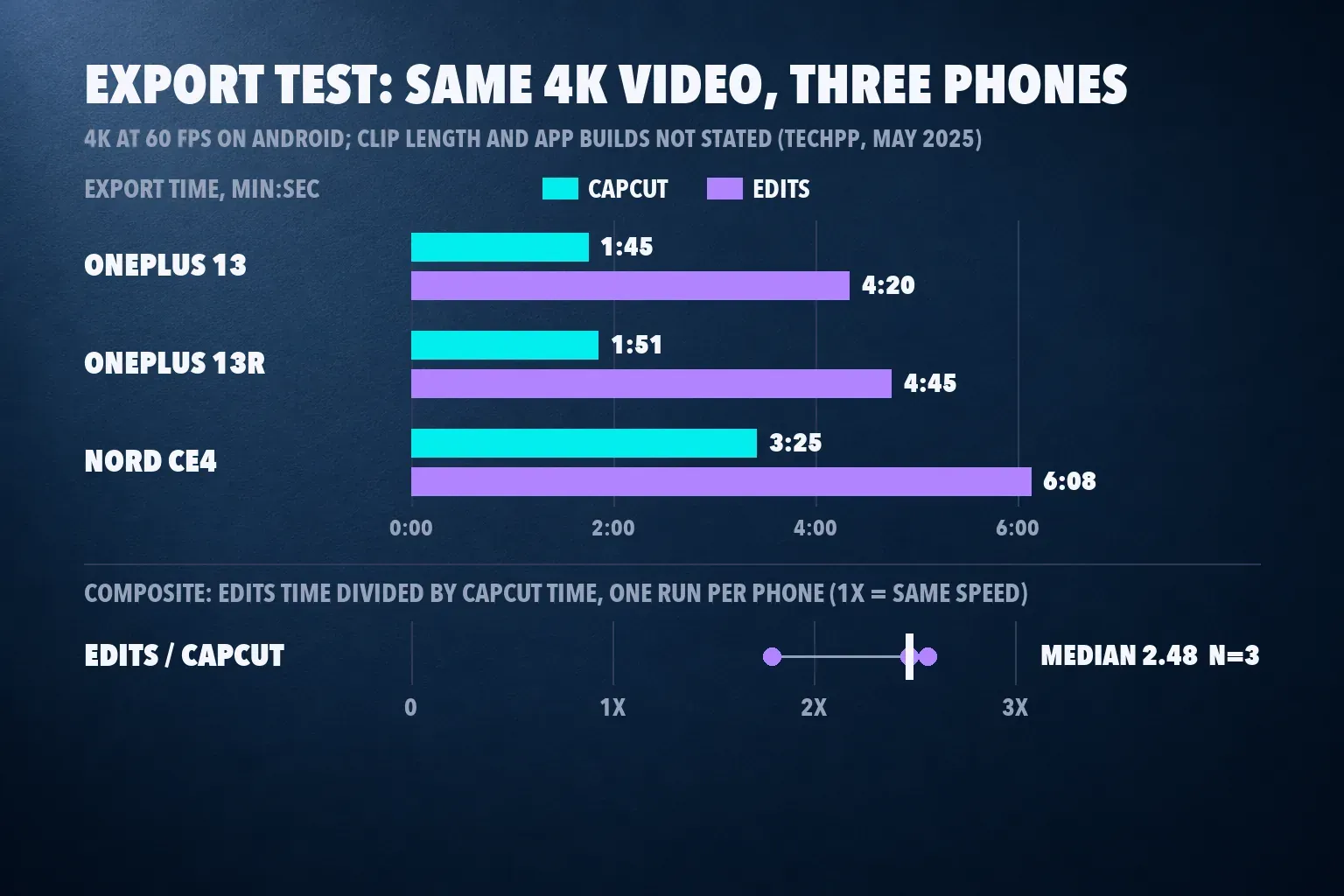
For TechPP's Instagram Edits vs CapCut comparison, published May 1, 2025, the same 4K video was exported from both apps at 4K and 60 fps on three Android phones, from a flagship down to a mid-range model. CapCut finished first every time.
| Phone | CapCut | Edits | Edits time divided by CapCut time |
|---|---|---|---|
| OnePlus 13 | 1:45 | 4:20 | 2.48 |
| OnePlus 13R | 1:51 | 4:45 | 2.57 |
| OnePlus Nord CE4 | 3:25 | 6:08 | 1.80 |
The composite result: Edits needed a median 2.48 times as long as CapCut to export the same video (1.80 to 2.57, three runs from one source). CapCut's median export took 1 minute 51 seconds and Edits' took 4 minutes 45 seconds. The page doesn't give the clip length, the app versions or a repeat count, and the iPhone wasn't compared because CapCut couldn't be installed where the test ran. The test also dates from nine days after Edits launched, and Edits updates from July to September 2026 list "fewer crashes and smoother exports." Even so, it's the only side-by-side timing I could find, and a gap that held from a flagship to a mid-range phone is the one I'd plan around: for long or 4K exports, CapCut hands your phone back sooner.
On short Reels the gap shrinks to seconds. Digital Trends' first look at Edits exported a 17-second video at 4K in 12 seconds, and the Dailytech test of free Android editors exported about 30 seconds from free CapCut 19.6.0 on an older Galaxy A31 at 4K and 25 fps in 48.2 seconds. Different phones and frame rates keep those two runs out of the composite, but both say the same thing: a 15-second Reel won't keep you waiting in either app.
You may not need 4K at all. NoobClaw's guide to Edits export settings quotes Tom Bender, who says he launched Edits, recommending 2K at 30 fps for posting because "your IG audience won't see a difference" at 4K, and 4K is slower to edit. That's the setting I'd use in Edits. In CapCut, our CapCut export settings guide shows which resolution, frame rate and bit rate to pick.
Captions, voiceovers and audio
Both apps write captions fast. MakeUseOf's Edits review timed 32 seconds for captions on a nearly three-minute video, and Sonary's small-business test saw CapCut's desktop app caption a 45-second clip in about 30 seconds, then spent about 15 minutes fine-tuning the wording and styling. The devices and clips differ, so I don't rank them on speed. The time goes into fixing captions, and the plan matters more: MakeUseOf's reviewer left CapCut partly because auto captions moved behind the Pro paywall, and our CapCut auto captions guide explains the current allowance. Edits captions cost nothing.
Voiceovers are where CapCut pulls ahead. The Andrew Tours SF test of Edits against CapCut edited a campaign video with a voiceover in both apps. In Edits the audio timing was slightly off, the snap when trimming was "way too harsh" until zoomed in, a voiceover couldn't run longer than the video, and noise removal had a single option. CapCut was precise enough to trim voiceover clips "almost without even listening." Edits also has no in-house library of copyright-free music. Our guides to recording a voiceover in CapCut and removing background noise in CapCut cover that side.
Trending audio flips the result. The same test made a second Reel with a trending track and no voiceover, and Edits was easy: Instagram's full music library sits inside the app, and posting straight from Edits kept the trending audio attached. With CapCut, the routine was to screen-record the trending sound, import it, cut to the beat, export, then find the original audio again in Instagram before posting. If your Reels ride on trending sounds, that alone is a reason to use Edits. For licensed music on other platforms, our guide to adding music in CapCut covers the options.
Store ratings, reviews and install size
| Measure | Edits | CapCut |
|---|---|---|
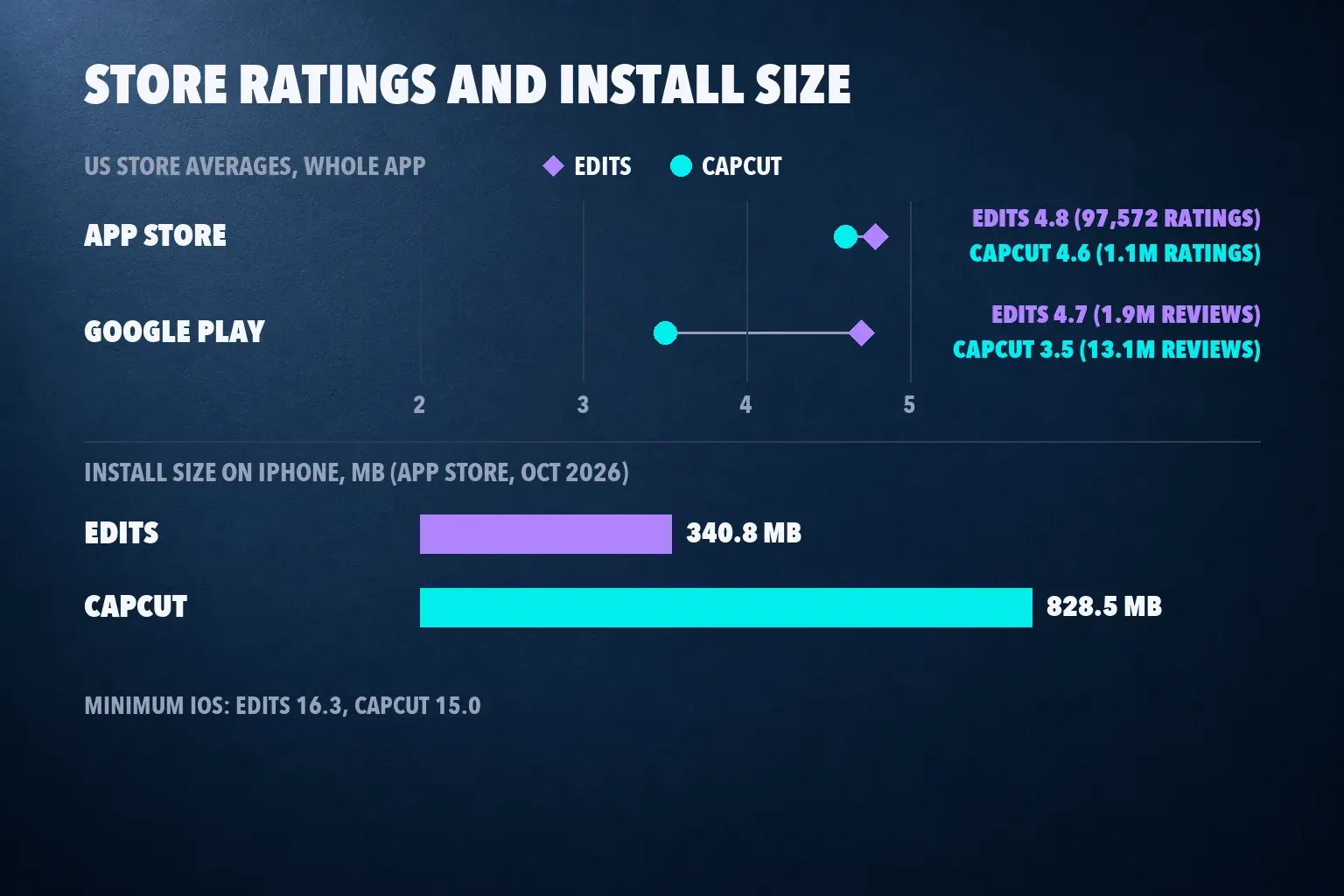
| US App Store | 4.8 from 97,572 ratings, #5 in Photo & Video | 4.6 from 1.1 million ratings, #1 in Photo & Video |
| Google Play (US) | 4.7 from 1.9 million reviews, 100M+ downloads | 3.5 from 13.1 million reviews, 1B+ downloads, Editors' Choice |
| Install size | 340.8 MB on iPhone; 79 MB on a OnePlus 13 in 2025 | 828.5 MB on iPhone; about 733 MB on the same OnePlus |
| Minimum iOS | 16.3 | 15.0 |
| Editorial review scores | None scored in the reviews I checked | TechRadar 4, MobileAppDaily 4, PCMag 3.5 for the desktop app; median 4 from 3 |
Edits wins the stores, but on a far smaller base: CapCut has more than ten times as many App Store ratings and about seven times as many Play reviews. CapCut's 3.5 on Google Play is still a warning, so read recent reviews for your phone model before paying. Edits is also less than half CapCut's size on iPhone, which matters on a full 64 GB phone; our guide to freeing CapCut storage on iPhone helps if CapCut is the one eating space. Older iPhones cut the other way: Edits needs iOS 16.3, and CapCut runs on iOS 15.
Reliability and privacy
The most helpful recent Google Play reviews point to different weak spots. For Edits, the top reviews from August and September 2026 describe crashes, exports that stopped working and every project disappearing after a reinstall or a "No network connection" error, plus colors washing out on export. For CapCut, they describe videos longer than two minutes failing to import, projects breaking when the source clip is deleted from the phone's album, and text spacing and font bugs. Keep source clips in your camera roll until the video is posted, and save a finished export before you reinstall either app. Our guides to backing up CapCut projects and recovering deleted CapCut projects cover CapCut's side. If colors wash out, switch between SDR and HDR in Edits' export menu; our guide to washed-out CapCut exports covers the same problem in CapCut.
On privacy, the data-safety sections cut against the usual assumption. The Edits Google Play listing says the app may share personal info and device or other IDs with third parties, while the CapCut Google Play listing declares no data shared with third parties. Both collect location, personal info and five other data types. Ownership is the other half of the question; our guide to whether CapCut is safe weighs it, and our CapCut ban status guide covers US availability.
What each app costs
Edits is free, with 4K export and no watermark, according to the Edits App Store listing. A paid tier is coming. Meta announced Edits Plus on September 15, 2026, as part of a Meta One Business bundle or as a separate subscription, Social Media Today reported. On October 21, Meta described it as "a paid subscription that unlocks additional cloud storage and AI usage," listed 200GB of cloud storage that syncs projects between iOS devices or between Android devices, and said it will start in limited testing inside the mobile app, according to Social Media Today's follow-up on Edits Plus. Meta hasn't shared a price. Edits' AI assistant, which reads your account metrics and suggests hooks, captions, scripts and trending audio, is rolling out to all US users for free with a daily prompt limit, per TechMyMoney's report on the Edits assistant. The $149 and $499 monthly Meta One plans in that report are business-agent plans, not an Edits price.
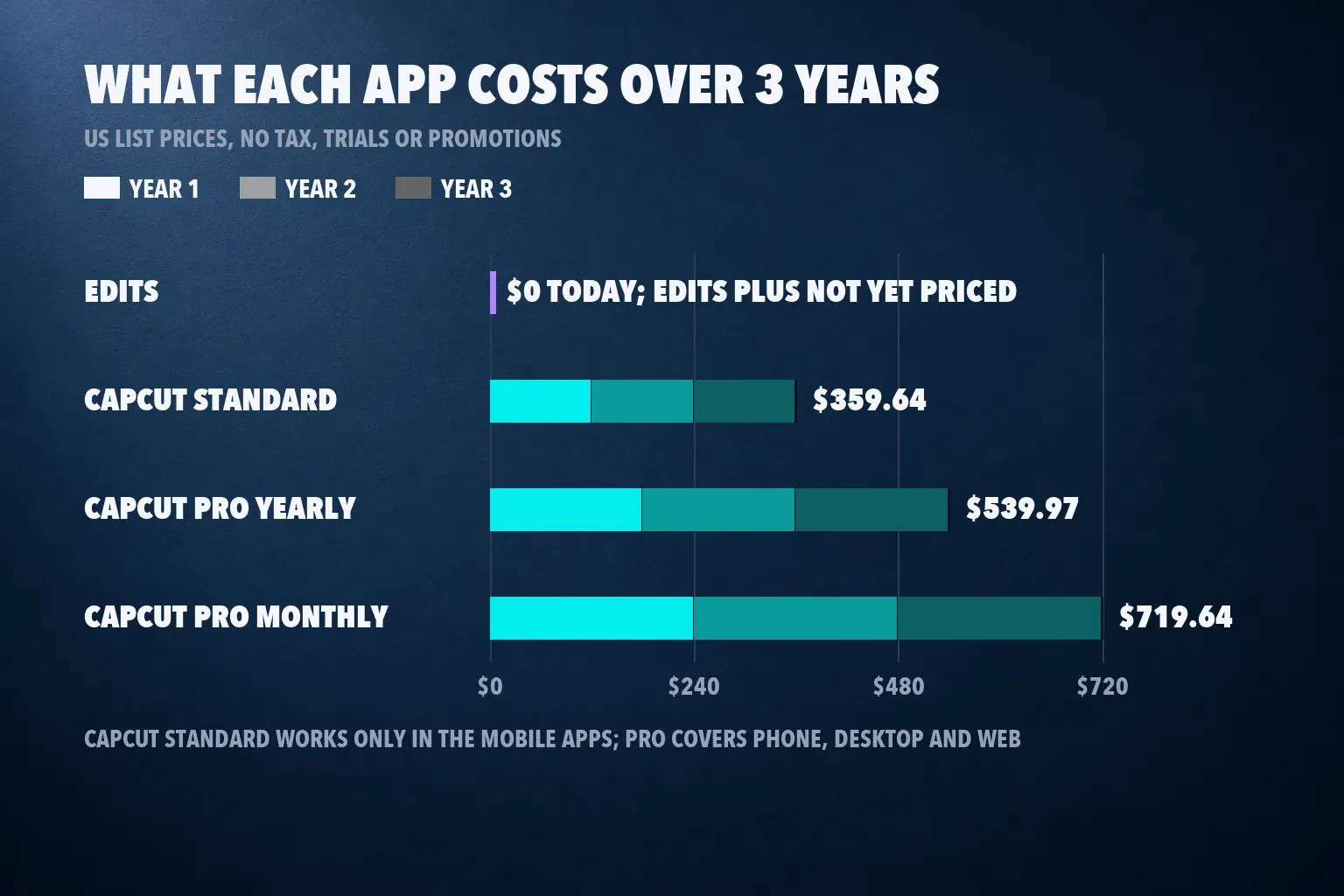
CapCut's free phone app exported with no watermark in the Dailytech test, adding only an end card you can delete, and reached 4K at 25 fps; moving toward 30 fps opened a trial prompt. PCMag found watermarks on free desktop exports. CapCut's watermark help page traces marks to template endings, stock that needs attribution, the default outro and Pro elements, and our CapCut watermark guide handles each case. The CapCut App Store listing shows Standard at $9.99 a month and Pro at $19.99, and CapCut's pricing page shows Pro at $179.99 a year. The App Store also lists $7.99 monthly and $89.99 yearly rows without naming the plan, so I leave them out. Standard works only in the mobile apps, while Pro covers phone, desktop and web, per CapCut's help page on cross-platform subscriptions.
| Plan | 1 year | 2 years | 3 years |
|---|---|---|---|
| Edits (current app) | $0 | $0 | $0 |
| CapCut Free | $0 | $0 | $0 |
| CapCut Standard monthly | $119.88 | $239.76 | $359.64 |
| CapCut Pro yearly | $179.99 | $359.98 | $539.97 |
| CapCut Pro monthly | $239.88 | $479.76 | $719.64 |
These are US list prices with no tax, trials or promotions, renewed at the same price. A creator who posts only Reels can stay at $0 in Edits with no watermark and 4K. Paying for CapCut buys the deeper editor, its AI tools and, with Pro, the desktop and web apps. Our CapCut pricing guide compares the plans, is CapCut Pro worth it answers whether they earn their price, and the CapCut Pro free trial guide shows how to try Pro first.
Export rules side by side
| Rule | Edits | CapCut |
|---|---|---|
| Resolution | HD, 2K (1440x2560) or 4K | 480p up to 4K |
| Frame rate | 24, 30 or 60 fps | 24, 25, 30, 50 or 60 fps |
| Other controls | SDR or HDR color | Bit rate, optical flow and an estimated file size; codec on desktop |
| Aspect ratio | Vertical first; other ratios added in a mid-2026 update | 9:16, 16:9, 1:1 and more |
| Watermark | None | Deletable end card on a free phone export; Pro elements can mark or lock an export |
Several pages still say Edits is vertical-only or tops out at 2K. Both are out of date: the store listings promise 4K export, and a mid-2026 update added other aspect ratios. CapCut's extra controls matter when a platform or client sets limits, because you can see the file size before exporting and pick a frame rate to match your footage. Our Instagram Reel size guide lists the numbers to export at, and our guide to changing the aspect ratio in CapCut covers square and 16:9 horizontal cuts.
Editing tools: where each one is stronger
Edits is built around Instagram. The current version, 452.1 from October 21, 2026, lists Kits, which save colors, text styles, caption styles and audio as one reusable set, along with carousels, more than 50 effects and audio links, and August updates added an adjustment layer and Share to Stories. The assistant and in-app insights tie your edits to what's working on your account. Our Edits app review tours the timeline, capture tools, green screen, teleprompter and insights in depth, so I won't repeat it here.
CapCut is built around the cut. You get a large library of CapCut templates for trends, keyframe animation in CapCut, a wide range of caption styles and a set of AI tools in CapCut that Edits doesn't match yet. Our guide to syncing audio to video in CapCut shows the precision the voiceover test praised.
Editing on a computer or an iPad
Edits now runs on a Mac. Instagram's Edits for Mac page lists a multi-track timeline, color grading, keyframes and layered audio for longer projects, free on a Mac with Apple silicon (M1 or later), and the desktop version is macOS only, so there's no Windows or web editor. TechCrunch's launch report adds watermark-free 4K exports, custom keyboard shortcuts, and audio and text styles that sync over from the phone app. A project can't move between your phone and your Mac yet; Instagram says it's working on that. There's still no iPad edition, since Apple lists Edits as built for iPhone.
CapCut runs on iPhone, iPad, Android, Mac, Windows and the web, and Pro carries one subscription across all of them. I'd cut a Reel on an Apple silicon Mac in Edits, because it costs nothing and exports 4K clean, and switch to CapCut on Windows, in a browser, on an iPad or on an older Intel Mac, where Edits doesn't run. If you edit in CapCut on a bigger screen, start with our CapCut for PC, CapCut for Mac, CapCut web editor or CapCut for iPad guide.
Using Edits and CapCut together
If you post to Instagram and somewhere else, you don't have to choose. Cut in CapCut, finish the Reel in Edits.
- Cut, voice and caption the video in CapCut, where trims and voiceover timing are precise.
- Mute or remove any background music, then export a clean master at 1080p or 2K and 30 fps.
- Import that master into Edits, add the trending track from Instagram's library and post from Edits so the audio stays attached.
- Keep the CapCut project for the TikTok and Shorts versions; our TikTok video size guide lists what to export.
Check your music license before reusing a Reel elsewhere, because trending Instagram audio belongs to Instagram's library; our CapCut commercial use rights guide covers CapCut's side.
Which one I'd pick
- Reels only, edited on a phone, $0 budget: Edits. It's free, exports 4K with no watermark and keeps trending audio attached when you post.
- Voiceovers, tutorials and talking-head videos: CapCut. Its trims are precise enough to cut voiceovers by eye, and it exported the same 4K60 video faster on every phone tested.
- One edit for TikTok, Shorts and Reels: CapCut for the edit, then Edits to post the Reel if you want the trending sound.
- Editing on a computer: Edits for a Reel on an Apple silicon Mac, since it's free; CapCut with Pro on Windows, in a browser or when you need its deeper tools.
- A phone that's short on space: Edits, at 340.8 MB against CapCut's 828.5 MB on iPhone. On an iPhone stuck on iOS 15, CapCut is the one that installs.
- Long or 4K exports on a mid-range phone: CapCut, which finished well ahead on the mid-range Nord CE4.
If neither fits, our CapCut alternatives guide compares more editors, and our InShot vs CapCut and Canva vs CapCut comparisons cover two more matchups. For a wider field, see the best video editing apps for iPhone and for Android.
How I compared
I put both apps through the questions a creator asks before choosing: how fast the export is, how captions and voiceovers hold up, what the free export looks like, what paying adds, how reliable each app is and which devices each runs on. Export times come from TechPP's three-phone same-clip test, with Edits' time divided by CapCut's and the median, range and count shown; Digital Trends and Dailytech add single-app runs for context. Caption timings come from MakeUseOf and Sonary, and the voiceover and audio findings from the Andrew Tours SF campaign test. I read both apps' US App Store and Google Play listings, Edits' recent version notes, CapCut's pricing and help pages, the Edits Plus and assistant reports from Social Media Today and TechMyMoney, Instagram's Edits for Mac page and TechCrunch's report on its launch. Where a ranking page disagreed with a listing or help page, the listing won.
Edits vs CapCut questions
Is Edits better than CapCut?
For Instagram Reels made on a phone, yes: it's free, exports 4K with no watermark and keeps trending audio attached when you post. For voiceovers, precise trims, TikTok, Shorts or editing on a computer, CapCut is the better editor.
Is Edits faster than CapCut at exporting?
No. In TechPP's three-phone test, CapCut exported the same 4K60 video first on every phone, and Edits needed a median 2.48 times as long (1.80 to 2.57). On a 15-second Reel the difference is a few seconds.
Is Edits really free?
Yes, today. Edits has no watermark and no paid tier on sale. Meta has announced Edits Plus, a subscription with 200GB of cloud storage and more AI usage, but hasn't given a price, and it will start in limited testing. The US assistant is free with a daily prompt limit.
Do Edits or CapCut add a watermark?
Edits doesn't. CapCut's free phone app added only an end card you can delete in a 2026 test, while PCMag found watermarks on free desktop exports, and Pro templates, effects or stock can mark or lock any export.
Can I use Edits on a computer?
Yes, on a Mac. Edits for Mac is free and needs Apple silicon (M1 or later), with a multi-track timeline, keyframes and color grading. There's no Windows or web version, and a project can't move between your phone and your Mac yet, so on a Windows PC or in a browser, CapCut's desktop and web apps are the choice.
What export settings should I use in Edits?
2K at 30 fps for posting, which is what Tom Bender, who launched Edits, recommends, because Instagram viewers won't see the difference at 4K. Pick 4K only for an archive copy, and switch to HD if a long project or an older phone struggles.
Can I use Edits and CapCut together?
Yes. Cut, voice and caption in CapCut, export a clean master without background music, then add the trending track and post from Edits. Keep the CapCut project for TikTok and Shorts versions.