

You may be able to recover a missing CapCut project if its editable data still exists in the original account, on the device, in Trash or in an earlier backup. A missing project card is not proof of deletion. A timeline with offline clips is a different problem: the edit may still exist, but CapCut cannot find its source media.
This guide covers recovery after something has gone wrong. For routine protection, start with the CapCut project safety hub.
What disappeared?
Choose the symptom you can see. You do not need to try every method.
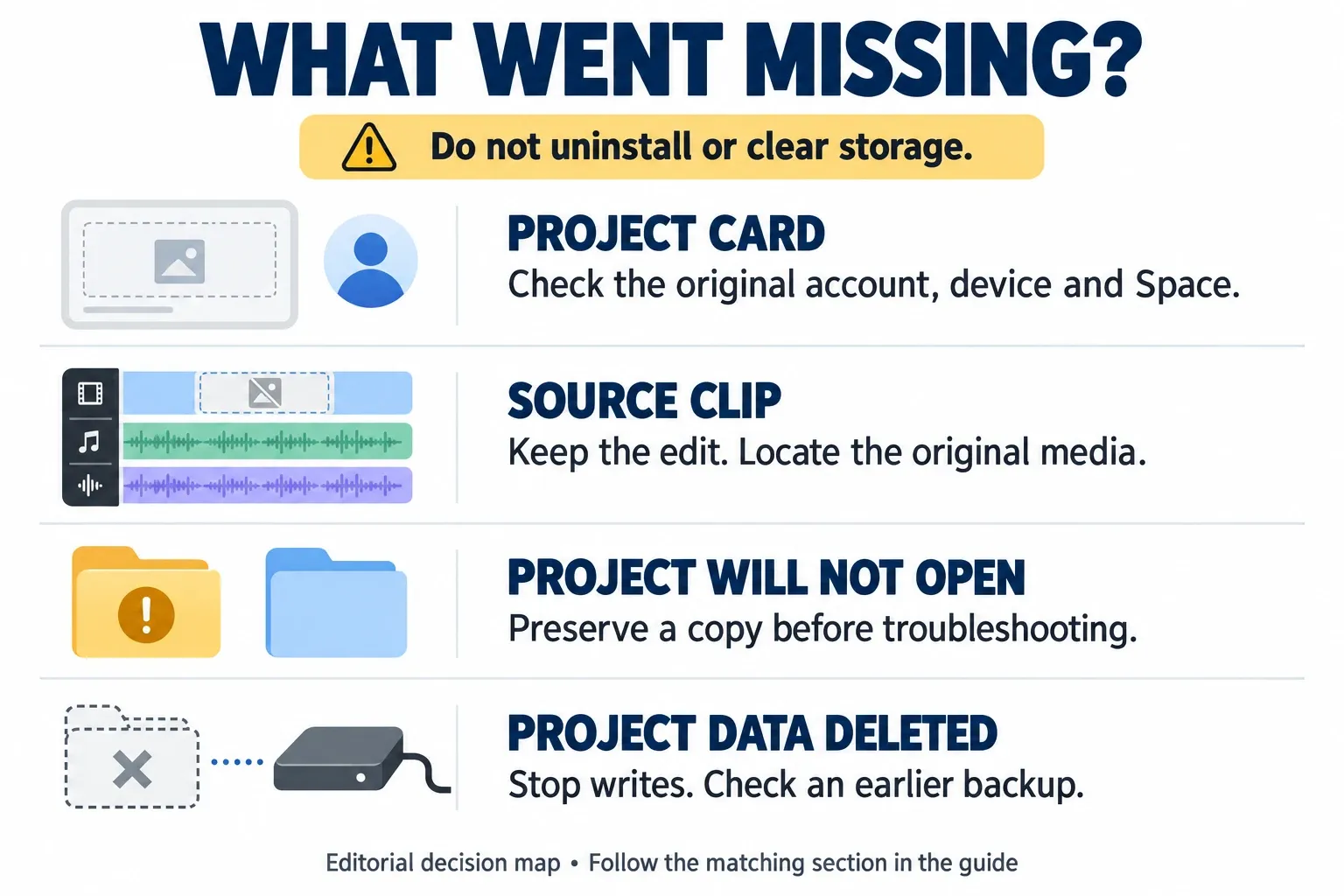
| What you see | Start here |
|---|---|
| The project card has gone | Check the account, device and Space, then any available Trash. |
| The timeline opens with missing clips | Locate the original media; keep the existing edit. |
| One project will not open | Preserve it before troubleshooting. |
| A desktop folder was deleted | Check the computer's bin and pre-loss backups. |
| You deleted the mobile app or its data | Check what survived outside local app storage. |
| Only an exported MP4 remains | Use the video for a new edit; it is not the original layered project. |
Preserve what is still there
If the desktop project folder is intact, close CapCut normally if it responds, then copy the complete folder and its source media to separate storage before experimenting. Do not move the only copy, merge folders or replace files with an older version yet. The project-folder guide explains how to find the active save location; a path from someone else's computer may not match yours.
Actual deletion needs more caution than an intact project that will not open. Do not create test projects on the affected disk while trying to recover deleted files. Microsoft explains why new writes can overwrite recoverable data. If copying produces read errors or the drive keeps disconnecting, stop repeated attempts and consider a data-recovery specialist.
Use this recovery order
- Stop destructive fixes and avoid new writes to storage that may contain deleted project data.
- Preserve any intact project folder and source media on separate storage before troubleshooting.
- Check the original account, device, Space and any available Trash for the missing edit.
- Use the matching recovery route: restore an earlier backup, reconnect missing media or troubleshoot a preserved copy.
- Check the full timeline, save and reopen it, test an export, and keep the originals until the recovered edit is verified.
The project disappeared from Home
Check the account before treating this as a lost-file problem. CapCut documents how Google login and email login can open different accounts even with the same email address. Use the original sign-in method, or one already linked to that account. Our account and login guide covers that distinction.
On the original device, look through the local Projects view and the Space where you actually saved or uploaded the edit. A logged-in account does not prove that every local draft was uploaded. If it was made on another phone or computer, check that device too. Do cloud checks from a different device if using the original would risk overwriting deleted disk data.
For a shared project, check whether you still belong to the team: leaving a CapCut team removes access to its projects. A subscription-related Space restriction can also be an access problem. Neither symptom alone proves that files were deleted. Ask the workspace owner or CapCut support to check access; do not buy another plan on the assumption that it will recover the edit.
Restore from CapCut Trash, if your version offers it
Open the relevant project library or Space and look for Trash or Recently Deleted. If the project is listed and a restore action is available, restore it and check the timeline. Read any expiry or deletion warning shown there.
There is no reliable universal seven-day or thirty-day promise to apply to every CapCut platform. The historical-project help page suggests checking Trash, while the mobile deletion instructions warn that deleted projects cannot be recovered. If your app has no such section, do not keep hunting for a button from an old tutorial. Move to an existing backup or the appropriate mobile section below.
Restore deleted desktop files from a backup
First check the computer's Recycle Bin or Trash for the deleted project folder and media. This is separate from CapCut's own Trash. On a Mac, Apple documents selecting an item in Trash and choosing File > Put Back. Preserve any newer folder at the destination before accepting a replacement.
Windows: File History or an earlier folder copy
File History helps only if it backed up the relevant folders before the loss. Do not assume it covered CapCut's AppData folder: Microsoft describes backups of libraries and other included locations.
- In File Explorer, open the location that contained the missing folder. Right-click its parent folder and choose Restore previous versions.
- Select a version from before the deletion. Use Open in File History to inspect its contents.
- Use Restore to… to recover to a separate safe location instead of replacing newer files.
These are Microsoft's File History restore steps. If there is no suitable version, enabling File History now cannot create yesterday's backup. Check any independent folder copy you already made.
Mac: Time Machine
Open the folder that contained the missing item, open Time Machine, browse to a backup from before the loss, select the item and choose Restore. Apple's Time Machine instructions say restored items return to their original location, so protect newer files there first.
Recovering a folder is not the same as recovering a working edit. One Mac user reported that putting a deleted folder back did not restore the project list. That report does not establish the cause; it is a reason to verify the draft and its media, not just the folder's presence.
The project opens, but clips are missing
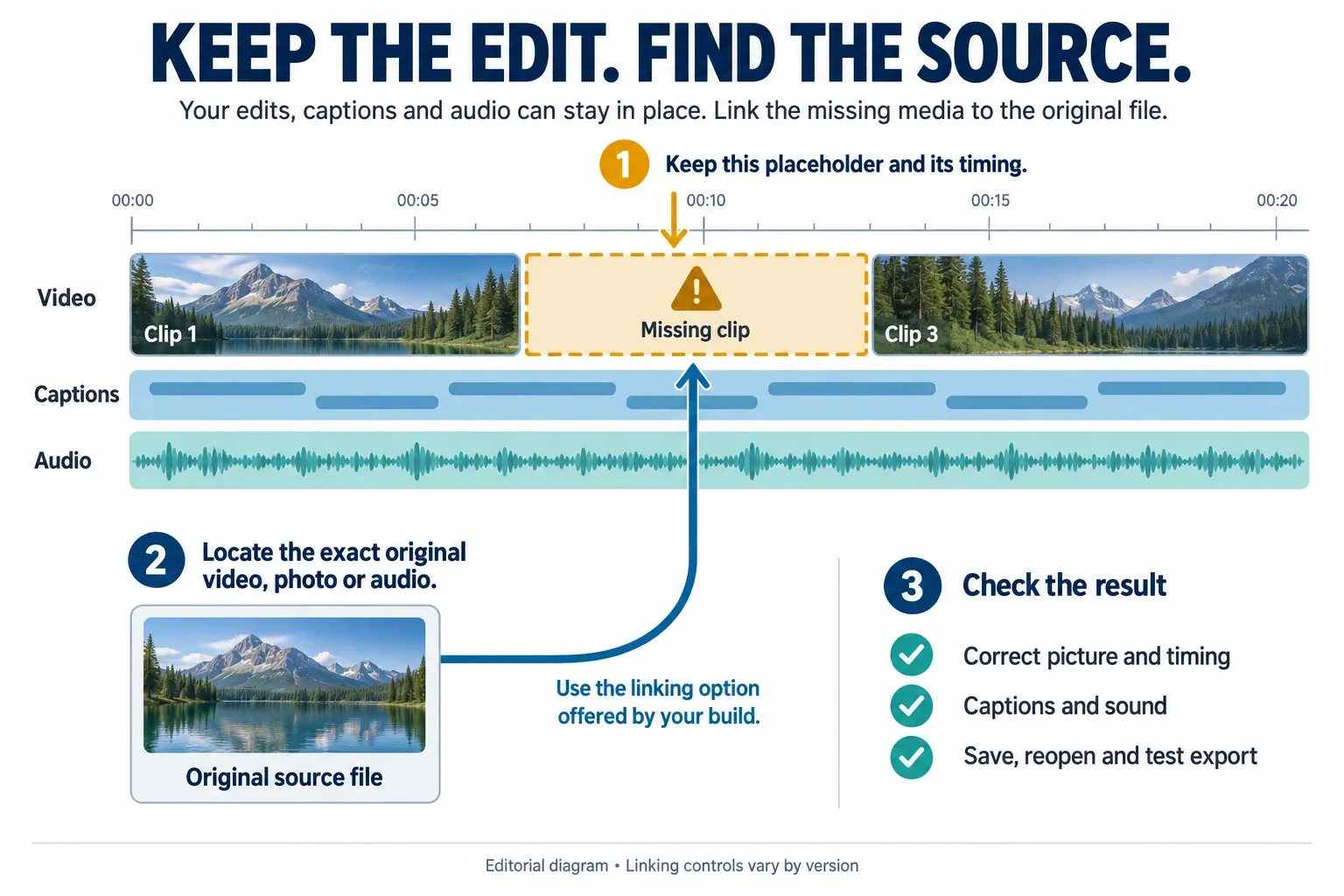
Keep the missing-media placeholders. Removing them can discard the cut positions you are trying to preserve.
- Find the exact original video, image or audio file. Check the drive, folder or photo library it came from, not just a similarly named export.
- Make the source accessible again. Reconnect its drive or restore the file from your backup; avoid overwriting unrelated files.
- If your build offers a link, relink or locate action for the missing item, use it to select that source. Do not assume importing the file into the media panel again will repair the existing timeline.
- Check each affected clip's picture, duration and timing, then captions and audio. Save, reopen and test an export from the recovered copy.
If the source exists but CapCut cannot see it, check its file or photo permissions. CapCut's missing-assets guidance identifies restricted access as one possible cause. Grant access to the needed media; a permissions change will not restore a file that was deleted.
One project will not open
After preserving the folder and ruling out an active deleted-file recovery attempt, try opening another existing, unimportant project. If that also fails, follow the CapCut crash troubleshooting guide. If only one edit fails, keep the investigation on that draft, its media and any earlier working copy.
A file named draft_content.json is not proof that the whole project is recoverable. Do not rename the largest temporary file, paste replacement JSON from a forum or change version fields in your only copy. Those files may describe different editing states or depend on other metadata and media. A folder backup is a fallback, not permission to experiment on the original.
If you cannot open a preserved copy, send CapCut support your device, app version, exact error and what happened immediately before it failed. Include anonymized evidence of the error. Keep client footage, account details, private paths and project files out of public forum posts.
After uninstalling CapCut or clearing mobile data
iPhone and iPad
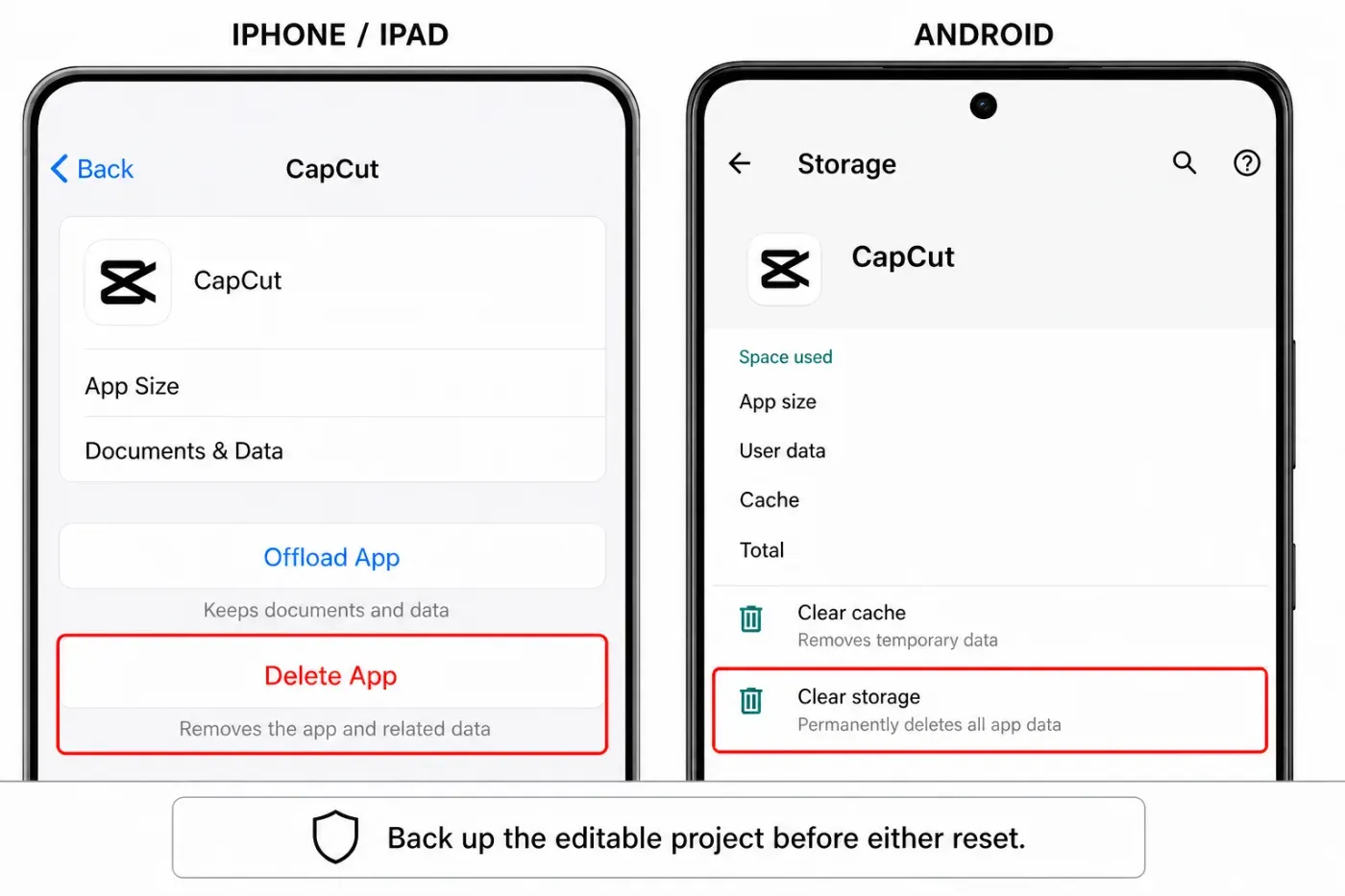
Offload App and Delete App are different: offloading retains documents and data; deleting removes the app and related data. Reinstalling a deleted app is not a backup restore.
Check for an existing Space copy first. An earlier iCloud backup may contain app data, but its existence alone does not prove it contains this draft. Check the backup date and whether CapCut was included.
Android
Clear cache removes temporary data; Clear storage deletes app data. Uninstalling also removes app-specific storage. Neither is a recovery step.
Archiving is different again. Android's app archiving keeps app data; restoring the archived app depends on the device and the app still being available through its store. For actual deletion, look for a previously uploaded project or a suitable device backup. Google's backup guidance warns that not every app restores all data. Check Backup details rather than assuming that a Google account means every CapCut draft is protected.
Only the exported video remains
Keep it. You can import the MP4, cut it into a new edit and add new captions or audio. What it cannot return is the exact original set of separately editable layers, effects and tracks. CapCut explains that distinction in its export-and-reimport guidance.
Your photo library's deleted-items area or a media backup may help retrieve source clips or an export. Recovering those files is useful, but it does not recover CapCut's editing decisions.
When there is no usable backup
Windows File Recovery can attempt recovery from local storage, not a CapCut cloud account or a network share. It needs different source and destination drives. Do not install tools, save results or create a new partition on the affected disk. A separate external destination is the practical option.
Check the file filters before concluding that no project data survived. Microsoft's documentation lists json among the file types filtered by default. Read the options for the installed tool and selected mode; do not assume a video-only scan searched CapCut metadata. No scan can promise a complete editable project.
A recovery tool finding an MP4 does not prove it recovered a draft. Ask what files it can actually recover before paying. Nor does connecting a phone by USB guarantee access to deleted private app data. If there is no usable project data, Space copy or pre-loss backup, rebuilding from surviving media may be the only practical route.
Before calling a recovery complete, inspect the whole timeline, save and reopen it, and test a difficult export section. Watch the full final export before delivery. Keep the original files until those checks pass, then make an independent backup of the editable project and source media.
Frequently asked questions
Where is Recently Deleted in CapCut?
Look in the relevant project library or Space for Trash or Recently Deleted, if your platform offers it. There is no single route that works on every CapCut version. A computer's Trash and a phone's photo bin are separate from CapCut project storage.
Can I recover a project after deleting CapCut?
Only if usable project data survived elsewhere, such as an uploaded Space project or a suitable pre-deletion backup. Reinstalling the app alone does not restore deleted local drafts. Offloading on iPhone and archiving on Android are different because they retain app data.
Why did my projects disappear after logging in?
A different sign-in method can open a different account even with the same email address. Check the original account, local Projects and the original device or Space. Team access changes can also make shared projects unavailable.
Can draft_content.json restore a corrupted project?
Not by its name alone. It must contain usable data and work with the other project files and media. Preserve the complete folder before troubleshooting; do not replace JSON or rename temporary files in your only copy.
Can an exported video restore my original project?
No. You can import it and make a new edit, but it does not restore the original separately editable layers, effects and tracks. Keep any surviving source media as well.
Does clearing CapCut cache delete projects?
Android distinguishes temporary cache from app storage: Clear storage deletes app data. Do not treat either action as a recovery method or use a cleaner while investigating missing drafts. Preserve accessible project data first.
How long does CapCut keep deleted projects?
Do not assume a universal seven-day or thirty-day window. Check the retention warning in the Trash available to your account. CapCut's mobile deletion help warns that deleted projects cannot be recovered.
Can File History or Time Machine restore a CapCut project?
They can restore files included in an earlier backup. The backup must contain the relevant project data and any needed media. Preserve newer files before restoring, then verify that CapCut can open and use the recovered edit.
Checked September 12, 2026 against CapCut, Apple, Google and Microsoft documentation, with community reports used only to flag failure cases. We did not run a deletion-and-recovery experiment. The diagrams explain the decisions; they are not evidence that a particular draft can be recovered.