


CapCut keeps editable drafts separately from exported videos. On Windows and Mac, read the draft location in CapCut’s settings; an older project may live in a different folder. On iPhone and Android, start in the app’s project library. For Web, check the account and Space where you saved the edit.
Where to look first
| Platform | Editable project | First check |
|---|---|---|
| Windows | Local draft folders, or an uploaded project in Space. | The project’s Path field, if available; otherwise the configured draft location in Settings. |
| Mac | Local draft folders, often under Movies/CapCut, or a selected custom location. | CapCut → Settings → Draft → Save to. This route was checked in CapCut 9.3.0 for macOS; labels are translated from Russian. |
| iPhone / iPad | App-managed local drafts; separately uploaded projects in Space. | Projects in CapCut, then the correct account and Space—not the Photos app. |
| Android | App-managed local drafts, not a universally accessible folder. | CapCut’s project library. An old Android/data path is not a reliable shortcut. |
| Web | The signed-in account’s saved projects or Space. | Original login method, selected workspace and completed save/upload. |
Find the CapCut project folder on Windows
If the draft is open and your build shows Details → Path, use that project-specific location. The ExportSRT developer’s illustrated folder guide documents this route. It is not present in every layout, so do not close an unsaved or damaged edit just to hunt for it.
To check the configured location from the home screen:
- Open Settings in CapCut. Look for the Draft or Project section; the label depends on the build.
- Read the Save to field, if available. This is the configured draft location, not a list of every folder used in the past.
- Open the displayed folder in File Explorer. Use a folder button if your version offers one, or enter the path in the address bar.
- Leave the setting and files unchanged. If the folder is empty, check earlier locations, the original Windows user account and any previously used drive.
A common Windows location is:
%LocalAppData%\CapCut\User Data\Projects\com.lveditor.draftYou can paste that into File Explorer’s address bar. The CapShare project-format documentation records this path and the Mac example below. These are third-party implementation examples, not a promise for every CapCut installation. You do not need to install CapShare to read them.
Empty or missing folder? Check the location displayed by your installation before searching guessed AppData subfolders. A Microsoft Store installation does not establish one universal package path. Do not create a new folder, change Save to or reinstall CapCut as a way to make old drafts appear.
Find the CapCut project folder on Mac
On the Mac checked for this update, CapCut 9.3.0 exposed the draft location through the macOS menu bar: CapCut → Settings → Draft → Save to. The installed interface was Russian; those labels are English translations. The folder fields for screen recordings and downloads were separate.
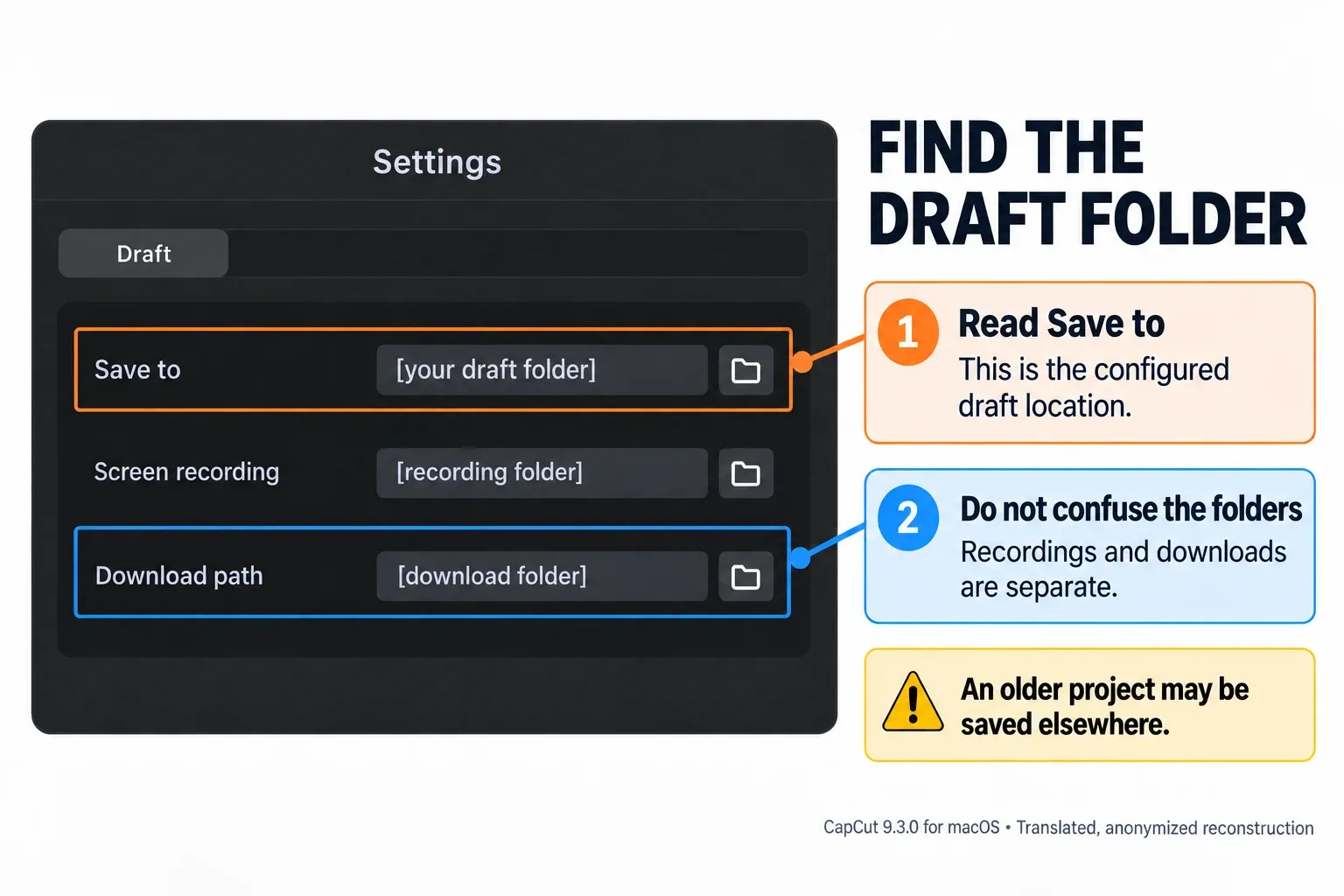
A common Mac location is:
~/Movies/CapCut/User Data/Projects/com.lveditor.draftIn Finder, choose Go → Go to Folder, paste the path displayed by CapCut and press Return. In the example above, ~ means your home folder. If the example does not exist, use the configured location instead; do not create the example folder.
Save to is a starting point, not proof that an old draft moved there. Check the Mac account you used for the edit and reconnect its original external drive if relevant. If the project itself exposes a Path field, compare that with the configured location.
Identify the draft—not just a video or cache file
A desktop draft folder can contain files such as draft_content.json or draft_info.json, metadata and supporting folders. The layout varies by build. A JSON file is project data, not an MP4; renaming it will not turn it into a video.
If several folders look plausible, compare their modification dates with when you edited. Dates are clues, not proof: copying or syncing can change them. Confirm the project through CapCut’s library and its expected timeline. Do not overwrite a same-named folder or edit internal JSON to identify it.
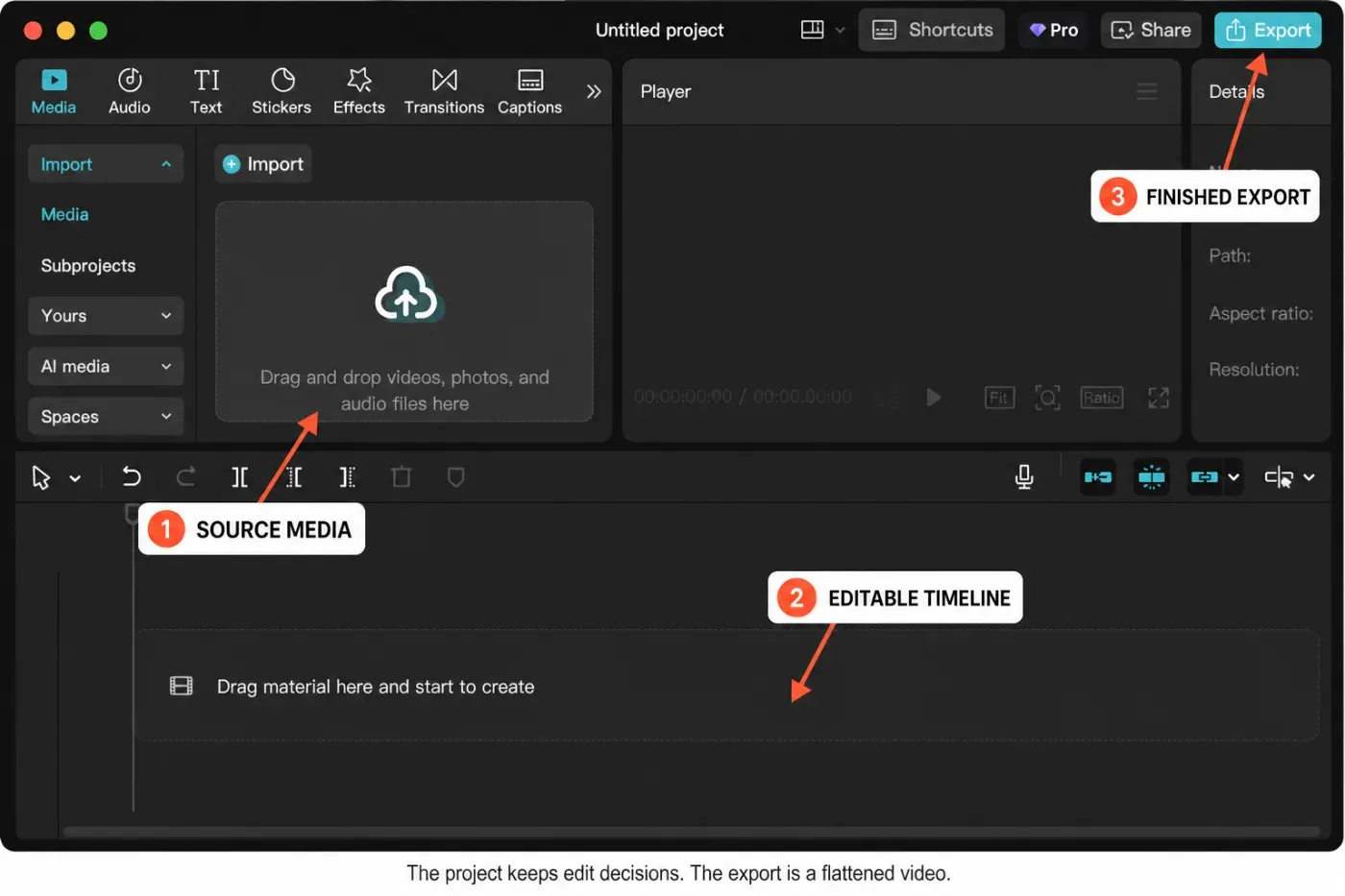
Finding the draft does not mean you found all its footage. Original clips can remain elsewhere; CapCut’s media-access guidance explains why file locations and permissions matter. If the timeline opens but clips are offline, preserve its placeholders and locate the originals. That is different from finding a missing draft.
For an MP4 you already exported, CapCut confirms that re-importing the video does not restore its original separate tracks and effects. You can recut the finished video, but it is not the editable project you were looking for.
Find drafts on iPhone and iPad
Open CapCut’s Projects library on the device used for the edit. Local drafts live in app-managed data. A video in Photos is an export or source clip, and a generic CapCut folder in Files is not a dependable route to every editable draft.
If the list is empty, check the original account and its Space. CapCut warns that different login methods can open different accounts even with the same email address. Use the original method or one you deliberately linked to that account. Our CapCut login guide covers that distinction.
Do not use Delete App to refresh the list. Apple says Offload App retains documents and data, while Delete App removes related data. Offloading is not an independent backup either.
Find drafts on Android
Start in CapCut’s project library on the original phone, then check any Space where you uploaded the project. A local draft does not become a cloud copy merely because you signed in.
Do not expect a normal file manager to expose every draft under Android/data. Android restricts other apps and the system file picker from accessing app-data directories. Old paths and root-based tutorials are not a reliable, supported way to locate and transfer all current mobile projects.
Google distinguishes temporary cache from permanently deleted app data. Clear storage is not a search or recovery tool. Android also removes app-specific files on uninstall; this does not mean it deletes every photo in shared storage.
Find saved projects in CapCut Web
Look in the project library or Space under the account used to save the edit. A Web project is not the desktop draft folder shown in Finder or File Explorer. CapCut’s saved-project instructions require uploading to Spaces for cross-platform cloud use; the same login alone is not evidence that a local draft uploaded.
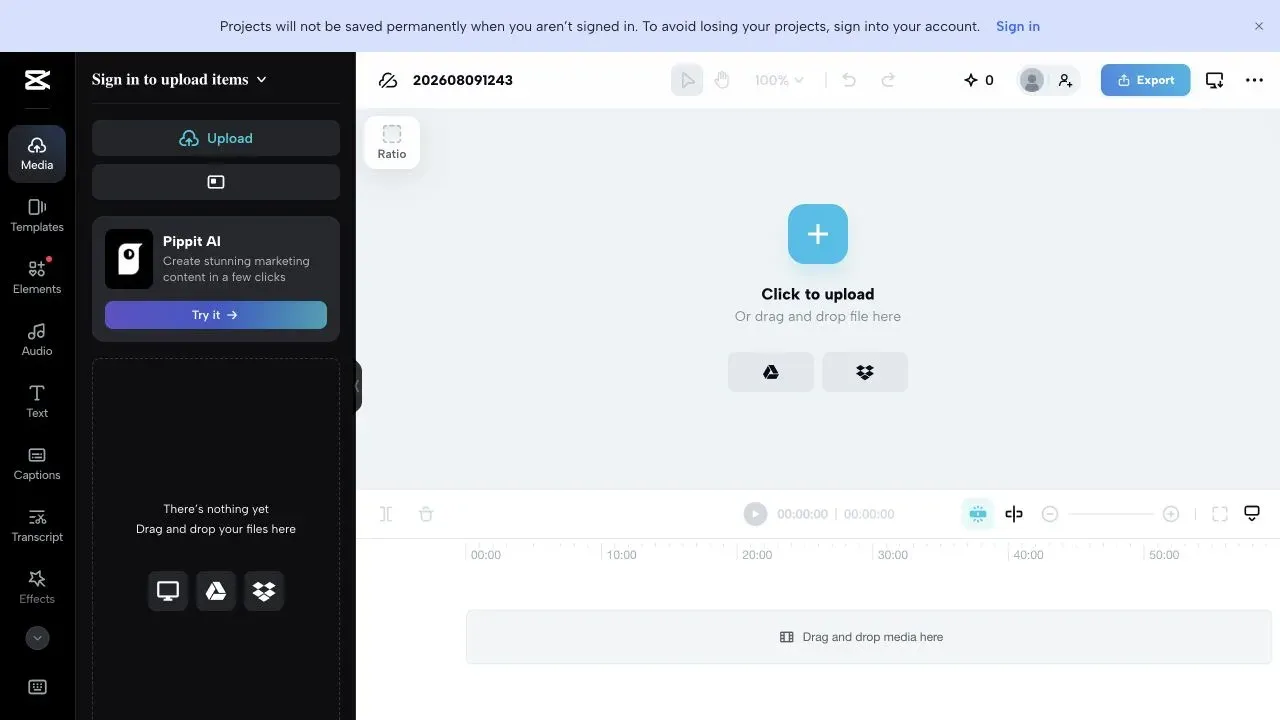
If an edit is still open without a confirmed saved copy, keep that session open. Follow the available sign-in/save flow, wait for completion and verify the saved revision without discarding the working original. The Web editor guide covers the browser workflow.
A missing upload can also be a storage problem. CapCut’s current Space capacity notice says newly created spaces no longer include complimentary storage. Check the allowance in your Space, not a quota shown in an old screenshot.
Where did the exported video go?
If you need the finished video rather than the draft, use the export destination:
- Desktop: check the path selected in Export. CapCut documents an Open folder button on the completed export screen; use it if your version shows it. Otherwise search for the filename you chose.
- iPhone and Android: check Photos or Gallery after a completed on-device export. If it is absent, check the save destination and media permissions; some exports appear in a different folder or after the gallery refreshes.
- Web: check the browser’s download list and selected download folder. Confirm the download finished, not just the video render.
Found it? Preserve it before changing devices
Keep the draft and its source media. Before uninstalling, resetting or moving to another computer, follow the editable-project backup and transfer guide. A second copy on the same disk or an untested cloud thumbnail is not enough. The project safety hub helps you choose between locating, preserving and recovering an edit.
Frequently asked questions
Does CapCut automatically save projects?
CapCut’s mobile Help describes updating the draft when you go back from the editor. Do not rely on one universal autosave interval across platforms. Saving changes to the current draft is different from keeping an independent backup.
Does signing in back up every local CapCut project?
No. Check whether the intended project was actually uploaded to the correct account and Space. Reopen the saved revision and verify its media. A local-only project should still be treated as local while you are signed in.
Will uninstalling CapCut delete my projects?
It can remove local drafts. Apple’s Delete App removes related data, and Android uninstall removes app-specific files. Desktop results depend on the installation and cleanup performed. Preserve an independently verified editable backup before uninstalling.
Can I open a CapCut project folder by double-clicking it?
Double-clicking a raw folder opens the folder, not its timeline. Reopen the draft through CapCut. Finding JSON files does not prove that it is healthy or portable. Preserve the original before attempting recovery.
Where does CapCut save exported videos?
Check the selected export destination. Desktop may offer Open folder after export; on-device mobile exports commonly appear in Photos or Gallery, subject to save location and permissions. Web downloads use the browser’s destination. These files are separate from editable drafts.
Is an exported MP4 enough to back up a CapCut project?
No. It preserves the rendered picture and sound, not the original separate timeline layers, captions or keyframes. Keep the editable draft and source media. Re-importing the MP4 lets you recut it as a new clip, not restore the old timeline.
Updated September 12, 2026. Mac folder settings were checked in CapCut 9.3.0 without changing them. Windows paths are documented examples, not a fresh Windows test. The Web capture is dated in its caption; no project recovery or transfer test is claimed here.