

Checked September 14, 2026. To sign in, open the official CapCut login page and choose the method you used before. If CapCut opens an empty account or your paid plan is missing, check the account rather than buying again. Keep any trusted device with the correct account signed in while you record its login method and CapCut ID. The email address alone is not enough: CapCut says Google sign-in and email/password can open separate accounts even when both display the same email.
Save the CapCut ID, linked login methods and any relevant Space or membership details privately. Save current edits and make a verified, independent editable backup with the source media before any step that could remove local data. An MP4 is not an editable backup. If you cannot verify a backup or another way into the account, stop before signing out, clearing app data or reinstalling. If you suspect someone else has access to the account, secure the linked provider and contact CapCut support; preserving a session is not more important than stopping unauthorized access.
Record the account details before signing out
Start with the CapCut ID and the sign-in method that works. These four records can help you find the account again; a familiar avatar or project thumbnail is not enough:
Login method
The Google, email, TikTok, Facebook or Apple sign-in you use. QR login authorizes another device through the account already open on your phone.
Google, Apple or other account
The exact Google, TikTok, Facebook, Apple or email account selected inside that method.
CapCut ID or UID
The account number to compare when two profiles look similar.
Account records
The expected Space and membership details. Keep the receipt too, but record its billing account separately from the CapCut login.
Compare the CapCut ID or UID, not the device ID. A local draft can remain on a device without proving which account is signed in, and a receipt identifies a purchase rather than its login button. The remaining diagrams explain account relationships, not the exact layout of every app version.
Why the same email can open two CapCut accounts
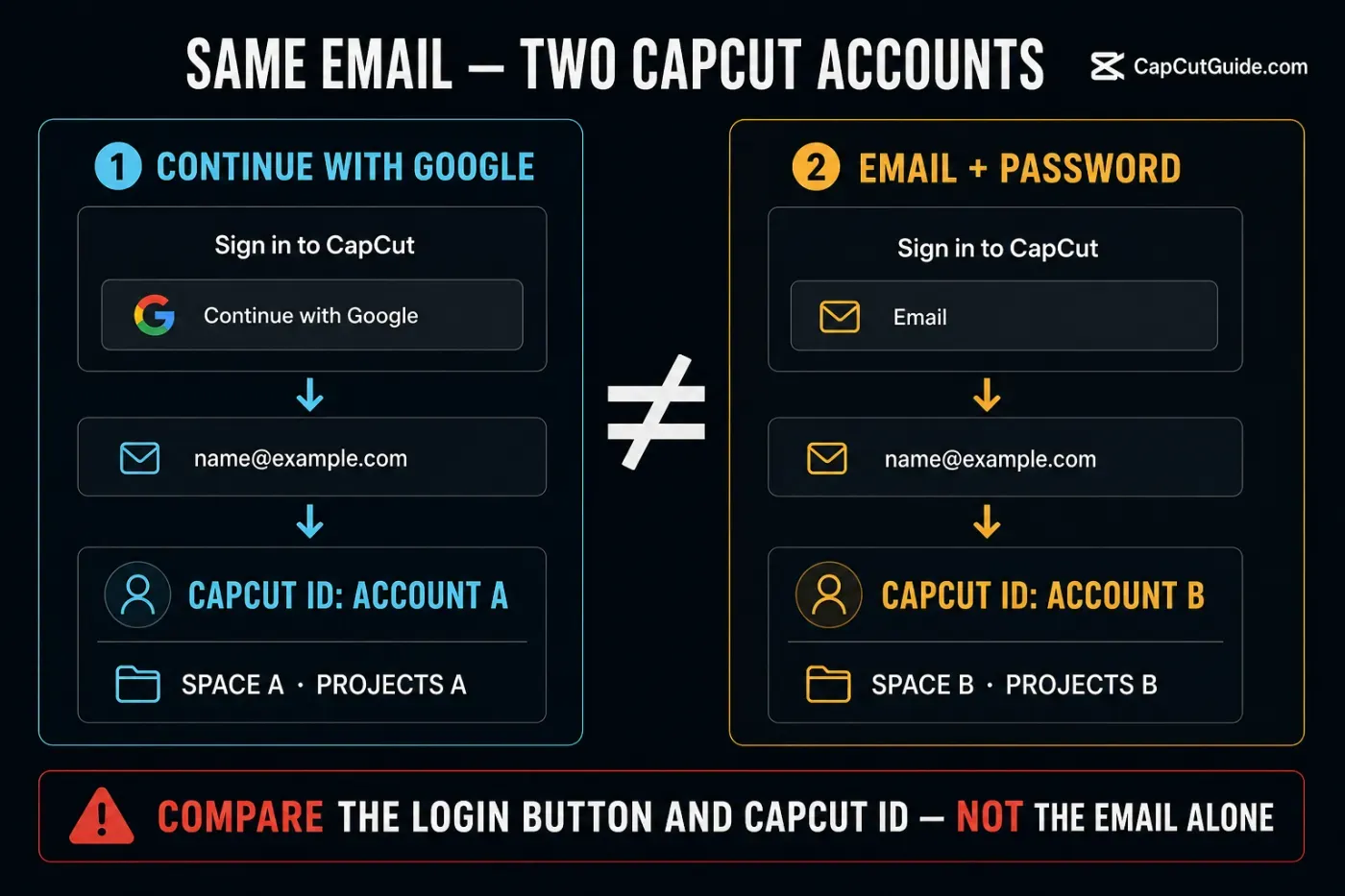
Continue with Google is not the same action as typing a Gmail address into CapCut's email field. The first signs in through Google. The second uses CapCut email login. CapCut's help explicitly says those can remain separate accounts even when the visible address is identical.
That example describes two separately created accounts, not every possible combination of login buttons. CapCut also lets you link an additional method to an existing account. Check the linked methods and UID before deciding that two sign-ins are different accounts. Keep the last working session open; test another method only on the device you are troubleshooting.
Find the login method and CapCut ID
CapCut's current login instructions differ by platform. Labels can move with an update, so use the route as a map and record what the live account shows.
| Platform | Login method | Account ID | Platform note |
|---|---|---|---|
| iPhone / iPad | Profile → Manage Account | Me → Settings → Edit profile | Use Mobile to link or unlink an email. |
| Android | Profile → Manage Account | Tap Profile after signing in | Use Mobile to link or unlink an email. |
| Web | Profile avatar → Settings | Settings lists User ID and Device ID | The Web screen checked on September 14 had email, Google, TikTok, Facebook and CapCut Mobile, but no Apple or phone button. Options may differ. |
| Desktop | The full method checker is not documented; an already-linked email can be visible. Check Web if you can safely access the same account. | Profile in the top-left corner → CapCut ID | Current Help says there is no phone-number login. |
Use CapCut's current guides for the exact login-method check and UID/DID locations. UID identifies the account; DID identifies the device, so different DIDs on a phone and computer are expected. Keep both out of public screenshots. CapCut's email-linking help says Desktop can display an already-linked email even though the separate login-method checker is unavailable. That email is a clue, not proof that a particular login button reaches the account.
Apple login on Web: check the actual buttons
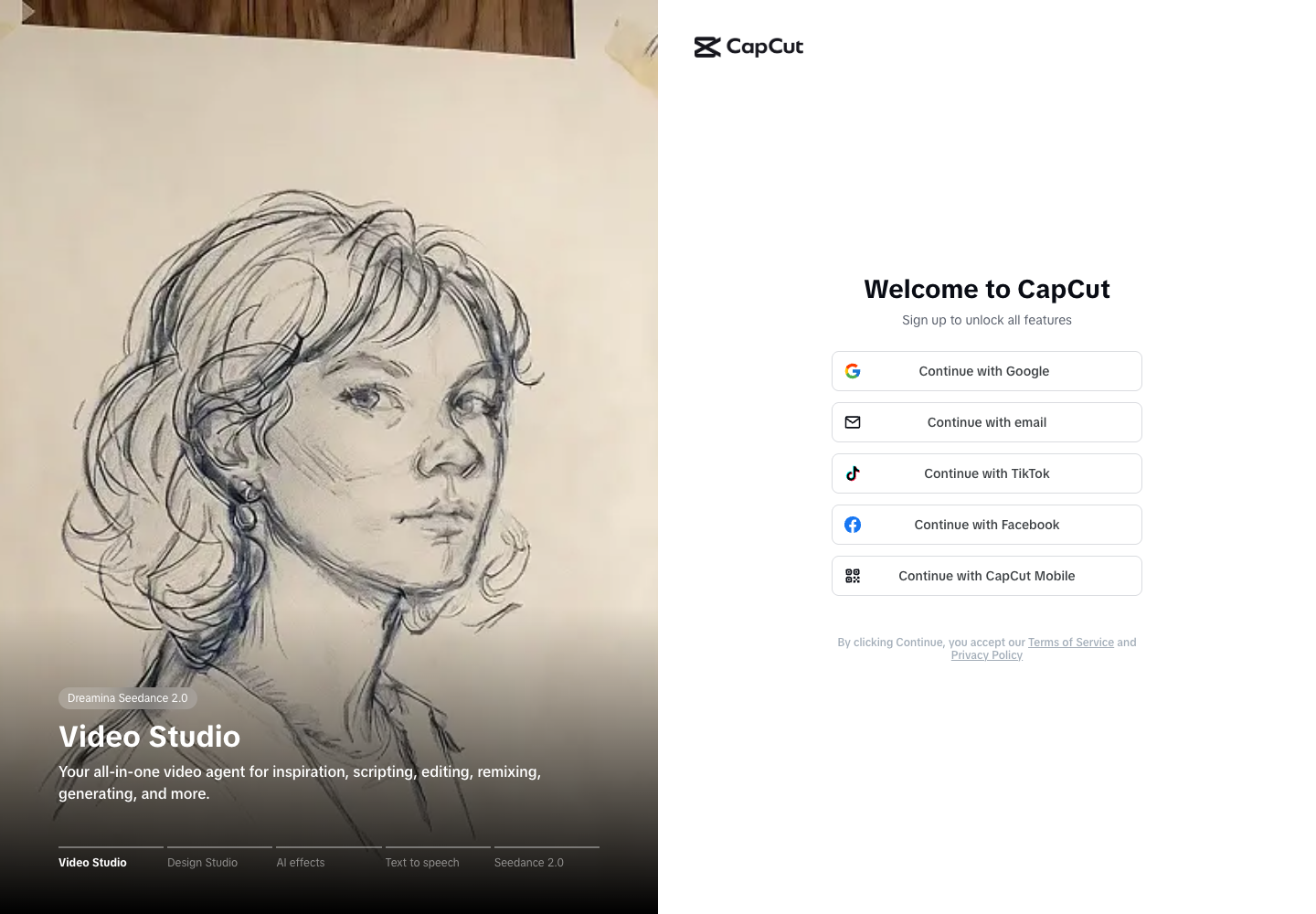
On September 14, our anonymous view of the official Web login displayed Google, email, TikTok, Facebook and CapCut Mobile. It did not display Apple or phone-number login. This was a public-screen check, not a successful account login or a test of every region.
The official sources disagree: the platform login guide excludes direct Web Apple login, while the 24-hour error guide names Apple among Web providers and wrongly describes Web as third-party-only. Use the buttons on your screen. If Apple is absent and your phone has the correct account, QR login is a documented alternative. Without that phone, use a previously linked method or the recovery routes below; do not assume typing an Apple relay address into email login will work.
Sign in on PC or Web with your phone
QR login is useful when your phone has the right account but the computer offers different sign-in buttons. It signs the computer into that account; it does not find a forgotten account or upload your local projects. Use it only for a login you started on a computer you trust.
- On your phone, confirm the expected CapCut ID and any relevant Space or membership details.
- On Desktop or Web, choose Use QR code or Continue with CapCut Mobile.
- In CapCut Mobile, open Me → Scan, as described in current Help, and scan the fresh code on your computer.
- Check that the phone prompt belongs to the login you just started, approve it, then compare the CapCut ID on the computer.
- On a shared computer, sign out when finished. Never forward a live login QR code or approve one sent by someone else.
If the code won't scan, make sure it is fully visible, allow CapCut camera access, refresh the code and confirm both devices are online. CapCut's QR login guide describes the phone as the scanner and PC or Web as the screen displaying the code.
If the computer does not display a code, check the missing-QR instructions. Try a wider window or an updated browser on the device you are troubleshooting; a private window can test a browser problem without clearing the working session. It does not bypass an account restriction. If Scan is missing on your phone, check the official app update and use an already-linked method if available. Do not install an old APK or disable security software just to reveal a login option.
No phone, no Scan, or only Desktop still works?
- You know the original login method: use that button on the device you are trying to sign into. For an email-based account, the official Web screen offers Continue with email. This does not prove your Desktop build offers email or that a Web session will sign Desktop in automatically.
- The phone works but Scan is missing: check for an official update, then use an already-linked method if the receiving device offers it. An update is not a guarantee that Scan will appear. Do not sign out of the only working account to look for the scanner.
- Only Desktop works and the method is unknown: leave it signed in, record its CapCut ID and any displayed linked email, then search your own sign-up mail and password manager. For Apple, inspect the app entry in your Apple Account settings on Mac or the web. If those checks do not identify a usable method, contact CapCut support from the working installation or official Help Center.
- No usable login remains: recover the original provider or email inbox through its official route below. QR cannot recover an account when no phone is signed into it. Do not follow a hidden-email trick or buy another subscription to get back in.
Match the symptom to the next account check
Compare Google login with email/password. Record the UID after each deliberate attempt.
Confirm UID first, then separate local projects from items uploaded to the same Space.
Compare CapCut IDs. If they match, check the plan and platform using the multi-device Pro guide.
Test the original provider, network and current app/browser before changing the account.
Find the store/web receipt and original login method. Don't buy a second plan to diagnose the first.
Check which account is open on the phone. Use a confirmed, accessible account before another scan; do not leave your last working session merely to test another account.
For a broad service or connection failure, use the CapCut connection checklist. For local or cloud draft risk, start with CapCut Project Safety. If you cannot sign in at all, start with the provider or connection error. You do not need to obtain a UID first. Compare IDs when an account opens but its contents look wrong.
Recover access without creating another problem
If a correct session is still open
CapCut's email-linking guide uses Mobile: Settings → Manage Account, then enter and verify the email. Confirm an alternative login is linked before unlinking an existing one; CapCut requires at least one active method. These email-linking controls are not the same as resetting a password on Web. If you need to switch accounts, current Help describes Settings → Switch accounts on Mobile; Web and Desktop use Log out. Save the account details and drafts first, and leave a separate known-good session alone.
If this is a CapCut email/password account
Open CapCut's official password-reset page, enter the email linked to the account and follow the message sent to that inbox. This resets a CapCut password, not your Google, TikTok, Facebook or Apple password. If you cannot access the original inbox, recover that email account or ask CapCut support; entering a different address will not recover the old account.
If Google, TikTok, Facebook or Apple owns the login
Use the recovery page for the account that owns the login, not CapCut's email reset form:
- Google Account recovery covers forgotten passwords, usernames and verification problems. Work or school accounts may need their administrator.
- TikTok's forgotten-password help starts from its login screen: Use phone/email/username → Email/Username → Forgot password. If the listed method is unavailable, use TikTok's own help instead of changing the CapCut login.
- Facebook account recovery separates accounts with access to their email or phone from those without it, and provides a hacked-account route.
- Apple Account password recovery covers trusted devices and the web route when a trusted device is unavailable. Follow its verification requirements; recovery is not guaranteed to be immediate.
After recovery, return through the same provider button in CapCut, or a method already confirmed as linked to that CapCut account. Password recovery can affect sessions; it is for lost access, not a routine test while your login still works.
If you used Sign in with Apple or Hide My Email
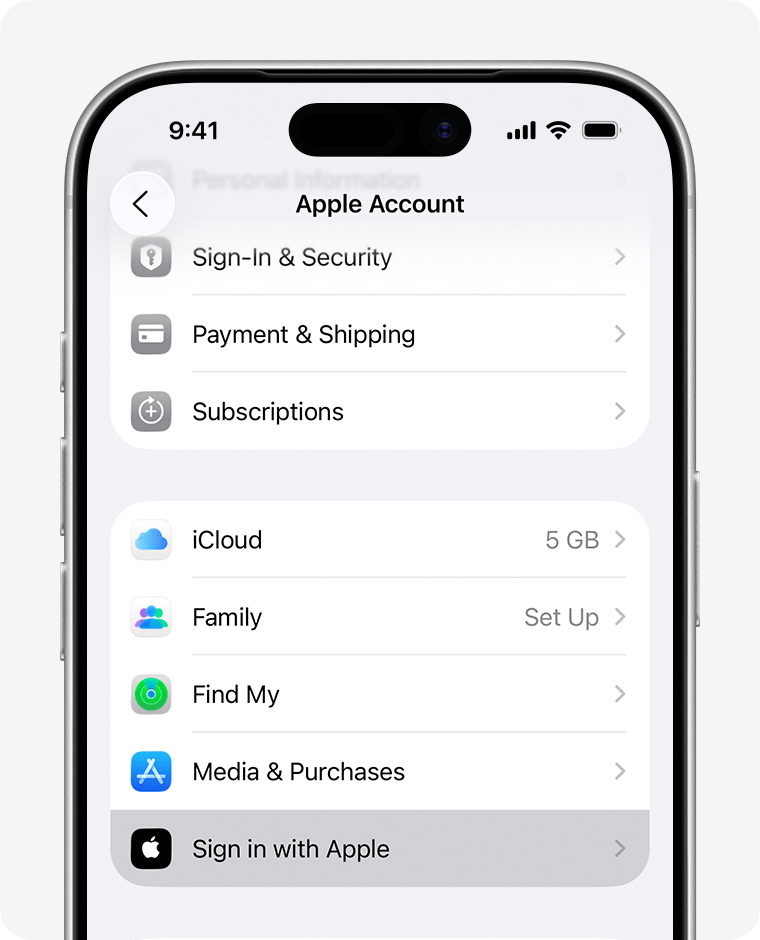
On iPhone or iPad, open Settings → your name → Sign in with Apple, then select CapCut if it is listed. Apple explains how to inspect the information shared with an app, including a hidden email address. On Mac, Apple documents System Settings → your name → Sign in with Apple. On the web, use account.apple.com → Sign-In & Security → Sign in with Apple. Select CapCut to inspect shared information without changing it. A hidden address may differ from your everyday inbox, but finding it does not establish that CapCut email/password login is enabled. Do not choose Delete or stop using Sign in with Apple as a troubleshooting step; first identify the existing account and its working sign-in.
If no correct session remains
- List the exact login methods and provider accounts you may have used.
- Search your inboxes for CapCut sign-up, verification and billing mail.
- Check Apple Subscriptions, Google Play subscriptions or CapCut Web billing based on the receipt source.
- Test one candidate method at a time and record the resulting CapCut ID.
- Stop repeated rapid attempts if CapCut warns about frequency or restriction; save the message and contact official support.
If a verification email does not arrive: check the address, correct inbox and spam or junk folders. CapCut's verification-email guidance warns that repeated resend requests can trigger limits. Follow the screen's countdown instead of repeatedly requesting codes. A school or work mailbox may require help from its administrator. Do not switch to an unrelated email to recover an existing account.
If the screen says “Retry after 24h” or “Maximum attempts reached”: save the exact message and stop rapid attempts. Follow any waiting period shown; CapCut's 24-hour guidance applies to that specific message, not every login failure. It does not guarantee access after a fixed delay. Ask support if the restriction persists. Do not change personal details, use modified apps or copy account folders to try to bypass it.
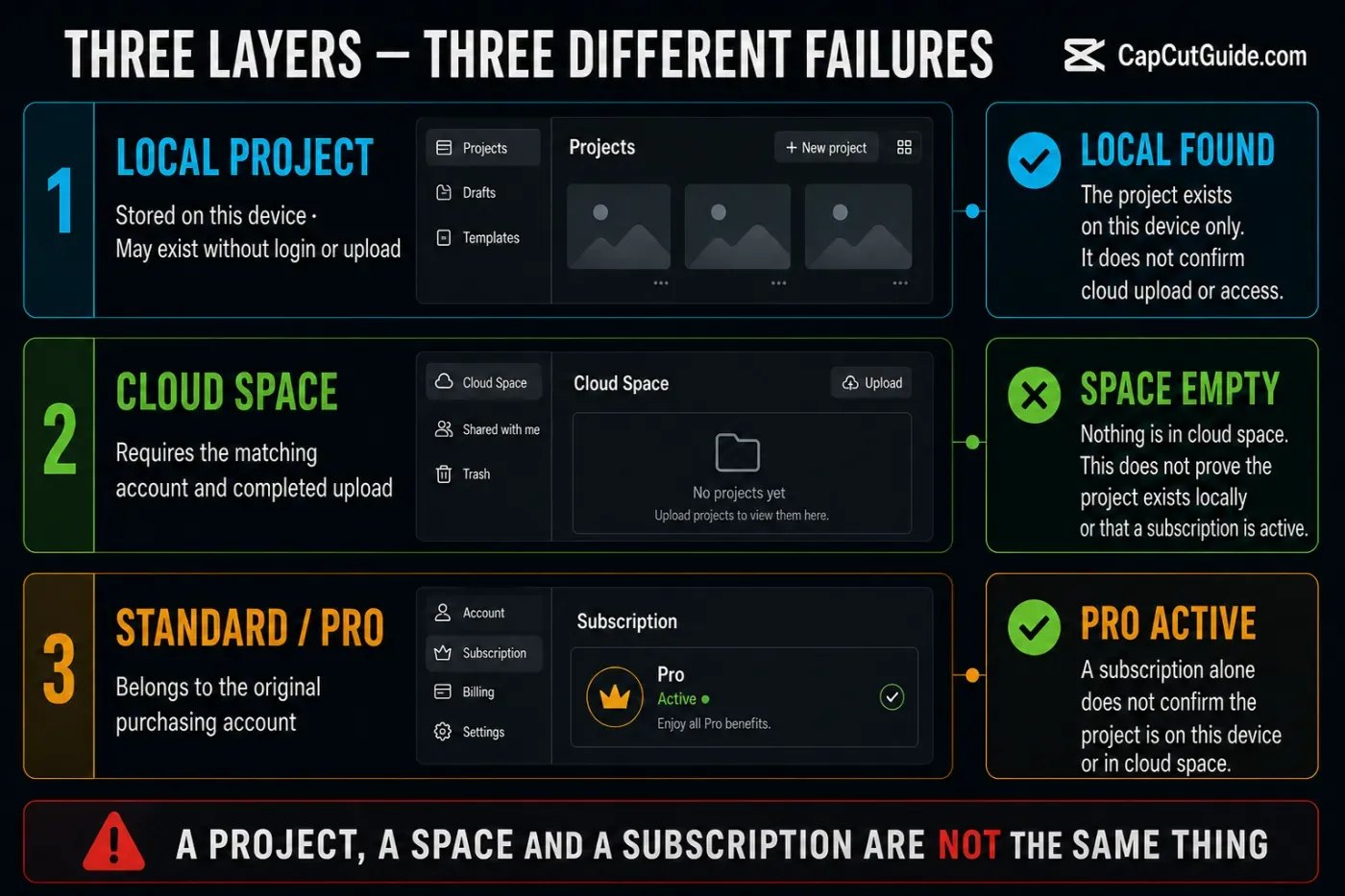
Account, project and subscription are three layers
May exist without cloud upload and may not prove which account owns it.
Requires access to the right Space and a completed upload. Signing in alone does not upload a local draft.
Belongs to the original purchasing account and has its own billing evidence.
CapCut's guidance says paid benefits can't be transferred to another account. If the correct UID is open and paid tools still remain locked, use CapCut Pro Not Working. If drafts are the concern, follow the location, backup or recovery route in Project Safety. Check upload completion and available storage: CapCut's cloud-quota notice explains why a Space may block new uploads. Do not delete local originals just because you can open the account on another device.
Build a useful support packet
Start at the official CapCut Help Center and use its support link for an account problem. Send the necessary identifiers privately, not in a public comment. A useful packet contains:
- the affected platform, OS and CapCut version;
- the login method and provider used on each device;
- the expected and current CapCut ID/UID, plus DID when support asks for the device identifier;
- the exact error text and time it occurred;
- project/Space name and whether the item is local or uploaded;
- for billing: order number, store/provider, purchase date and renewal state; never passwords, one-time login codes or full card details;
- cropped screenshots with unrelated projects, email, QR codes and other private data removed.
Explain which account you are trying to recover and what still works. Support may need to verify ownership; an ID alone is not a promise of recovery or permission to merge accounts. Give a necessary ID or order number only inside your verified private support case.
If the account is correct but another part of CapCut fails, the CapCut troubleshooting hub can help you choose the next check.
CapCut account and login FAQ
Why does the same email open a different CapCut account?
Google sign-in and a separately created email/password login can open different accounts with the same email. An additional method deliberately linked to an existing account is different. Compare the linked methods and CapCut ID, not the email alone.
How do I find which login method my CapCut account uses?
On Web, open Profile avatar → Settings. On Mobile, open Profile → Manage Account. CapCut does not document the same full checker on Desktop, but says an already-linked email can be visible. If Desktop is your only working session, keep it open and record the CapCut ID before trying to access Web.
Does logging into CapCut delete local projects?
A missing project after login is not proof it was deleted. Local drafts and uploaded Space projects are separate. Before signing out, clearing app data or reinstalling, identify where the draft is stored and back up important drafts with their source media.
Can I use Apple ID to log into CapCut Web?
The anonymous Web login checked September 14, 2026 had no Apple button. CapCut's help pages disagree, so this is not a claim about every region or future screen. If Apple is absent, use QR from the correct Mobile account or a previously linked method. Without either, follow official recovery; an Apple relay email alone is not a proven substitute.
Can two CapCut accounts be merged?
Don't assume they can. CapCut documents same-email accounts as separate identities and says Standard/Pro benefits can't be transferred to another account. Preserve both IDs and ask official support about the exact accounts; don't delete either one or buy a replacement plan first.
Why does QR login open the wrong CapCut account?
QR login authorizes the account open on your phone. Check its CapCut ID before scanning and compare the computer's ID after approval. It does not search for a different account or transfer local projects.
What if Pro is missing after I confirm the correct CapCut ID?
Check the membership status, receipt source, plan and affected platform. A matching account ID does not prove every paid feature is available on that device. Follow the CapCut Pro Not Working guide before buying another subscription.
What if CapCut does not send my verification code?
Check the exact email address, inbox and spam folders, then follow the resend countdown. Repeated requests can trigger limits. If a work or school mailbox blocks the message, ask its administrator; do not enter an unrelated email to recover the original account.
How do I find the email used with Sign in with Apple?
On iPhone or iPad, open Settings → your name → Sign in with Apple and select CapCut if it is listed. Inspect the information shared with the app; Hide My Email may use an address different from your personal inbox. Do not revoke the sign-in while identifying the account.