

CapCut is the better free editor, and InShot is the better deal once you pay. In the only same-phone export test with published numbers, CapCut exported at up to 4K for free with no watermark, while InShot stamped its logo on every frame and ran ads around the export. CapCut also runs on Windows, Mac and in a browser, where InShot stops at phones, tablets and Apple-silicon Macs. InShot Pro, though, costs $49.99 once in the US App Store, less than three months of CapCut Pro at $19.99 a month.
The pages ranking for this comparison miss the numbers that decide it. PDFChef lists InShot Pro at $3.99, $17.99 and $39.99 and says InShot has no Mac version, while the App Store now charges $4.99, $19.99 and $49.99 and runs the iPad app on M1 Macs. BlitzCut says InShot has no auto captions and leaves out CapCut's Windows and Mac apps. None of them publishes an export time or a file size. This page puts one same-phone test, five review scores, both store ratings and three years of prices side by side, then tells you which app I'd install for each job.
InShot vs CapCut at a glance
| Feature | InShot | CapCut |
|---|---|---|
| Best for | Simple phone edits and a one-time purchase | Free exports, templates and editing across devices |
| Runs on | iPhone, iPad, Android; Apple-silicon Macs through the iPad app | iPhone, iPad, Android, Windows, Mac, web browser |
| Free export | Logo in the corner unless you watch a reward ad or pay | No watermark with free assets; a short end card you can delete |
| Free ceiling in the 2026 test | 4K at 60 fps selectable, but the render was stopped at 11%; 1080p at 30 fps finished | 4K at 25 fps; 30 fps opened a trial prompt |
| Ads | Banner and full-screen ads | None seen; a paywall during setup |
| Paid plans (US) | Pro $4.99 a month, $19.99 a year or $49.99 once | Standard $9.99 a month, Pro $19.99 a month or $179.99 a year |
| Review median | 3.4 from 2 reviews (2.5 to 4.3) | 4 from 2 phone reviews; PCMag gave the desktop app 3.5 |
| App Store rating | 4.8 from 2.5 million ratings | 4.6 from 1.1 million ratings |
| Google Play rating | 4.8 from 24.8 million ratings | 3.5 from 13.1 million ratings |
| Data linked to you (Apple label) | None listed | Contact info, user content, identifiers, usage data, diagnostics |
Same phone, same clip: the export test
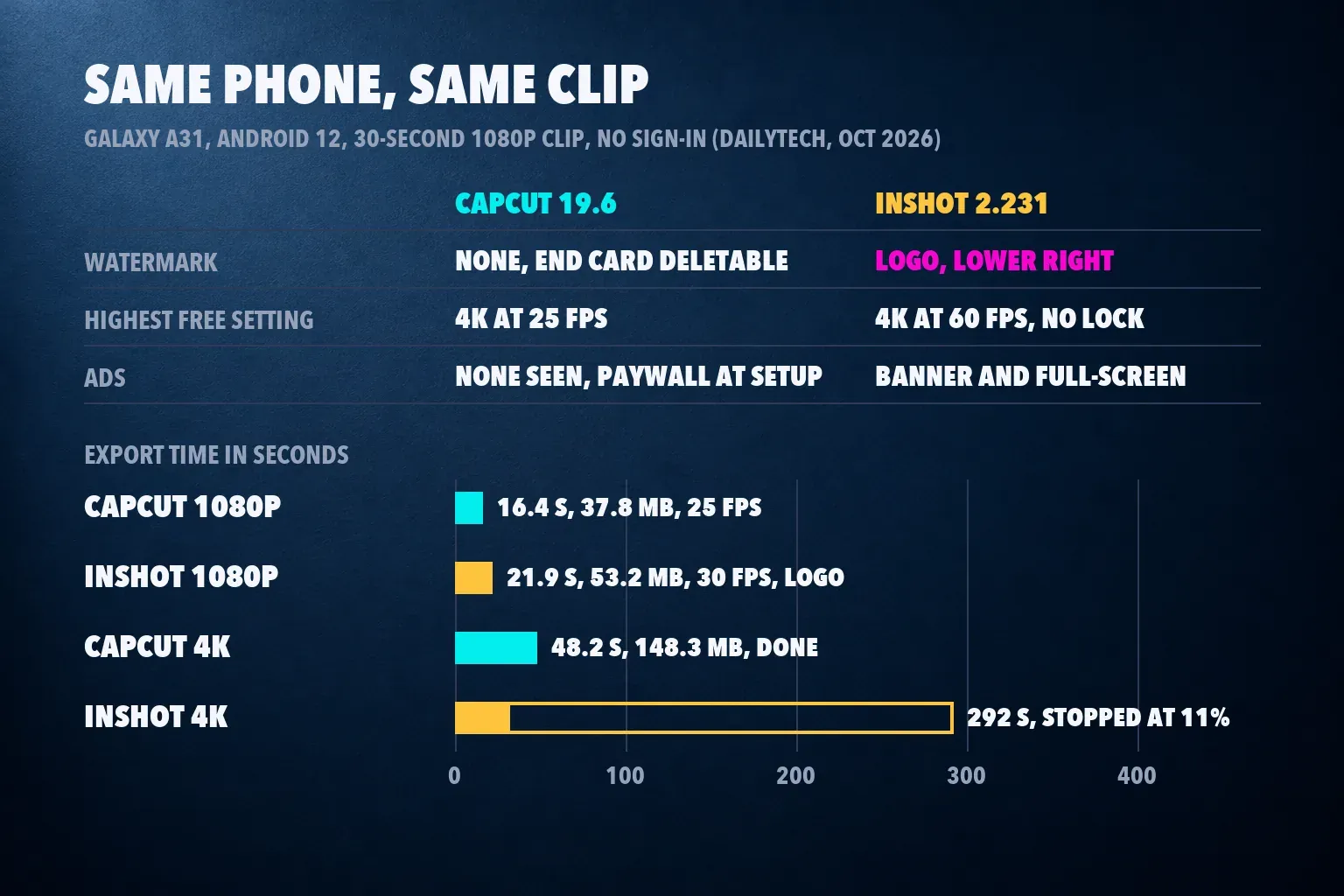
For a Dailytech test of free Android editors published October 8, 2026, Aron Mists ran both apps on one Samsung Galaxy A31 with Android 12, installed from Google Play with no sign-in and no purchases, and exported the same 30-second 1080p clip with a title. The versions were CapCut 19.6.0 and InShot 2.231.1551.
| Result | CapCut | InShot |
|---|---|---|
| Watermark | None; a 1.96-second end card with the CapCut logo, deletable | Translucent logo in the lower right of every frame |
| Highest free setting | 4K at 25 fps | 4K at 60 fps, no lock |
| 4K export | 48.2 s, 148.3 MB | Stopped at about 11% after 292 s, with about 40 minutes estimated |
| 1080p export | 16.4 s, 37.8 MB at 25 fps, end card removed | 21.9 s, 53.2 MB at 30 fps with the logo; 25.7 s after the reward ad |
| Ads and prompts | Full-screen CapCut Ultra paywall after the first setup screen; no ads seen | Banner ads in the editor and export sheet; a full-screen ad after export needed a force-stop |
CapCut's free result is the cleaner one. The picture carried no watermark, only a black Ending clip you can delete before you render, and the free plan went up to 4K at 25 fps on this phone. Moving the frame rate toward 30 fps opened a seven-day trial prompt for high-resolution export, so check the frame rate before you tap Export. One more detail: CapCut estimated the 4K file at 84 MB and wrote 148.3 MB, so leave more free space than the export sheet suggests. Our CapCut export settings guide covers which resolution and frame rate to pick.
InShot's 1080p render took 21.9 seconds and carried the logo. Removing it took a rewarded ad from the Remove Watermark and Ads dialog: the first try stuck on an ad that wouldn't close, and the second worked. 4K at 60 fps wasn't locked, yet the render reached about 11% in 292 seconds with roughly 40 minutes left on the estimate, so the test stopped it. On a phone like the A31, plan on 1080p from InShot.
Dailytech's verdict was blunt: "Skip unless you can live with the logo: InShot." I agree for anything you post under a brand or deliver to a client, because a corner logo reads as unfinished work. This is one test on one phone, and the frame rates differ (CapCut's free 25 fps against InShot's 30 fps), so read the times as the size of the gap rather than a benchmark for your phone. Filmora's InShot vs CapCut page names its test phones but publishes no numbers, and I found no second same-phone test with results.
Review scores and store ratings
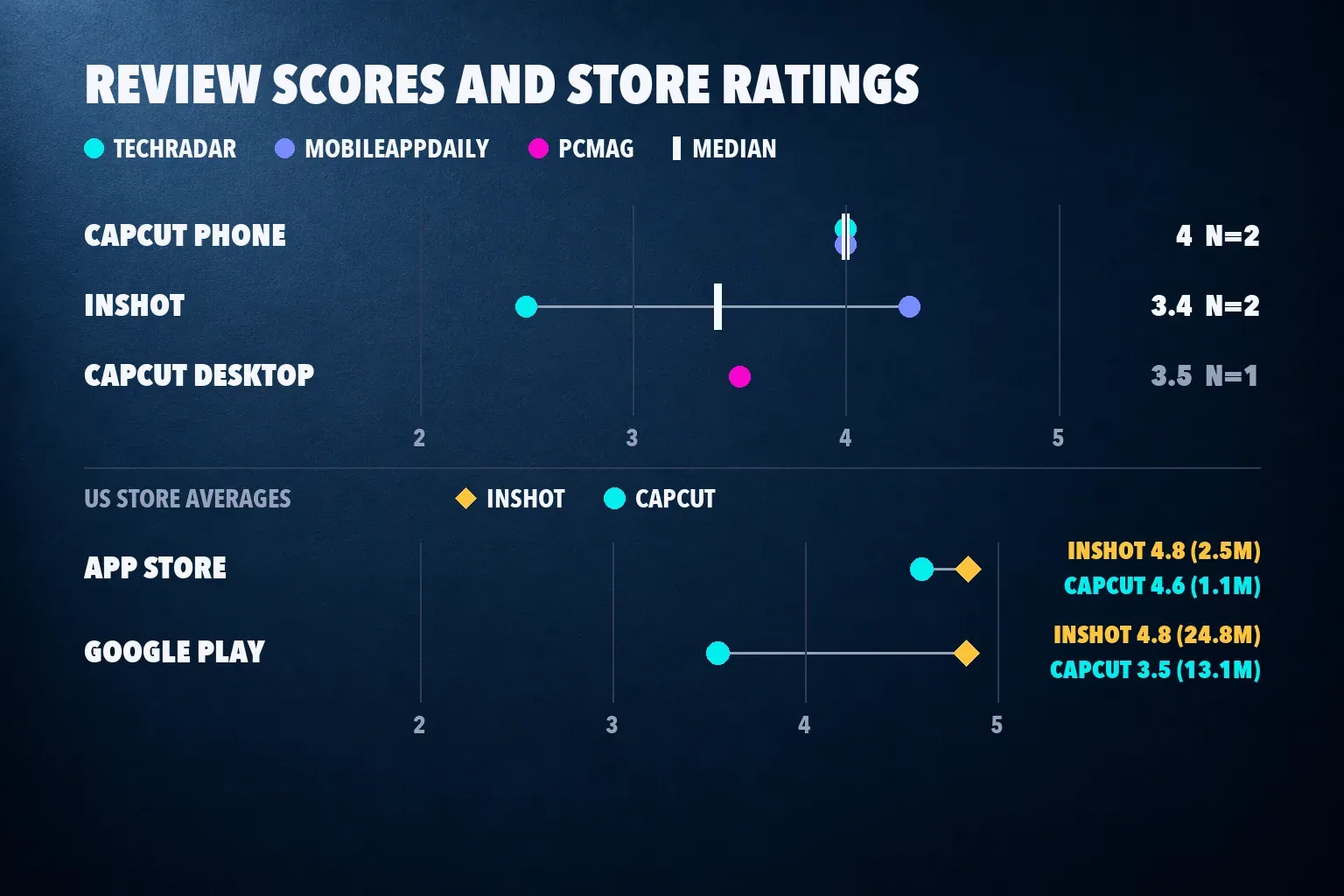
Two outlets reviewed both phone apps. Their scores put CapCut ahead, though the two InShot reviews sit almost two points apart.
| App | Review scores | Median |
|---|---|---|
| CapCut (phone) | TechRadar 4, MobileAppDaily 4 | 4 from 2 |
| InShot | TechRadar 2.5, MobileAppDaily 4.3 | 3.4 from 2 (range 2.5 to 4.3) |
| CapCut (desktop) | PCMag 3.5 | 3.5 from 1 |
TechRadar's InShot score is the low one. Steve Paris gave it 2.5 in December 2023 and listed privacy concerns among the cons, while noting that the free app offered 4K export with a subtle logo. MobileAppDaily rated InShot 4.3 across design, usability, features and reliability, but that review dates from 2021 with a 2025 update, and its price list is older than the store's. Both CapCut phone reviews give 4. TechRadar's 2023 complaint that CapCut was portrait-only no longer holds, since CapCut edits in 16:9 too. PCMag's 3.5 covers the desktop app, which InShot doesn't compete with, so I keep it out of the phone median. I left out AI Chat Daily's 4.2 for InShot because the site calls its page a researched overview rather than a hands-on review.
| Store | InShot | CapCut |
|---|---|---|
| US App Store | 4.8 from 2.5 million ratings | 4.6 from 1.1 million ratings |
| Google Play (US) | 4.8 from 24.8 million ratings, 500M+ downloads | 3.5 from 13.1 million ratings, 1B+ downloads |
The stores flip the reviewers' verdict. InShot holds 4.8 on both, while CapCut drops to 3.5 on Google Play. A store average pools every reason someone taps a star, from a paywall to a crash, and it doesn't weigh editing depth. Reviews judge the editor itself, so I give them more weight. A 3.5 across 13 million ratings is still a signal, so read the recent Play reviews for your phone model before you commit.
What a clean export costs
InShot charges to remove its logo. Its terms of use list removal of the InShot logo and ads among the subscription benefits, and subscriptions renew automatically. In the US App Store, InShot Pro costs $4.99 a month, $19.99 a year or $49.99 once for lifetime access, and add-on packs cost $1.99 to $3.99. A separate Remove Ads purchase at $3.99 is easy to confuse with Pro, but AI Chat Daily's InShot overview notes that it doesn't remove the watermark.
CapCut doesn't charge for a clean export. CapCut's watermark help page traces marks to a template's ending clip, stock that needs attribution and the default outro, and a Pro element can lock or mark the export; our CapCut watermark guide shows how to handle each case. What you pay for is the toolset. The US App Store listing shows Standard at $9.99 a month and Pro at $19.99, and CapCut's pricing page shows Pro at $179.99 a year in its USD view. Standard's benefits work only in the mobile apps, while Pro covers phone, desktop and web, according to CapCut's help page on cross-platform subscriptions. The store also lists an $89.99 "Yearly Subscription" without naming the plan, so I leave it out. Prices vary by country, and our CapCut pricing guide compares them.
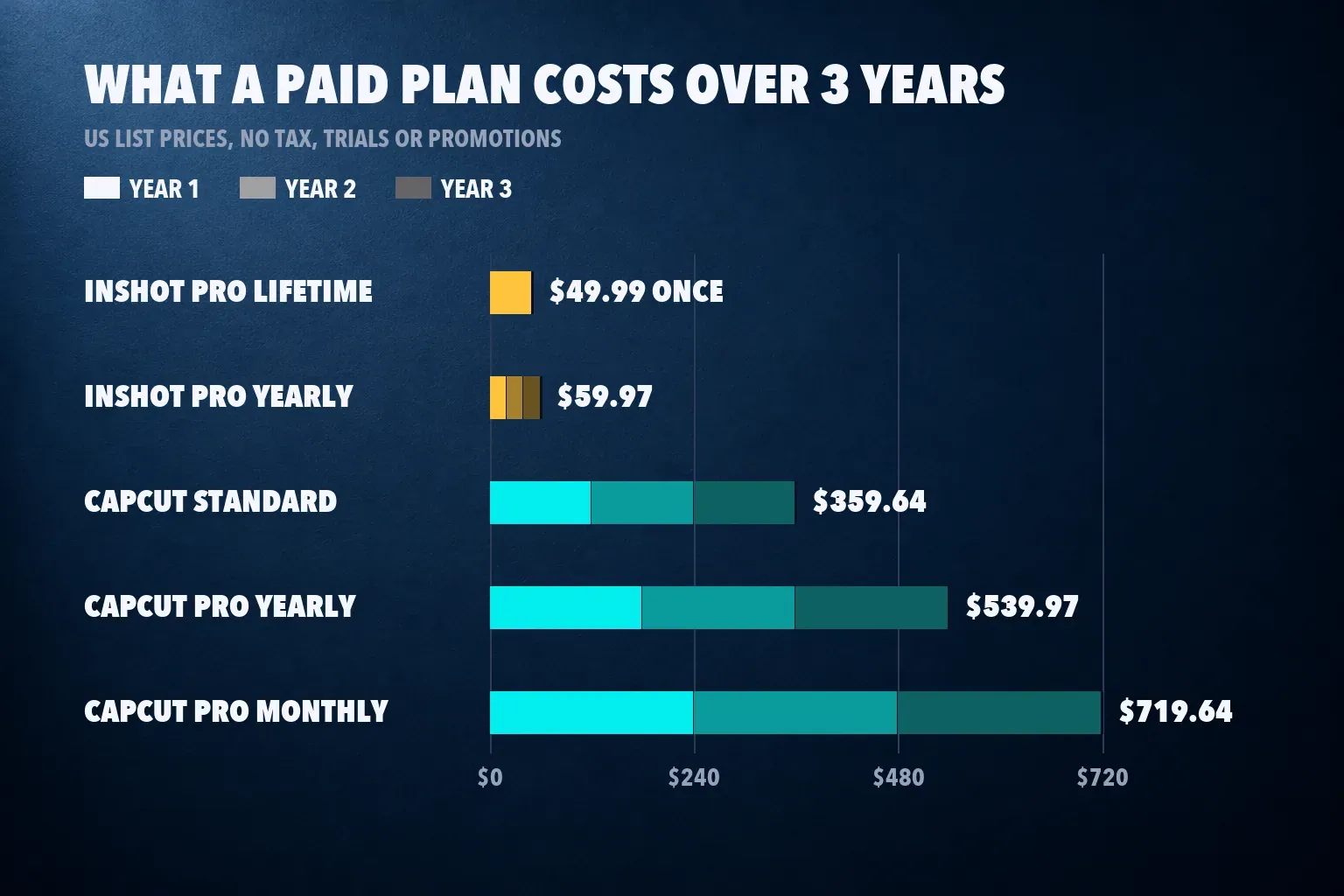
| Plan | 1 year | 2 years | 3 years |
|---|---|---|---|
| InShot Pro yearly | $19.99 | $39.98 | $59.97 |
| InShot Pro lifetime | $49.99 | $49.99 | $49.99 |
| CapCut Standard monthly | $119.88 | $239.76 | $359.64 |
| CapCut Pro yearly | $179.99 | $359.98 | $539.97 |
| CapCut Pro monthly | $239.88 | $479.76 | $719.64 |
These are US list prices with no tax, trials or promotions, renewed at the same price. InShot's lifetime price catches up with its yearly plan two and a half years in, so buy lifetime if you expect to keep editing past the second year. Three months of CapCut Pro ($59.97) cost more than InShot for life, and one year of Pro costs more than three lifetime licenses. Whether CapCut's extra tools earn that difference is the question our is CapCut Pro worth it guide answers, and the CapCut Pro free trial guide explains how to try it first.
Editing tools: captions, templates, timeline and AI
On a phone, the two overlap more than the price gap suggests. InShot's store listing names auto captions with bilingual subtitles, AI voices, an AI Cut tool that trims silences and filler words, keyframes, stabilization, motion tracking and 4K export at 60 fps, and recent updates added filter and effect keyframes and volume balancing. Its timeline keeps one main clip row with picture-in-picture layers on top, which is quicker to read on a small screen. Our InShot review walks through the workflow and its limits.
CapCut goes wider. It has a larger template library (our CapCut templates guide shows how to find and edit them), auto captions in CapCut that may need Pro or show a limited allowance on your account, keyframe animation in CapCut and separate tracks for video, audio, text and effects. On a computer, that becomes a full desktop timeline. If your edits are a few clips, music and captions, InShot covers them with less to learn. If you build layered edits or start from trend templates, CapCut is the better tool.
Platforms: phone, computer and browser
| Platform | InShot | CapCut |
|---|---|---|
| iPhone and iPad | Yes, iOS 15 or later | Yes, iOS 15 or later |
| Android | Yes | Yes |
| Mac | iPad app on M1 or later Macs with macOS 13 or later | Mac app, macOS 10.14 or later |
| Windows | No | Yes |
| Web browser | No | Yes |
| App Store download size | 264.7 MB | 828.5 MB |
InShot's Mac option is the iPad app running on Apple silicon, so it behaves like the phone app with a mouse. CapCut has full desktop apps covered in our CapCut for PC and CapCut for Mac guides, a CapCut web editor and an iPad layout we cover in CapCut for iPad. Standard's benefits apply only in the mobile apps, so pick Pro if you plan to finish edits on a computer.
Privacy, ownership and the US question
Both Apple privacy labels list identifiers as data used to track you. The difference is what's tied to your identity: InShot lists identifiers, usage data and diagnostics as not linked to you, while CapCut lists contact info, user content, identifiers, usage data and diagnostics as linked to you. Google Play tells the opposite story on sharing. InShot's data safety section says it may share device or other IDs with third parties, and CapCut's says it shares no data with third parties. Both encrypt data in transit and accept deletion requests.
InShot's privacy policy says audio for auto captions goes to its server and is deleted after processing, so treat captions as an online feature in either app. CapCut's App Store seller is Bytedance Pte. Ltd., and its US terms name TikTok USDS Joint Venture LLC; our who owns CapCut page explains that structure. CapCut left US app stores on January 18, 2025 and is listed in both again; is CapCut banned in the US has the timeline. For the full data picture read is CapCut safe, and for paid client work check CapCut commercial use rights, because templates and music carry their own licenses.
If the least data tied to your identity matters most, InShot's Apple label is the lighter one. If third-party sharing worries you more, CapCut's Play listing is cleaner.
Moving between InShot and CapCut
Neither app opens the other's projects, and I found no import path in either app's store listings or help pages. Moving means exporting the finished video, or rebuilding the edit from your original clips. Keep the source footage in your gallery until the new edit is done, because an InShot draft can break when its original file is deleted. Export at the best clean setting your phone handles (our CapCut export quality guide covers bit rate) and check free space first: CapCut's iPhone app alone is 828.5 MB before drafts and cache, and our CapCut iPhone storage guide shows how to clear it.
Which one I'd pick
- Free posts for TikTok, Reels or Shorts: CapCut. The free export is clean, and templates and captions are built in; our CapCut for TikTok guide covers the setup.
- The cheapest paid editor: InShot Pro lifetime at $49.99. It costs less than three months of CapCut Pro and never renews.
- Editing on a computer or in a browser: CapCut, with Pro rather than Standard.
- A first editor for simple phone videos: InShot. One main clip row and fewer menus, and one purchase removes the logo for good.
- The least data linked to your identity: InShot, going by Apple's labels.
Install CapCut from the official stores with our CapCut Android download and CapCut iOS download guides. If neither app fits, our CapCut alternatives guide compares twelve editors, and our roundups rank the best video editing apps for iPhone, the best Android video editors, the best video editors for TikTok and the best free video editing apps.
How I compared
I put both apps through the questions a creator asks before installing: what the free export looks like, what it costs to remove the catch, which devices it runs on and what it does with your data. Export results come from the Dailytech same-phone test, the only one I found with published numbers. Scores come from TechRadar, MobileAppDaily and PCMag, with the median, range and count shown. I read both apps' US App Store and Google Play listings, InShot's terms and privacy policy, and CapCut's pricing and help pages. Where a ranking page disagreed with a listing, the listing won.
InShot vs CapCut questions
Is InShot better than CapCut?
For free use, no. CapCut exported at up to 4K with no watermark in a same-phone test, while InShot added its logo and showed ads. InShot is the better value if you'll pay, because Pro costs $49.99 once against CapCut Pro's $19.99 a month.
Does InShot put a watermark on free videos?
Yes. Free exports carry a translucent InShot logo in the lower right corner. Watching a reward ad removed it in a 2026 test, and InShot Pro removes it for good; the $3.99 Remove Ads purchase does not.
Does CapCut add a watermark?
Not in the same-phone test: CapCut's free 1080p and 4K exports carried no watermark. The app adds a short logo end clip you can delete, premium templates, effects or stock can mark or lock an export, and PCMag found watermarks on free exports from the desktop app.
Is InShot Pro cheaper than CapCut Pro?
Yes, by a wide margin. In the US App Store, InShot Pro costs $4.99 a month, $19.99 a year or $49.99 once, while CapCut Pro costs $19.99 a month or $179.99 a year on CapCut's site. Over three years that's $49.99 against up to $719.64.
Can I use InShot on a computer?
Only on a Mac with an M1 chip or later and macOS 13 or later, where the iPad app runs from the App Store. There is no Windows or browser version. CapCut has Windows and Mac apps and a web editor.
Which is safer, InShot or CapCut?
InShot links less data to you on Apple's privacy label, and CapCut shares less with third parties on Google Play. Both list identifiers used to track you and accept deletion requests. CapCut is owned by ByteDance, which matters if your employer or school restricts its apps.
Can I move an InShot project into CapCut?
No. Neither app imports the other's projects. Export the finished InShot video, or rebuild the edit in CapCut from your original clips.