

The newest CapCut release for iPhone and iPad is version 20.2.0, out on November 17, 2026 with bug fixes and a better trimming experience, and the Google Play listing was updated again on November 16 with the same note. The bigger news came from CapCut World in Los Angeles on October 24: prompt-based editing with EditPilot on Desktop, edits made directly in the preview window, AI generation coming to the web editor and a ChatGPT plugin. To update, tap Update on CapCut's App Store or Google Play page, or use Help > Check for Updates in CapCut Desktop. I recommend finishing and backing up open Desktop projects before updating, because CapCut warns that uninstalling during an update can lose locally saved projects.
Below you'll find the version table, a dated timeline built from CapCut's own announcements, the features that were announced but may not be in your app yet, and the update, version-check and auto-update routes for every device.
Latest CapCut versions by platform
| Platform | Newest release in this log | What changed | Where to check yours |
|---|---|---|---|
| iPhone and iPad | 20.2.0, November 17, 2026 | Fixes for known issues and a better trimming experience; needs iOS 15.0 or later | Me > Settings icon > bottom of the list |
| Android | Listing updated November 16, 2026 | Google Play shows the date and the same short note, but no version number | Me > Settings icon > bottom of the list |
| Windows and Mac | Shown inside the app | CapCut checks against the newest build for you | Settings > Version |
| CapCut Web | Runs in your browser | Nothing to install or update | Not needed |
CapCut's App Store listing carries the version number, the release date and the short "what's new" note, which makes it the most precise public record of a mobile release. The Google Play listing shows the update date and a "What's new" note but no version number, so on Android the number lives inside the app. The current release notes on both stores are short; the feature news comes from CapCut's newsroom, and our CapCut features guide explains the tools those notes refer to.
CapCut news timeline for 2026
Newest first. Each entry points to CapCut's own announcement or the primary record behind it, so you can see what was said and who it applies to.
November 17: version 20.2.0. The App Store version history records 20.2.0 on November 17 with the same note about known fixes and an improved trimming experience. Google Play shows a November 16 update with the same short note. Neither entry announces an additional feature rollout.
November 10: version 20.1.0. The App Store lists version 20.1.0 with the same short note about known fixes and the trimming experience. Google Play showed a November 13 update before the latest check. These store notes do not establish that every announced Los Angeles feature has reached your account, so check the rollout conditions below.
October 27 to November 2: store-listing dates. Version 19.9.0 reached the App Store on October 27 with fixes and trimming improvements. Monitoring runs from October 29 through November 3 recorded Google Play's "Updated on" field as October 28, October 29, October 30 and November 2. All six observations carried the same "What's new" note about known fixes and trimming improvements.
October 24: CapCut World Los Angeles. CapCut's Los Angeles announcement, posted on October 27, lists four editing updates. On Desktop, the updated EditPilot takes instructions in plain language for complex or repetitive timeline tasks, such as changing the color of one object in a shot while leaving the rest alone. Generative and Interactive Edit let you select the part of the preview you want changed instead of describing it. The web editor is being upgraded with AI image, video and audio generation, with Interactive Edit, AI Extend and Intelligent Audio on the way. On mobile, AI Lab turns photos and clips into vlogs or social recaps through a conversation, and personalized templates are expanding.
The same post announced a ChatGPT plugin and an agentic creation pilot "in the coming months", a Skills Marketplace on the web for sharing styles and workflows, and a Visual Creator Program for designers, animators and prompt creators that builds on the existing creator program. CapCut is also piloting a transparency tool: upload a file and it tells you whether CapCut, Dreamina, Pippit or Hypic AI tools helped make it. CapCut puts its audience at more than 700 million users a month across 170+ markets and 30 languages.
September 4 to 6: CapCut World Singapore. CapCut's Singapore recap of the first event traced one workflow from AI Lab, where you brainstorm in your own words, to Infinite Canvas and then the multi-track editor with Edit Pilot, and showed interactive editing in Video Studio and Design Studio. It also said Skills, a way to save and share the styles and workflows behind a piece, had recently rolled out. CapCut counted more than 85 AI tools, 400,000 new templates every day and 6 billion AI generations in 2026.
August 10: Design Studio upgrade. CapCut's Design Studio press release, carried by The Manila Times, describes an infinite canvas with an AI agent, a Skills system, batch text replacement with translation into 50+ languages and the Seedream 5.0 Pro image model, which it says was officially released on July 8. The AI image generator guide covers the image side of CapCut that Seedream powers.
July 31: Seedance 2.5 and Seedream 5.0 Pro. CapCut's Seedance 2.5 announcement says the video model makes clips up to 30 seconds long from up to 50 multimodal references and was rolling out to subscriber accounts of people over 16 in Europe, Asia, the Middle East and South America. The United States isn't on that list. Seedream 5.0 Pro, with arrow, circle and layer editing and text in more than 10 languages, was announced for paying subscribers in those regions and in the US.
March 25 to April 7: Seedance 2.0 reaches more countries. CapCut's Seedance 2.0 post describes a phased paid rollout that began in Indonesia, the Philippines, Thailand, Vietnam, Malaysia, Brazil and Mexico, widened on March 25, March 28 and March 31, and reached the US on April 7. The initial rollout restricted making videos from images or clips that contain real faces, and results carry an invisible watermark, with visible watermarks and C2PA Content Credentials as well.
January 23: the US joint venture. The TikTok USDS Joint Venture announcement came on January 23, 2026. Our CapCut US ban explainer summarizes how its safeguards cover CapCut.
June 2025: Terms of Service update. CapCut's Terms of Service explainer describes a minor update dated June 12, 2025, announced by push notification on June 6. It clarified third-party services, added more information about Company Content and supplemental terms for Australia and Japan, and left the User-generated Content section unchanged.
January to February 2025: removal from US app stores. A Congressional Research Service report records that CapCut, TikTok and Lemon8 were removed from certain Apple and Google stores beginning January 18, 2025 and restored on February 13.
Announced but not in your app yet
After every CapCut event the same question follows: where is the feature they showed? Check the feature's rollout window, region and account requirements as well as your app version.
ChatGPT plugin. The Los Angeles post says "in the coming months", yet CapCut's CapCut × ChatGPT page already gives an install prompt. CapCut directs you to send the installation prompt to a supported task in the ChatGPT desktop app. Access, generation limits and individual assets depend on the account, region and product terms. The prompt tells ChatGPT to download a SKILL.md file and follow it exactly to install and authorize the plugin. I'd open that file and read it yourself first, because you're about to let a plugin act on your CapCut account and that file is the set of instructions it follows.
Agentic creation pilot. In its October 27 announcement, CapCut said this pilot would roll out on desktop, web and mobile in the coming months. That announcement gives no download date.
Web editor upgrades. Interactive Edit, AI Extend and Intelligent Audio were described as coming to the web editor in the October 27 announcement. Our CapCut Web guide covers what the browser editor does today.
Seedance 2.5 in your region. CapCut's Seedance 2.5 feature page says it shows up as a selectable model once it's available in your region, and the July post ties it to subscriber accounts. Check the model list in the AI video generator rather than reinstalling, and see which features belong to a subscription in our Pro features guide.
CapCut World London. The CapCut World event site lists London on November 26, 2026 at Outernet London on Charing Cross Road, the third and final stop after Singapore (September 4 to 6) and Los Angeles (October 24). The Los Angeles post says London will highlight CapCut's UK and European community. The day opens at 14:00 GMT with a keynote and product showcase, and the awards ceremony starts at 18:30. Until November 19 you can also try for a hosted spot: post a public TikTok about your CapCut story (a project you're proud of, your process or an editing tip) with #CapCutWorld and #CapCutWorldLDN, in English, Spanish, German or French. CapCut announces the winners on November 20, and they get event access, round-trip flights and a hotel.
Skip "new version" APK pages. Installing a newer APK does not by itself establish that your account and region qualify for these features. I'd install CapCut only from Google Play, the App Store or capcut.com, because a mirror's file can be modified and you can't easily tell. Our Android download guide and the CapCut safety review cover the official routes.
How to update CapCut on every device
iPhone and iPad. Apple's manual app update guide gives this route: open the App Store, tap your profile icon, tap App Updates, then tap Update next to CapCut. If the button says Open, you already have the newest version available to you. Restart CapCut after the update. CapCut adds that updates may roll out gradually, so availability can differ by region and device. If CapCut isn't on your iPhone yet, the iOS download guide covers the first install.
Android. Open the Play Store, search for CapCut and tap Update. The same Open-means-current rule applies.
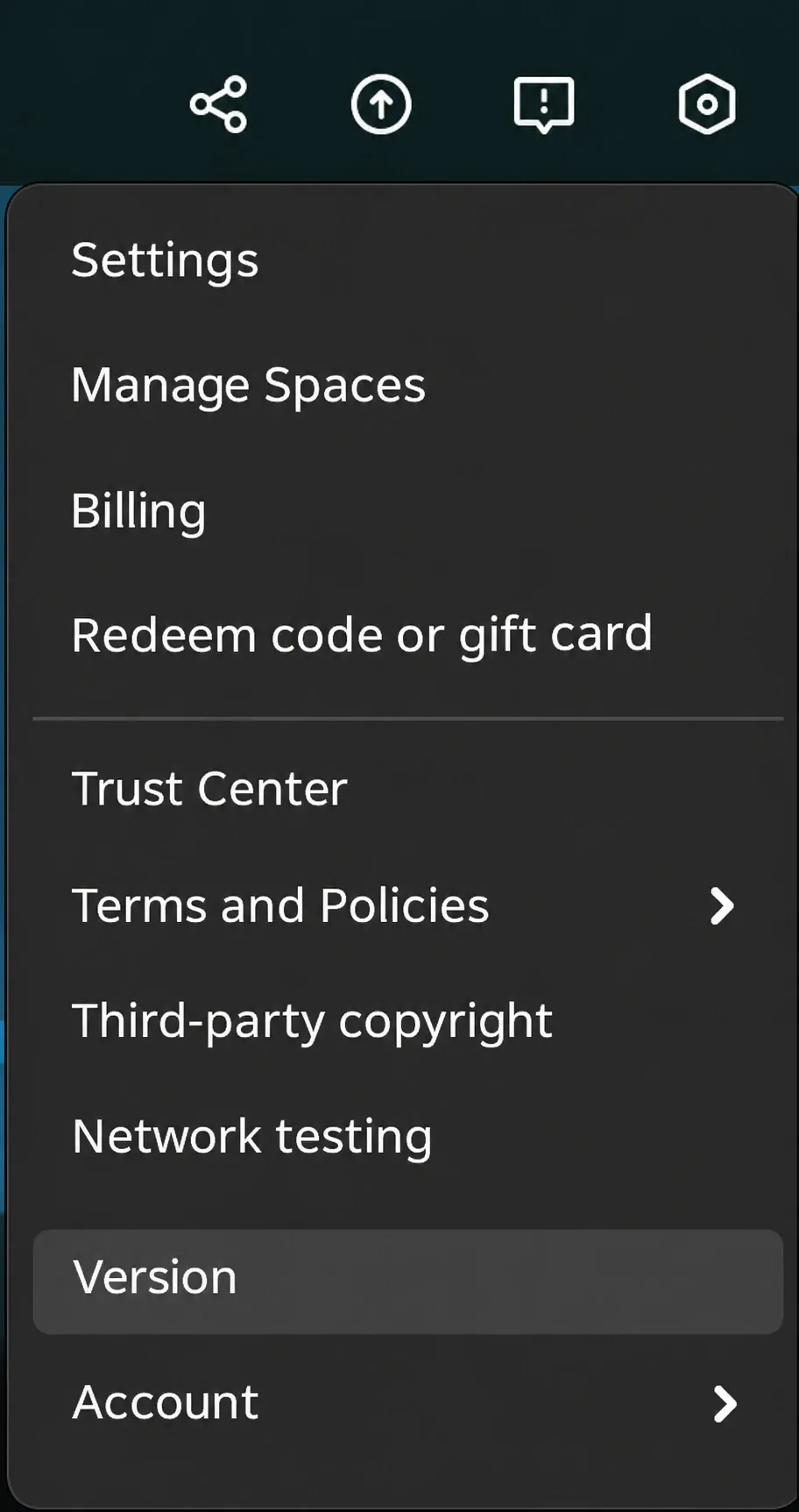
Windows and Mac. CapCut's PC update guide says to open Settings in the top right, choose Version and click Check for updates, or click the upward arrow icon labeled "You're up to date" in the top right, which checks for and installs the newest version. Its Desktop guidance for Windows and macOS also gives Help > Check for Updates. Keep the app open on a stable connection, and don't uninstall CapCut while it updates. Our guides to CapCut for PC and CapCut for Mac cover a fresh install, and the CapCut download hub links every platform.
When the update fails or CapCut forces one. CapCut's forced update page explains why: security patches, new features that need updated components, older versions that get disabled, and old builds that stop working with cloud, login or a newer operating system. For a stalled PC update, CapCut says to download its official installer and install it over the current version, keeping projects safe. Back up first. It also suggests checking your connection, restarting the computer, deleting temporary update files, reinstalling, and freeing at least 1 to 2 GB of space. On a work or school computer, ask your IT admin or use CapCut Web.
CapCut Web. The browser editor has no installer, so there's nothing to update.
How to check which CapCut version you have
CapCut's version help page gives two routes. On Desktop, click Settings and find Version in the pop-up window. On a phone or tablet, tap Me, then the Settings icon in the top right, and scroll to the bottom of the list. Compare it with the table above. I'd note the version number before you contact CapCut support, because it identifies the build you're troubleshooting.
Can you stop CapCut from updating?
iPhone and iPad. Apple's automatic updates guide says App Store apps update automatically by default. Turn that off in Settings > Apps > App Store > App Updates, and you'll get an App Store notification for each update instead.
Android. Google Play's app update help lets you switch off updates for CapCut alone: open the Play Store, tap your profile, go to Manage apps & device > Manage, open CapCut, tap More and turn off Enable auto update. Google adds that it may still install an update that fixes a critical security vulnerability, whatever your settings say.
Windows. CapCut's PC guidance says an update can be required before you continue, and CapCut's older versions page says it can't provide installation packages for older versions.
I wouldn't freeze CapCut on an old build. CapCut's own forced-update page warns that outdated versions may stop working with cloud features, login or newer operating systems. I'd keep updates on and back up your projects before a big release instead.
What an update can do to your projects
An update can move controls. CapCut's UI changes help page suggests restarting the app, checking the main menu, toolbar and settings, using search or help, and updating to the newest build. If something still looks wrong:
- A tool moved or vanished: our after-update guide helps you tell a moved control from a feature that was removed or gated.
- You can't find a project: check where CapCut saves projects on your device before you assume it's gone.
- CapCut crashes on launch: work through the crash fixes in order.
- Pro features stopped working: the Pro troubleshooting guide covers sign-in and subscription checks.
Where "CapCut update" searches lead
The recorded Google results from October 29, 2026 for "capcut new update", "capcut news" and "capcut update news today" contain 9, 9 and 10 organic entries. Removing duplicate URLs leaves 24 results. The table summarizes their recorded titles and search snippets.
| Result type | Unique URLs | Observed title or snippet | Useful next check |
|---|---|---|---|
| CapCut /explore/ results | 12 | Titles include Free Breaking News CapCut Templates and New CapCut Updates & Video Templates. | For a product change, find its dated announcement or store entry. |
| APK/version article and download results | 3 | Uptodown's preview says "20.0.0 Oct 28, 2026". The other results are a Softonic download page and a CapCut APK-version resource. | Use the official store and in-app version when checking your installed build. |
| YouTube video results | 3 | One title is How To Update CapCut (Easy Guide 2026); the other titles concern a news ticker and a newsroom video. | Match the tutorial topic to your task and confirm current update steps in CapCut help. |
| CapCut News Intro Maker | 1 | Free News Intro Maker | CapCut Editor Online. The preview offers templates for making a news intro. | Useful when creating a news-style video. |
| App Store listing | 1 | The title identifies Apple's CapCut listing; the snippet includes "Version History". | Open the listing for its version history and release note. |
| CapCut desktop update help | 1 | How Can I Update CapCut to The Latest Version on PC?. The snippet says "Go to Version" and "Select Check for updates". | Use the official help for update steps, then check the installed version. |
| Reddit r/CapCut | 1 | The r/CapCut previews discuss update cycles and a Pro badge. | Use community reports to identify a symptom, then verify the relevant account or help-page details. |
| Downdetector status result | 1 | The title is CapCut down? Current problems and outages. | Useful for service-status troubleshooting. |
| Instagram topic result | 1 | The title is Capcut Latest News And Updates; the snippet includes "CapCut 2025 Updated Latest Version: New Pro Features Explained!". | Trace a version or feature claim to its original announcement or store listing. |
Half of these 24 unique URLs were CapCut /explore/ results. The recorded titles and snippets mix product-update wording with templates, news-video tutorials, downloads and service-status reports. My verdict: start with CapCut's newsroom and store listings for product changes, use its help pages for update steps, and check Settings > Version for your installed build. I'd skip APK "new version" pages when deciding what changed in my account.
Making a news video instead?
If "CapCut news" meant a breaking-news intro rather than release notes, start with CapCut's news template gallery or the online News Intro Maker, which CapCut describes as free, with pre-built breaking news templates and no watermark. For more choice, our guides to intro templates, CapCut templates and trending templates show how to find and use them.
Is CapCut down, shutting down or banned?
If CapCut won't load after an update, use our CapCut not working guide to check for app, device or service problems. Shutdown rumors are a different question: the ban explainer linked in the timeline covers the US legal record, and our page on who owns CapCut covers the company behind it. CapCut is still shipping releases, with 20.2.0 the newest on the App Store in this log.
CapCut updates: questions
How do I know if there's a new CapCut update?
Open CapCut's page in the App Store or Google Play. An Update button means a newer build is waiting; Open means no newer build is offered to you there. On Desktop, use Help > Check for Updates.
Why don't I have the new CapCut feature everyone is talking about?
Announced features can have separate rollouts, and CapCut ties AI access to app version, account and region. Update, restart the app and check again later. I'd also confirm you're signed in to the account you expect with the login guide, because AI access also depends on your account, plan and available credits.
Can I go back to an older version of CapCut?
CapCut says it can't provide installation packages for older versions and recommends updating and reporting the problem to customer service. If an update cost you a project, our guide to recovering deleted projects lists the places to look.
Does updating CapCut delete my projects?
CapCut's PC guidance says installing over your current version keeps projects safe. It also warns that uninstalling during an update may lose locally saved projects, so back up first.
How do I turn off CapCut auto-updates?
On iPhone, Settings > Apps > App Store > App Updates turns off automatic updates for App Store apps. On Android, open CapCut in Manage apps & device, tap More and turn off Enable auto update. Google may still install critical security updates.
Is CapCut shutting down?
CapCut remains listed in the US App Store and Google Play, and it keeps releasing updates, including 20.2.0 on November 17, 2026.