

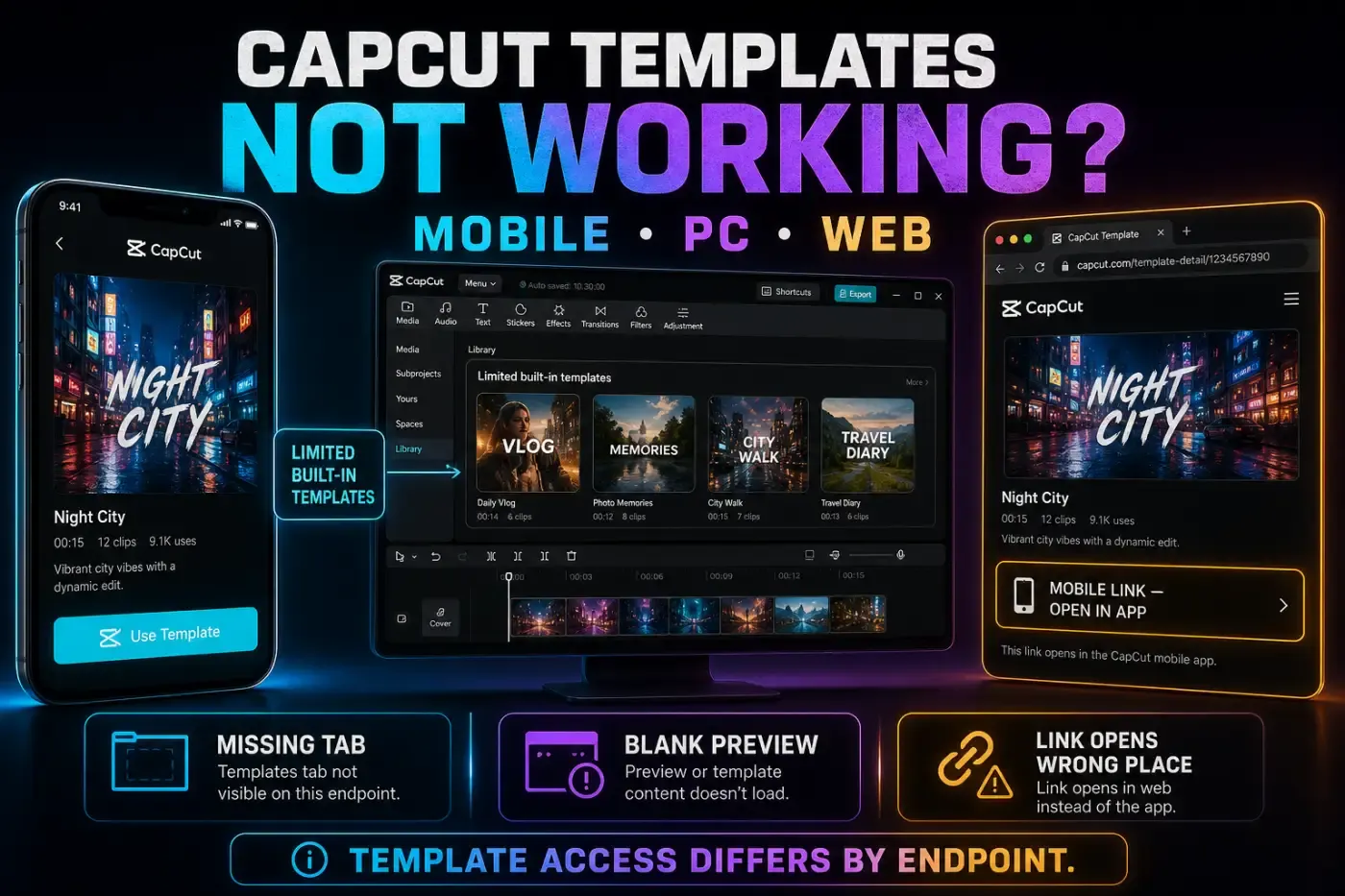
“CapCut templates not working” covers several different failures: the Templates tab is missing, a shared link opens the wrong place, previews stay blank, loading stops, replacement media looks wrong, or export fails. Clearing everything treats those as one problem and can put local drafts at risk.
Start with the platform and the first broken step. A TikTok template link that works on a phone doesn't prove that the same template should open as an editable Desktop project. Once you know where the workflow breaks, the next test becomes much smaller.
Quick answer: protect local projects, then try a second current template. Open TikTok or shared template links on a phone. Test another network, restart CapCut and update the official app. Use only a clearly labelled cache-only control, if available. Leave system App Data and reinstall alone until an editable backup outside the affected storage is verified.
Updated September 20, 2026. Template controls vary by account, region, device and build, so match each fix to the first step that fails.
Identify the First Step That Fails
- Tab missing: check platform, region, app version, rollout and connection.
- Link doesn't open: identify whether it is a Mobile/TikTok deep link.
- Blank preview or search: test another template, network and device.
- Media won't replace: check slot selection, media permission and source format.
- Export fails: inspect missing, paid, licensed or unavailable assets and project state.
Write down the template URL or name, platform, CapCut version, account, region and exact error. Then test one other current template. If only one fails, its creator may have deleted it or made it private; CapCut includes those possibilities in its template-use troubleshooting. A single failure can also involve its assets or your chosen media, so this test does not prove deletion. If the whole gallery fails, investigate the app, account, network or service instead.
Use Two Tests Before You Reset Anything
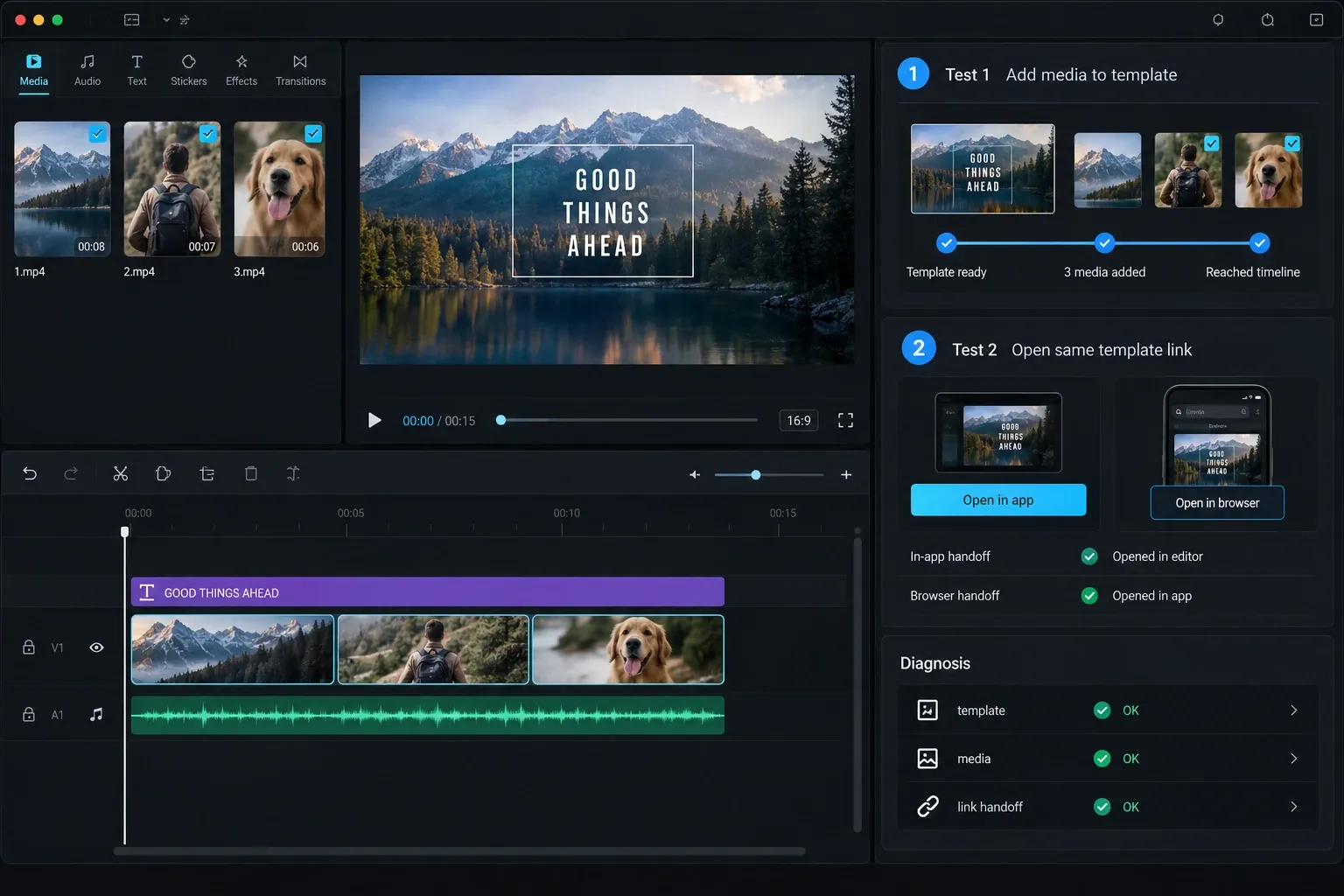
The fastest useful test is not another reinstall. Change one variable at a time. First open a second current template on the same device. Then open the original on another supported device or network. These tests narrow the fault without disturbing a working project.
| What you observe | Most useful interpretation | Next check |
|---|---|---|
| One template fails; others open | The link may be expired, removed, restricted or built with an unavailable asset | Open a fresh template from the same CapCut feed and check the original creator page |
| Every template is blank on one network | The connection, DNS filter or network policy is more likely than the project | Try cellular data or a trusted second network without deleting app data |
| The same account fails on two devices | Account or catalog availability may be involved, but both devices could share the same failing network | Keep the login method constant, test a separate network and ask CapCut support about availability |
| A phone opens the link but PC doesn't | The shared URL is probably a Mobile deep link, not a transferable Desktop project | Edit it on Mobile or rebuild it with Desktop's available tools |
| The template opens but the result looks wrong | Access is working; the problem is now a slot, crop, text, font, audio or asset issue | Inspect each editable element before export |
Don't change the region, account, app version and network simultaneously. If the template starts working, you won't know which change mattered; if it still fails, you have created four new variables. Keep the original shared URL and record the first error with private media hidden. A generic “templates broken” report gives support very little to reproduce.
Availability and editing are separate checks. A template can load correctly while one paid effect, font, soundtrack or creator-controlled element remains unavailable. Conversely, a blank catalog doesn't mean that an already saved local project is corrupt. This distinction protects completed edits from unnecessary resets.
Access Differs by Platform
CapCut's documentation is easy to misread because “templates on CapCut” covers several libraries and link types. The most stable distinction is this:
- Mobile: main discovery, sharing and TikTok/mobile deep-link workflow.
- Desktop: catalog and search availability can vary by build, account and region; Mobile and TikTok deep links remain a separate Mobile workflow.
- Web: may expose Web templates, but a Mobile/TikTok link is not the same workflow.
CapCut's January 2026 template export guidance says Mobile owns template discovery/customization/sharing and Desktop is limited to preloaded templates. Its TikTok-link help explicitly says that deep-link workflow is Mobile-only and doesn't open on Web or Desktop.
CapCut's current help pages disagree about Desktop search. The dedicated empty-search page says Desktop has a limited built-in set and no search; a broader template-search guide describes a PC search box. That conflict matters: trust the interface in your installed build, and don't diagnose a missing Desktop search control as a fault by itself.
Templates Tab Missing or Empty on Mobile
Open the official app's home navigation, not only the editing timeline. Confirm the intended account and look for Templates. CapCut says availability can vary by region, version or device. If the tab exists but is blank, follow the loading checks below; if it has never appeared, check platform availability before treating it as corrupted data.
CapCut's missing-template checklist points to the correct section, version and connection. Its separate missing tab/page guidance adds cache and network state. If the tab is unavailable by region or rollout, repeated reinstalls won't create it.
Don't clear system App Data. That can remove unsynced local projects. An unofficial APK or downgrade is not a safe shortcut either: it adds package risk and may leave a newer project incompatible with the older build.
Use Template Link Will Not Open CapCut
- Open the shared link on a phone, not a Desktop browser.
- Update both CapCut Mobile and the app that supplied the link.
- Allow the browser or TikTok to open CapCut when prompted.
- On Android, check CapCut's supported-link or “Open by default” setting if every live link stays in the browser.
- Try the same link in the phone's normal browser.
- Test a second current template link to distinguish an item-specific failure from a wider handoff problem.
A computer can display the template landing page but still can't hand that Mobile deep link to an editable Desktop template. Don't keep changing default Windows/macOS app associations to force an unsupported workflow. Use Mobile for the shared template, or choose a built-in Desktop template/manual edit instead. CapCut's template-switch troubleshooting confirms that deep-link switching is Mobile-only and explains that deleted or restricted templates can fail silently.
For general discovery, use the CapCut templates guide and the trending templates workflow. Template popularity doesn't guarantee continued availability.
Preview, Search or Favorites Are Blank
Test a second category and a template you have never favorited. Compare the signed-in account and login method with the one that saved or purchased the missing item. Do not log out of your only working session to experiment: first confirm that you can recover access and that local work is protected. Our account and login guide explains why matching email addresses alone may not identify the same account. A missing favorite can also have been delisted.
For an empty Mobile search, try a broader keyword before resetting anything. On Web, save your work and verify that it reopens before reloading. Compare a private window or another supported browser without closing your working session. A private window also changes login and cookie state, so a successful test does not prove an extension caused the failure. If only Desktop lacks a search box, return to the platform note above. Use our CapCut connection guide when several online catalogs fail together.
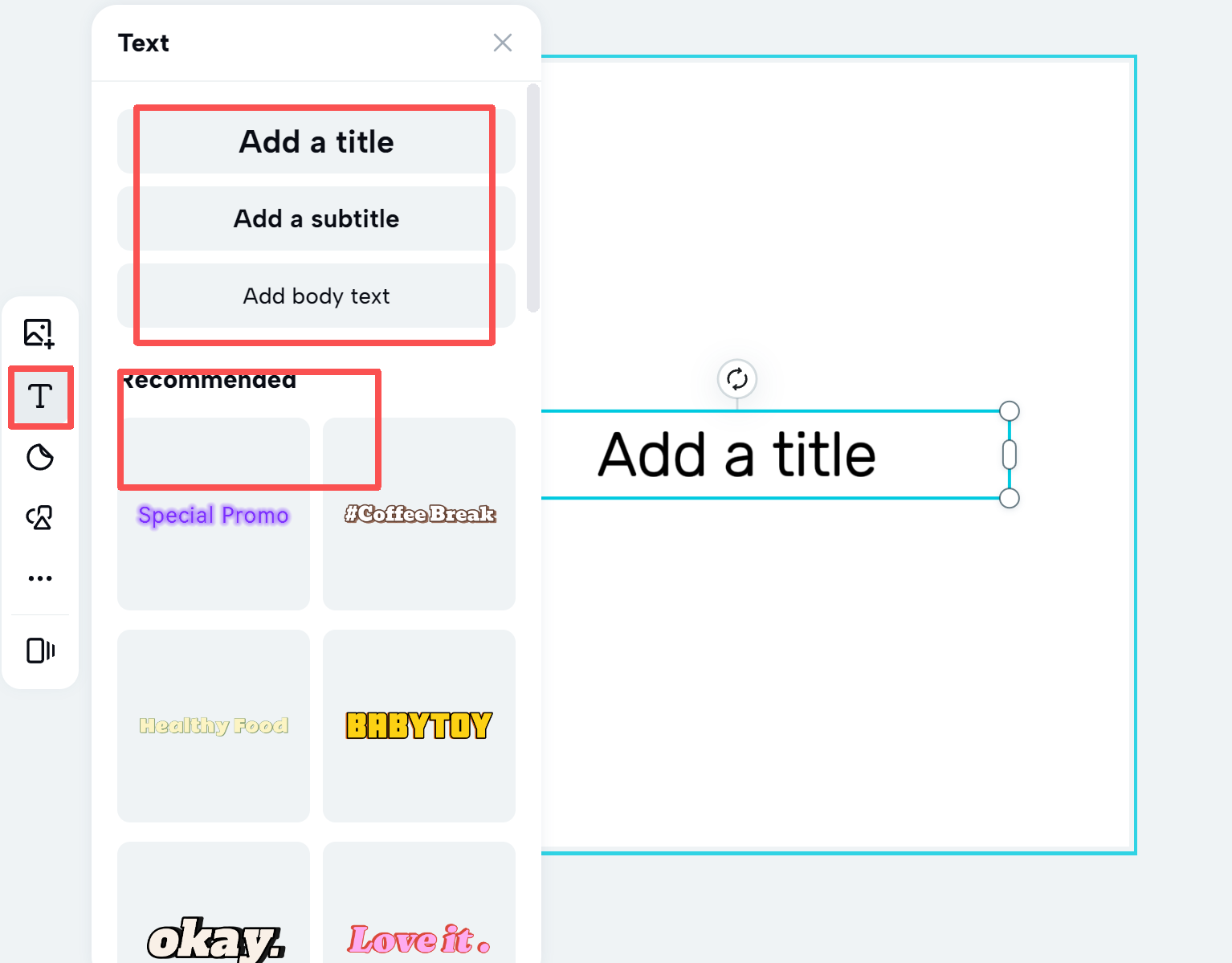
If the text/font or text-template gallery returns “no licensed commercial materials,” check whether its Commercial Use, Commercial or Licensed Content filter is active. CapCut's missing text-material instructions describe this filter on Mobile, Desktop and Web, with labels varying by interface. Turning it off may reveal noncommercial options; it does not grant commercial rights. For client or business work, use assets licensed for the intended use and destination. This is a text-material filter, not a universal switch for the video-template feed.
Loading Stops at 51% or Another Percentage
A percentage such as 51% tells you where progress stopped, not why. The current official loading guidance checked for this article does not identify 51% as a unique error code. Try another current template first. If the second template loads, preserve the original link and test different permitted source media in a separate copy. The first template, a particular asset download, its processing demands or the original media may be involved; success elsewhere does not prove removal or incompatibility. If both stop, continue with the device checks below.
- Switch between Wi-Fi and mobile data.
- Close other heavy apps and restart CapCut.
- Check that the device has free storage.
- Use the platform-specific cache-only guidance below if the control is available, then reopen the template.
- Update through the official app store without uninstalling first.
Those are the checks in CapCut's template-loading guidance. If the same template stalls on two devices and two networks, send its link, the exact percentage and a screen recording to support instead of repeating resets.
Desktop and Web Don't Match Mobile
Do not treat every paid template as one product. CapCut's January 2026 individual paid-template guidance places browsing and purchase on Mobile and describes already-purchased projects opening through sync. Its Pro-template guidance instead describes viewing and using subscription-marked templates on Mobile, Desktop and Web. The wording overlaps and conflicts, so neither page establishes one universal catalog rule. Check the exact template badge and the requirement shown in your current editor. A Pro subscription, a separate template purchase and permission to use an asset commercially are different checks. Do not buy a plan merely to diagnose a blank gallery; use the Pro access troubleshooting guide if an existing entitlement is missing.
Web can have its own Templates area, but CapCut's help says TikTok and Mobile gallery templates don't transfer through the same link. Use the browser template workflow for browser/session failures and CapCut for PC for built-in Desktop workflows.
If you need precise control and the desired Mobile template can't open on Desktop, recreate the structure from your own clips, text, transitions and audio. An exported Mobile template video can be used as a reference, but a flattened video is not the original editable template.
Media Replacement Breaks the Edit
If a photo or clip is absent from the picker, first check the selected Photos/Videos category and the type required by that slot. Confirm the original opens outside CapCut and is downloaded locally rather than only visible as a cloud thumbnail. Apple explains how to download a copy of selected iCloud photos or videos; keep your originals rather than reverting or overwriting them.
Check CapCut's permission to access the specific media. On Android, Settings → Apps → CapCut → Permissions lists the permissions available on that device. On iPhone, inspect CapCut's Photos permission in system settings. If selected-photo access is offered, include only the items needed; full-library access is not a required first fix. For a diagnostic comparison, try a new, nonprivate photo or short video of the required slot type in a separate test project. If that works, investigate the original file or its availability rather than declaring all templates broken.
- Fill every required slot in the intended order.
- Choose the source range for each slot and reframe the crop.
- Preview fast cuts; a subject can disappear if the chosen moment starts too late.
- Edit and review the text controls the template actually exposes.
- Check the font, music and source-clip audio after replacement.
Templates define timing and structure. Replacement media must fit those slots; it doesn't automatically choose the best moment, crop or subject position. A vertical template can crop horizontal footage aggressively, so inspect each slot instead of watching only the final frame.
If a template exposes no control for a creator's text or media, do not assume every layer is editable. For a text track you can select, CapCut's text-editing help starts with selecting the correct track. If the template still provides no way to modify it, use another template or build a manual project from permitted originals.
Text or Fonts Are Missing After Replacement
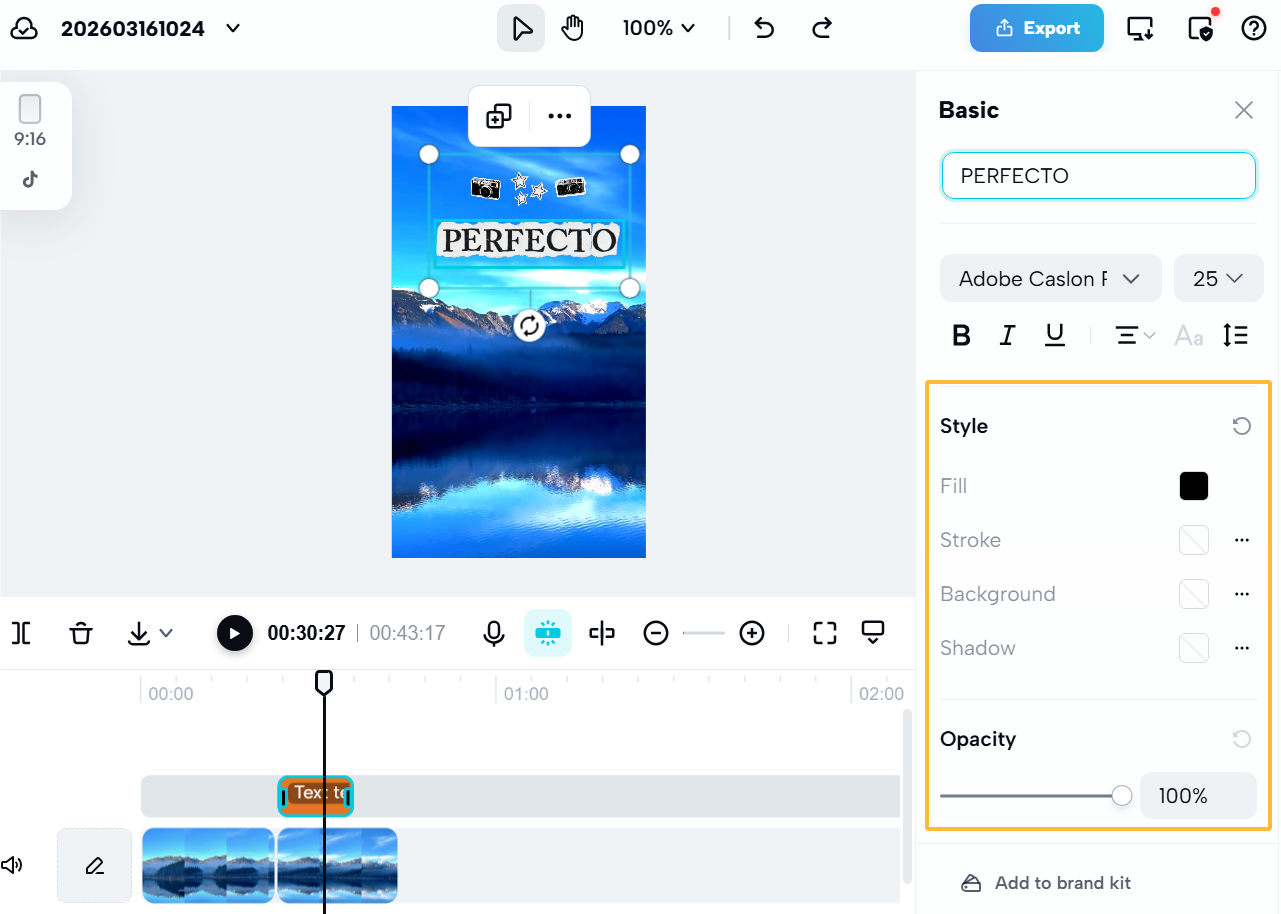
Where the template exposes editable text, confirm its content, timing, color, opacity, size and position. Check layer order and whether the playhead falls inside the text duration; also preview beyond any entry animation. A text box can sit outside the frame, under an overlay or match the background. CapCut's text visibility checks cover the layer and timing causes. If the template does not expose those controls, choose another template or rebuild from permitted source material. The CapCut text guide covers editing and visibility checks.
Template creators can use fonts or text materials that are absent on another platform, account or region. Choose an available replacement with similar width and weight, then recheck line breaks and safe placement. Don't assume a custom font uploaded on Desktop will appear on Mobile.
Test the same text slot in a second template before changing plans or reinstalling. A disappearing layer doesn't establish a Standard-versus-Pro boundary; the exact font, template and platform are more useful evidence.
Music or Clip Audio Changes After Replacement
Template music, effects and replacement-clip audio are separate. After every replacement, play the complete edit with sound. Check whether source audio is muted, removed, duplicated or fighting the template soundtrack. The CapCut music guide covers track-level timing and volume.
CapCut's Keep original sound guidance says replacement-video audio depends on a setting chosen when the creator publishes the template. Replacing a placeholder therefore doesn't guarantee that the clip's audio will remain. Keep an original copy and listen to the exported mix when a voice or sound effect matters. If the template strips speech and offers no control to restore it, choose one that retains source audio or rebuild in an editable project and add your original audio there. Do not expect a volume slider to recover sound that was not carried into the template.
Desktop Shows One Frame or a Gray Template
A project created from a paid or community Mobile template can arrive on Desktop as one static image, blank/gray frames or a flattened result instead of the editable animation. CapCut documents this in its Desktop one-frame template help.
Return to the Mobile project that owns the editable template and confirm its media, text and audio there. CapCut says a completed Mobile template project may still export even when Desktop shows one frame or a gray preview, but treat that as something to test, not a guarantee. Keep the Mobile source and export the complete short template on Mobile, then play the file outside CapCut. Use a short range only if an editable copy actually provides range export. Rebuild on Desktop only if you need track-level control.
Export Stuck, Failed or Missing Elements
- Confirm every required slot is filled.
- Play every text layer, transition and asset in the preview.
- Check unavailable, paid or account-checked materials.
- Listen to music and source-clip audio.
- Export the complete short template, or a short range only where your editable copy supports it.
First name the failing action. Export video creates the finished media file. Post as template submits a reusable creator template and can involve region, account eligibility, editable-slot and content rules. CapCut's use-and-export instructions describe the finished-video flow. Its separate creator guidance discusses public posting versus reusable-project export, not just rendering a video. Do not use the creator-posting checklist to diagnose an ordinary video export. If an ordinary video render stalls, use the CapCut export-stuck guide instead.
Keep the original template project until the final file plays outside CapCut. A preview is not enough: a missing font, unavailable audio item or incomplete slot can appear only in the finished file.
Safe Reset Order
Use the non-destructive checks first: another current template, a trusted second network, restart and an official update without uninstalling. Close only apps whose work is saved. Do not disable security software or bypass workplace network rules to make a template load.
A duplicate draft inside CapCut is not a reinstall-safe backup. Before any sign-out, data removal or reinstall, keep a verified editable project and its source media outside the storage that action could erase. Follow the project backup and transfer procedure and check that the copy opens with its media. An exported MP4 preserves the finished picture, not the editable timeline. Cloud upload is optional and depends on availability, space and permission to upload that footage. If you cannot verify a restorable copy or recover account access, stop before resetting.
- Android: system Settings → Apps → CapCut → Storage & cache → Clear cache is the Pixel-style path; labels vary by device. Google separates temporary cache from Clear storage, which permanently deletes app data. Do not choose Clear storage or Clear data.
- iPhone/iPad: use a clearly labelled in-app Clear cache control if present. CapCut documents Settings → Clear cache in its template preview help. If your build has no such control, skip that step. Offload App, Delete App and reinstall are not interchangeable with clearing temporary cache.
- Desktop/Web: use an explicitly labelled cache control only when its scope is clear. Do not manually delete the CapCut application-data folder or clear browser site data to follow a generic “cache” tip. Protect saved work and your working session first.
Reinstall is a last resort to discuss with support, not a fix for an unavailable region or unsupported platform. Use official stores/installers, not modified APKs, random region tools or an old build to force access. The Android download guide explains official-source checks.
What to Send CapCut Support
- Template link/name and whether it came from TikTok, CapCut Mobile, Web or Desktop.
- Device, OS, platform and exact CapCut version.
- Account login method and region, without a password.
- The first broken step: tab, link, preview, replacement or export.
- Whether another template/network/device works.
- A screen recording with private media hidden.
Those details let support distinguish a removed template from a platform limitation, connection failure, account rule or broken project. Send them through CapCut Help or the support route shown inside your current app.
CapCut Templates FAQ
Why is the Templates tab missing in CapCut?
The tab can be absent because of platform, region, app version, account, network state or a staged interface change. Mobile has the main discovery and shared-link workflow; Desktop and Web don't mirror the full Mobile or TikTok catalog.
Why won't a CapCut template link open in the app?
Many TikTok and shared template links are Mobile deep links. Open the link on a phone with the official CapCut app installed, update both apps and allow the browser or TikTok to open CapCut. The same link is not guaranteed to become an editable Desktop or Web template.
Why is a CapCut template stuck at 51%?
The official loading guidance checked for this article does not identify 51% as a unique error code. Test a second template, another network and available storage, then restart, clear CapCut's cache only and update through the official store. If it still fails on supported devices and separate networks, send the link, media-test results and percentage to support.
Why are CapCut template previews blank?
Test another template and network, restart the app, clear CapCut's cache only and update. If many templates fail across devices and separate networks, account or service availability may be involved. One failure can involve the template, its assets or your source media; it does not prove deletion.
Why is a CapCut template not available in my region?
Template visibility can differ by jurisdiction, account, device, language, app build and the rights attached to that template. Check the same account and link on the intended supported platform. Reinstalling or changing several region settings at once doesn't prove availability.
Can I use Mobile CapCut templates on PC?
Don't assume a Mobile or TikTok template transfers as an editable Desktop template. Desktop catalog and search availability can vary by build, account and region, while Mobile deep-link discovery remains a separate workflow. Keep the Mobile source if you sync the project.
Why did text or a font disappear from a template?
Where text controls are exposed, check color, opacity, layer order, duration and position, then choose a font available on that platform. If those controls are locked, use another template or a manual edit. A custom or library font used by the creator may not be available on your device or account.
Why did audio change after I replaced a template clip?
Template music and replacement-clip audio are separate. Whether the clip's own audio remains can depend on the setting chosen by the template creator. Preview the music, voice and every replaced clip before export.
Should I reinstall CapCut when templates stop working?
Not first. Protect local projects, identify the failing platform, test another template and network, restart, clear CapCut's cache only, update and check the intended account. Reinstall only after an editable backup and source media outside the app's affected storage have been verified. A duplicate local draft or exported MP4 is not that backup.
Once the template works again, the CapCut tutorial learning path covers the next editing steps. If the first broken step is elsewhere, return to the CapCut Fixes hub. Keep the original template project until its exported video has been checked on the destination device.