


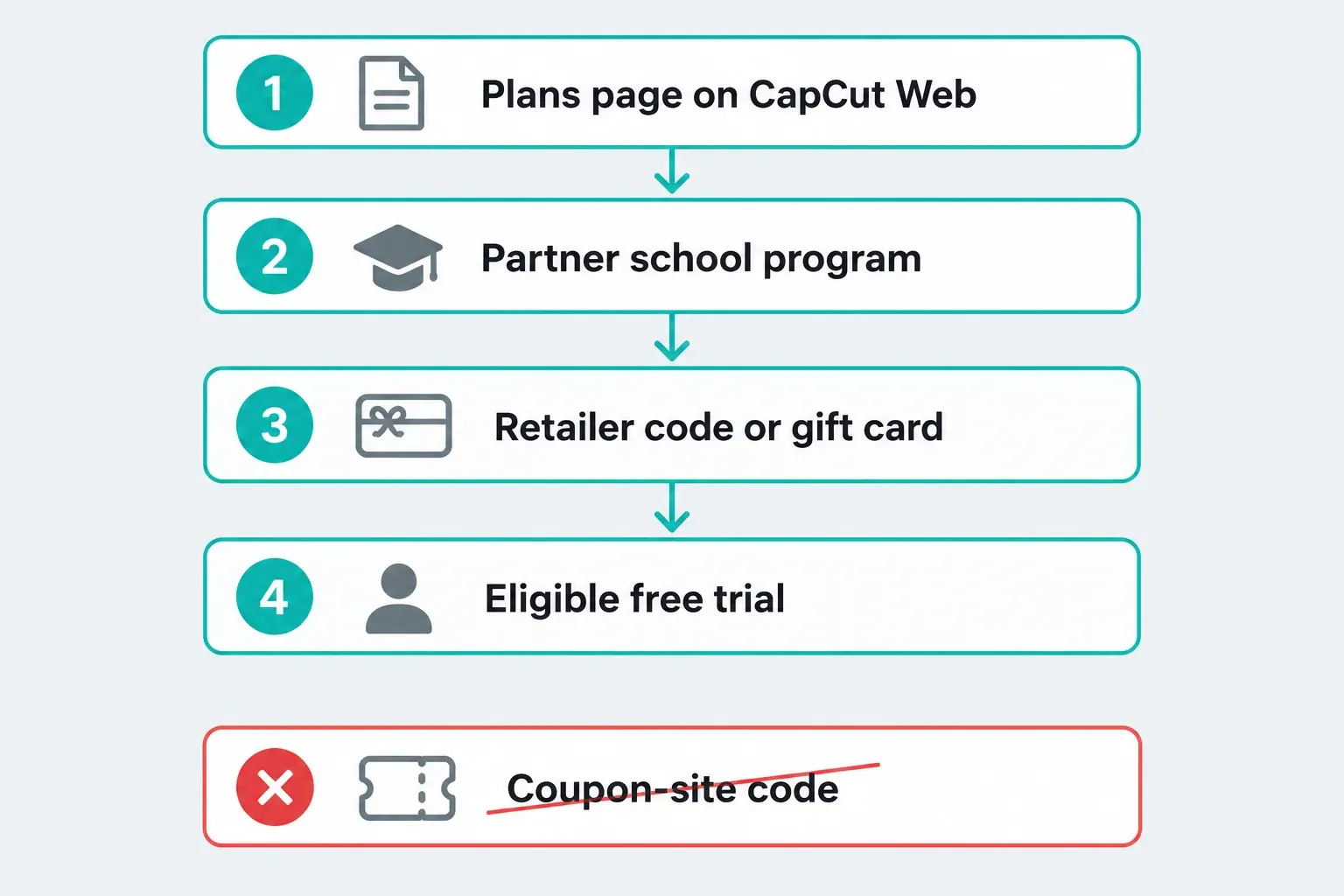
I could not confirm a CapCut student discount that a student can switch on alone, and I found no promo code that CapCut publishes. What CapCut does document is smaller and easier to check: free Pro memberships for students at partner universities, a redemption page for codes and gift cards bought elsewhere, an eligible-account trial and a desktop invite reward.
I checked this on October 10, 2026 against CapCut's Help Center, its Creative Campus page, its redemption page and its Terms of Service (last updated April 15, 2026). I did not buy a subscription, redeem a code or verify as a student, so every account step below comes from CapCut's own pages. Offers change, and your region and account decide what you see.
The shortest useful check is your own plans page. If a student offer exists for your account, that is where CapCut says it appears.
Where each CapCut offer comes from
| Offer | Who it is for | Where CapCut documents it | What I could not confirm |
|---|---|---|---|
| Student discount on the plans page | Accounts and regions where CapCut shows one | The Help Center lists "Regional offers or student discounts (if applicable)" | Any price, percentage, verification service or country list |
| Free Pro for students | Students at partner universities | The Creative Campus page | How long the membership lasts and how an individual student receives it |
| Redeem code or gift card | Anyone holding a valid code | The redemption page and its seven terms | Which retailers sell codes |
| Free trial | Accounts that never subscribed to Pro, in selected countries | The Help Center trial page | Whether your account qualifies before you open the subscription page |
| Invite reward | New CapCut PC users and the friends inviting them | The Help Center invite FAQ | Whether the campaign is open for you today |
| Public promo code | Depends on the offer's terms | No current public code confirmed | Whether a code is valid for your account, region and purchase route |
Check your own plans page first
CapCut's Help Center page on joining Pro, dated April 2, 2026, says the Pro plans page on CapCut Web shows a Monthly Plan, an Annual Plan and "Regional offers or student discounts (if applicable)". It also says Web is the only place where you can compare all plans side by side. The wording is conditional, and no page I read puts a price, a percentage or a country list on that line.
Where you buy changes what you can see. The same page says the mobile app sends you to the Apple App Store or Google Play for the purchase, and the desktop app opens your browser on the CapCut Web subscription page. So the web page is the one to read before you pay, even if you edit on a phone or PC.
- Sign in to your CapCut account on CapCut Web.
- Open the profile icon at the top right and choose the upgrade option.
- Read the plan list. A student line either appears for your account or it does not.
- If it appears, read the verification step and the first charge before you accept anything. Our pricing guide explains how to read introductory prices against the renewal price.
If there is no student line, I would not go looking for one in a coupon forum. Nothing I found from CapCut says a hidden student route exists.
CapCut Creative Campus: free Pro for partner-school students
The one student program CapCut describes in detail is CapCut Creative Campus. The page promises free CapCut Pro memberships to students at partner university programs, and it says the program is free for participating students and partner schools. It names Mediadesign Hochschule (mdh) Berlin, The University of Manchester, Sup Luxury and Shibuya Women's International School, with more schools "joining soon". It lists availability in the U.S., the U.K., France, Germany and Japan, and it says the first wave of partnerships was set to roll out in November 2025.
Three limits matter if you are a student:
- Your school has to be a partner. The page does not describe a way for an individual student at a non-partner school to claim the membership.
- The page gives no length. It calls the program a "long-term initiative" but does not say how long a student's Pro membership runs. Ask the program contact at your school.
- The student link goes to a form. The page ends with a "Become a CapCut Student Creator" link. It does not say that form issues a Pro membership, so I would not describe it as a claim button.
If you teach or run a program and want your school considered, the page says universities can write to marketing@capcut.com, and that it prioritizes media, communications, marketing, film and arts programs. Other disciplines are welcome to ask if the fit is strong.
Do not confuse this with the Creative Partner Program. That one is a portfolio-based program for AI creators, applications are judged on portfolio quality and social impact, and the page does not mention students. Our Creator Program guide covers how to choose between CapCut's creator routes.
Redeem codes and gift cards: the seven terms
CapCut has a redemption page for codes and gift cards. When I opened it, it showed the heading "Redeem code or gift card", the line "Use a code or gift card to activate your CapCut subscription", a "Sign in and redeem" button and seven redemption terms. I did not redeem a code, so I cannot describe what the entry field looks like after sign-in.
The seven terms, in short:
- Each code or gift card can be used once.
- Expired codes cannot be redeemed. Most codes are valid for one year, and the retailer can confirm the exact date.
- You must be signed in to CapCut.
- Credits and storage from a redeemed subscription last as long as the subscription. Credits are given based on the number of active days, calculated from a monthly total.
- Codes and gift cards apply to virtual products and cannot be refunded once redeemed.
- For redemption help, submit feedback through Help and then Feedback in the CapCut web app.
- CapCut has the final say in interpreting the terms.
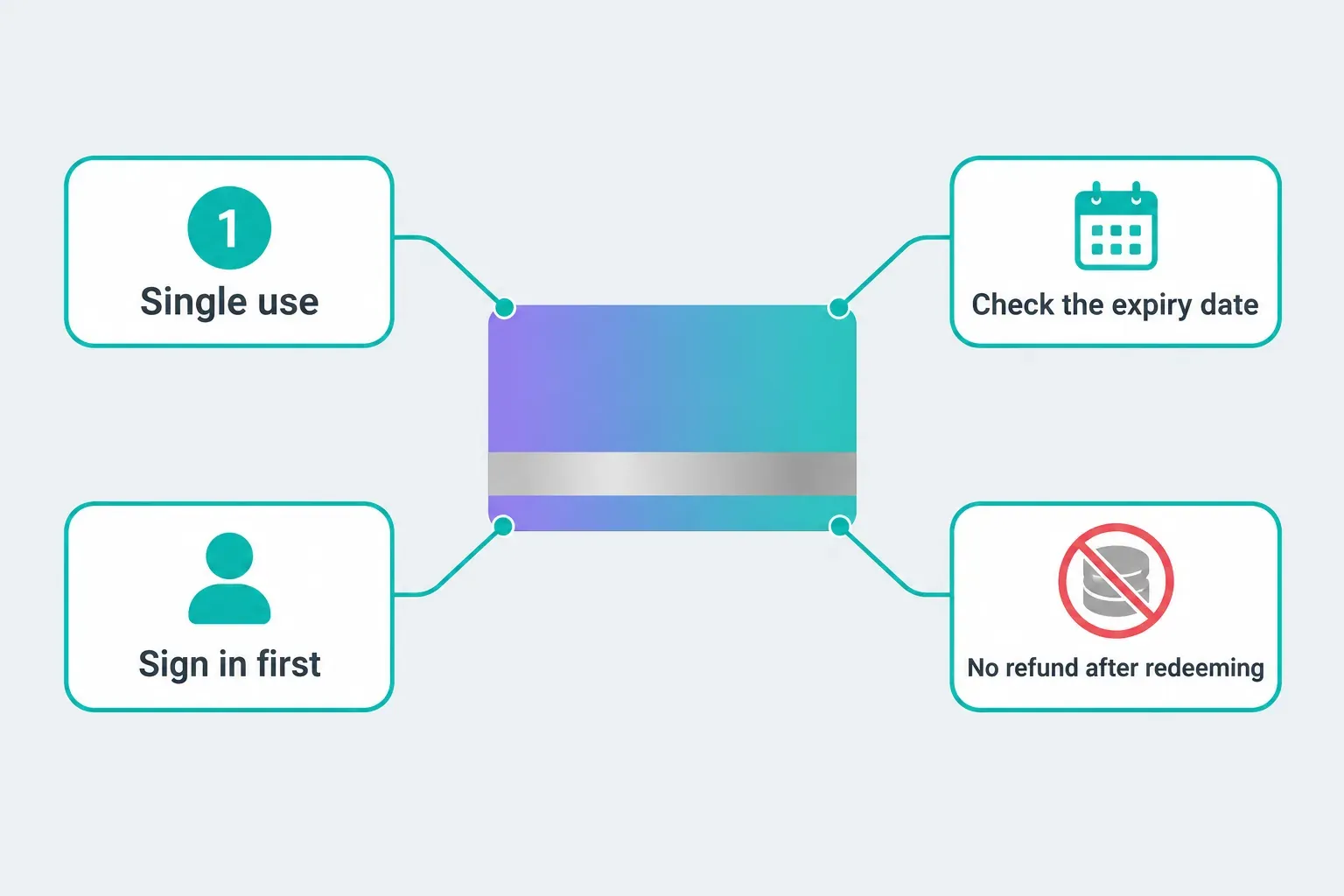
Terms 1, 2 and 3 give you three checks when a code fails: whether it has been used, whether it has expired and whether you are signed in. Term 5 concerns refunds after redemption; it is a purchase condition rather than a reason a code fails. For anything the terms do not cover, the CapCut support routes lay out where to send what.
Buy a code the way you would buy any gift card: from a retailer you would trust with the money. The terms point to "your retailer" for the expiry date, which means CapCut expects a retail source, not a message from a stranger. A heavily discounted code from a direct message or a marketplace listing is the case where a single-use, expiring code costs you the most.
Promo codes: what the codes on coupon sites usually are
I searched capcut.com for promo codes and found none that CapCut publishes. The pages that do exist cover trials and the invite reward. The pricing guide linked above reached the same result on October 1, 2026.
An invite link has different eligibility rules from a promo code. CapCut's invite FAQ says each friend you invite earns seven days of Pro, for up to ten invites or 70 days. The invitee must be new to CapCut on a computer, meaning they never installed it on a computer and their account never received this reward, and they must redeem their seven days within three days of downloading CapCut PC. A link like that only works for a new PC user, so it does nothing if you already have CapCut on your computer.
The trial page has its own limits. It describes a seven-day trial in selected countries and regions, says you need CapCut version 8.20 or higher and must not have subscribed to Pro before, and says a "Free Trial" badge appears on the subscription page if the trial is available to you. If no badge appears, no code from a video will add one. Our trial guide goes through the platform checks.
CapCut credits are a different currency. The Help Center says credits cannot be used to purchase Pro plans on any platform, so a "pay for Pro with credits" claim is wrong. Our AI credits guide explains what credits do cover.
What the student-discount pages in search results say
Several results for this search make firmer claims than CapCut's own pages. Here is what I could and could not match on October 10, 2026.
- A capcut.com student discount page that returns 404. Google still lists capcut.com/imlv/student_discount with a snippet that begins "A student discount is a special reduced price". When I opened that address, it returned a 404 error both to a script and in a normal Safari tab. A search snippet is not proof of a current offer, and this one points to a page that is gone.
- A Student Beans listing for the U.K. Student Beans lists a "7-Day Pro Trial" with the wording "for a limited time only" and keeps its conditions behind a separate Conditions tab. It shows no code and no percentage. I read it as a trial promotion routed through a partner marketplace, not a student price, and it is labeled for the U.K. Check the Free Trial badge on your own subscription page before you rely on it.
- A reseller blog. A GamsGo blog post, from a company that sells shared CapCut Pro accounts, describes a student discount of up to 50 percent, a "Student" tab on the plans page and a document upload step. I could not match any of that to CapCut's Help Center, which only says "student discounts (if applicable)". Treat it as unverified.
- Social posts and the AI summary. Short videos and posts repeat that you get a discount with a school email. Google's AI summary for this query on the same day repeated the 50 percent and school-email claims. I could not trace either claim to a CapCut page.
None of this proves a discount does not exist for your account. It means the specific numbers and steps in these results have no CapCut page behind them that I could find.
Shared accounts, lifetime Pro and other shortcuts
Skip anyone selling shared logins, "lifetime Pro" or a cut-price account. CapCut's Terms of Service bar users from distributing, licensing, transferring or selling the Services, and from marketing, renting or leasing them for a fee or for free. A shared login is also someone else's access to the account that holds your projects. My recommendation is simple: keep your projects in an account only you control, and keep a copy using our backup guide.
Cracked or modified apps are the same problem with a bigger risk, and nothing in this article covers them.
Ways to pay less that CapCut documents
- Use an eligible trial for one project. If the Free Trial badge shows, start it with a project ready, and set a reminder before the first charge. Our cancel guide covers each billing route.
- Do not cancel to hunt for a lower price. CapCut's resubscription page says that if you cancel and later resubscribe, the system applies the current listed price rather than the old discounted rate, and that earlier prices are not guaranteed.
- Check whether the free editor already covers the job. Our Pro features guide and Is CapCut Pro worth it help you separate what needs Pro from what does not. If your plans page and your budget do not meet, CapCut alternatives are worth a look.
- Ask your school. If your university runs a media or film program, ask whether it is a Creative Campus partner before you pay for anything.
If I were a student on a budget, I would do it in this order: read the plans page, ask my program about Creative Campus, take an eligible trial only for a project with a deadline, and buy a code only from a retailer. I would not pay a third party for anything.
CapCut student discount FAQ
Does CapCut have a student discount?
Not one I could confirm for a student to claim alone. CapCut's Help Center says the web plans page can list "student discounts (if applicable)", and Creative Campus offers free Pro to students at partner universities. Your own plans page is the final check.
Is there a CapCut student promo code?
I found no promo code published by CapCut. A code may belong to a limited campaign or a new-PC-user invite offer. Check the issuer, expiry and account conditions; a coupon listing alone does not confirm that it works.
Is CapCut Pro free for students?
Only through a program like Creative Campus, as far as CapCut has published, and only for students at partner universities. Otherwise the free editor is free, and Pro needs a plan.
How do I redeem a CapCut code?
Sign in to CapCut and open the redemption page. It opens with a "Sign in and redeem" button and seven terms. I did not redeem a code, so I cannot describe the screen after sign-in.
Why does my CapCut code not work?
Check the terms first: a code works once, it must not be expired, and you must be signed in. If those are fine, send feedback through Help and then Feedback in the CapCut web app, as the redemption terms say.
Can I pay for CapCut Pro with credits?
No. CapCut's Help Center says credits cannot be used to purchase Pro plans on any platform.