

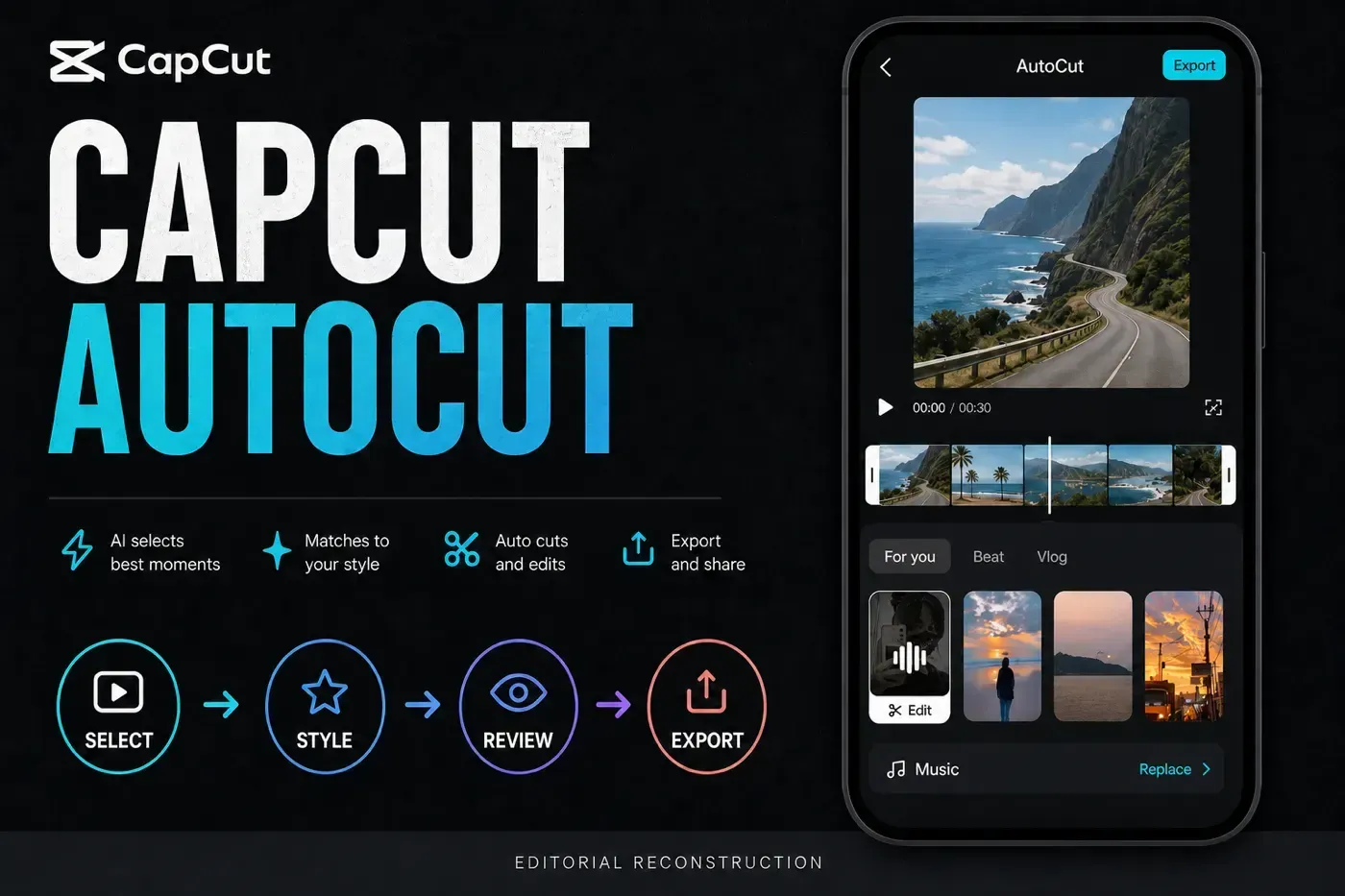
CapCut AutoCut can turn a batch of phone clips and photos into one music- and template-led first edit. A second documented mobile route starts with one longer recording. The clearest current mobile route is short: open AutoCut from Home, choose the media, tap Next, test more than one style, then use Edit or Edit more before you export.
The important part starts after CapCut builds the draft. AutoCut can find a rhythm and assemble footage, but it can't know which reaction, product detail or spoken sentence matters to your story. Treat the result as an editable proposal, not a finished video.
This guide was checked against both of CapCut's current mobile AutoCut walkthroughs and interface images, current Help pages and recent community reports. The public signed-out Web editor observation is dated August 10. No personal project was opened, and no AutoCut draft was generated or exported. Desktop availability is reported cautiously because CapCut's own pages show conflicting workflows.
Every UI image below is an anonymized editorial reconstruction made for instruction. None shows the owner's account, projects, files, paths, media library, email, balance or a claimed AutoCut result test.
CapCut AutoCut quick answer
Open AutoCut from the Home tools, select clips or photos, then compare the generated styles.
Give each clip one useful action and enough room around that action for a clean cut.
Check story order, cut timing, framing, text, music, dialogue and the last frame.
Desktop documentation conflicts, and the full AutoCut workflow was not found in the checked Web editor.
AutoCut is useful when speed matters more than exact first-pass timing: a trip recap, behind-the-scenes sequence, product montage or casual short made from several small clips. For a precise story, it still needs a human edit. If you only need to place exact cuts, use the manual Cut, Trim and Split workflow instead.
What AutoCut does and which tool you may mean instead
CapCut's mobile AutoCut guide shows a template-led workflow: choose multiple clips or photos, let CapCut assemble a preview, switch the style or music, edit the media, then export. The Help page describes broader beat-, speech- and text-driven cutting. Those descriptions are not a reason to assume that every account exposes the same controls.
A second official mobile AutoCut walkthrough starts with one longer video and turns it into one short vertical draft. That's an input variation, not proof that AutoCut will create a package of separate publishable shorts. The page also makes broad claims about silence and highlight detection; without a disclosed result test, treat those as CapCut's product description rather than a guaranteed outcome.
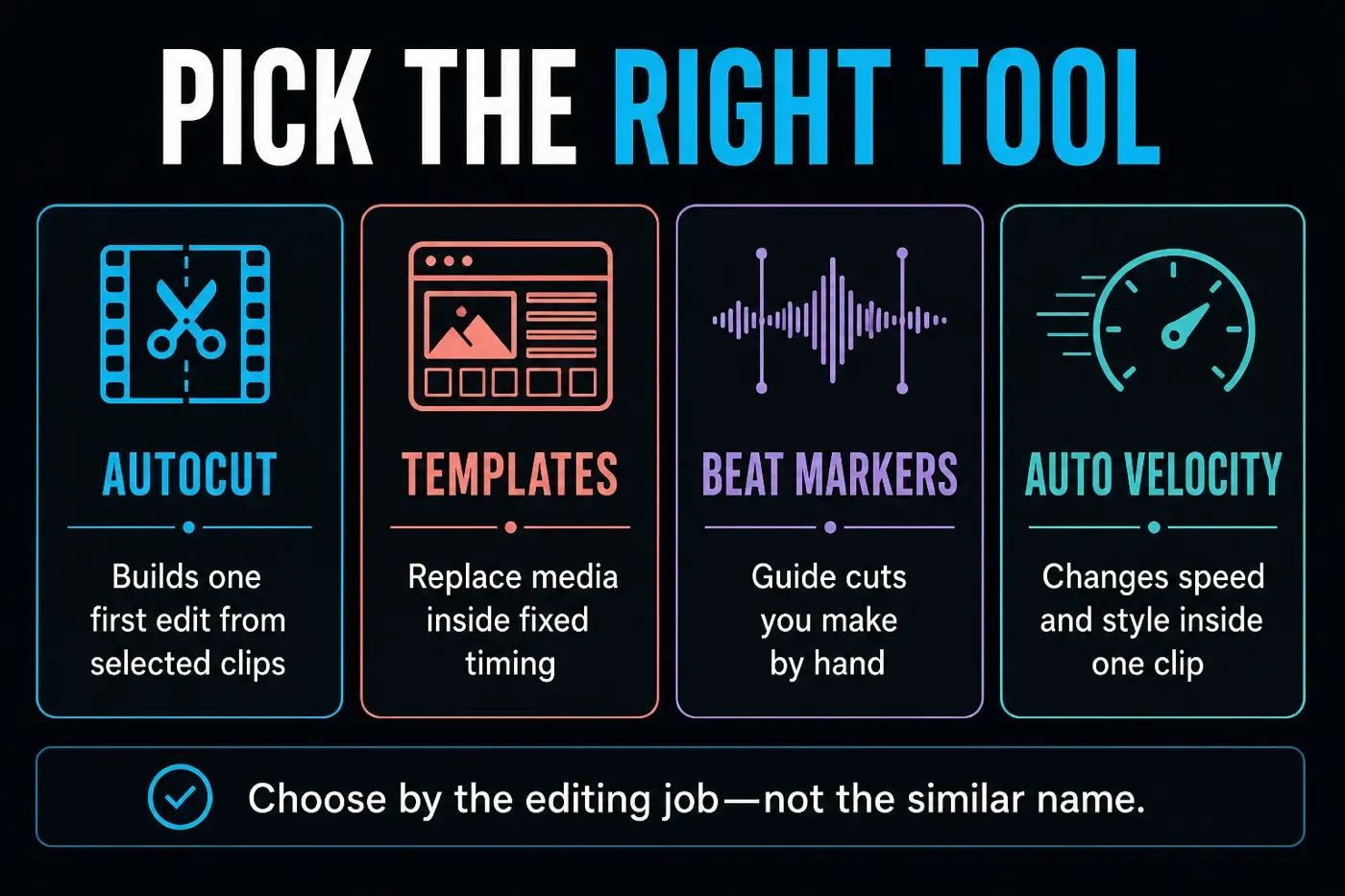
| Tool | What it changes | Use it when |
|---|---|---|
| AutoCut | Builds and styles one first edit from selected media, including a longer source where that route appears | You want CapCut to propose the pacing and arrangement |
| Template | Places your media inside an existing creator's timing and effects | You already want one recognizable structure |
| Beat markers | Adds timing guides to an audio waveform | You want to make the cuts yourself |
| Auto Velocity | Applies a speed-and-style treatment inside a clip | The motion needs a trend-style speed effect |
| Split Scenes | Finds scene boundaries inside one source clip | You need segments, not an assembled music edit |
The distinction matters. Our CapCut velocity edit tutorial covers Speed Curve, Auto Velocity and manual beat timing. Fixed template discovery and customization sit in our CapCut templates walkthrough, and our overview of CapCut AI tools places AutoCut beside the other input-to-output routes. AutoCut gets the narrower job of producing an automatic first assembly from your chosen media.
Prepare the clips before AutoCut touches them
AutoCut can't rescue a weak source batch. If every file starts with the camera pointing at the floor, contains three unrelated moments or changes orientation halfway through, the template has to guess around problems you could remove first.
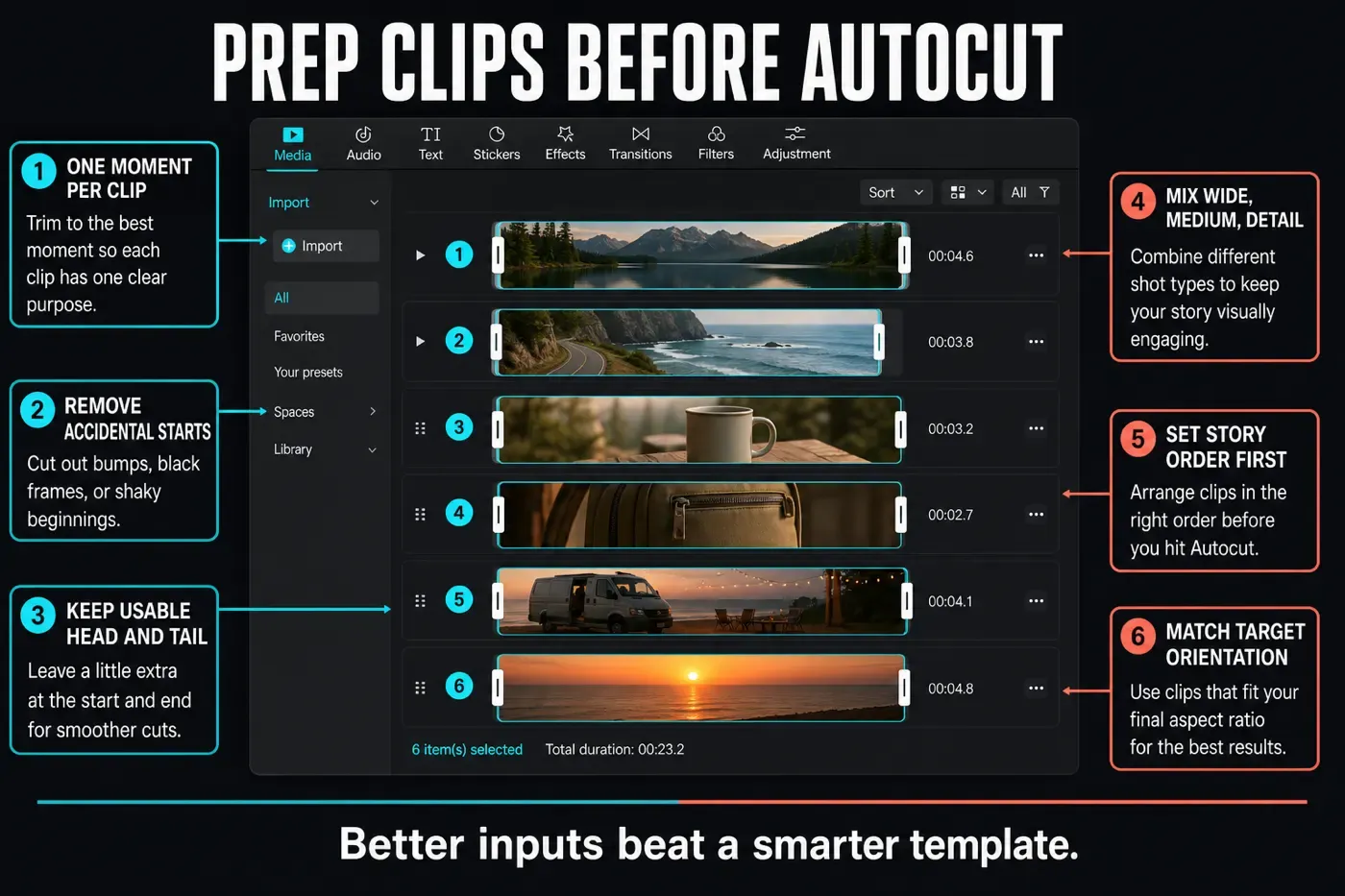
- Give each clip one job. A wide location shot, a medium action, a close detail and a reaction are easier to arrange than six clips that all show the same thing.
- Remove accidental starts and endings. Cut away the pocket shot, black frame, camera shake or finger over the lens. Leave a little clean footage around the real moment.
- Put the story in a sensible source order. AutoCut may rearrange media, but a clean beginning, middle and end gives it a better starting point.
- Match the destination. For a vertical short, favor vertical footage or clips that can survive a 9:16 crop. Don't assume a template will protect an edge subject.
- Separate dialogue from montage footage. A fast beat edit can cut straight through a sentence. Keep spoken clips short and self-contained, or plan to rebuild that section manually.
- Keep the originals. Start AutoCut from copies or a protected source batch when the footage matters. Don't delete the camera files after one preview.
How to use AutoCut in CapCut Mobile
The current official screenshots place AutoCut in the expanded tools area on the mobile Home screen. The exact tile order can change by version, account and region, but the workflow after entry is stable enough to follow.
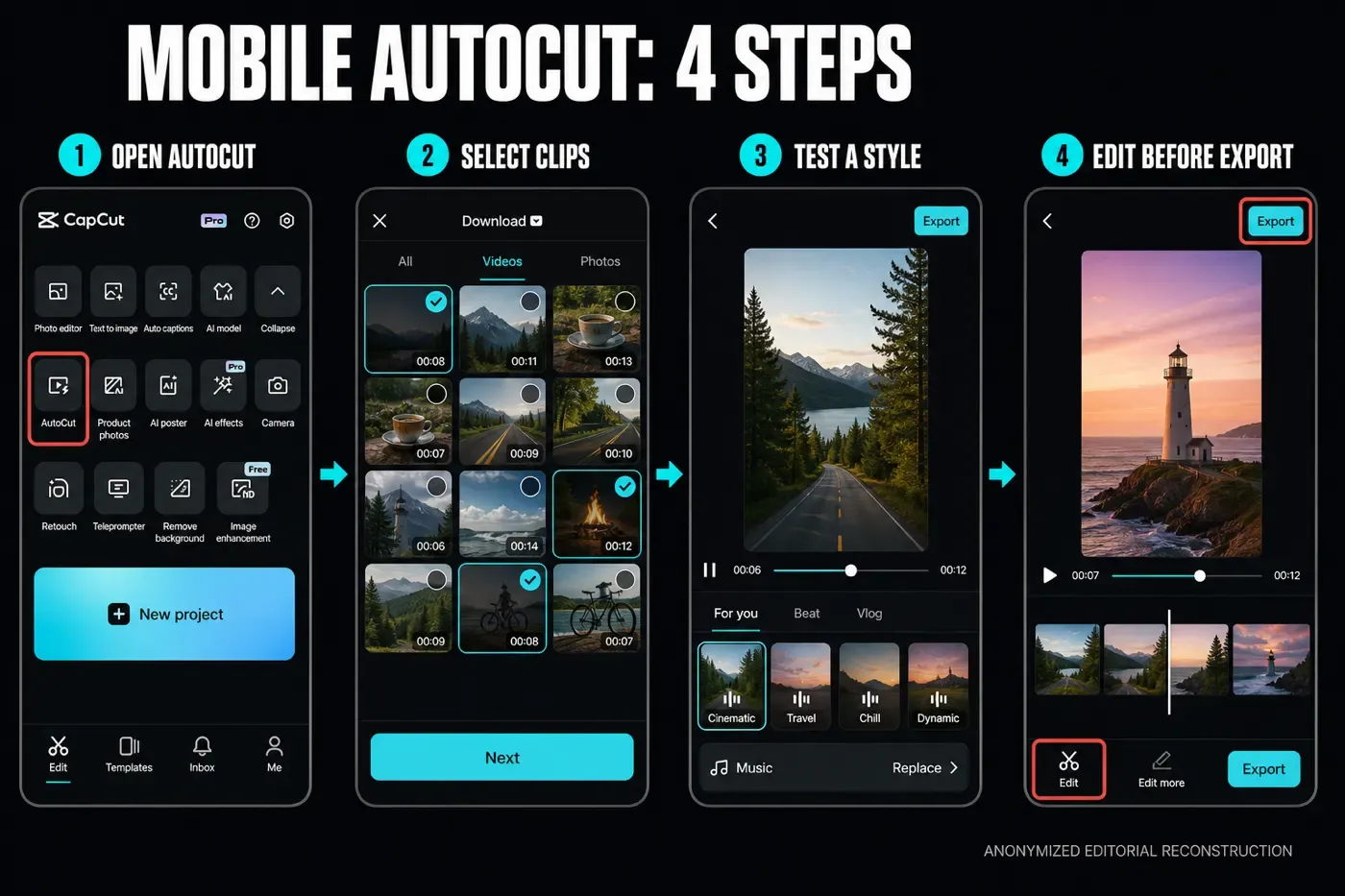
1. Open AutoCut from Home
Launch CapCut and expand the Home tools if AutoCut is not in the first row. Tap the exact AutoCut tile. Don't open a normal project and hunt through every timeline toolbar first; the documented mobile route begins before the regular editor.
2. Select the source clips and photos
Choose only the media that belongs in this draft, then tap Next. Start with a small, understandable batch. Ten good moments are easier to judge than an entire camera roll. If your version accepts one longer recording, choose a source with distinct moments and expect one assembled short. Don't assume it will create several finished clips. Grant photo-library access only to the items you intend to use where your phone offers limited access.
3. Let AutoCut build the preview, then test styles
CapCut processes the selection and presents a preview with style categories. The current official UI shows categories such as For you, Beat and Vlog. Watch the whole first result, then test at least one calmer and one faster option. A flashy opening can hide a poor middle.
4. Edit the draft before export
Use Edit on a bad segment where available. Use Edit more when you need the regular timeline for clip order, timing, captions, volume or a manual replacement. Use Replace to change the music. Export only after the edited file survives the review below.
Read the AutoCut preview before you tap Export
The preview screen is where AutoCut either saves time or creates more work. Don't compare templates only by the first frame. Scrub to the middle, listen through a transition and inspect the ending.
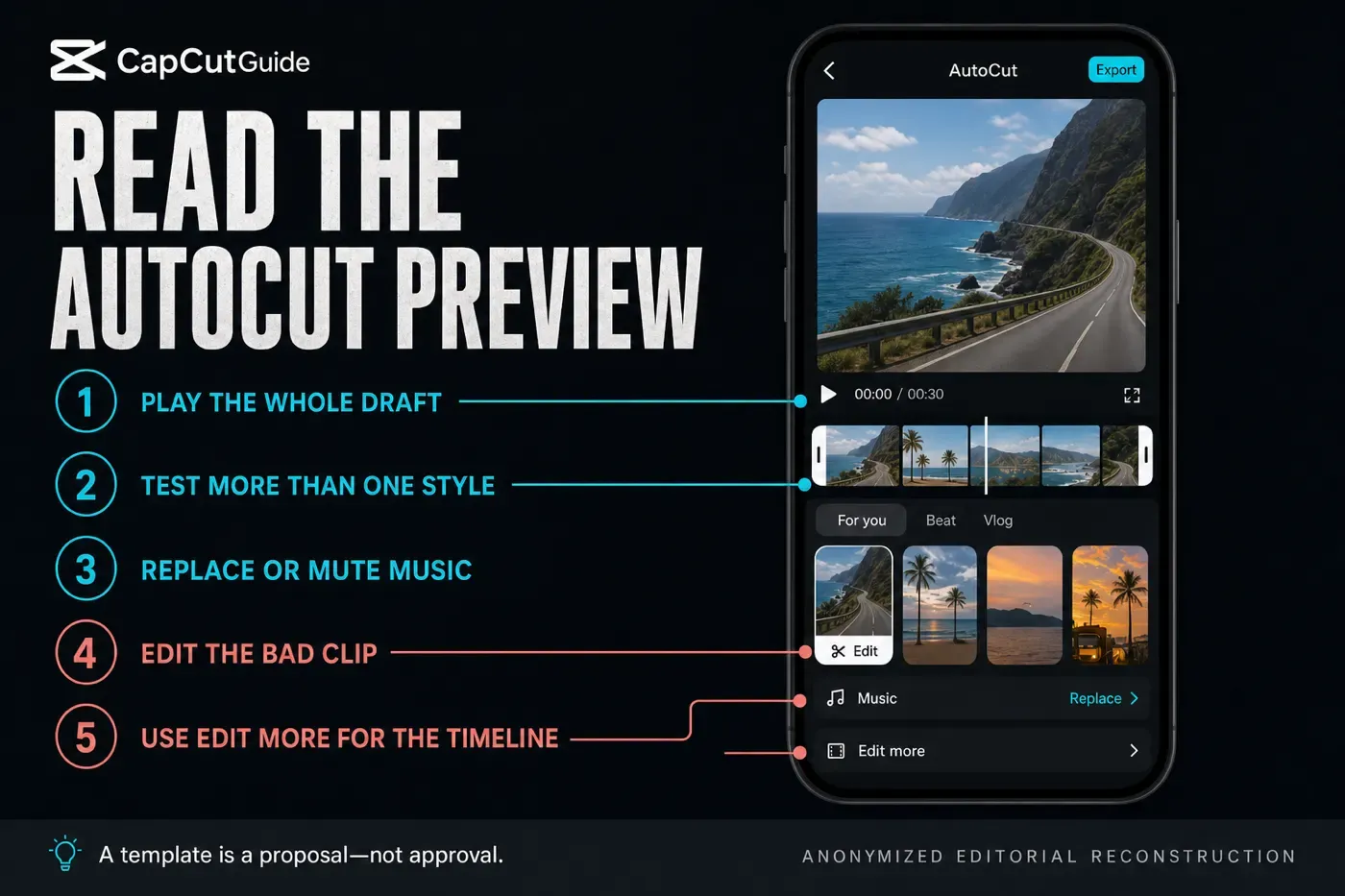
- Play the entire draft. A template may handle the opening well and repeat the same cut pattern until the ending feels rushed.
- Compare the same moment across styles. This reveals whether a better template fixes the issue or only changes the decoration.
- Listen with and without music. If the video becomes confusing when muted, the sequence itself may be weak. If dialogue disappears with sound on, the music mix is the problem.
- Open the deeper editor early. Once the order, missing moments or spoken timing is wrong, changing filters is no longer the right repair.
AutoCut on Mobile, Desktop and Web
Platform claims need unusual care here. CapCut's Auto Cut Help page says the feature is available on Mobile and Desktop during supported rollouts, but not on Web. Its Desktop instructions describe AI or Smart Edit menus, beat, speech and text logic. Another official PC AutoCut resource shows a different AI clip-maker panel built around editing style, duration and written requirements.
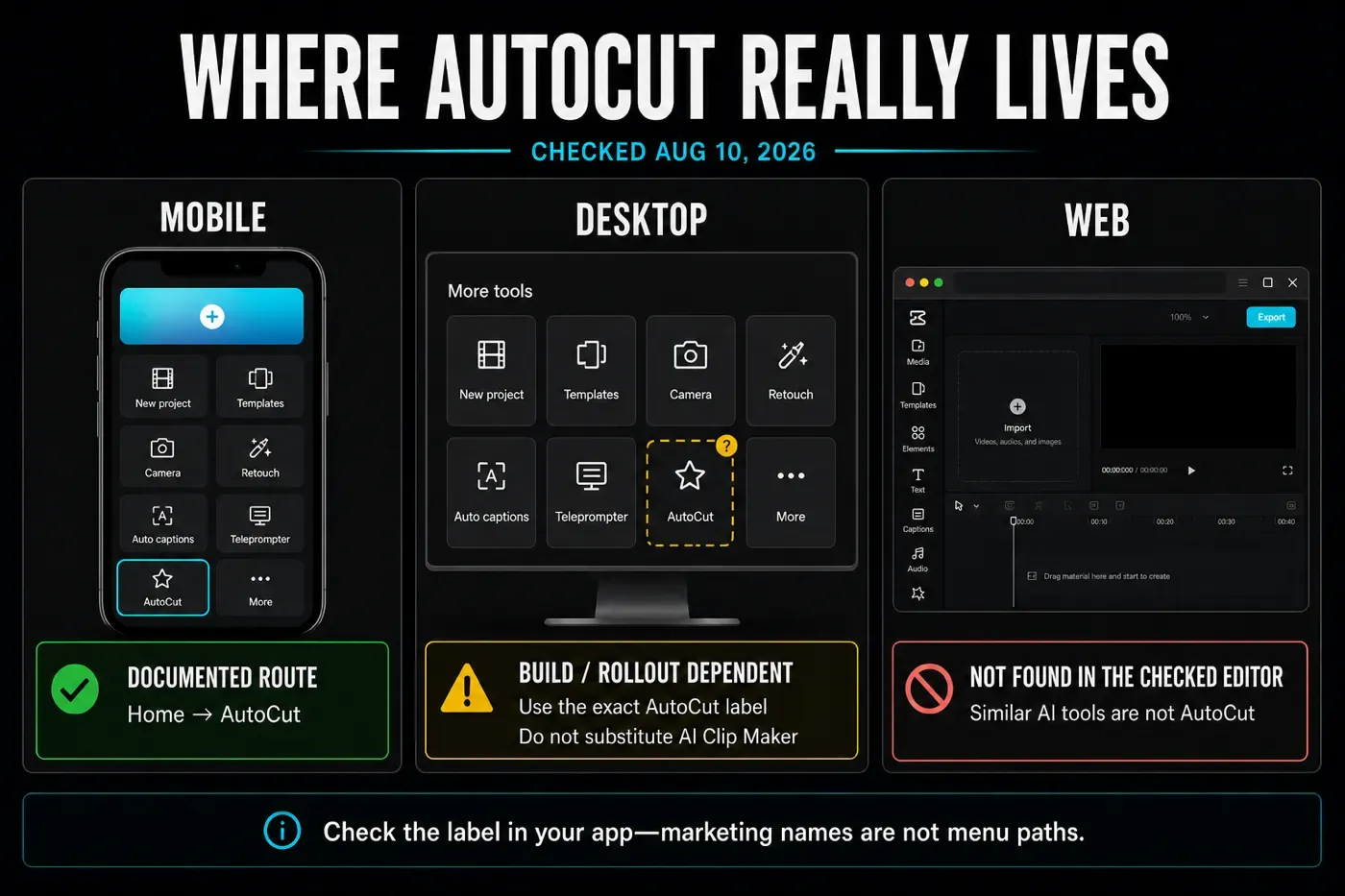
The official current walkthrough shows Home → AutoCut, media selection, style preview, editing and export.
Availability and the tool's meaning can vary. Don't treat AI Clip Maker, Long Video to Shorts or another automatic tool as identical without checking.
The signed-out Web editor checked on August 10 exposed regular editing and other AI areas, but no AutoCut entry.
The safe rule is simple: trust the exact interface in front of you. The maintained CapCut feature availability matrix tracks the broader platform picture, but a staged rollout can still make two accounts look different on the same day.
Review the generated edit like an editor
A fast montage can feel energetic while still dropping the only useful product shot, hiding a face behind interface text or cutting a spoken thought in half. Run the review in layers instead of trying to judge everything at once.
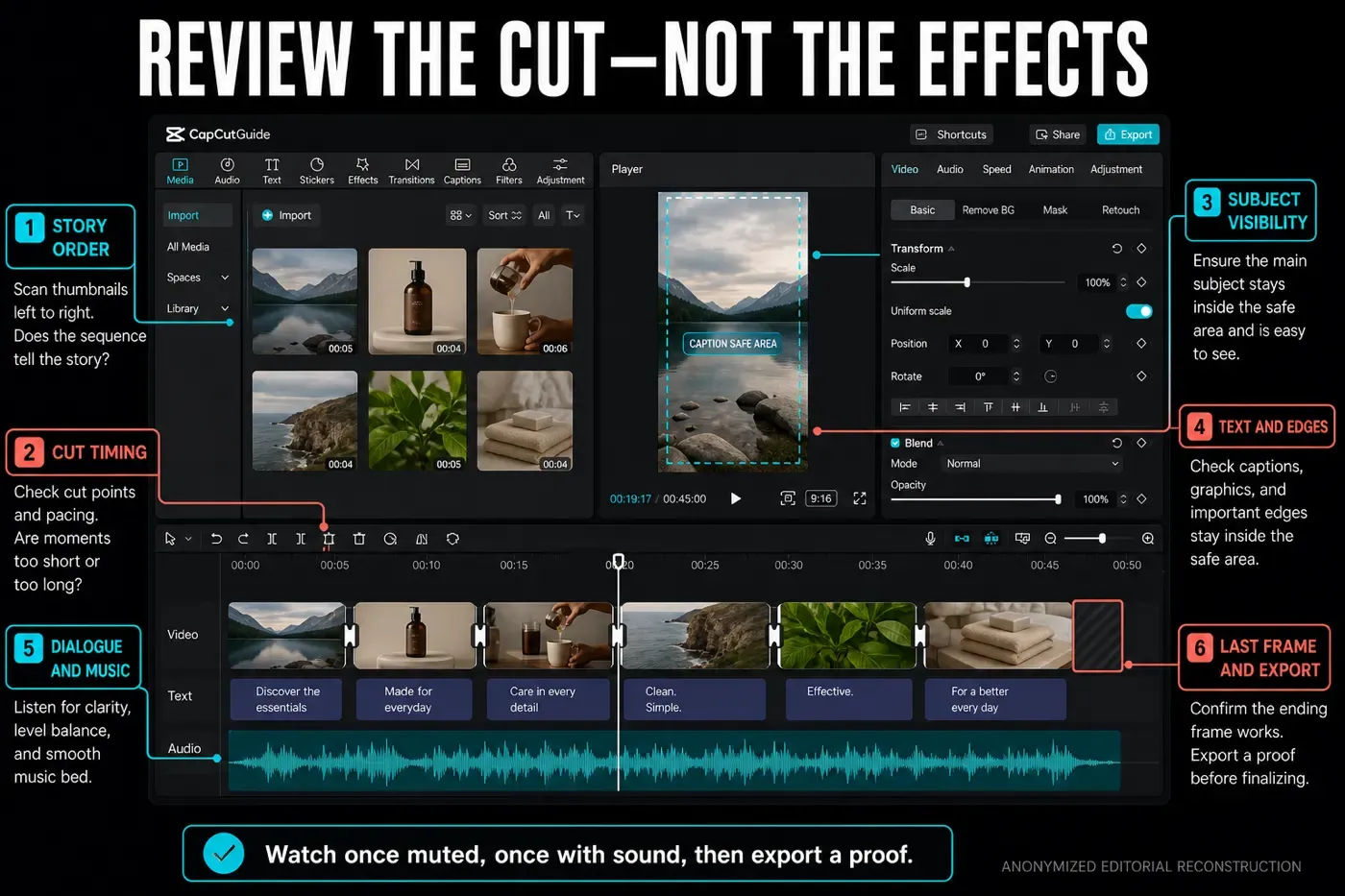
- Story pass: scan the thumbnails without sound. Can you explain the beginning, development and ending?
- Timing pass: watch every cut. Give actions enough time to land, and remove repeated angles that add no information.
- Frame pass: check faces, hands, products and text near every edge. Preview the real destination ratio.
- Audio pass: listen for chopped words, abrupt level changes and music that fights dialogue.
- Rights pass: check the selected music, template and effects before a business or client post.
- File pass: export a short proof and watch it outside CapCut. Confirm sync, sharpness, the first frame, the last frame and any visible branding.
For the final file settings, see our separate CapCut export settings breakdown. AutoCut chooses an edit; it doesn't remove the need to verify resolution, frame rate and the saved file.
Fix a weak AutoCut result without changing everything
Find the failing layer first. A single bad clip doesn't justify throwing away the whole draft. A broken story order won't be fixed by trying another filter.
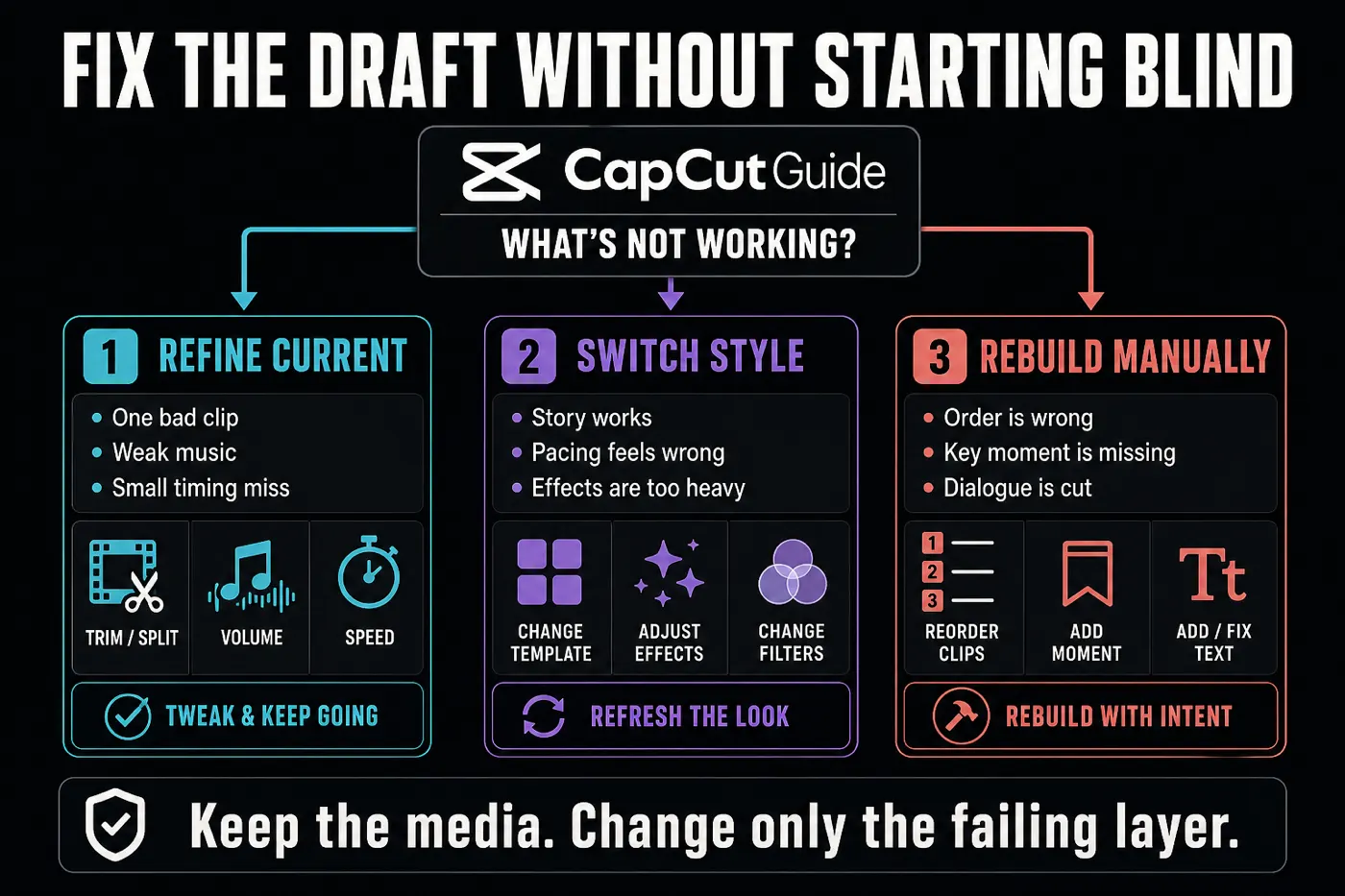
Trim or replace one weak clip, lower the music, remove one effect or adjust a small timing miss.
Use this when the story order works but the pace or effect package feels wrong.
Use Edit more when a key moment is absent, dialogue is cut or the sequence tells the wrong story.
Return to media selection when the clips are repetitive, badly framed or missing the shots the story needs.
If AutoCut is missing, stuck or not working
CapCut's troubleshooting page names platform support, rollout, account, version, connection and device limits. Some of its exact version and menu claims conflict with other official pages, so use the diagnostic order below instead of reinstalling first.
Expand the Home tools, confirm you're in the main CapCut app, record the app version and account, then check the store for an update. A rollout or region difference may remain.
Read the tool description. AI Clip Maker, long-video clipping and the mobile-style AutoCut workflow may not produce the same kind of draft.
The full AutoCut route was not present in the checked editor. Use Mobile, or make the timing manually with cuts and beat markers.
Keep the originals, use a stable connection, reduce the source batch and retry later before clearing data or reinstalling.
That can be a catalogue or rollout change. Preserve a usable draft, then compare the available styles instead of chasing an old screenshot.
Close other heavy apps and export a short proof. Judge the saved file before rebuilding a draft solely because the editor preview dropped frames.
Recent community reports describe both the AutoCut tile disappearing from an updated iPhone and categories changing or disappearing. These are useful warning signals, not proof that CapCut removed the same feature for every account. They support checking the current account, region and catalogue before destructive troubleshooting.
If the failure affects the whole application rather than AutoCut alone, continue with the broader CapCut not working diagnostics. Don't uninstall until local drafts and source media are protected.
Check the music, template assets and export gate
AutoCut's music is part of the edit, but selectable doesn't mean licensed for every destination. CapCut's current Materials License Agreement distinguishes ordinary Sounds, Commercial Sounds, non-commercial materials and materials marked for limited commercial use.
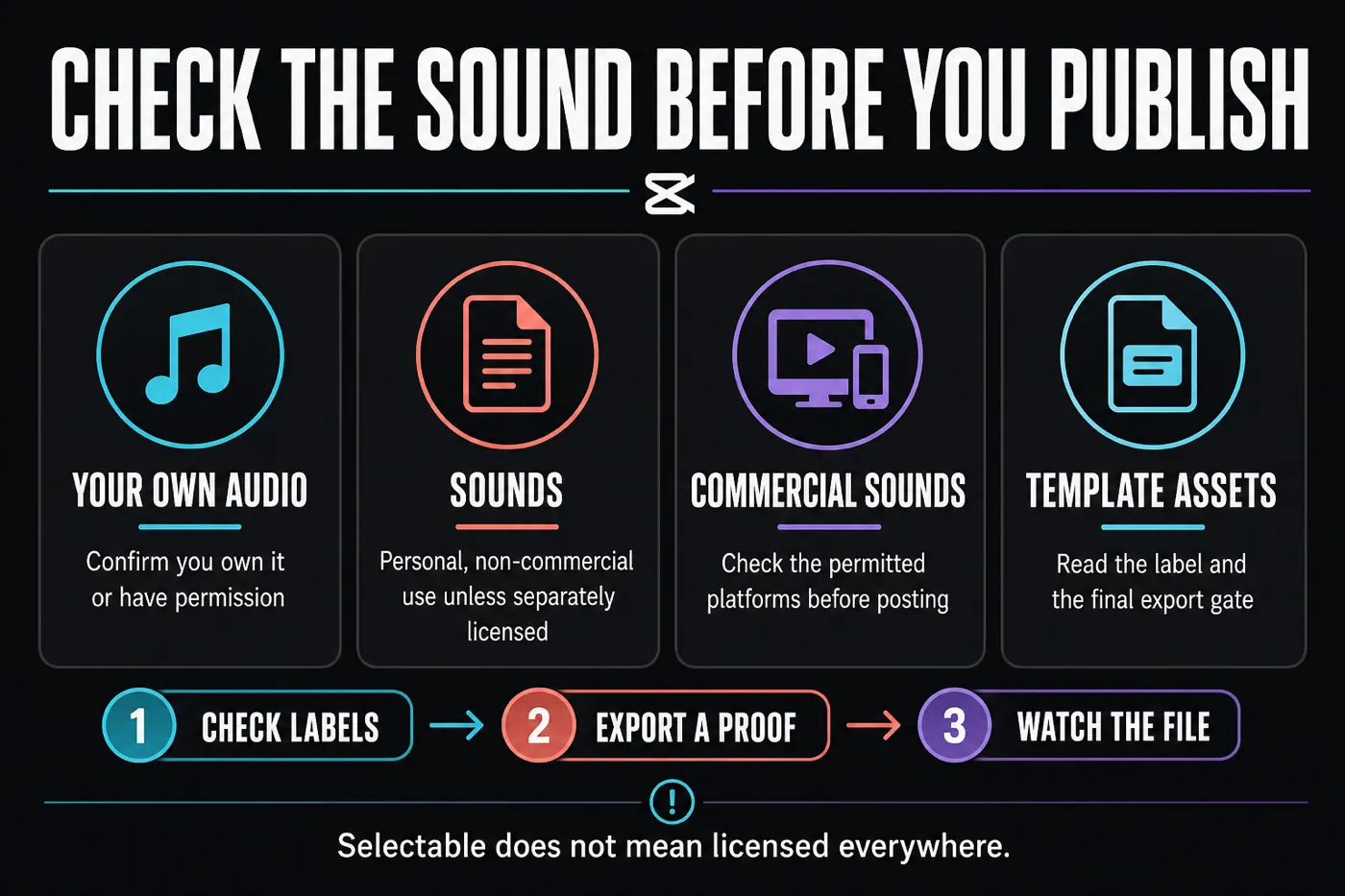
Use music you own or have permission to use, or follow the current Commercial Sound terms and permitted-platform limits. Check every template asset label. The fact that CapCut lets you preview or export an item doesn't grant rights outside its stated license.
Also inspect the final export screen. A style may introduce a paid asset, Pro gate, branded ending or different export option in your account. This guide doesn't promise a universal free tier, fixed watermark outcome or identical catalogue across regions.
Who should use AutoCut and who should skip it
Use AutoCut when
- You have several short, clear clips
- A quick social montage is the goal
- You are willing to compare styles
- You will review and repair the draft
Skip AutoCut when
- Dialogue must remain exact
- Every product detail has a required duration
- The music or assets lack clear rights
- You need several clips extracted from one long recording
AutoCut earns its place when it removes the blank-timeline problem. It doesn't earn the final decision. If you spend longer correcting the story than you would placing six deliberate cuts, move to the manual timeline and keep control.
CapCut AutoCut FAQ
What is AutoCut in CapCut?
AutoCut is an automatic first-edit workflow that can assemble selected clips or photos around a style, template and music. A second documented mobile route starts with one longer source. It produces one draft, which still needs a review of timing, order, framing, sound, rights and the exported file.
Where is AutoCut in CapCut Mobile?
In CapCut's current official mobile walkthrough, AutoCut appears in the expanded tools on the Home screen. Tap AutoCut, select media, tap Next and review the generated styles. The tile order and availability can vary by app version, account and region.
Is CapCut AutoCut available on Desktop?
CapCut Help says AutoCut can be available on Desktop during supported rollouts, but official pages show conflicting menu paths and different automatic-clipping workflows. Use the exact AutoCut label in your installed build and read its description before assuming it matches the mobile template-and-beat workflow.
Can I use CapCut AutoCut on Web?
The full AutoCut workflow was not found in the public Web editor checked on August 10, 2026, and CapCut's Help pages say it is not supported on Web. Similar AI tools don't prove that the same AutoCut workflow is present.
Is CapCut AutoCut free?
CapCut promotes a free mobile entry, but templates, music, effects and export gates can vary by account, region and rollout. Check the labels and the final export screen in your own account instead of assuming every AutoCut result is free.
Why is AutoCut not showing in CapCut?
You may be on an unsupported platform, outside the current rollout, signed into a different account or using an older build. Check the Mobile Home tools first, record the current version and account, then update if available. Don't reinstall before protecting local drafts.
Is AutoCut the same as Auto Velocity or Beat Sync?
No. AutoCut builds a first sequence from selected media. Auto Velocity changes speed and visual style inside a clip. Beat markers guide manual cut timing, while fixed templates place your media inside an existing structure.