


Start with Aesthetic 1 pict for a soft one-photo edit. For a framed photo set, look at 10Pic Clip Aesthetuc; its creator tags it Polaroid. If you're after a retro photo dump, try Dump photos. You'll find all three linked below, next to vlog and collage options. For the wider choice between collages, memes, title cards and other visual formats, see our CapCut design tools overview.
The real question is what the look does to your photos. A faded finish may suit a warm café shot, yet the same filter can turn a night portrait muddy. Pick a style first. Then check the number of media slots, the crop and the controls you can change.
The slot bands are planning suggestions, and more slots don't necessarily mean a longer video. Repeat a shot as a motif only when it supports the sequence. If a duplicate adds nothing, cut it.
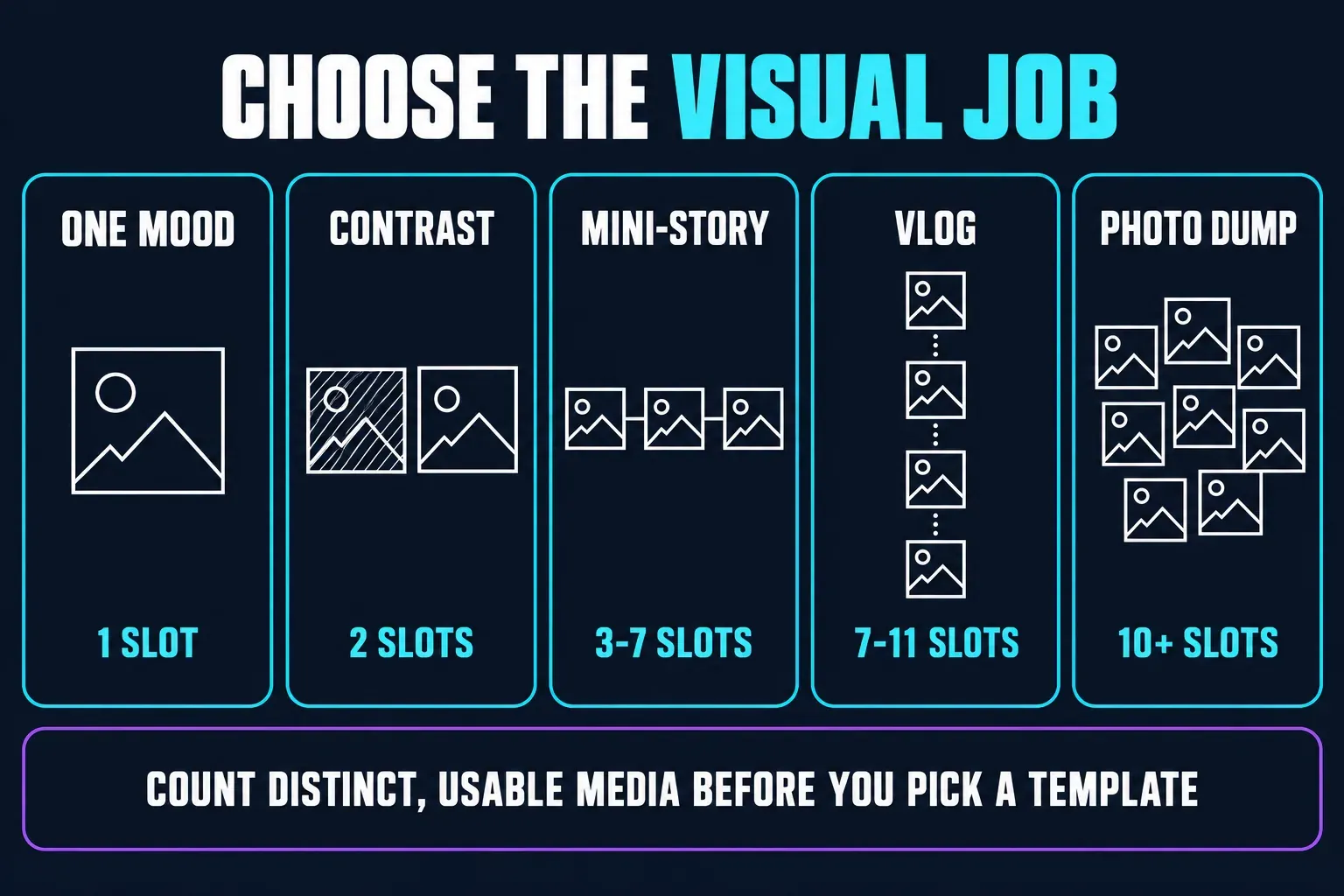
14 aesthetic templates to compare
Let the creator's description narrow the look, then preview it with your own media. The style notes below report labels; they're not a promise about every effect or transition. Durations are rounded from the official detail data.
| Official example | Creator label or useful check | Slots | Length | Ratio |
|---|---|---|---|---|
| Aesthetic 1 pict | Tagged softfilter; inspect skin tones | 1 | 20.4 sec | 9:16 |
| Sweater Weather | Labeled Aesthetic_Spedup, not necessarily a slow edit | 1 | 23.9 sec | 3:4 |
| aesthetic | Tagged aestheticfilter; compare both crops | 2 | 33.6 sec | 9:16 |
| grid 3clips | Tagged grid and vlog; check panel placement | 3 | 4.6 sec | 9:16 |
| Travel 3video | Tagged chill; inspect the music and timing | 3 | 13.8 sec | 9:16 |
| EID TRANSITION | Tagged Eid and slowmo; check the occasion and text | 5 | 12.7 sec | 9:16 |
| Bubblegum3 | Seven slots despite the number in its name | 7 | 11.3 sec | 9:16 |
| Estetikvlog | Tagged vlog and storyvlog | 7 | 11.3 sec | 9:16 |
| mini vlog | Tagged daily life; landscape format | 9 | 22 sec | 16:9 |
| 10Pic Clip Aesthetuc | Tagged slide, Polaroid and frame | 10 | 26.4 sec | 3:4 |
| Today vlog | Tagged todayvlog and todaystory | 11 | 19.3 sec | 9:16 |
| Trend | Generic title; preview the look before choosing | 15 | 12.1 sec | 3:4 |
| Dump photos | Tagged vintage, retro and photos | 17 | 11.4 sec | 9:16 |
| 26 Collage Aesthetic | 52 slots, not 26; inspect how the frames repeat | 52 | 15.1 sec | 9:16 |
Ten examples use 9:16, three use 3:4 and one uses 16:9. Both 9:16 and 3:4 are portrait shapes, yet they frame the same photo differently. The aspect-ratio guide explains the trade-off. That doesn't mean you can resize a locked template without affecting its composition.
Treat slot counts as a starting point. CapCut lets creators enable a flexible number of clips, so some templates let you add or remove media. Check the live picker for the permitted count and for whether each slot takes a photo or a video.
Choose a look that suits the photos
Soft and light
Try this for window light, portraits or a quiet morning. Look for gentle contrast and readable skin tones. Aesthetic 1 pict carries a softfilter tag; check that its finish does not wash out your brightest photo.
Clean and minimal
Search for minimal or clean layouts when the subject should do most of the work. Preview the busiest frame: small text, borders and stickers should not compete with a face or product.
Vintage or Polaroid
Compare 10Pic Clip Aesthetuc's Polaroid tag with Dump photos' vintage and retro tags. Try a bright and a dark image before filling every slot; a faded finish can hide detail you wanted to keep.
Dark or moody
Search dark aesthetic or dark academia for a moodier starting point. Check the face and shadows as well as the background. If the preview turns your subject into a silhouette unintentionally, choose a less aggressive look.
A small daily vlog
Estetikvlog, mini vlog and Today vlog offer different counts and formats. For a café visit, you could use the street, your companion, a door opening, the cup and the walk home. That is a story idea, not a required shot list.
A lively photo dump
Use a bigger set when there are several moments worth seeing. Try people, scenery and close details together. Play the result at normal speed: the template's total length does not tell you how long each photo stays visible.
Make mixed photos feel like one edit
Choose something the set shares: warm light, a blue coat, one place or the same group of friends. Then vary the framing. A street view beside a close-up of a coffee cup gives a café sequence more context than five similar cup photos.
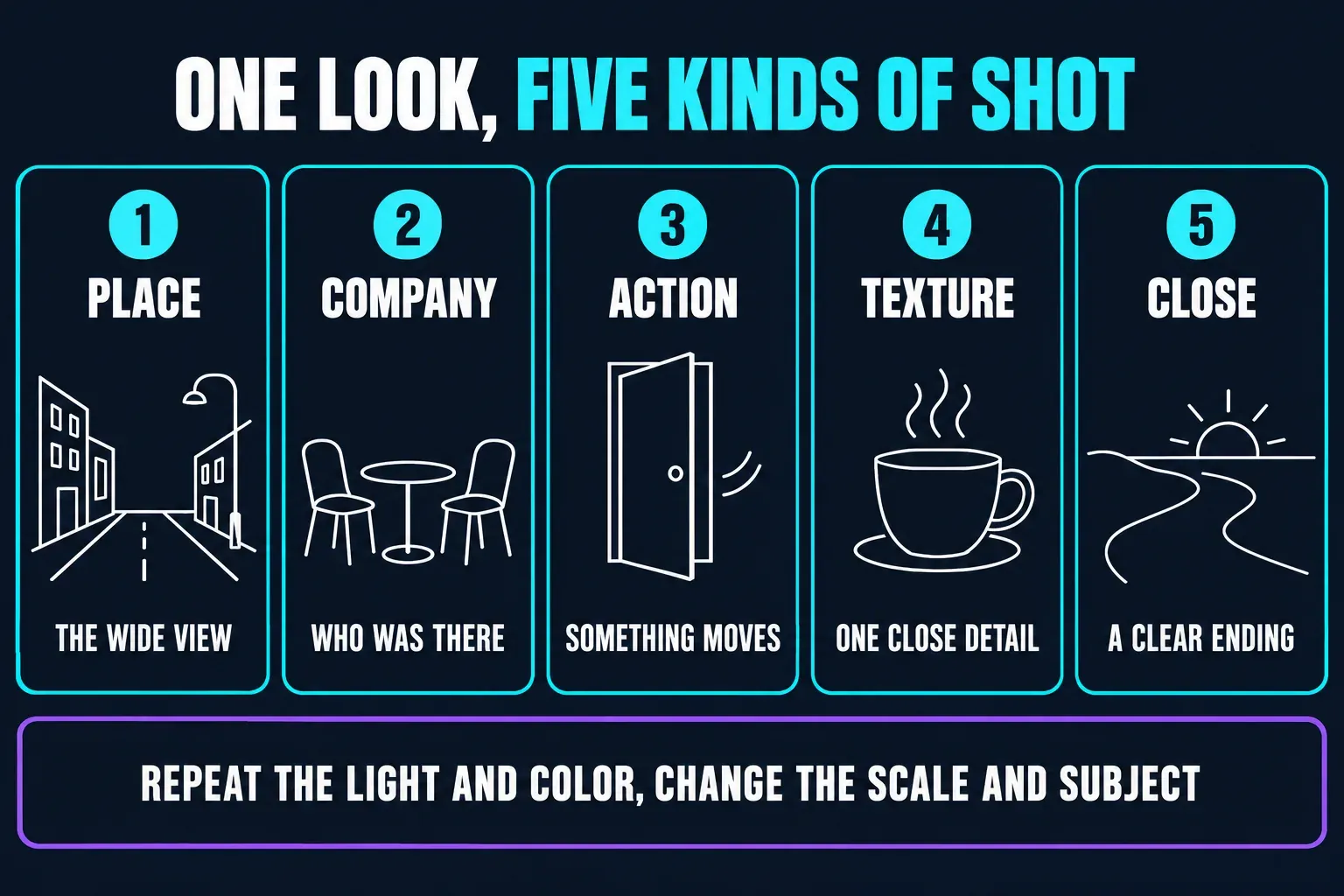
The storyboard is one possible arrangement. You don't have to reproduce it. Repetition can work as a motif, so remove duplicates only when they add nothing. If you want a simple ordered photo presentation, use the slideshow guide. For several pictures visible together, go with collage and split-screen templates; for a month or year in order, use recap templates.
Prepare a small set before filling 52 slots
Start with your best photo, one different view and a few details, and leave the originals untouched. Before you import, scan the photos for private notifications, addresses or file paths you wouldn't want published.
Try that small set first wherever the template permits it, and inspect every moving crop, especially faces near the edge. If a template needs a full set before you can preview, pick a smaller one for your first attempt. I wouldn't add filler just to reach a number; it's rarely worth the extra sorting.
Use an aesthetic template on Mobile or Web
On Mobile, CapCut's template-use instructions lay out this sequence, though labels and available edits can differ:
- Open an official template link or find the template in the app's Template or Templates section. Check its count, ratio, preview and any price shown.
- Tap Use template. Choose Photos or Videos as appropriate and fill the available slots with your media.
- Open Preview and inspect the complete sequence, including the first and last frames.
- Select a segment and use the editing controls provided to replace or crop media. Change text only where the template allows it.
- Listen for your original speech or ambience, then watch muted to check whether the pictures and text still make sense.
- Export a completed test and play the downloaded file outside CapCut. Check the crops, effects, sound and any branding before posting.
On Web: CapCut's August 31 Web walkthrough shows template search, media replacement and download in the browser. That newer example is more useful than the older blanket claim that Web has no community-template browsing. Still, it doesn't show that every Mobile template works there. If you can't find the exact result, try Mobile or another template.
On Desktop: check the library your version provides. CapCut's platform guidance describes more limited support on some desktop versions, so don't expect identical search results or controls across all three platforms.
Check locked filters, text and sound early
Being able to replace a photo doesn't mean you can remove its filter. CapCut's replaceable-media guidance explains that creators choose which elements are editable and can restrict media types. Other parts of the design may stay locked.
One Desktop user reported on r/CapCut that a template changed their color grade without an obvious reset control. That's a single report, not proof that every template behaves this way. Try your most difficult photo first. If the editor gives you no usable filter or adjustment control, switch templates or rebuild the look by hand.
With video clips, listen to the result before you assume a conversation or ambient sound survived. CapCut documents original-sound preservation as a creator setting. If the template drops audio you need and offers no way to restore it, you're better off with a manual project.
Check the price, watermark and music separately
A creator's hashtag isn't a price label. CapCut says paid-template prices are set by creators, and the final amount shows up at checkout. Look at the actual offer before you commit to a large photo set.
For a watermark-free result, check the finished export itself. CapCut's watermark guidance covers deleting an editable branded ending. That doesn't guarantee every locked template, overlay or paid element can be removed for free. Don't turn to third-party downloaders as a workaround.
For a brand or client video, payment alone doesn't settle music rights. CapCut's non-US materials agreement distinguishes personal-use materials from those licensed for commercial use. Its Commercial Sounds permission names CapCut, TikTok and TikTok for Business; other destinations require separate rights. US users have a separate agreement. Check the terms that apply to your account, your chosen track and your destination.
Check the edit before posting
Run through the checklist to protect faces, titles and visual balance, then confirm the actual crop in the template you picked.
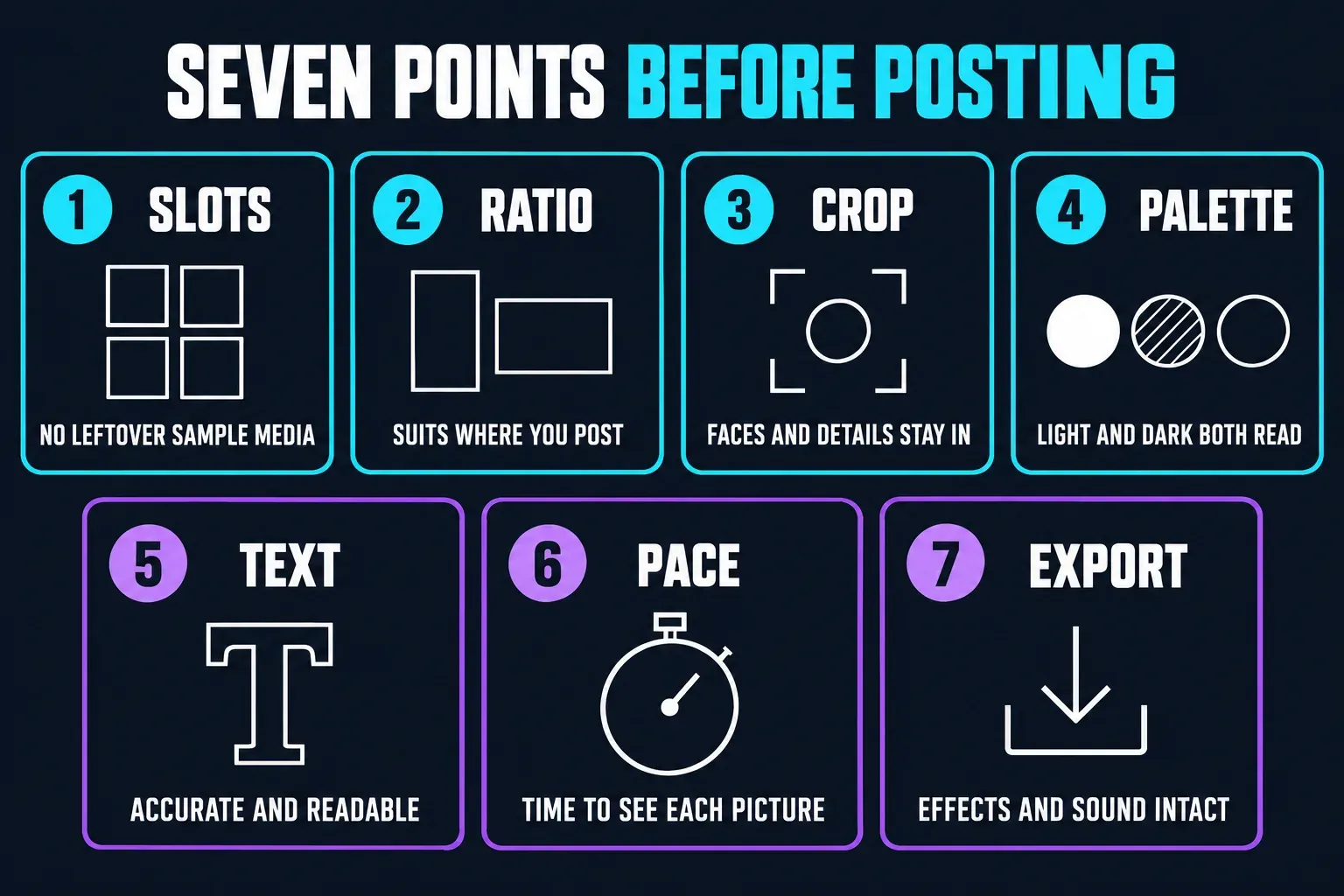
- Slots: no unwanted sample media remains; any repeated photo has a purpose.
- Ratio: the frame suits the place you will publish it.
- Crop: important faces, hands and details stay visible as the frame moves.
- Palette: the light and dark photos both remain readable after the filter.
- Text: replaceable words are accurate and readable; unwanted locked text means choosing another design.
- Pace: viewers have time to understand the important pictures at normal playback speed.
- Export: the downloaded file has the intended effects and sound, without unexpected branding.
If the saved file differs from the preview, review your CapCut export settings before you upload. A higher resolution can't bring back a face the template cropped out.
If the template or your photos will not load
If a link fails, try the official library, sign in if asked and check your connection. Availability can depend on region and app version, or a creator may remove a template. CapCut's troubleshooting advice warns against uninstalling first, since you may lose local drafts.
If the template opens but your photos are missing, check the Photos category and whether the app has permission to access the files you selected. CapCut's missing-media guidance also notes that an album may still be loading. When access problems persist, follow the template troubleshooting guide, and don't delete a working project just to test a link.
CapCut aesthetic template FAQ
How many photos do I need?
The 14 examples checked on September 5, 2026 list one to 52 media slots. Those are not necessarily distinct photos: creators can allow flexible counts or restrict slots to particular media types. Check the live picker.
Which option should I try for one photo?
Aesthetic 1 pict lists one slot and a softfilter tag. Sweater Weather also lists one slot, but its creator labels it Aesthetic_Spedup. Preview the motion and crop rather than assuming one photo means a slow edit.
Are these templates vertical?
Ten of the 14 checked examples use 9:16, three use 3:4 and one uses 16:9. Both 9:16 and 3:4 are portrait formats. Confirm the current ratio before adding your photos.
Can I change the aesthetic filter?
Only if the template exposes suitable editing controls. Replacing a photo does not guarantee control over filters, effects or text. Choose another template or edit manually if a locked look does not suit your media.
Are aesthetic templates free and watermark-free?
Neither is guaranteed for every template. Check the current price and any paid elements, then inspect an exported test. An editable branded ending is different from a locked overlay or a paid-use restriction.
Can I make an aesthetic photo dump?
Yes. Dump photos lists 17 slots, while 26 Collage Aesthetic lists 52 despite its name. Choose a set you want people to see, then inspect how the template arranges it. More slots do not guarantee a longer video.
Can I use these in a browser?
CapCut documents Web template search, media replacement and export. The available catalogue and controls can differ from Mobile, so a working public detail link is not proof that the same template will work in your browser account.
Keep the look that helps your photos
Where possible, compare two plausible styles on the same small set. Keep the one that preserves the faces, color and moments you care about. If the available designs get in the way, head back to the CapCut template finder or make a simpler manual edit.