
Is CapCut Free? Pricing, Pro Features & Hidden Limits (2026)
Short answer: yes, CapCut is free in 2026. You can download it on iPhone, Android, Windows and Mac, edit full projects, and export without a forced watermark on most clips. The catch is that
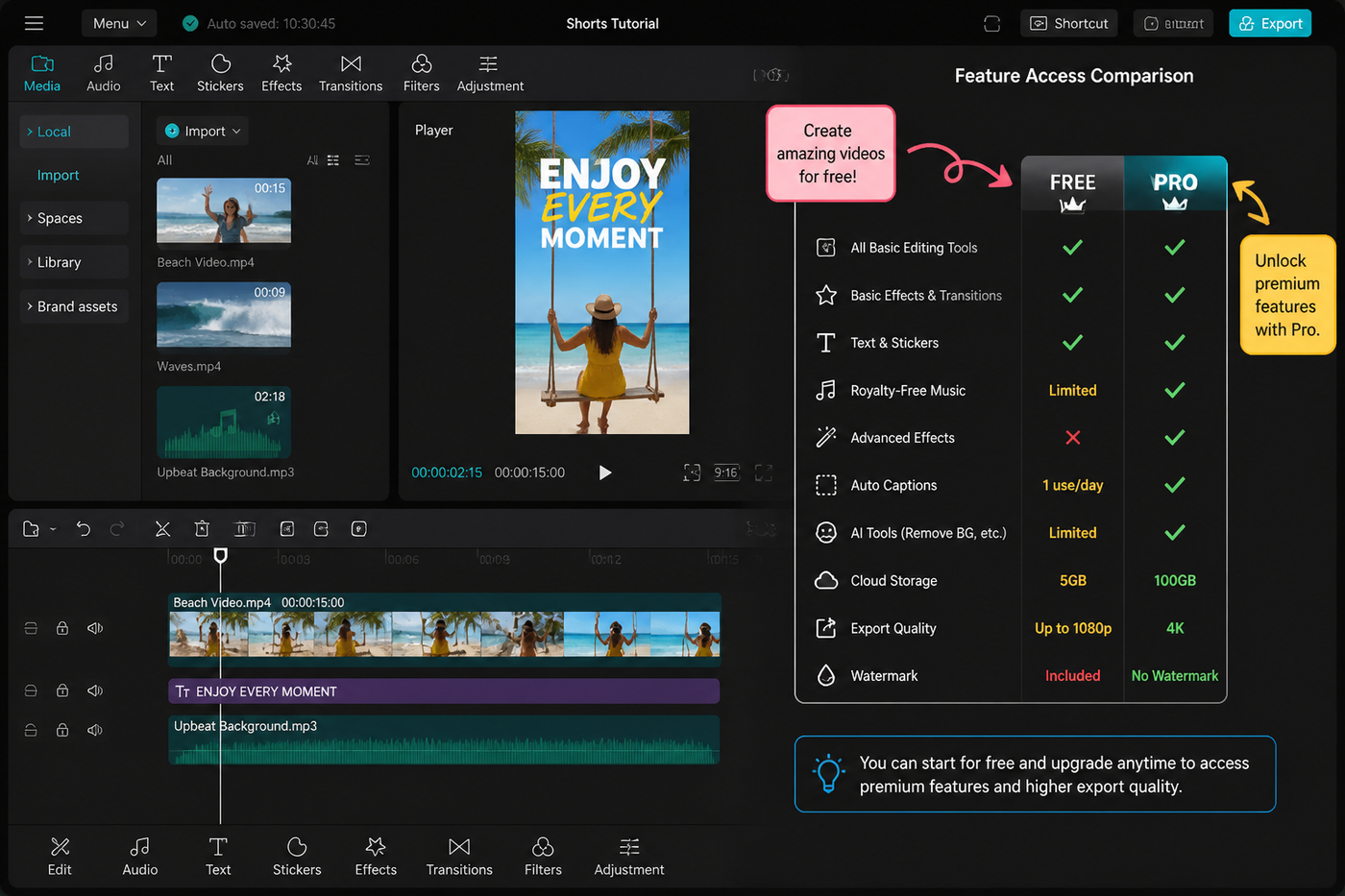
Short answer: yes, CapCut is free in 2026. You can download it on iPhone, Android, Windows and Mac, edit full projects, and export without a forced watermark on most clips. The catch is that a growing chunk of the AI tools, premium effects, stock library and cloud features sit behind CapCut Pro, and a few export ceilings have crept up over the last year. I edit on CapCut daily across an iPhone 15 Pro, a Pixel 8 and an M2 MacBook Air, and below is exactly where the free tier ends and where Pro actually earns its money.
Testing note: I checked CapCut’s official pricing help and current pricing SERPs before drafting this. CapCut says pricing varies by region and device, so this article avoids pretending there is one global price. Sources checked: CapCut Pro pricing help.
What you actually get on the free plan
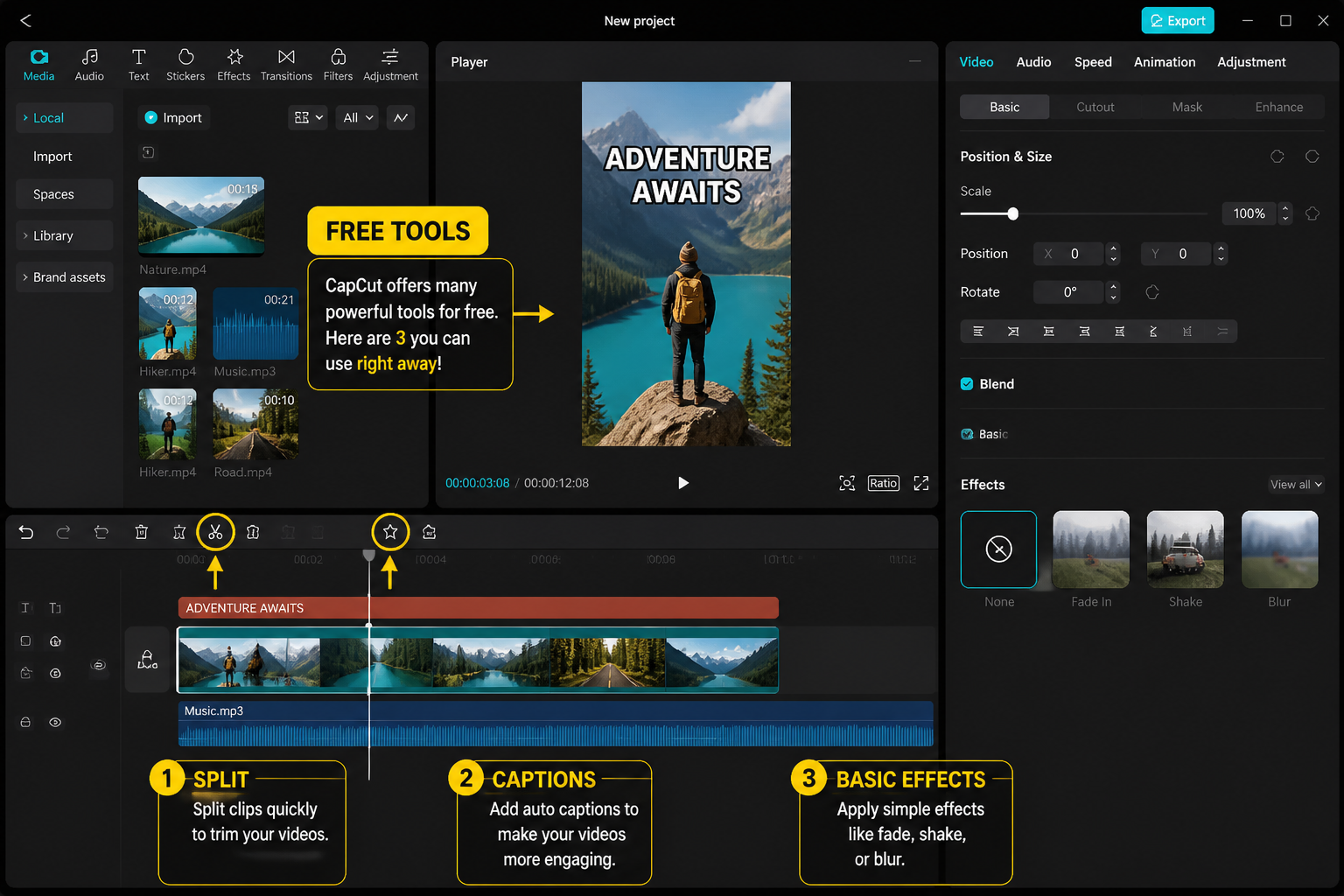
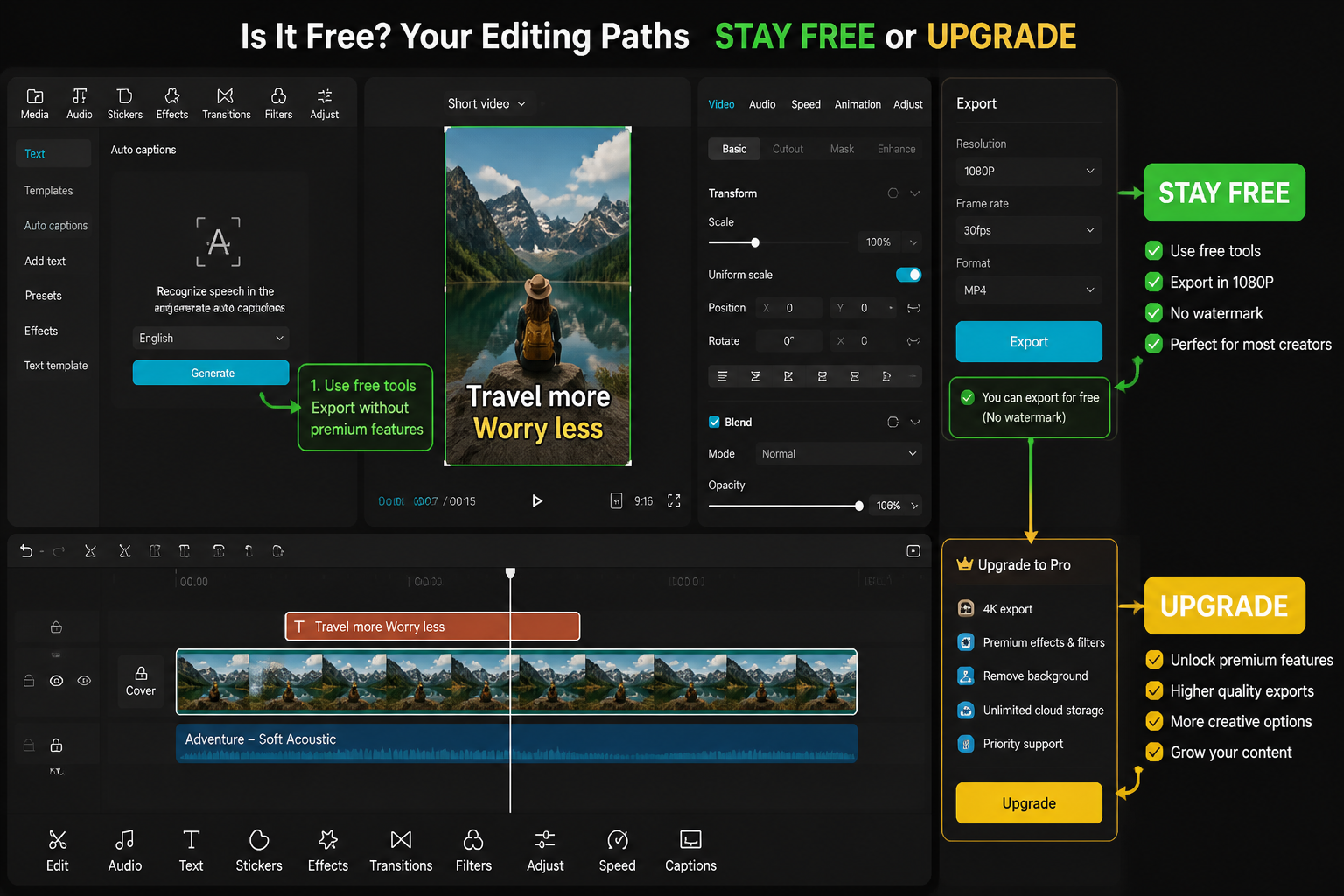
The free plan is closer to a full editor than a trial. We tested a typical TikTok workflow — multi-layer timeline, music, captions, transitions, basic color — and never hit a paywall during the edit itself. On both mobile and desktop, free users get:
- Unlimited project length and unlimited exports (subject to your device storage).
- The full core timeline: multi-track video, audio, text, stickers, overlays and keyframes. If you want to see the keyframe system in action, our CapCut keyframes walkthrough uses only free-tier tools.
- Standard transitions, basic filters, speed ramps and the velocity curve editor — everything you need for the kind of edits in our velocity edit guide.
- Auto captions in major languages (with a monthly minute cap that resets — see the AI section below).
- Royalty-free music marked "Free" in the audio library, plus any sound you import yourself.
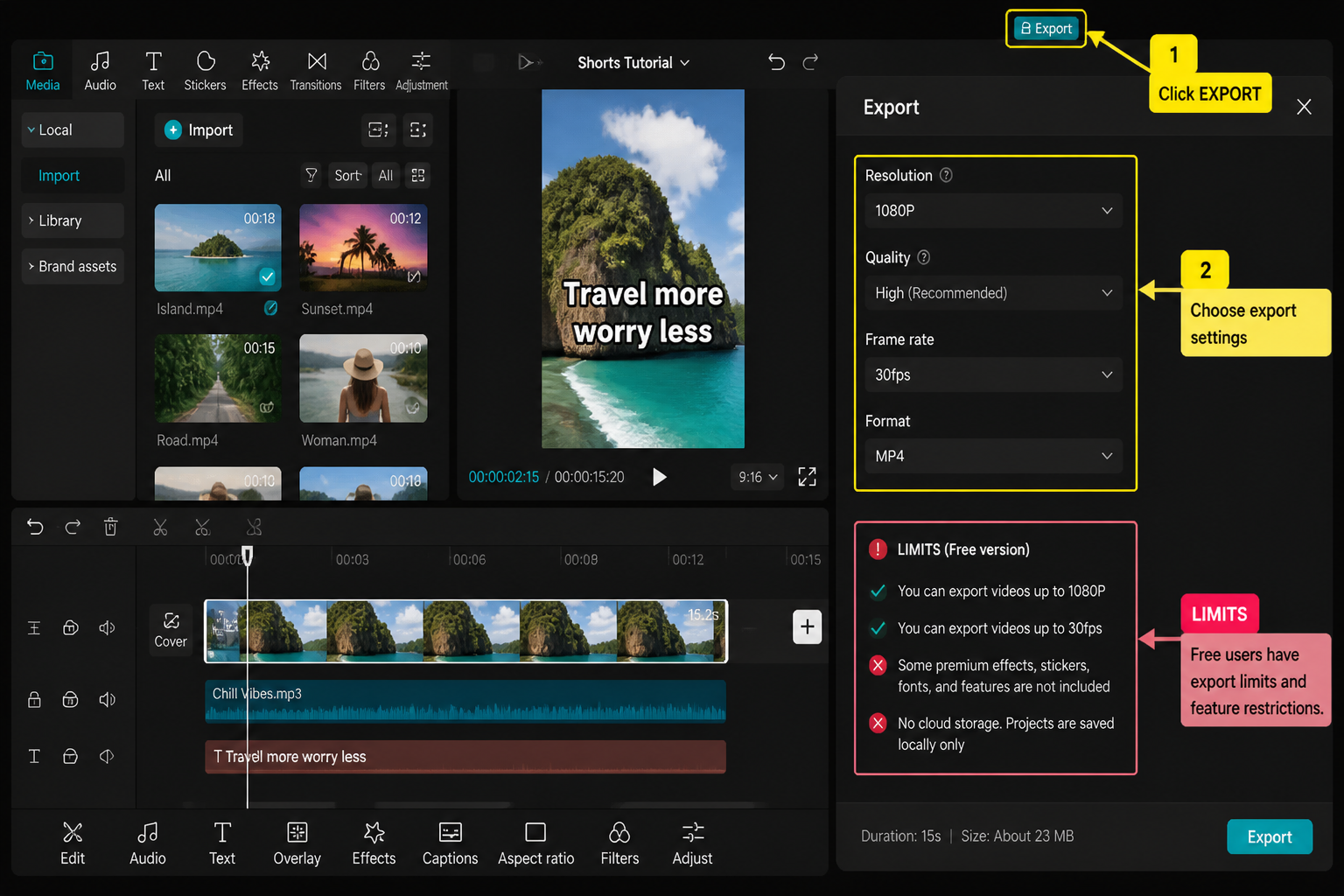
- Exports up to 1080p 60fps on mobile and up to 4K 60fps on desktop, with no forced watermark when you finish a clip from scratch.
The "no watermark" point is the one people get wrong. CapCut stopped slapping a brand watermark on every export years ago. The watermarks you still see come from templates — if you start a project from a creator's template in the CapCut feed, the credit watermark stays on unless you remove it manually before exporting.
What CapCut Pro actually unlocks
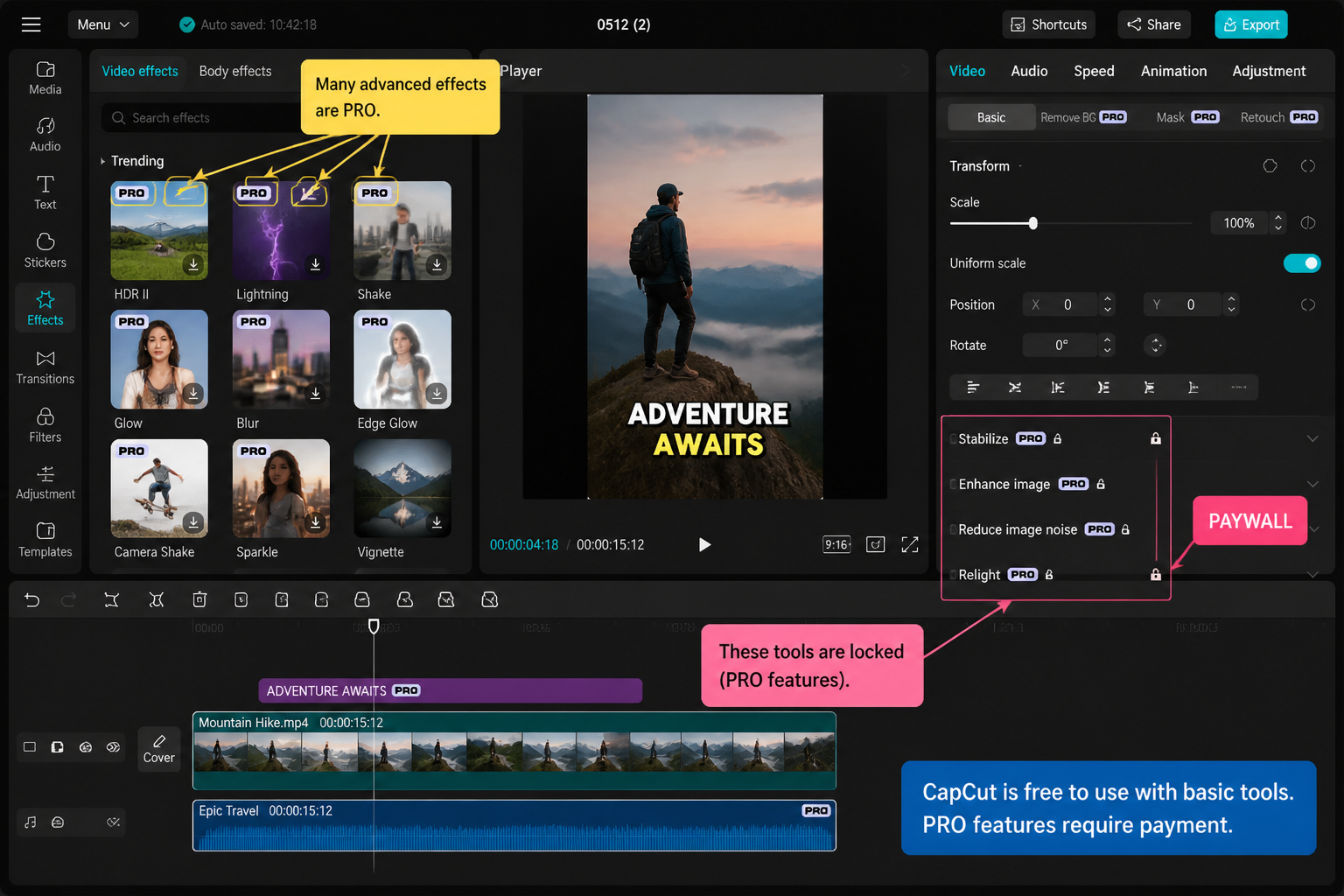
Pro is where the AI stack lives. As of May 2026, the meaningful Pro-only features are:
- AI tools with no monthly cap: long-form auto captions, AI script-to-video, AI background removal on longer clips, AI voice cloning, AI image-to-video, smart cutout for non-human subjects and the higher-quality voice changers.
- Premium effects and filters: the items marked with the gold Pro badge — currently a few hundred effects, transitions, text styles and stickers, refreshed monthly.
- Cloud storage and cross-device sync: Standard/Pro storage and sync limits vary by plan; CapCut's help pages describe Standard around 100GB and Pro up to larger team-friendly storage and can open the same project across mobile and desktop. Free accounts are stuck with local-only projects.
- Premium stock library: the larger pool of stock video, audio and SFX inside the app.
- Higher export ceilings on mobile: 4K export and higher-bitrate H.265 options on phones that support them. Free mobile export limits can vary by region, device and current store plan; 1080p 60fps is the safe baseline to check before you start a project.
- No upscale watermark and faster AI processing — Pro renders go to a priority queue, which on the M2 Air shaved AI background removal on a 30-second clip from about 38 seconds to roughly 14 seconds during our tests.
What Pro does not do: it doesn't unlock a hidden "real" editor. The free timeline and the Pro timeline are the same product. You're paying for AI minutes, premium assets and cloud — not for a different app.
Current CapCut pricing tiers (and the currency catch)
Pricing varies by region and by whether you subscribe through Apple, Google or directly on capcut.com, but the May 2026 pattern in the US store looks like this:
- Free — $0, the plan above.
- CapCut Pro Monthly — around $7.99/month.
- CapCut Pro Annual — around $74.99/year, which works out to roughly $6.25/month.
- CapCut Pro for Commercial Use — a separate higher tier (in the $20-25/month range in the US) aimed at brands and agencies, bundling the commercial license with extra cloud and team seats.
Treat those figures as ballpark, not gospel — Apple and Google take their cut, regional pricing shifts, and CapCut runs promotional annual deals a few times a year. As of May 2026, confirm current pricing in the CapCut app store listing or capcut.com before you commit. If you see a price more than 20% off the numbers above, it's usually a regional adjustment, not a scam.
One quiet gotcha: subscribing on iOS is usually 10-20% more expensive than subscribing directly through capcut.com on a browser, because of Apple's commission. If money matters, buy Pro on the web and sign in on your phone.
Is there a free trial?
Most regions get a 7-day free trial on the Annual plan, billed in advance and cancellable from your App Store or Google Play subscription screen. A few markets get a longer 14-day promo trial during launch windows for new AI features (the AI script-to-video rollout in early 2026 ran one). The trial unlocks the full Pro stack — AI tools, cloud, premium effects — so it's the cleanest way to find out whether you actually need Pro before paying.
Two things to know before you tap "Start trial":
- It auto-converts to the paid Annual plan unless you cancel at least 24 hours before the trial ends.
- Anything you produced with Pro-only assets during the trial keeps working in your exported files, but you lose the ability to re-edit those Pro assets after the trial expires unless you resubscribe.
Can you use free CapCut commercially?
This is the question that trips up freelancers and small brands, and the answer changed in 2024 and got refined again in 2025. As of May 2026:
- Personal creator content — posting your own edits to TikTok, Reels, Shorts or YouTube, including monetized content from your own channel — is allowed on the free plan. Ad revenue from your own channel is treated as personal use.
- Client work and branded content — editing for a brand, agency, or any third party who's paying you to produce the video — technically requires the CapCut Pro for Commercial Use tier, not the standard Pro plan.
- In-app stock assets — music, sound effects, stock video and templates from the CapCut library carry their own license. Free-marked assets are fine for personal use; commercial use of any in-app asset officially requires the commercial tier.
In practice, plenty of small creators run client work on standard Pro and never hear a peep. But if you're invoicing a brand and using CapCut's own stock library, the commercial tier is the clean answer. For most solo TikTok and YouTube creators editing their own content — including the workflows we cover in our edit TikTok with CapCut guide — the free plan is enough on the licensing side.
Alternatives if you want fully free, no strings
If the AI gating and the licensing fine print bother you, three free alternatives are worth a look in 2026:
- DaVinci Resolve (desktop) — still the most powerful free editor on Mac and Windows. Steeper learning curve, but no subscription, no AI minute caps and a genuinely professional color and audio toolset.
- CapCut's own web editor — same account, browser-based, slightly fewer features but useful when you don't want to install anything.
- InShot or VN on mobile — both have generous free tiers. InShot's watermark on free exports is the main trade-off; VN is closer to a free, no-watermark CapCut clone but with a smaller effects library. Our CapCut vs InShot comparison goes deeper on that one.
FAQ
Does CapCut put a watermark on free exports?
Not on edits you build from scratch. The watermark you sometimes see comes from creator templates — if you start from a template in the CapCut feed, the credit watermark stays on the export unless you remove it manually in the timeline before rendering.
Is CapCut free for YouTube monetization?
Yes for your own channel content. Ad revenue from your own YouTube, TikTok or Reels account counts as personal use, so the free plan covers it. Editing videos that a client or brand is paying you to produce is where CapCut's licensing technically asks for the Commercial Use tier.
What's the difference between CapCut Pro and CapCut Pro for Commercial Use?
Standard Pro unlocks AI tools, premium effects and cloud for personal creators. The Commercial Use tier costs more (roughly $20-25/month in the US as of May 2026), adds a commercial license for in-app assets, more cloud storage and team seats. Confirm current pricing in the CapCut app store listing or capcut.com.
Can I export 4K on free CapCut?
On desktop, yes — free CapCut for Mac and Windows exports up to 4K 60fps. On mobile, 4K export is currently a Pro-only feature in most regions; free mobile users cap at 1080p 60fps.
Will CapCut start charging for features that are free today?
It has before. AI background removal and long-form auto captions were both free a year ago and now sit behind Pro or a monthly minute cap. Expect the pattern to continue with new AI features — they typically launch free for a few months, then move behind Pro.
Is CapCut free on Mac and Windows?
Yes. The desktop versions for macOS and Windows download free from capcut.com and the Mac App Store, with the same free/Pro split as mobile. Free desktop is actually more generous than free mobile — you get 4K export at no cost.
Do I need Pro to use auto captions?
No, but free accounts have a monthly minute cap on AI-generated captions that resets each month. Heavy users hit it fast. Our auto captions walkthrough shows the free workflow and where the cap kicks in.
Can I cancel CapCut Pro any time?
Yes. If you subscribed on iOS, cancel in Settings → Apple ID → Subscriptions. On Android, in Google Play → Subscriptions. On the web, in your CapCut account dashboard. Your Pro access runs until the end of the billing period you've already paid for.
Final cut
CapCut is genuinely free in 2026, and the free tier is good enough for the vast majority of creators — including the kind of short-form workflow most people land here for. Pro is worth it if you're leaning hard on AI tools, you want cloud sync between phone and laptop, or you're shipping client work and need the commercial license. If you're new to the app, start free, finish a real project (our beginner's guide is the fastest path), and only pay when you hit a wall you actually care about. Don't subscribe on the assumption that "Pro is the real version" — it isn't.